How Our Multi-LLM Engine Routes Queries to the Right Model
There's a belief in the AI support space that you pick a model — GPT-4, Claude, Llama — and build your product on top of it. That's how most of our competitors work. A single LLM sits behind a prompt template, and every customer query, regardless of complexity, language, or intent, gets processed the same way.
We tried that approach in 2023. It didn't work.
Not because the models were bad — they weren't. But because customer support isn't one problem. It's dozens of problems wearing the same name. A password reset and a billing dispute and a multi-threaded technical escalation have almost nothing in common except that they all arrive in the same inbox. Treating them identically is like using a sledgehammer for every task in a workshop.
This is the story of how we built IrisAgent's multi-model federation layer — the system that dynamically routes every incoming query to the best model for that specific job — and why it's core to how we deliver 95% accuracy with zero hallucinations at scale.
The Problem With Single-Model Architectures
When we ran our first production deployment on a single LLM, we noticed a pattern within the first week.
Simple queries — "How do I reset my password?" or "What are your business hours?" — were getting routed to the same heavyweight model that handled complex technical debugging. The model answered both correctly, but at wildly different cost and latency profiles. We were spending $0.08 per query on questions that a much smaller, faster model could handle for $0.002.
Worse, we saw the reverse problem too. The general-purpose model was adequate at simple FAQ-style answers but inconsistent on multi-step technical issues that required understanding product-specific context. It would sometimes hallucinate plausible-sounding troubleshooting steps that didn't match the customer's actual product configuration.
The math was clear: a single model meant either overspending on simple queries or underperforming on complex ones. We needed a system that could distinguish between the two and act accordingly.
How the Federation Layer Works

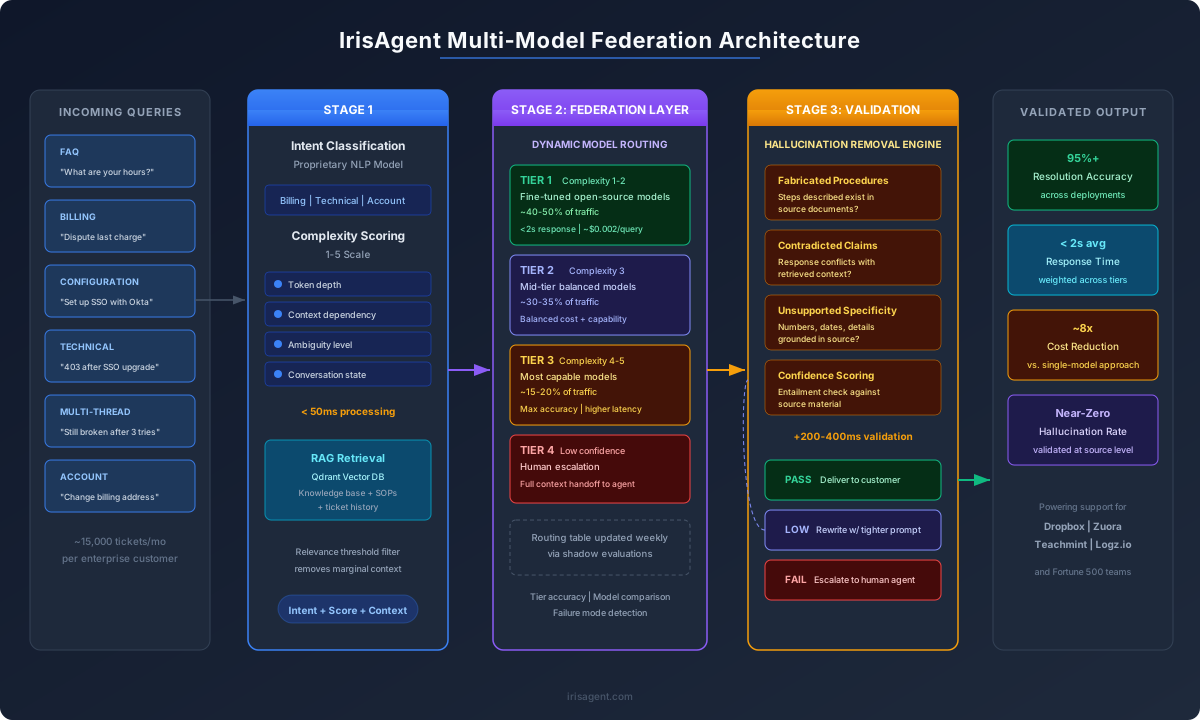
Our multi-model federation is a routing system that sits between IrisAgent's intent detection pipeline and the LLM inference layer. Every incoming query passes through three stages before a model ever generates a response.
Stage 1: Intent Classification and Complexity Scoring
Before any LLM sees the query, our proprietary NLP pipeline classifies it. This isn't a simple keyword match — it's a fine-tuned classification model trained on millions of real support tickets across our customer deployments.
The classifier outputs two things: an intent label (billing, technical, account management, product feedback, etc.) and a complexity score on a 1–5 scale. The complexity score is based on several signals:
Token depth: How many concepts does the query reference? "Reset my password" is a 1. "I'm seeing a 403 error when I try to access the admin panel after upgrading from the Team plan to Enterprise, but only when I use SSO through Okta" is a 4.
Context dependency: Does answering this query require information from the customer's account history, previous tickets, or product configuration? If yes, complexity goes up.
Ambiguity: Can the intent be determined with high confidence, or is the query ambiguous enough that it could map to multiple intents? Ambiguity pushes complexity higher.
Conversation state: Is this the first message, or the fifth reply in a thread? Multi-turn conversations inherently require more context management.
This classification happens in under 50 milliseconds and determines everything that follows.
Stage 2: Model Selection
The federation layer maintains a routing table that maps intent-complexity pairs to specific models. This isn't a static lookup — the table is continuously updated based on performance data from production. But the general logic looks like this:
Tier 1 — FAQ and simple queries (complexity 1–2): These go to smaller, faster models — fine-tuned open-source models that we host on our own infrastructure. They're optimized for speed and cost, and they handle roughly 40–50% of all incoming queries. For a straightforward "How do I change my billing address?" the customer gets an answer in under 2 seconds, grounded in the company's knowledge base via our RAG pipeline.
Tier 2 — Standard support queries (complexity 3): These are the workhorse queries — billing disputes, feature questions, configuration guidance. They go to mid-tier models that balance capability with cost. This tier handles about 30–35% of traffic.
Tier 3 — Complex and multi-step queries (complexity 4–5):Technical debugging, multi-system issues, edge cases, anything that requires reasoning over long context or synthesizing information from multiple sources. These go to our most capable models. They're slower and more expensive per query, but accuracy at this tier is non-negotiable. This is roughly 15–20% of traffic.
Tier 4 — Escalation: If the confidence score on any model's output falls below our threshold, the query doesn't get an automated response. It gets routed to a human agent with full context attached — the original query, the model's draft response (flagged as low-confidence), and relevant knowledge base articles. We'd rather not answer than answer wrong.
Stage 3: RAG Retrieval and Context Assembly
Before the selected model generates a response, our RAG pipeline assembles the context window. This is where Qdrant — the open-source vector database we run on our Google Cloud infrastructure — does its work.
The query embedding is compared against the customer's knowledge base: help articles, product documentation, previous ticket resolutions, and SOPs that the customer has configured. Qdrant returns the most semantically relevant chunks, ranked by similarity score.
But we don't just stuff everything into the prompt. The context assembly layer applies a relevance filter: only chunks above a similarity threshold make it into the final prompt. We've found that including marginally relevant context actually increases hallucination rates — the model tries to incorporate information that's tangentially related but not actually on-topic. Less context, more precisely selected, produces better answers.
The assembled prompt — query + customer context + relevant knowledge chunks + system instructions specific to that intent tier — goes to the selected model.
The Hallucination Prevention Layer
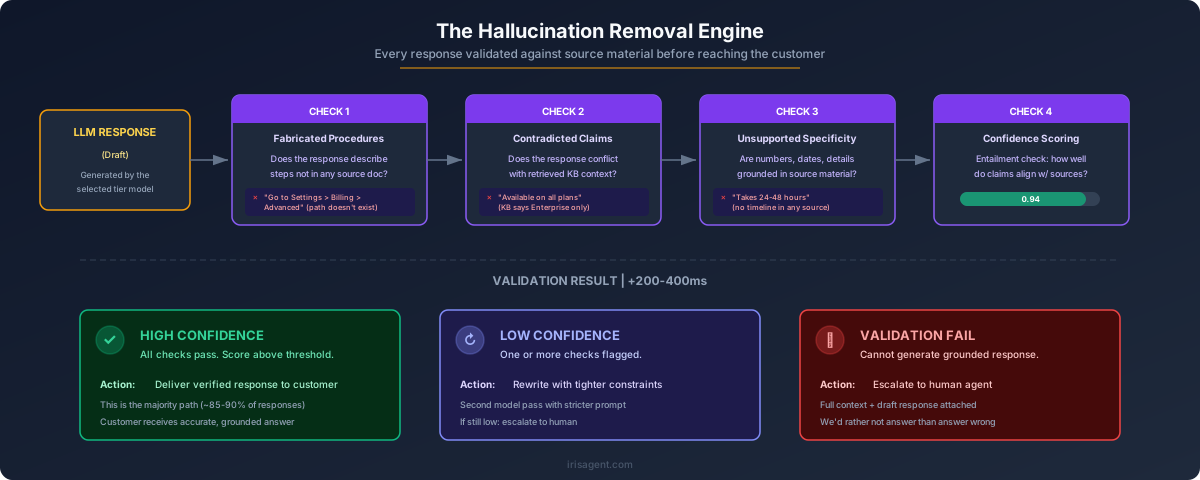
This is the part that makes the whole system work. After the model generates a response, it doesn't go directly to the customer. It passes through our Hallucination Removal Engine — a set of programmatic guardrails that validate the response against the source material.
The engine checks for several failure modes:
Fabricated procedures: Did the model describe a sequence of steps that doesn't appear in any source document? If it says "Go to Settings > Billing > Advanced" and no source document contains that navigation path, the response gets flagged.
Contradicted claims: Does the response contradict information in the retrieved context? If the knowledge base says the feature is available on Enterprise plans and the model says it's available on all plans, that's a catch.
Unsupported specificity: Did the model generate specific numbers, dates, or details that aren't grounded in any source? This is the most common hallucination pattern — the model confidently states "This typically takes 24–48 hours to process" when no source material mentions a timeline.
Confidence scoring: Each response gets a confidence score based on how well the generated claims align with the retrieved context. Below our threshold, the response either gets rewritten by a second model pass with tighter constraints, or it escalates to a human agent.
This isn't a simple string-matching exercise. The validation layer uses a combination of entailment checking and structured extraction to determine whether claims in the response are actually supported by the source material. It adds about 200–400 milliseconds to total response time, but it's the difference between 95% accuracy and 75% accuracy.
Why Not Just Use the Best Model for Everything?

This is the question we get most often. If the best model is the most accurate, why not just use it for every query?
Three reasons:
Cost. At enterprise scale, the cost difference between tiers is significant. One of our customers processes 15,000 tickets per month. If we routed every query to Tier 3, their monthly LLM inference cost would be roughly 8x what it is with the federation layer. The federation layer lets us deliver the same accuracy profile at a fraction of the cost — because 45% of queries genuinely don't need the most powerful model.
Latency. Larger models are slower. For a customer asking "What are your support hours?", a 5-second response time is unacceptable when a smaller model can answer correctly in 1.2 seconds. In support, speed is part of the experience.
Accuracy, counterintuitively. Larger models are more prone to hallucination on simple queries because they have more capacity to "elaborate." Ask a powerful model a straightforward factual question and it sometimes adds qualifications, caveats, or related information that wasn't asked for — and some of that added content can be wrong. Simpler models, constrained to shorter responses and tighter prompts, often give cleaner answers on straightforward questions.
How We Keep the Routing Table Current
The federation layer isn't a "set it and forget it" system. Every week, our ML team reviews a sample of routed queries across all tiers, checking three things:
Was the tier assignment correct?
Did any Tier 1 queries actually require Tier 3 reasoning? Did any Tier 3 queries get an unnecessarily complex treatment?
Did the selected model outperform alternatives?
We periodically run shadow evaluations where the same query is processed by multiple models, and we compare accuracy and latency.
Are new failure modes emerging?
Customer products evolve, and queries that were simple last month might become complex this month after a product update. The routing table needs to adapt.
This is also where our AI Agent Management Framework comes in. It gives us a unified system to measure agent performance, simulate realistic customer interactions for testing, and iterate on the routing logic without disrupting production traffic.
What We've Learned
Building a multi-model system is harder than building on a single model. There's more infrastructure to maintain, more evaluation to do, and more failure modes to monitor. But after two years of running this in production across deployments ranging from 1,000 to 50,000+ tickets per month, a few things are clear:
The 80/20 rule applies to support queries. Roughly 40–50% of all support tickets can be handled by fast, inexpensive models with no loss in accuracy. Another 30–35% need a capable but not maximum-tier model. Only 15–20% genuinely require the most powerful model available. A single-model architecture means you're either overpaying for 80% of queries or underperforming on 20%.
Hallucination prevention is an architecture problem, not a prompt engineering problem. You can't prompt your way to zero hallucinations. You need structural validation — a system that checks generated claims against source material before the response reaches the customer. The federation layer makes this practical because each tier has tailored validation rules.
The best model changes every six months. The LLM landscape moves fast. When we started, GPT-4 was the clear leader for Tier 3 queries. Open-source models have since closed the gap significantly on many task types. Our federation architecture means we can swap models at any tier without rewriting the product — we just update the routing table and run a validation pass.
Speed and accuracy aren't always trade-offs. By routing simple queries to fast models and complex queries to capable models, we often achieve both faster average response times and higher overall accuracy compared to a single-model baseline. The right model for the job, not the biggest model for every job.
We built IrisAgent's multi-model federation because we believe the future of AI in customer support isn't about which single model you use — it's about how intelligently you orchestrate multiple models to match the actual diversity of customer problems. If you're evaluating AI support tools and the vendor can't explain how they handle the difference between a simple FAQ and a complex technical escalation, that's worth asking about.
If you want to see how this works on your own ticket data, we offer a free pilot. And if you're an engineer interested in building systems like this, we're hiring.
Related reading:
- IrisAgent and Qdrant: Redefining Customer Support with AI
- Best Performing LLMs for Customer Support: Open Source Models Rise