
Grounded voice AI for customer service
Contextual conversations. Seamless human handoff.
By Palak Dalal Bhatia, CEO & Co-founder, IrisAgent · Updated September 5, 2026





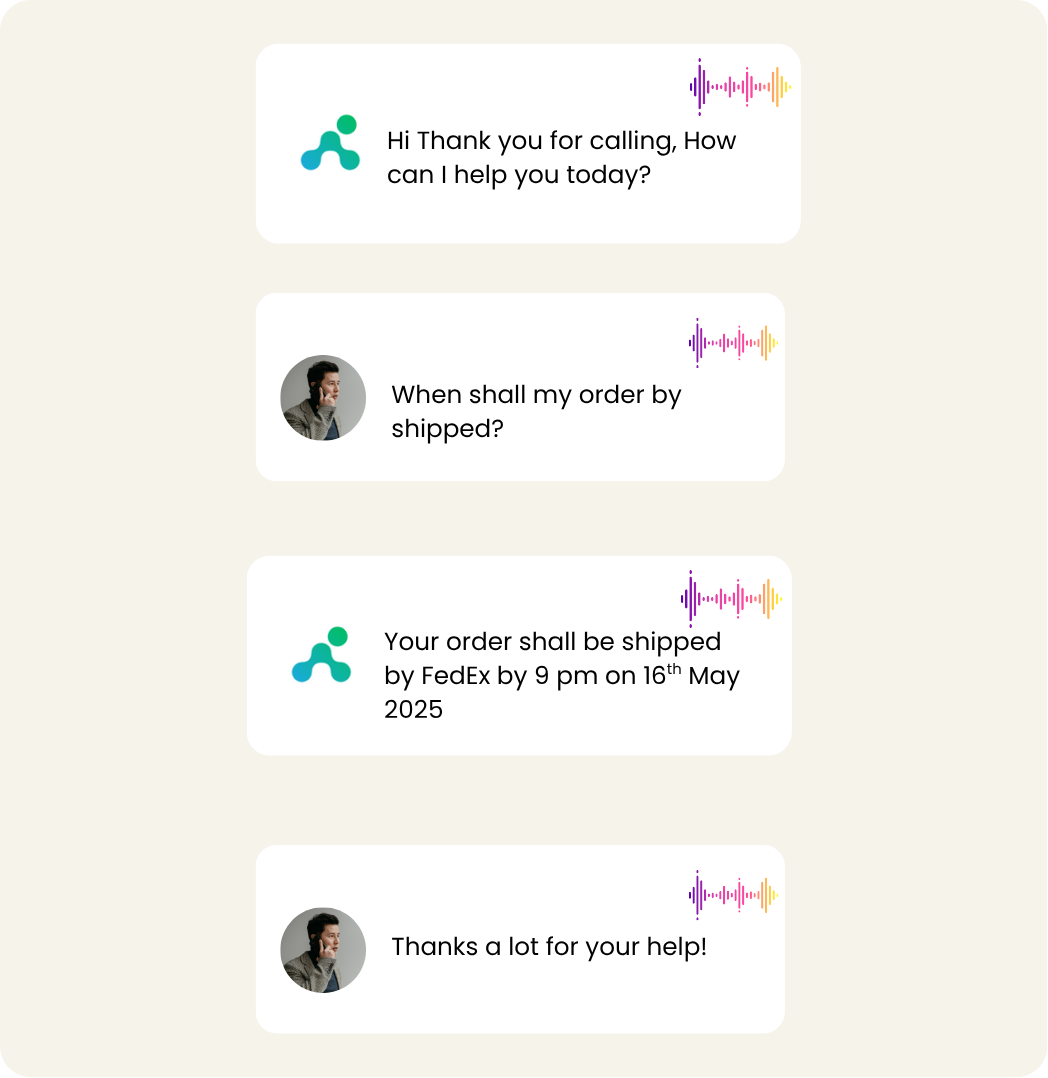
Interactive, contextual conversations
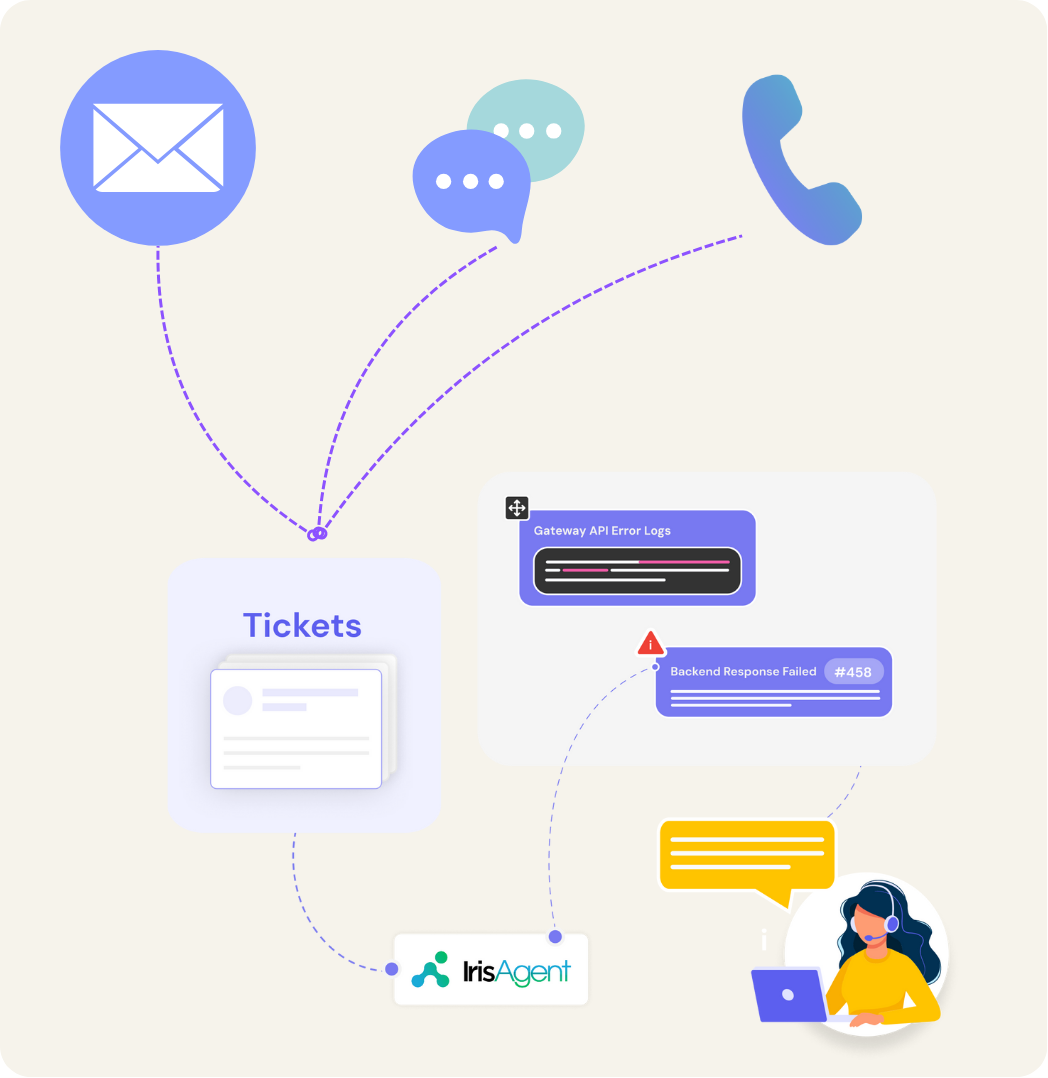
Complex queries and backend actions
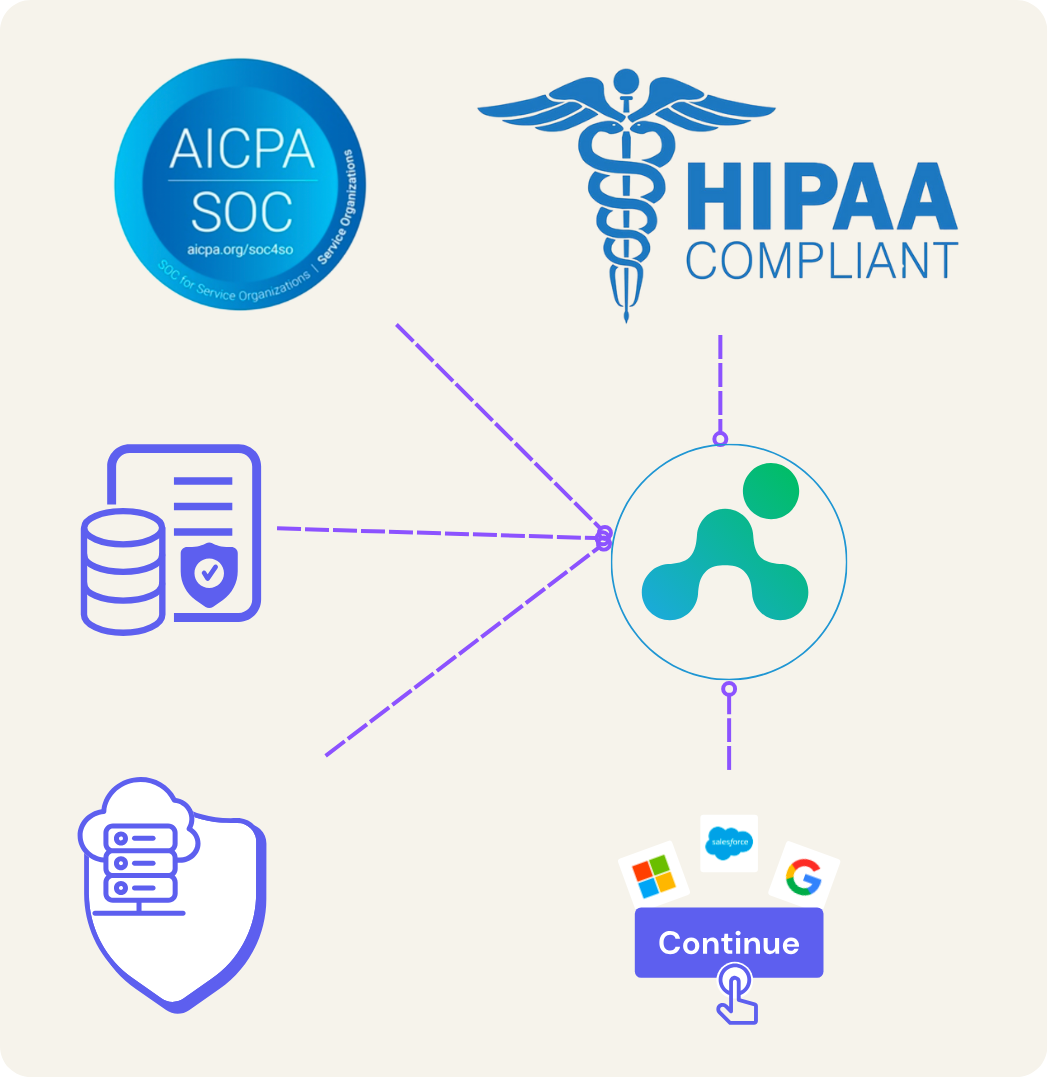
Enterprise-Grade Security and Integration
Seamless human handoff with full context
A clean transfer is a success, not a failure. When confidence drops, sentiment spikes, or the intent is out of scope, IrisAgent Voice AI hands the call to your team with the transcript, intent, entities, and actions already taken, so the customer never repeats themselves.
- Context transfer: summary plus raw turns, not a cold warm-transfer
- Reason codes: why the AI escalated (policy, low confidence, customer request)
- Ticket write-back: keep the helpdesk (if you use one) as system of record
Grounding before the agent speaks
Source validation is the quality bar for voice. IrisAgent retrieves from your knowledge base and live systems, then runs hallucination control before text-to-speech, so a confident wrong answer does not hit a recorded call. See the deeper loop in How voice AI works below.
Zendesk Talk AI overlay
Looking for Zendesk Talk AI without a rip-and-replace? Treat Talk as a deploy path on this Voice hub. Keep Zendesk as the system of record for tickets, and layer IrisAgent Voice for grounded resolve and handoff. Overlay commercial detail for Zendesk email and chat lives on the Zendesk page.
AI for Zendesk (email/chat overlay + Talk link-back) →Voice ops triangle: AutoQA, call monitoring, benchmarks
Resolve on the phone, then score and monitor without inventing Voice-only customer proofs. After-call work (ACW) is its own software choice.
Outbound Voice Campaigns
Inbound Voice answers the phone. Outbound campaigns place the calls. In the IrisAgent dashboard, import a CSV of contacts, draft the campaign, run a test call, then launch. Watch queued and sending status the same way as AI Agents for Text. Text is a separate channel from Voice. Scope each Voice procedure to inbound, outbound, or both so reminders and confirmations do not reuse your inbound after-hours script.
Resolve the call, and grade every call
IrisAgent is the only voice agent that also runs AutoQA on 100 percent of your calls, AI and human. Most teams review maybe 2 percent of calls. You get full coverage on accuracy, compliance, and tone, so you can trust the AI on the phone and see exactly how your whole team is performing.
Resolve end to end
The AI answers, verifies identity, takes backend actions, and closes routine calls without a human.
Grade 100% of calls
AutoQA scores every AI and human call, not a 2 percent sample, on accuracy, tone, and policy.
Stay compliant
Catch missed disclosures and policy breaks across the whole phone channel, ideal for fintech and regulated teams.
AI call center automation: the four voice AI deployment models
Most failed rollouts try to automate the whole phone line on day one. There are four models, and they carry very different risk.
After-hours and overflow
The AI covers the calls you cannot staff: nights, weekends, and peak spikes. The lowest-risk entry point, and where most teams should start.
Front-line triage with handoff
The AI answers every call, resolves what it can, and transfers the rest to a human with full context so the customer never repeats themselves.
Full inbound resolution
The AI owns specific high-volume intents end to end (order status, password resets, returns), with humans on the complex tail.
Outbound and proactive
The AI places calls for reminders, confirmations, and notifications. Same SmartOps procedures as inbound, scoped outbound or both.
The right sequence is almost always after-hours first, then expand by intent as the resolution rate proves out.
Start where it is easy: after-hours and overflow
You do not have to hand over your phone line on day one. Most teams start the AI on the calls they cannot staff (nights, weekends, and peak spikes), then expand once they see the resolution rate.
How to deploy voice AI for customer service
First live calls land in 24 hours on the phone system you already have. A helpdesk is optional. You never hand over the whole phone line on day one. Expand coverage by intent over the following weeks.
- Connect your stack. Layer the voice AI onto your existing telephony. A helpdesk is optional. No re-platforming and no new dialer. See all IrisAgent integrations.
- Ground the agent. Connect your knowledge base, SOPs, and the backend systems it reads and acts on, so it resolves rather than deflects.
- Scope the first intents. Pick two or three high-volume, well-structured intents and a clear escalation path for everything else.
- Start on after-hours. Point the AI at the calls you cannot staff today, and measure resolution, transfer rate, and CSAT against your baseline.
- Expand by evidence. Add intents and hours as the resolution rate holds, keep the human handoff clean, and keep QA on every call.
What is voice AI for customer service?
Voice AI for customer service is software that answers inbound phone calls, understands the caller in natural speech, and resolves routine requests end to end without a human agent. It transcribes speech, detects intent, retrieves a grounded answer from your knowledge base and systems, takes the action the call needs, and responds in a natural voice. Unlike legacy IVR, it does not force callers through keypad menus, and unlike a simple answering bot, it resolves the call instead of just routing it.
How voice AI works
A voice AI agent runs a tight loop on every turn of the conversation. Five things happen, usually in under a second:
- Speech to text. Automatic speech recognition transcribes the caller's words in real time, including partial phrases, so the agent can respond without awkward pauses.
- Intent and understanding. A language model classifies the caller's intent (refund, password reset, billing, complaint) and pulls the entities it needs, like an order number or account ID.
- Grounded reasoning. The agent retrieves the answer from your knowledge base and live systems rather than guessing from training data, which is what keeps it from inventing policies or account details.
- Action. For transactional intents, it calls your backend (CRM, order system, billing) to take the action: issue the refund, reset the credential, update the record.
- Text to speech. The response is spoken back in a natural voice, and the loop repeats until the call is resolved or handed off.
The grounding step is where trust is won or lost. Ungrounded large language models invent incorrect answers in 15% to 30% of responses. On a recorded call, a confident wrong answer is worse than no answer, so IrisAgent's Hallucination Removal Engine validates each response against the source before the agent speaks, keeping validated accuracy above 95%.
What to measure: voice AI benchmarks
Voice AI is measured differently from chat, because phone calls have their own failure modes. Track these together, not in isolation:
- Resolution rate. The share of calls handled end to end with no handoff. Pair it with your AI deflection rate so a high containment number cannot hide abandoned callers.
- Transfer rate and quality. How often the AI hands off, and whether the handoff carries context. A clean transfer is a success, not a failure.
- Average handle time. For AI-resolved calls and the human calls it hands off. Good triage should lower human AHT.
- Latency. Response delay per turn. On voice, long pauses break the conversation, a hard real-time constraint chat does not have.
- CSAT by intent. Structured intents should score near human levels; sentiment-heavy calls should be escalated, not forced.
- Cost per resolved call. Compare the AI's cost per resolution against your current fully-loaded cost per call.
Treat published voice benchmarks as ranges, not guarantees. See our 2026 voice AI benchmarks from production deployments for the full data, then baseline your own queue first and measure the AI against it.
Voice AI vs legacy IVR
| Dimension | Legacy IVR | Voice AI |
|---|---|---|
| Input | Press 1, press 2 menus | Natural speech, caller says what they want |
| Understanding | Fixed keypad paths | Intent detection across many phrasings |
| Resolution | Routes the call | Resolves the call end to end |
| Backend actions | None or rigid | Reads and updates your systems |
| After-hours | Voicemail | Live resolution 24/7 |
| Caller effort | High | Low |
Replace your IVR without replacing your contact center
You do not need a CCaaS migration to retire your IVR. IrisAgent Voice AI sits in front of the phone system you already run (Genesys, Five9, Amazon Connect, Talkdesk, NICE, and others), resolves routine calls in natural speech, and hands the rest to your existing queues with the intent and identity of the caller already captured. Start with three to five high-volume call types, retire those IVR branches, and keep the old flow as a one-step rollback.
Read the enterprise playbook for replacing your IVR with AI voice agents for the migration order, latency targets, PCI and HIPAA on the phone line, and a 30/60/90-day cutover plan.
How to evaluate a voice AI vendor
Most demos look similar. The differences show up in production. Ask every vendor:
- Resolve or deflect? Does it take real backend actions, or only answer and route? Ask to see a refund or account change completed live.
- How is hallucination controlled? Ask for the validation mechanism that prevents confident wrong answers on a recorded call, not a marketing claim.
- What is the pricing model? Per resolution, per minute, per seat, or platform fee? Per-resolution pricing aligns cost with outcomes.
- Time to value? Days or a quarter? A well-built agent layers onto your existing telephony without re-platforming.
- How is quality assured? Full-coverage QA beats sampling 2% of calls by hand.
- Is it compliant? SOC 2, and can it catch missed disclosures on regulated calls?
IrisAgent extends the AI customer support software platform to the phone channel, grounds every answer in your own data, and routes complex calls through intent-based routing. A helpdesk is optional. See all IrisAgent integrations.
Standalone voice agent vs CCaaS vs helpdesk overlay
Most voice AI buying processes compare standalone dialers. That is the wrong shortlist if you already have a phone system, whether or not you also run a helpdesk. There are three product shapes. IrisAgent is the third. Our CCaaS explainer walks through the economics of each.
| Dimension | Standalone voice agent | CCaaS-native voice | Helpdesk overlay |
|---|---|---|---|
| Telephony | New number or SIP trunk | Built into the CCaaS | Uses the phone system you already have |
| System of record | A separate voice app | The CCaaS | Your helpdesk ticket, if you have one |
| Grounding | Often the model, plus a bolted-on KB | Vendor knowledge base | Your KB, tickets, and backend systems |
| Agent handoff | A new console | Inside the CCaaS | Inside the helpdesk your team already uses |
| Best when | You want a new voice stack | You are replacing the helpdesk | You want resolution without a migration |
| Time to live | Weeks to months | Tied to a CCaaS project | Hours to a day on an existing helpdesk |
If the shortlist is only standalone voice vendors, you will buy a second stack and then try to pipe transcripts back into the helpdesk. Start from the ticket instead. IrisAgent Voice AI is the overlay: same grounding engine as chat and email, AutoQA on every call, write-back to the ticket, $2 only when the call is fully resolved. See how contact center as a service is priced for how the three shapes compare on cost.
Voice AI deployment models
There is no single way to run voice AI. The right model depends on how much autonomy you want to give the agent, which calls you want it on, and where your data is allowed to live. Four decisions define almost every deployment.
Autonomous agent vs voice copilot
A fully autonomous agent answers the call and resolves it end to end. A voice copilot instead listens on a human agent's call and feeds them the answer, the next step, and the compliance prompt in real time. Most teams run both: autonomous on high-volume structured intents, copilot on the complex calls a person still owns.
Inbound vs outbound
Inbound Voice AI answers calls customers place to you. Outbound campaigns place calls on your behalf: payment reminders, delivery confirmations, outage notices, renewal outreach. Outbound has a higher compliance bar (consent, disclosures, calling windows), so scope it separately from inbound.
Cloud vs private deployment
Most teams start on a multi-tenant cloud for speed. Regulated industries (healthcare, fintech, government) often need a private or in-region deployment so call audio and transcripts never leave a controlled boundary. Ask a vendor early whether private deployment is a real option or a slideware promise, because retrofitting it later is expensive.
Build vs buy
You can assemble a voice agent from raw speech-to-text, an LLM, and text-to-speech APIs, but the hard 20% (real-time latency, barge-in handling, grounding, hallucination control, telephony edge cases, QA, compliance) is most of the work and never ends. A bought platform absorbs that so your team owns intents and outcomes, not infrastructure.
Voice AI use cases
Voice AI earns its place on structured, high-volume intents where the answer lives in a system of record. The strongest starting points repeat across every support team:
- Account and access. Password resets, identity verification, and account unlocks, resolved by reading and updating your systems rather than routing to an agent.
- Billing and payments. Balance questions, payment status, and failed payment recovery, handled on the phone with full backend action.
- Orders and logistics. Order status, shipping exceptions, and returns, where the caller wants an answer now, not a callback.
- Appointments and scheduling. Booking, rescheduling, and reminders, including outbound confirmation calls that cut no-shows.
- Triage and overflow. Answering every call at peak, resolving what it can, and handing off the rest with context so no caller waits on hold.
The intent mix shifts by industry. Voice AI for fintech support leans on identity and payments with a heavy compliance load; HIPAA-compliant healthcare support centers on scheduling and PHI-safe verification; ecommerce support is dominated by order status and returns; and SaaS support skews toward access, provisioning, and tier-1 troubleshooting.
Caller authentication and security
The phone is the easiest support channel to impersonate. Caller ID can be spoofed, account details leak in breaches, and voices can be cloned. So IrisAgent Voice AI never lets the model decide who a caller is. A verification procedure collects the identifiers your policy requires, such as an account number plus date of birth or the last four digits on file, and checks them against your own systems through an API call. Your system returns match or no match, and the AI acts only on that result.
Verification is tiered by risk. A store-hours question needs none, an order status needs a light match, and an address change or refund needs a full check. When a caller fails, the agent says only that it could not verify them, never which detail was wrong, and transfers the call to your team. The procedure can log what was collected to a ticket first, and every transcript is in the call log. IrisAgent runs under SOC 2 Type II and HIPAA controls, redacts PII before storage, and AutoQA scores every call, including failed verifications.
Read how AI voice agents authenticate callers, and where they fail for a verification matrix and a pilot red-team checklist, or see verified flows for password resets and card activation.
Voice AI vs chatbots vs live agents
Voice AI is not a replacement for your chatbot or your team. It covers the channel each of the others handles poorly.
| Dimension | Chatbot | Voice AI | Live agent |
|---|---|---|---|
| Channel | Web and app text | Inbound and outbound phone | Any channel |
| Best for | Self-service, deflection | Callers who prefer or need to talk | Complex, emotional, high-value |
| Real-time constraint | Relaxed | Hard, sub-second turns | Human pace |
| Cost per contact | Lowest | Low | Highest |
| Availability | 24/7 | 24/7 | Staffed hours |
The cost case for voice AI
The economics of a phone call are different from chat. A live phone contact is the most expensive channel most teams run, because a call occupies one agent for its full duration and staffing has to cover peaks and after-hours you may never fully use.
To build an honest cost case, compare like with like. Start from your fully-loaded cost per call: agent wages plus benefits, telephony, QA, management overhead, and the cost of attrition and re-training on a high-turnover queue. Then hold voice AI to a cost per resolved call, not cost per call attempted, so a cheap agent that deflects without solving does not look like a win. Outcome-based pricing that only charges for fully-resolved calls keeps that comparison clean, because you never pay for a handoff.
The larger return usually is not the direct cost per call. It is the capacity you free. When voice AI absorbs after-hours, overflow, and repetitive tier-1 calls, your team stops firefighting the queue and moves to the complex, revenue-linked conversations where humans are worth the cost. Model both effects. Run the numbers with the support automation ROI calculator before you commit to a vendor.


operations
Any questions?
We got you.

Still shortlisting vendors? Read the 10 best AI voice bots for customer service, compared on cost per minute, latency, and accuracy. Weighing a full platform instead? See the best AI call center software compared, from Genesys and NICE to AI layers on your current stack. Or check the 2026 voice AI benchmarks from live deployments. For what actually makes a voice agent sound convincing, and where lifelike AI agents in voice support still hand off to a human, start there. To pick the system that scores those calls once they are live, compare AI call monitoring and scoring on coverage, scoring consistency, and what it costs to review every call instead of a 2% sample.
Running QA on a voice queue is its own problem. Read how to score every call, not a 2% sample, covering the features, vendor criteria, and compliance work that come with recording at scale.