
What Is AI Deflection Rate? How to Measure and Report It
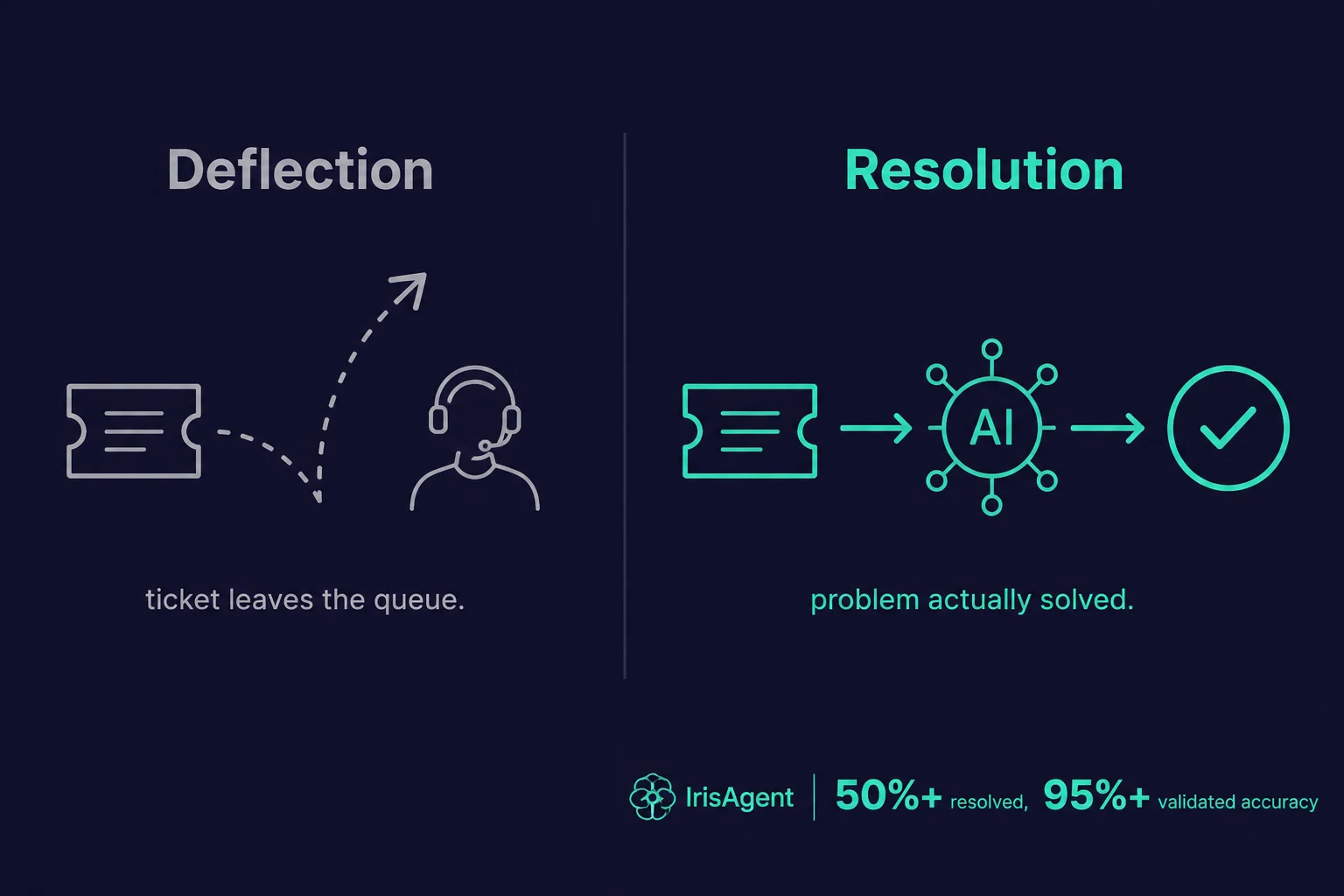
AI deflection rate is the percentage of customer support contacts an AI system handles without a human agent. If 1,000 customers start a support interaction and your AI closes 400 of them on its own, your AI deflection rate is 40%. It is the headline metric most AI support vendors lead with, and it is also the most misleading one. A high deflection rate counts tickets the AI took off an agent’s plate. It does not count whether the customer actually got their problem solved.
That gap matters. IrisAgent’s grounded AI resolves 50%+ of tickets with validated accuracy above 95%, and we measure resolution, not deflection, because a deflected ticket and a resolved ticket are not the same outcome. This guide defines AI deflection rate, shows you the formula, sets realistic benchmarks, explains why the metric you actually want to track is resolution rate, and shows how to report it to leadership without replacing your helpdesk.
Here is what we will cover:
What AI deflection rate means and how it is calculated
The two ways teams define “deflection” (and why they disagree)
Realistic benchmarks for 2026
Why deflection rate hides bad outcomes
How to measure resolution instead
How to report AI deflection to leadership, with a metric decision tree
A checklist for proving AI ROI inside Zendesk or Salesforce
What to measure when the AI hands off to a human
Why 100% QA coverage matters for deflection reporting
What Is AI Deflection Rate?
AI deflection rate measures how many support interactions your AI handles end to end, so a human agent never has to touch them. It is usually expressed as a percentage of total inbound contacts over a set period.
The term comes from “ticket deflection,” an older self-service idea: if a customer finds an answer in your help center, they never file a ticket, so the ticket is “deflected” away from the queue. AI deflection extends that concept to chatbots and AI agents that resolve a conversation without escalating.
There is an important framing problem baked into the word itself. “Deflection” describes what the metric does for your team (it reduces agent workload). It says nothing about what happened to the customer. That distinction runs through the rest of this guide.
Deflection is one metric inside a broader contact center automation strategy.
The AI Deflection Rate Formula
The basic formula is straightforward:
AI Deflection Rate = (Contacts handled by AI without a human) / (Total support contacts) × 100
So if your AI handles 600 of 2,000 monthly chats without escalation, your deflection rate is 30%.
The complication is the denominator. Teams measure “total contacts” in two different ways, and the two definitions produce very different numbers:
Containment-based deflection.
Counts any conversation the AI closed without escalating to a human, whether or not the customer was satisfied. This is the number most vendor dashboards report by default.
Self-service deflection.
Counts help-center or chatbot sessions where the visitor found an answer and never opened a ticket. This requires tracking intent (did the visitor actually want to file a ticket?), which is harder to measure cleanly.
Because containment-based deflection is easier to compute and produces a bigger number, it dominates vendor reporting. It is also the definition most likely to overstate success.
AI Deflection Rate Benchmarks for 2026
Benchmarks vary widely by industry, query complexity, and how aggressively the AI is configured to avoid escalation. As a rough guide:
20% to 40%
is typical for a knowledge-base chatbot answering FAQs
40% to 60%
is achievable for AI agents grounded in a strong knowledge base and connected to backend systems
60%+
is possible but should raise a question: is the AI solving problems, or just refusing to escalate?
That last point is the trap. A bot can hit 80% “deflection” by stalling, looping, or burying the path to a human. The number looks great on a dashboard. The customer experience behind it is often the opposite.
According to Zendesk’s CX Trends research, customers abandon channels that make them work too hard, and forced self-service is a top driver of frustration. A deflection rate that climbs while CSAT falls is not a win. It is a warning.
Phone support has its own name for this metric. Voice teams call it containment, and it carries the same blind spot: a caller who hangs up counts as contained. The voice AI containment rate benchmarks show how far containment and true resolution drift apart on calls.
Why Deflection Rate Hides Bad Outcomes
Deflection rate counts ticket closures, not customer outcomes. Those two things diverge in predictable ways:
The customer gave up.
A frustrated customer who abandons the chat counts as a “deflection,” because no agent handled the ticket. The problem did not go away. It just left your queue.
The AI hallucinated an answer.
Ungrounded large language models invent incorrect answers in 15% to 30% of responses, depending on query complexity (source: Stanford, 2024). A confident wrong answer deflects the ticket and damages trust at the same time.
The issue resurfaces later.
A customer who got a partial or wrong answer files a second ticket next week. The first contact was “deflected.” Your real workload did not drop.
The customer escalated through another channel.
Deflected in chat, the customer emails, calls, or posts publicly. You counted a win in one channel and absorbed the cost in another.
Each of these inflates deflection rate while making the customer experience worse. This is why IrisAgent uses a different word. We track resolution: the share of tickets closed where the customer’s problem was actually solved, validated against your own knowledge base before the answer ever reaches them.
Deflection starts to fail the moment a bot misreads what the customer wants. Accurate chatbot intent recognition is what keeps automated answers on target.
AI Deflection vs. Resolution: The Distinction That Matters
Deflection asks: did a human avoid this ticket? Resolution asks: did the customer get their problem solved? You want the second number.
Here is how the two compare:
Dimension | Deflection Rate | Resolution Rate |
What it counts | Tickets closed without a human | Problems actually solved |
Customer abandonment | Counts as success | Counts as failure |
Hallucinated answers | Counts as success | Counts as failure |
Repeat contacts | Ignored | Penalized |
What it optimizes for | Lower agent workload | Better customer outcomes |
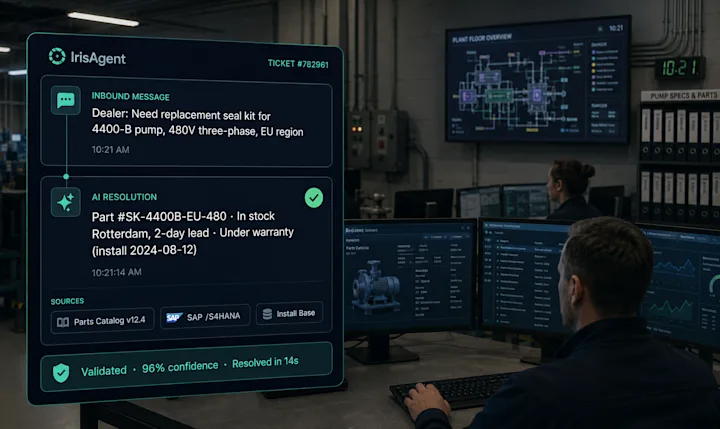
A deflection-only chatbot shows the customer a help article and closes the conversation. IrisAgent reads the customer’s account, checks the product state, takes the action (refund, password reset, plan change), and closes the loop. That is the difference between a ticket leaving the queue and a problem being solved. It is why Dropbox, Zuora, and Teachmint run IrisAgent’s AI for customer support platform on their highest-volume queues, and why validated accuracy stays above 95% instead of degrading into confident guesses.
If you only track one metric, track resolution. If you track deflection, pair it with CSAT and repeat-contact rate so a rising number cannot hide a falling experience.
Measuring resolution properly means watching the whole ticket lifecycle, not one endpoint. An AI workflow analyzer gives you that view, and it is the difference between reporting a deflection number and being able to defend it.
How to Measure Resolution Instead of Deflection
Switching from deflection to resolution takes three changes to how you instrument your support stack:
Add a confirmation step.
Ask the customer “Did this solve your problem?” at the end of an AI conversation. A ticket only counts as resolved if the customer says yes (or never reopens it within a defined window).
Track repeat contacts.
Tag any ticket that follows an AI interaction on the same issue within 7 days. Subtract those from your resolution count. This catches the “deflected then resurfaced” pattern.
Ground every answer in your own data.
An AI that answers from your verified knowledge base and validates each response before sending cannot inflate its numbers by guessing. IrisAgent’s Hallucination Removal Engine does this validation as a core part of the architecture, not an add-on, which keeps the hallucination rate under 5%.
Set a confidence threshold for escalation, route low-confidence queries to a human through your existing ticket routing rules, and let the AI handle the rest. A safe handoff is not a failed deflection. It is part of a healthy resolution strategy.
How to Report AI Deflection to Leadership
Leadership rarely asks “what is our deflection rate?” They ask whether the AI investment is paying off and whether customers are worse off for it. One number cannot answer both questions. Report a ladder of four metrics instead, each stricter than the last:
Deflection rate. Contacts the AI handled without a human, divided by total contacts. The broadest number, and the easiest to inflate.
Containment rate. Conversations that stayed with the AI and never escalated. It excludes customers who asked for a human, but still counts customers who gave up.
Automated resolution rate. Conversations the AI closed that did not reopen or generate a repeat contact on the same issue within 7 days. This is the number that maps to agent hours saved.
Resolution with experience. Automated resolutions that also pass a quality check: confirmed by the customer, rated at or above your human CSAT baseline, or passing a QA score. This is the number that proves customers were helped, not just handled.
Each step down the ladder produces a smaller number. That is the point. When leadership sees all four side by side, the gap between deflection and resolution with experience shows how much of the AI’s “success” is real. Vendors draw these lines differently, so normalize any vendor’s figure with the questions in our breakdown of AI support resolution rate benchmarks.
Which Metric Should You Report? A Decision Tree
Start from the question leadership is actually asking, report the metric that answers it, and pair it with the guardrail that keeps it honest.
If leadership is asking | Report this metric | Pair it with |
“Is the AI reducing agent workload?” | Containment rate | Repeat-contact rate within 7 days |
“Can we absorb growth without hiring?” | Automated resolution rate | Agent hours saved (automated resolutions × average handle time) |
“Is the AI hurting customer experience?” | Resolution with experience | CSAT on AI conversations vs. human conversations |
“Is this worth what we pay for it?” | Cost per automated resolution | Fully loaded cost per human-resolved ticket |
“Can we trust the AI on sensitive topics?” | QA pass rate on AI conversations | Escalation rate on flagged intents |
If you can put only one number in a board deck, use automated resolution rate with CSAT next to it. It is conservative enough to survive scrutiny and concrete enough to convert into dollars. For the full cost model, see support automation ROI for SaaS teams.
How to Prove AI ROI Inside Zendesk or Salesforce Without Replacing Your Helpdesk
You can show leadership an AI deflection improvement without replacing your helpdesk by measuring inside the platform you already run. Capture a pre-launch baseline, have the AI tag every ticket it resolves, escalates, or assists, and report verified resolutions (not raw deflection) against that baseline each month. Zendesk, Salesforce Service Cloud, Intercom, Freshdesk, and HubSpot all support this with tags or case fields, so there is no migration and no platform-level IT project.
The data already lives in your tickets. What most teams lack is a clean way to tell AI-handled conversations apart from human ones, and a baseline to compare against. This checklist closes both gaps.
Capture a baseline before launch. Pull 4 to 8 weeks of pre-AI data: ticket volume by intent, first-contact resolution, reopen rate, average handle time, and CSAT. Without a baseline, every post-launch number is an opinion.
Tag every AI-touched ticket. Have the AI write a consistent tag (Zendesk) or case field value (Salesforce) for three states: resolved by AI, escalated by AI, and assisted by AI. This one step makes every later report possible.
Build a reopen and repeat-contact view. In Zendesk, a view or Explore report of AI-resolved tickets that were reopened. In Salesforce, a case report filtered on the AI field with a 7-day follow-up window per contact. These are the tickets your deflection number is hiding.
Hold out a control group. Route 5% to 10% of eligible traffic away from the AI for 2 to 4 weeks. Comparing CSAT and resolution between the two groups is the cleanest causal evidence you can show leadership.
Measure handle time on escalations. Compare average handle time on escalated AI tickets against your baseline. If agents spend longer on tickets the AI touched first, the handoff is costing you money.
Score quality on AI-resolved conversations. Run your QA rubric across AI conversations, not just human ones (more on this below).
Ship one monthly report. The four ladder metrics, the pairings from the decision tree, and a dollar figure: automated resolutions × fully loaded cost per human-resolved ticket. Keep the format identical month to month so trends are obvious.
A Monthly Deflection Report Template for Leadership
Use the same layout every month. The example below shows a team whose ticket volume grew 20% after launch. Numbers are illustrative.
Metric | Baseline (pre-AI month) | Month 3 with AI | Change |
Total inbound tickets | 20,000 | 24,000 | +20% |
Handled by AI without a human (deflection) | 0 | 10,800 (45%) | +45 pts |
Stayed with the AI, never escalated (containment) | 0 | 9,600 (40%) | +40 pts |
Repeat contact within 7 days on contained tickets | n/a | 1,680 (17.5%) | Watch |
Automated resolutions (no reopen in 7 days) | 0 | 7,920 (33%) | +33 pts |
Automated resolutions that pass QA (resolution with experience) | 0 | 7,200 (30%) | +30 pts |
Tickets agents handled | 20,000 | 16,080 | -20% |
CSAT, AI conversations vs. human | n/a vs. 4.5 | 4.4 vs. 4.5 | -0.1 |
Agent hours saved (automated resolutions × 12 min AHT) | 0 | 1,584 hours | New |
Dollar value (automated resolutions × $8 per human-resolved ticket) | $0 | $63,360 | New |
Lead the slide with the two rows leadership cares about most. Total volume grew 20% while the tickets agents handled fell 20%, with no new hires. Then show the ladder from 45% deflection down to 30% resolution with experience. The 15-point gap is the honest part of the story, and showing it up front is what makes the rest of the report credible.
If volume grew, compare agent-handled tickets against the volume you would have had without AI, not against last month. A deflection rate can stay flat while the team absorbs a 20% surge, and that is still a win worth reporting.
Three Ways to Add AI Deflection, Compared
Native helpdesk AI | AI layer on your current helpdesk | Replace the helpdesk | |
Migration needed | No | No | Yes |
Where the AI tags and fields land | Your helpdesk | Your helpdesk | A new platform |
Baseline stays comparable | Yes | Yes | No, history and reports move |
Typical time to first results | Days to weeks | About 24 hours (IrisAgent) | Months |
Works across several helpdesks | No, one vendor only | Yes | n/a |
QA coverage on AI conversations | Varies by vendor | 100% with AutoQA (IrisAgent) | Varies by vendor |
Main risk | Locked to one vendor's roadmap | Depends on integration depth | Lost history makes before/after reporting hard |
For leadership reporting, the main point is the third row. If you replace the helpdesk, the baseline you are comparing against sits in a different system with different ticket definitions, so the before/after story gets weaker exactly when you need it. For named vendors on each path, see our AI ticket deflection tools comparison.
AI that layers onto your existing helpdesk makes step 2 nearly automatic, because it writes tags and fields directly into the tickets your reporting already uses. IrisAgent works inside Zendesk, Salesforce, Intercom, Freshworks, and HubSpot this way, so the ROI evidence lives in the system leadership already trusts.
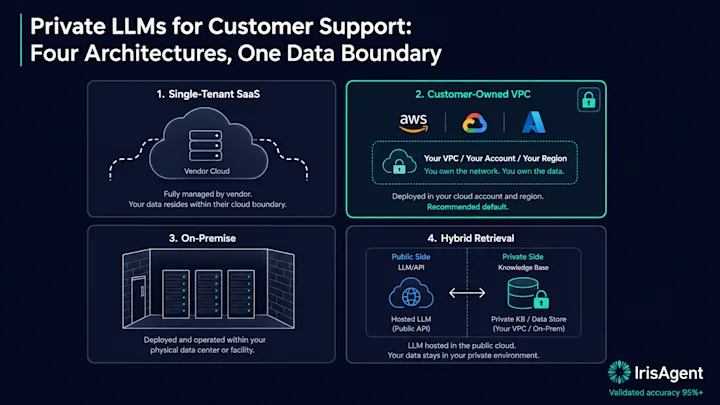
For security-sensitive teams, the same setup can run in a private deployment. IrisAgent can be deployed on-premise or in your own AWS, Azure, or Google Cloud account, so tickets and knowledge base content never leave your environment while the AI still writes its tags back to your helpdesk. That matters when legal or InfoSec has to sign off before any deflection numbers exist to report. See on-premise AI agents for the deployment options.
What Happens When AI Can’t Resolve: The Handoff Question
Every AI escalates some conversations, and leadership will ask what happens to them. A deflection number says nothing here, yet the handoff is where many AI rollouts quietly lose the savings they report. Track four things on every escalated conversation:
Time to a human. How long the customer waited between asking for help and reaching an agent. Long waits after a failed AI attempt produce some of the worst CSAT in the queue.
Context passed. Whether the agent received the conversation history, detected intent, and account details, or had to ask the customer to repeat everything.
Handle time after escalation. Whether agents resolve escalated tickets faster than baseline (good context) or slower (cleanup work).
CSAT on escalated conversations. Compared with tickets that went straight to a human. If escalated customers rate you lower, the AI is adding friction before the handoff.
A good handoff turns an AI miss into a faster human resolution. Agent Assist helps here by putting the conversation summary and a suggested resolution in the helpdesk sidebar the moment a ticket escalates. If you are comparing vendors on this point, our AI ticket deflection tools comparison grades eight platforms on live chat handoff and pricing model.
Why Sampled QA Hides the Risk in Your Deflection Number
Most support teams still review 2% to 5% of conversations by hand, and many review none of the conversations their AI handles. That leaves leadership looking at a deflection number with no evidence about the quality behind it. A confident wrong answer, a misapplied refund policy, or a compliance slip on an AI-resolved ticket shows up nowhere in the metric.
Scoring 100% of conversations changes what you can report. With AutoQA, every AI and human conversation is scored against the same rubric, so you can show leadership:
A QA pass rate on AI-resolved conversations, side by side with human agents
The intents where AI quality drops, so you can tighten escalation rules before customers notice
Policy and compliance misses across your full volume, not a sample
That turns “resolution with experience” from a survey estimate into a measured number. For a comparison of tools that score every conversation instead of a sample, see the best AI tools for support QA and coaching.
Next Steps
AI deflection rate tells you how much work left your agents’ queues. It does not tell you whether customers got help. The teams that win in 2026 measure the harder, more honest number: resolution.
Four takeaways to act on this week:
Report the ladder, not one number. Put deflection, containment, automated resolution, and resolution with experience side by side, and lead with the one that answers leadership’s actual question.
Audit your current deflection definition.
Confirm whether your vendor counts abandoned chats and hallucinated answers as “deflected.”
Pair deflection with CSAT and repeat-contact rate.
A rising deflection number means nothing in isolation.
Shift your target to resolution.
Add a confirmation step, track repeat contacts, and ground every answer in your own data.
The fastest way to move from deflection to real resolution is grounded AI that resolves tickets end to end instead of just closing them. See how IrisAgent’s AI for customer support platform resolves 50%+ of tickets with validated accuracy above 95%, deployed in 24 hours. Book a 20-minute demo to see your own resolution rate.
Frequently Asked Questions
What is a good AI deflection rate?
For an AI agent grounded in a strong knowledge base and connected to backend systems, 40% to 60% is a realistic deflection rate. Numbers above 60% deserve scrutiny: confirm the AI is solving problems rather than stalling or hiding the path to a human. Always read deflection rate alongside CSAT and repeat-contact rate, because a high deflection number paired with falling satisfaction usually means customers are giving up rather than getting helped.
How is AI deflection rate calculated?
Divide the number of support contacts your AI handles without human involvement by the total number of support contacts, then multiply by 100. For example, 600 AI-handled chats out of 2,000 total chats is a 30% deflection rate. The tricky part is the denominator: some teams count only sessions where a customer intended to open a ticket, while others count every conversation the AI closed, which produces a larger and often less meaningful number.
What is the difference between deflection and resolution?
Deflection counts tickets closed without a human agent. Resolution counts problems actually solved. The two diverge when a customer abandons a chat, receives a hallucinated answer, or files a follow-up ticket later: each inflates deflection while leaving the customer's issue unsolved. Resolution is the better metric because it ties the AI's performance to customer outcomes rather than agent workload. IrisAgent reports resolution rate, validated against your knowledge base, for this reason.
Does a high deflection rate mean better customer service?
Not necessarily. A chatbot can reach a high deflection rate by refusing to escalate, looping, or burying the link to a human agent. Those tactics close tickets without solving problems and tend to lower CSAT. A high deflection rate only signals better service when it comes with stable or rising satisfaction and a low repeat-contact rate. Otherwise it measures avoided work, not delivered help.
Why do AI vendors report deflection instead of resolution?
Deflection rate is easier to compute and produces a larger headline number, because it counts every ticket the AI closed regardless of outcome. Resolution rate requires confirming the customer's problem was solved and subtracting repeat contacts, which is more work and yields a more honest, often smaller figure. Ask any vendor how they define their metric, and whether the number accounts for customer abandonment and follow-up tickets.
How can I show leadership an AI deflection rate improvement without replacing our helpdesk?
Measure it inside the helpdesk you already run. Capture 4 to 8 weeks of baseline data before launch, have the AI tag every ticket it resolves, escalates, or assists, and build a report of AI-resolved tickets that reopen or generate a repeat contact within 7 days. Hold out 5% to 10% of traffic as a control group, then report deflection, containment, automated resolution, and resolution with experience side by side each month. Zendesk, Salesforce, Intercom, Freshdesk, and HubSpot all support this with tags or case fields, so no platform swap is needed.
What is the difference between deflection, containment, and automated resolution?
Deflection counts contacts the AI handled without a human. Containment counts conversations that never escalated, which still includes customers who gave up. Automated resolution counts AI-closed conversations that did not reopen or come back as a repeat contact within 7 days. Each metric is stricter than the last, so the numbers get smaller. Automated resolution is the one that maps to agent hours saved, and pairing it with CSAT or a QA score shows whether customers were actually helped.
What should we measure when the AI cannot resolve a ticket?
Track four things on every escalated conversation: time to reach a human, whether the agent received the conversation history and account context, handle time after escalation compared with your baseline, and CSAT on escalated tickets compared with tickets that went straight to a human. If escalated tickets take longer or score lower, the handoff is eroding the savings your deflection number reports.

Loading the form. Prefer email? Reach us at info@irisagent.com or call +1 617 249 3312.