From tagging and routing to knowledge, analytics, and quality assurance, IrisAgent runs the manual operations behind every ticket. Free up your agents from busywork and give your team a support operation that runs itself.
Trusted by Fortune 500 companies and serving 1M+ tickets a month
Tag and route tickets automatically
IrisAgent discovers tags customized to your domain, automatically tags new tickets, and routes the ticket to the right person. Get rid of manual and inaccurate tagging for good.
JD
John Doe
2 minutes ago
#TKT-4829
Hi, I'd like to cancel my subscription and get a refund for this month. The billing was unexpected and I wasn't notified before the charge.
AI-Detected TagsAnalyzing...
Billing94%
Subscription89%
Cancellation76%
Refund Request71%
Auto-Route Suggested
→ Billing Team (Sarah M.)
Real-Time Sentiment
LIVE
72Score
Positive→
Customer sentiment is being monitored in real-time across this conversation.
Conversation Trend
✓
No Issues Detected
Continue monitoring
Predict and prevent escalations proactively
Discover at-risk tickets with automated revenue and customer sentiment impact analysis for every ticket and bug. Act on urgent tickets with real-time severity, customer health and sentiment monitoring and alerts.
Early warning engine to discover customer issues proactively
Get real-time alerts about trending product and customer experience issues detected from anomalies in support and product data.
IrisAgent
Live
1423
892
532
📥 Incoming Tickets2847 today
Sarah M.
Can't login to my account
2s ago
john@acme.co
Invoice question - urgent
5s ago
+1 (555) 0123
Upgrade inquiry
8s ago
Mike T.
How do I export data?
12s ago
2,847
Resolved
52%
Automation
95%
Tag Accuracy
Omnichannel
Auto-Tagging
Trending Issues
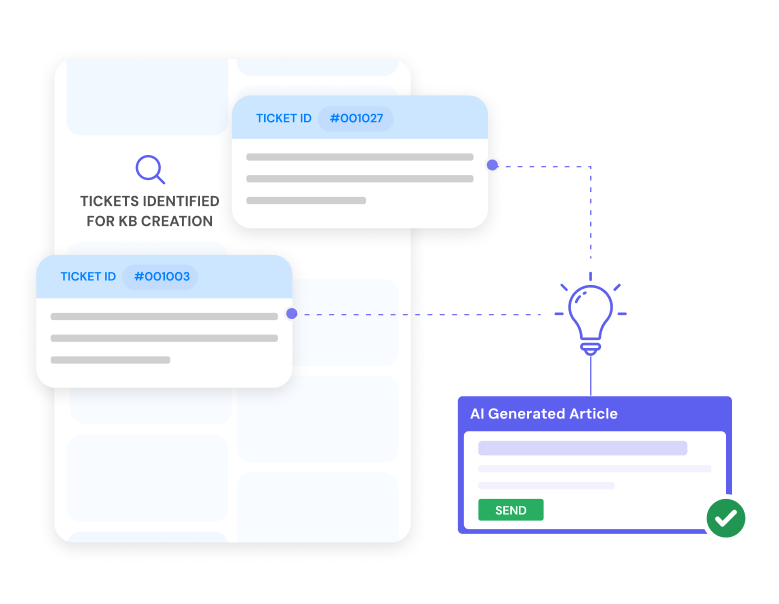
Keep your knowledge base current, automatically
Every resolved ticket is a knowledge article waiting to be written. AutoKB turns your resolved cases into structured, accurate help articles with no manual effort, and flags gaps where documentation is missing or outdated. Your agents and AI answer from a knowledge base that keeps itself current and syncs straight into Zendesk, Salesforce, and your existing tools.
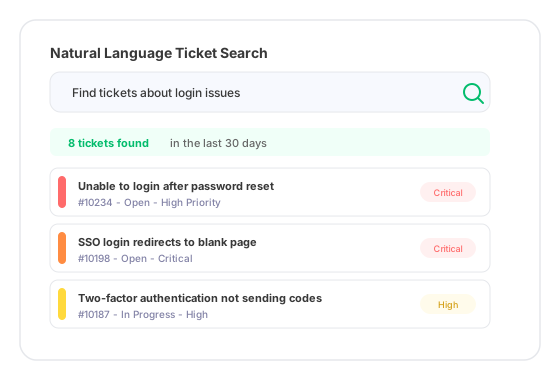
Stop building dashboards to answer simple questions. Support Analyst lets you query your entire ticket history in plain English: surface tickets with negative sentiment before they escalate, get instant analytics on volume, trends, and response times, and pull a full deep dive on any ticket. No setup and no learning curve.
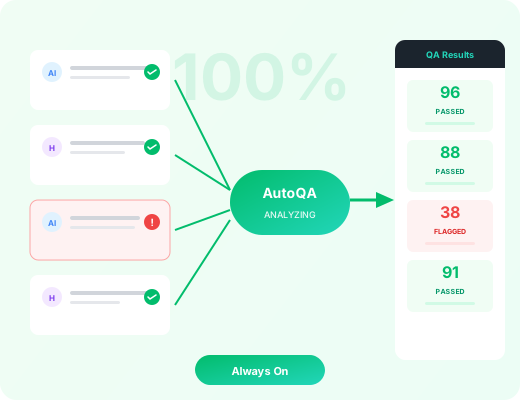
Audit quality on every conversation, not just a sample
Manual QA reviews a handful of tickets a week. AutoQA evaluates every AI and human agent conversation against criteria you define in plain English, catching compliance risks, sentiment drops, and missed resolutions in real time. Every flagged conversation becomes a prioritized improvement for your team and your AI agents.
Still deciding how to measure all of this? Compare the real-time workflow reporting options on alert latency rather than dashboard refresh rate, because those are not the same number.
Ticket automation works by utilizing an automated ticket system to streamline the process of receiving, categorizing, and routing tickets. The automated ticketing system takes incoming tickets, routes them to the appropriate team or individual based on predefined rules, and tags them based on their content. This helps to prioritize and manage tickets more efficiently, resulting in faster resolution times.
Automated ticket routing involves automatically sorting and distributing tickets based on certain criteria. These may include factors such as the nature of the issue, the team or individual with the relevant expertise, and the severity of the issue. Automated ticket routing ensures that the right person handles the ticket, thus improving the efficiency and effectiveness of the ticket resolution process.
The benefits of ticket automation are manifold. Firstly, it helps in efficient management and prompt resolution of customer issues, thus enhancing customer satisfaction. Secondly, it reduces the workload of the customer support team, allowing them to focus on complex issues that require expert attention. It also minimizes the possibility of errors due to manual intervention and maintains a record of all tickets, which can be useful for future reference or analysis.
An automated ticketing system can manage different types of tickets. These could range from general queries to technical issues or complaints. What's essential is appropriately setting up the system to recognize and handle these varied ticket types. Finally, by consistently tagging and routing tickets, a system can help identify trends. This could involve repeated issues or frequent queries, allowing the business to improve its services or products accordingly.
Ticket automation can significantly aid in tracking trends within customer queries and issues. The automated ticket system simplifies data collection by efficiently categorizing tickets through automated ticket tagging. This allows us to gather insight into recurring issues, peak times for customer inquiries, and frequently asked queries. Businesses can proactively address common problems and improve customer service by monitoring these trends.
Ticket automation is an efficient way to manage and streamline customer service. Some best practices include creating an automated ticket triage system to prioritize issues based on severity, using AI to respond to simple issues, conditional automation for specific situations, and maintaining a human touch in responses to ensure customer satisfaction. Regular analyses for continuous improvement also play a crucial role in a successful automation system.
A support operations platform automates the manual work that surrounds every ticket, not just the customer-facing reply. IrisAgent handles ticket tagging and routing, proactive escalation and incident detection, knowledge base generation, plain-English ticket analytics, and quality assurance across every conversation. Instead of only deflecting tickets like a standalone chatbot, it runs the operations layer that keeps your support team efficient and your knowledge and quality consistently high.
A customer service chatbot focuses on deflecting or answering incoming questions. Automated support operations cover the full lifecycle behind those tickets: tagging and routing them to the right person, predicting and preventing escalations, generating and maintaining knowledge base articles from resolved cases, answering analytics questions about your ticket history, and auditing the quality of every AI and human conversation. IrisAgent does both, so you get autonomous resolution and a support operation that improves itself over time.
IrisAgent's AutoKB turns resolved tickets into structured, accurate help articles with no manual effort. It analyzes how cases were solved, drafts knowledge articles, flags gaps where documentation is missing or outdated, and syncs the content into tools like Zendesk and Salesforce. This keeps your knowledge base current automatically, so both your agents and your AI answer from up-to-date, grounded information.
Support Analyst lets you query your entire ticket history in plain English instead of building dashboards. You can surface tickets with negative sentiment before they escalate, get instant analytics on volume, trends, and response times, and pull a full deep dive on any individual ticket. There is no setup and no learning curve, so support leaders get answers about their operation in seconds.
Traditional manual QA reviews only a small sample of tickets each week. AutoQA evaluates every AI and human agent conversation against criteria you define in plain English, catching compliance risks, sentiment drops, and missed resolutions in real time. Each flagged conversation becomes a prioritized improvement for your team and your AI agents, giving you 100 percent quality coverage instead of spot checks.
Most support-ops gains start at the ticket layer. Our AI ticketing system guide covers what to automate first, what to leave with agents, and how to measure the difference. The cheapest ticket is the one never filed, so pair it with measuring ticket deflection rate on a 72-hour re-contact window rather than on article views. Teams consolidating tools can run it all on AI helpdesk software that works standalone or on top of Zendesk, Salesforce, and Intercom.