
Automated QA for Customer Support: Why Sampling 5% of Conversations Is Costing You Customers
Most support teams still rely on manual QA. They review a small random sample of conversations, score them against a rubric, and assume that 5% slice represents the other 95%.
It doesn't. And the gap between what you review and what actually happens is where customers quietly leave.
Manual quality monitoring in contact centers typically covers just 2-5% of interactions, according to industry benchmarks. That means compliance violations, AI agent errors, and sentiment shifts go undetected until they show up in churn reports or escalation spikes days later.
Meanwhile, Gartner predicts that by 2026, 60% of customer service organizations will use AI to automate quality monitoring, up from less than 10% in 2022. The shift is already underway.
That's why we built AutoQA.
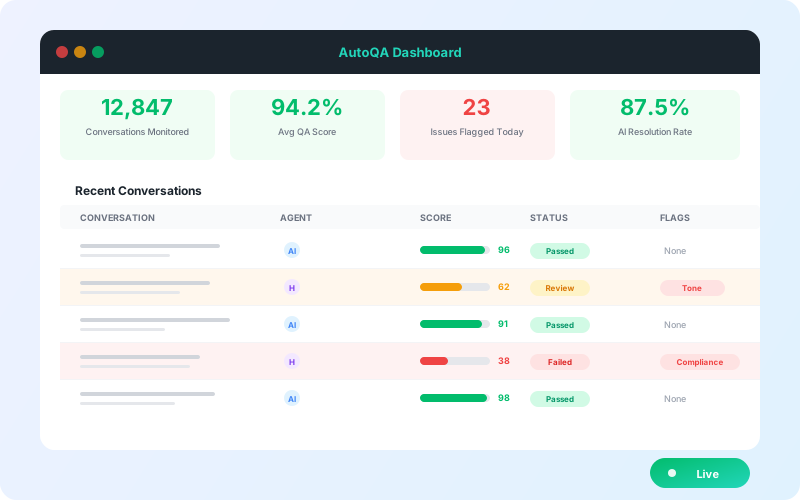
AutoQA is continuous, automated quality assurance for every customer conversation, both AI and human, evaluated against your custom quality standards in real time. No sampling. No spreadsheets. No lag between a bad interaction and finding out about it.
The Problem with Manual QA in Customer Support
Before diving into the solution, it helps to understand why manual QA creates blind spots that grow worse as your team scales.
Small Samples, Big Gaps
When QA analysts review 2-5% of conversations, they are making quality decisions based on incomplete data. A team handling 50,000 tickets per month might review 1,000 to 2,500 of them. The remaining 47,500+ conversations are a black box.
That is not a QA program. That is a spot check.
Lag Between Problems and Detection
Manual QA operates on a review cycle. Conversations from last week get scored this week. By the time a pattern surfaces, dozens or hundreds of similar interactions have already gone out the door. For compliance-sensitive industries, that delay is not just inconvenient; it is a risk.
Inconsistent Scoring
Different QA analysts apply rubrics differently. One reviewer might flag a conversation for missing an identity verification step. Another might let it pass. When your quality data depends on who happened to review what, your coaching decisions rest on inconsistent foundations.
It Doesn't Scale
Hiring QA analysts linearly as ticket volume grows is expensive and slow. If your team doubles throughput after deploying AI agents, your manual QA process cannot keep up without doubling headcount, too. According to Forrester, AI-powered quality management can deliver a 25% decrease in QA operating costs within the first year of adoption while covering far more ground.
What Is Automated QA for Customer Support?
Automated QA uses AI to evaluate every customer conversation against your defined quality standards, continuously, without manual review bottlenecks.
Instead of sampling a fraction of interactions, automated QA systems analyze 100% of conversations in real time. They score for compliance, sentiment, resolution quality, process adherence, and any custom criteria you define.
The result: complete visibility into support quality across both human agents and AI agents from a single dashboard.
How IrisAgent AutoQA Works
AutoQA is designed to replace guesswork with full-coverage quality monitoring. Here is what that looks like in practice.
1. Define Quality Rules in Plain English
Instead of rigid scoring rubrics, you write rules the way you would explain them to a new team lead:
"Flag conversations where the agent doesn't verify identity before making account changes"
"Check that agents offer a follow-up before closing the conversation"
"Alert me when sentiment drops below neutral and no escalation is offered"
AutoQA applies these rules with context-aware scoring across every single interaction. No regex patterns or Boolean logic required.
2. Monitor 100% of Conversations Automatically
Whether you handle 1,000 or 1,000,000 conversations a month, AutoQA evaluates all of them. Both your AI agents and human agents are assessed against the same standards from a unified dashboard.
This is the core difference between automated QA and manual QA: coverage. When you evaluate everything, patterns become visible immediately instead of hiding in the 95% you never reviewed.
3. Get Alerted to Problems in Real Time
When a conversation falls below your quality threshold, whether it is a compliance miss, a sentiment issue, or a blown SLA, you know immediately. Not in next week's QA review meeting. Now.
Real-time alerts mean you can intervene before a single bad interaction becomes a pattern affecting dozens of customers.
4. Close the Loop with Actionable Recommendations
AutoQA does not just score conversations. It identifies root causes and recommends specific fixes:
Content gaps: Knowledge base articles or SOPs that need updating
Missing data sources: Information your AI agent should have access to but doesn't
Workflow bottlenecks: Processes causing repeat escalations
Training opportunities: Patterns where human agents need coaching
Every finding comes with a prioritized recommendation so your team knows exactly what to fix next.
Manual QA vs. Automated QA: A Direct Comparison
For support leaders evaluating the shift, here is how manual and automated QA compare across the metrics that matter:
Dimension | Manual QA | Automated QA |
|---|---|---|
Coverage | 2-5% of conversations | 100% of conversations |
Detection speed | Days to weeks | Real time |
Scoring consistency | Varies by reviewer | Consistent across all evaluations |
Scalability | Requires linear headcount growth | Scales with volume automatically |
AI agent coverage | Often excluded or separate | Unified with human agent QA |
Cost trajectory | Increases with volume | Decreases per-conversation over time |
Actionability | Spreadsheet reports | Prioritized recommendations with root causes |
The comparison is not about eliminating human judgment. Your QA team's expertise is valuable for calibrating standards, handling edge cases, and coaching. Automated QA frees them from the repetitive work of reviewing samples so they can focus on strategic quality improvements.
Who Should Use Automated QA?
AutoQA is built for support leaders who face one or more of these challenges:
Hybrid teams managing AI and human agents. If you have deployed AI agents alongside your human team, you need unified quality visibility. Manual QA processes rarely cover AI interactions with the same rigor, creating a blind spot exactly where you need the most oversight.
Compliance-driven organizations. In industries like financial services, healthcare, and insurance, missing a compliance violation is not a coaching opportunity. It is a regulatory risk. Sampling 5% of conversations when compliance is at stake is an unacceptable gamble.
Fast-scaling support operations. When ticket volume grows faster than you can hire QA analysts, quality coverage degrades. Automated QA maintains 100% coverage regardless of volume changes.
Teams focused on AI agent improvement. If you are using AI agents to handle a growing share of conversations, you need continuous feedback on accuracy, tone, and resolution quality. Automated QA provides the data loop that makes AI agents better over time, not just when someone manually spots an issue.
The Business Impact of Automated QA
Moving from manual to automated QA is not just an operational upgrade. It directly affects the metrics support leaders report on.
Faster issue detection. Real-time quality scoring means problems surface in minutes, not days. A compliance gap that might have affected hundreds of conversations over a week gets flagged on the first occurrence.
Reduced QA operating costs. Forrester analysis indicates AI-powered quality management can reduce QA operating costs by 25% in the first year while covering significantly more interactions.
Better coaching outcomes. When QA data covers 100% of conversations instead of 5%, coaching becomes data-driven rather than anecdotal. Managers can identify specific patterns across an agent's full interaction history, not just the handful that happened to get reviewed.
Continuous AI agent improvement. For teams using AI agents, automated QA creates a feedback loop that identifies accuracy issues, knowledge gaps, and tone problems across every AI-handled conversation. This data feeds directly into improvements rather than waiting for customer complaints.
Getting Started with AutoQA
Implementing automated QA does not require ripping out your existing processes. Most teams follow this progression:
Define your quality criteria. Start with 5-10 rules covering your most critical standards: compliance checks, required process steps, sentiment thresholds, and resolution quality markers.
Run in parallel. Keep manual QA running alongside AutoQA initially. Compare results to calibrate and build confidence in automated scoring.
Expand coverage. Once calibrated, extend rules to cover more interaction types and quality dimensions. Add rules for AI agent-specific behaviors.
Shift QA team focus. Move your QA analysts from sample-based reviewing to strategic work: calibrating rules, handling escalated reviews, and driving coaching programs based on comprehensive data.
The Bigger Picture
AutoQA is part of a broader mission to make AI support operations measurable, improvable, and trustworthy. It sits alongside IrisAgent's AI agents and hallucination detection capabilities, giving you not just automation, but confidence that your automation is working correctly.
88% of service leaders agree that their QA processes do not match customer expectations. Automated QA closes that gap by replacing partial visibility with complete, real-time quality intelligence.
If you are still evaluating 5% of conversations and hoping for the best, there is a better way.
IrisAgent is trusted by Dropbox, Zuora, InvoiceCloud, and other enterprise teams to automate support without sacrificing quality. Book a demo to see how automated QA fits into your workflow.


