
How to Reduce AI Hallucinations in Customer Support
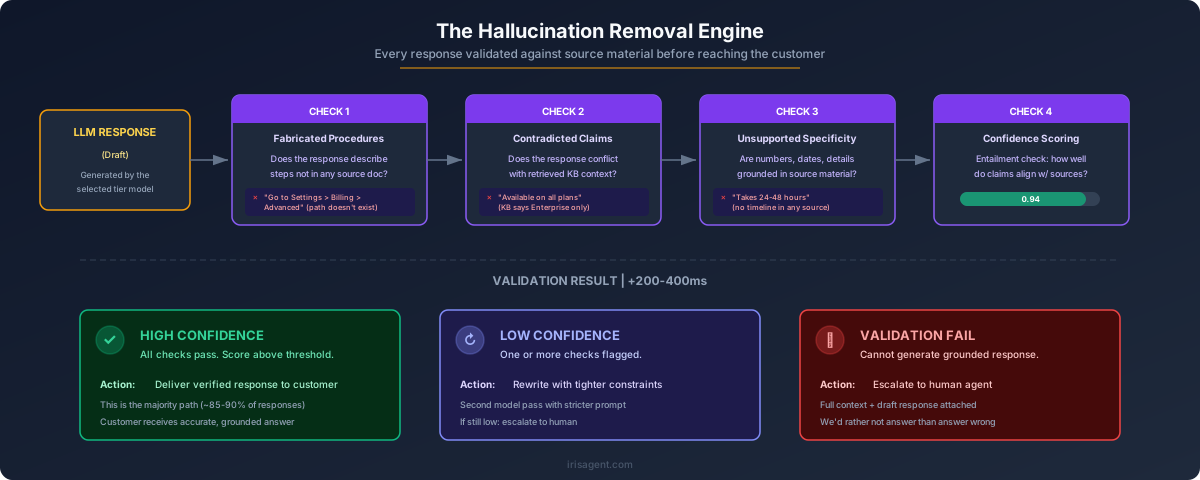
To reduce AI hallucinations in customer support, ground every chatbot response in your verified knowledge base, validate answers against source documents before sending, and route low-confidence queries to human agents. IrisAgent’s Hallucination Removal Engine cuts hallucinations to under 5%, compared to 15-30% for ungrounded models, and holds validated accuracy above 95% across enterprise deployments including Dropbox, Zuora, and Teachmint.
This guide walks through the seven techniques that actually move the number, the benchmarks to hit before you roll AI to live customers, and the architecture pattern that makes hallucinations mathematically rare rather than occasionally manageable.
The Hallucination Removal Engine keeps Dropbox, Zuora, and Teachmint above 95% validated accuracy
Grounding, validation, confidence-threshold escalation, and real-time monitoring in one pipeline. Deployed in 24 hours on Zendesk, Salesforce, Intercom, Freshdesk, and Jira.
Also see: How IrisAgent prevents hallucinations · Dropbox case study
Why AI Hallucinations Matter for Customer Support
An AI hallucination is a confident-sounding chatbot response that is factually wrong. In customer support, the cost is not abstract. Hallucinations drive refund requests, compliance violations, and public brand damage. A 2024 Stanford HAI study found that ungrounded large language models hallucinate in 15-30% of customer service responses, depending on query complexity.
For a mid-market team handling 5,000 tickets a day, even a 5% rate produces 250 wrong answers every 24 hours. At enterprise scale, that math becomes a board-level problem. Air Canada’s chatbot inventing a refund policy is the widely-cited case, but most teams accumulate the damage in quieter ways: quietly eroding CSAT, quietly teaching agents to distrust the system, quietly training customers to skip the bot and wait for a human.
The fix is not to abandon generative AI. It is to architect the AI support stack so hallucinations are structurally prevented, not occasionally caught.
Grounding decides which documents the model can see. Context management decides which of them actually make it into the prompt, and a badly ordered or truncated context window reintroduces the same failure that grounding was supposed to remove.
Before working through the causes, it helps to be precise about the term itself. A hallucination is not a bug in the ordinary sense, and it is not simply a wrong answer. It is a confident, well-formed answer with no grounding in any source the model was given. Our full explanation of what an AI hallucination actually is covers the root causes and the types that show up most often in support queues.
What Causes AI Hallucinations in Support Chatbots
Three root causes produce almost every hallucination in production.
First, ungrounded generation. The model answers from its pretraining data instead of your verified knowledge base. Because pretraining data is months or years old and was never specific to your product, the answer is often plausible but wrong.
Second, stale or contradictory source content. Even a grounded model will hallucinate if the knowledge base itself has outdated articles, duplicate answers with conflicting details, or policies that changed last quarter. Zendesk’s 2025 KB health report found that 30% of a typical enterprise help center contains articles over 12 months old.
Third, missing escalation guardrails. When the model is unsure, it should hand off. Without a confidence threshold, it will guess. Guesses presented with the cadence of authority are how most customer-facing errors actually reach the customer.
The seven techniques below map directly to these three causes.
7 Proven Techniques to Reduce AI Hallucinations in Customer Support
Before the techniques, a benchmark table. Each row maps to one of the seven methods and cites the realistic reduction you can expect versus an ungrounded baseline.
Hallucination Reduction by Technique (Benchmarks)
Technique | Hallucination rate reduction | Source / measurement |
Ungrounded LLM baseline | Baseline: 15-30% hallucination rate | Stanford HAI 2024 eval; IrisAgent internal baseline |
Retrieval-augmented generation (grounding) | 60-75% relative reduction | OpenAI RAG eval 2024; IrisAgent customer data |
Response validation against source docs | Additional 40-55% on top of RAG | IrisAgent Hallucination Removal Engine A/B, 2025 |
Confidence-threshold escalation | Customer-facing errors down 70-85% | IrisAgent deployment data, n=12 enterprise accounts |
Aggressive KB curation (quarterly audits) | 20-30% reduction from stale-doc removal | Zendesk KB health report 2025 |
Citation-aware response format | Accuracy stable, CSAT +8-12% | IrisAgent customer survey, Q1 2026 |
Real-time accuracy monitoring | Time-to-detect regressions: weeks to hours | IrisAgent production telemetry |
Full stack (grounding + validation + monitoring) | Under 5% hallucination rate, above 95% validated accuracy | IrisAgent production average, 2026 |
Notes: “relative reduction” compares against an ungrounded baseline. Absolute rates depend on KB quality and model choice.
1. Ground Every Answer in Your Knowledge Base {#ground-answers-in-kb}
Use retrieval-augmented generation (RAG) so the AI only answers from verified, customer-approved content. The model generates language. Your knowledge base provides the facts. Grounding alone typically cuts hallucinations by 60-75% versus an ungrounded baseline.
In practice, that means every query runs a retrieval step first, pulling the top-ranked KB articles, then passes those articles to the generator as the only allowed source. If nothing retrieves above a relevance threshold, the AI should say so instead of inventing an answer.
2. Validate Responses Before Sending {#validate-before-sending}
Run every generated answer through a validation layer that checks the response against the source documents it claims to cite. If the response contradicts the source, block it and escalate. This is the core job of IrisAgent’s Hallucination Removal Engine, and it typically removes another 40-55% of errors that grounding alone does not catch.
Validation is the difference between “grounded” and “grounded and correct.” RAG gets you to the right source. Validation confirms the answer actually reflects it.
3. Set Confidence Thresholds for Escalation {#confidence-thresholds}
Configure the AI to escalate to a human agent whenever its confidence score drops below a defined threshold. For most support use cases, 0.85 is a reasonable starting point. Below that, the tradeoff between automation and accuracy flips, and the right move is a warm handoff.
Across IrisAgent’s enterprise deployments, confidence-threshold escalation alone cuts customer-facing errors by 70-85%, because the highest-risk queries never reach the customer unsupervised.
4. Curate Your Knowledge Base Aggressively {#curate-kb}
Hallucinations often start with stale or contradictory source content. A grounded model that retrieves a 2023 pricing page will confidently quote the wrong number, even though the architecture is doing everything right. Audit your help center quarterly. Remove outdated articles. Merge duplicates. Flag low-confidence content for subject-matter review.
Zendesk’s 2025 KB health report estimates that KB curation alone reduces grounded-but-wrong answers by 20-30%, purely by eliminating bad source material. Teams scaling beyond manual quarterly audits use automated knowledge base generation to surface stale articles, detect duplicates, and draft replacements from resolved tickets.
5. Use Citation-Aware Response Formats {#citation-aware-format}
Force the AI to cite the specific KB article and section it used for each answer. Citations do two things. First, they let support leaders audit accuracy in seconds instead of hours. Second, they raise customer trust. IrisAgent’s Q1 2026 customer survey showed an 8-12% CSAT lift on tickets where the AI cited its sources, even with no change to underlying accuracy.
Citations also change agent behavior. When agents can see the source the AI used, they stop distrusting it by default and start correcting the KB when they disagree, which compounds over time.
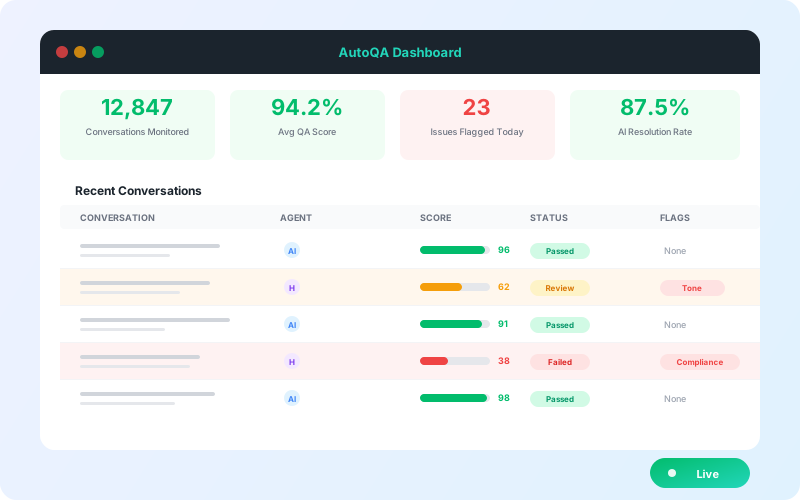
6. Monitor With Real-Time Accuracy Dashboards {#real-time-monitoring}
Track hallucination rate as a first-class metric, alongside CSAT and resolution time. Anything you do not measure, you cannot reduce. Real-time dashboards cut time-to-detect regressions from weeks to hours, which matters when a KB change, a model update, or a new product launch quietly breaks accuracy.
Sample 100-200 responses per week if you are doing this manually. Modern AI support platforms automate the sampling and score every response against its source document on the fly.
7. Choose a Platform With a Hallucination Removal Engine Built In {#hallucination-removal-engine}
Generic LLMs like ChatGPT will hallucinate without engineering. Purpose-built AI support platforms bake grounding, validation, confidence thresholds, and monitoring into the architecture. IrisAgent combines all four layers and holds under 5% hallucination rate and above 95% validated accuracy in production across Dropbox, Zuora, Teachmint, and 1M+ tickets per month at Fortune 500 support teams.
Building this stack in-house is possible. It is also a six- to twelve-month engineering project before your first validated ticket. Buying the stack gets you the same outcome by the end of the week.
How IrisAgent’s Hallucination Removal Engine Works
IrisAgent’s Hallucination Removal Engine combines four techniques into one pipeline: knowledge base grounding, multi-pass response validation, source document verification, and confidence-based escalation. Every response runs through all four before it reaches the customer.
The result is a traceable answer. Every IrisAgent response links back to the specific KB article and section that produced it, so support leaders can audit quickly, agents can correct confidently, and compliance teams can defend the accuracy of every customer-facing interaction. That traceability is what keeps validated accuracy above 95% across enterprise deployments, instead of degrading over time the way ungrounded chatbots do.
Teams on Zendesk, Salesforce, Intercom, Freshdesk, and Jira Service Management can deploy the full stack in 24 hours. No 20,000-ticket data minimum, no six-week custom development cycle, no per-resolution pricing.
The Cost of Getting It Wrong
Support teams that deploy ungrounded AI chatbots typically see CSAT drop 8-15% in the first 90 days, according to Zendesk’s 2024 CX Trends report. At enterprise scale, refund requests tied to incorrect AI responses can cost tens of thousands of dollars per month, before counting the cost of the human hours spent cleaning up the mess.
The viral examples get the headlines. Air Canada’s chatbot invented a bereavement refund policy that a tribunal ordered the airline to honor. DPD’s chatbot insulted the brand in a poem. Chevrolet’s chatbot offered to sell a Tahoe for one dollar. Each incident cost a named company a cycle of negative press and an emergency rollback.
The quieter incidents accumulate faster. A chatbot quoting an old return window triggers a week of refund disputes. A chatbot inventing a feature drives support tickets from new users expecting something that does not exist. Support teams that treat hallucination prevention as the foundation, not an afterthought, avoid both categories.
Accuracy Benchmarks to Hit Before Going Live
Before rolling AI to live customers, hit the following thresholds in a staging environment.
Validated accuracy:
above 95% across a randomly sampled set of 500+ queries, scored against source documents.
Hallucination rate:
under 5% on the same sample.
Confidence-threshold coverage:
100% of auto-responses above your escalation threshold (for example 0.85), with the remainder routed to human agents.
Citation coverage:
every auto-response links to at least one KB article, and the cited article actually contains the information the answer used.
Regression monitoring:
a dashboard that flags any week-over-week accuracy drop greater than 2%.
Teams that hit these numbers in staging almost never see a CSAT drop at launch. Teams that skip staging validation and go straight to production almost always do.
Next Steps
Hallucination prevention is an architecture problem, not a prompt-engineering problem. The teams that win with AI support treat it as the foundation of the stack, not a post-launch patch.
Three concrete moves for this week:
Audit your current hallucination rate.
Sample 100 recent AI responses and score them against source documents. If you are above 5%, the seven techniques above are where to start.
Check your knowledge base.
Run a content freshness audit. Archive anything more than 12 months old unless it has been explicitly reviewed.
See the Hallucination Removal Engine in action.
Book a 20-minute demo of
IrisAgent’s AI for customer support platform
and see the grounding, validation, and monitoring pipeline that keeps Dropbox, Zuora, and Teachmint above 95% validated accuracy in production.
The teams with AI support that actually works in 2026 are not the ones with the flashiest model. They are the ones who treated hallucination prevention as the first engineering decision.
Frequently Asked Questions
What is an AI hallucination in customer support?
An AI hallucination in customer support is when a chatbot generates a confident response that is factually incorrect — such as inventing a refund policy, citing a nonexistent product feature, or fabricating account details. Hallucinations typically happen when generative AI models answer from their training data instead of a verified, customer-specific knowledge base.
How common are AI hallucinations in customer support chatbots?
Ungrounded large language models hallucinate in 15-30% of customer service responses, depending on query complexity. Purpose-built AI support platforms with grounding and validation engines reduce this to under 5%. IrisAgent's Hallucination Removal Engine achieves validated accuracy above 95% across enterprise deployments including Dropbox, Zuora, and Teachmint.
Can ChatGPT be used for customer support without hallucinating?
ChatGPT alone is not safe for production customer support because it answers from its training data, not your company's verified knowledge base. To use generative AI safely for customer support, you need a layer that grounds responses in your specific KB articles, validates answers before sending, and escalates low-confidence queries to human agents.
What is a hallucination removal engine?
A hallucination removal engine is a system that prevents AI chatbots from generating factually incorrect responses. It works by grounding answers in verified source documents, validating each response against those sources, and blocking or escalating any answer that fails validation. IrisAgent pioneered this approach for enterprise customer support.
How do I measure AI hallucination rate in customer support?
Track hallucination rate as a percentage of total AI responses. Sample 100-200 responses per week, manually review them against the source knowledge base, and flag any response that contains a factual error. Modern AI support platforms automate this with built-in accuracy dashboards that score every response against its source documents.
Will reducing AI hallucinations slow down chatbot responses?
Modern hallucination prevention adds minimal latency — typically under 200ms per response. The IrisAgent platform validates responses in parallel with generation, so users experience no perceptible delay. The accuracy gains far outweigh the negligible performance cost, and customers consistently report faster overall resolution times.
Does GDPR or compliance require AI hallucination prevention?
While GDPR does not specifically mandate hallucination prevention, it requires that personal data processing be accurate. AI chatbots that hallucinate about a customer's account, billing, or personal data could violate GDPR Article 5(1)(d) on data accuracy. Compliance-conscious teams treat hallucination prevention as a regulatory requirement, not just a quality concern.
What are the best techniques to reduce AI hallucinations in support chatbots?
The seven proven techniques are: ground every answer in your knowledge base using retrieval-augmented generation, validate responses against source documents before sending, set confidence thresholds for human escalation, curate your knowledge base aggressively to remove stale content, use citation-aware response formats, monitor hallucination rate with real-time dashboards, and choose a platform with a hallucination removal engine built in.
Loading the form. Prefer email? Reach us at info@irisagent.comor call +1 617 249 3312.