
Customer Support Knowledge Base: Build, Customize, Maintain (2026)
51% of customers prefer technical support through a knowledge base, according to Econsultancy data cited by Document360's knowledge base statistics roundup. That should change how support leaders think about the channel. A customer support knowledge base isn't backup documentation. It's one of the main places customers expect to get help.
The teams that get value from it don't treat it like a side project for technical writers. They also customize the knowledge base so it looks, reads, and answers like their own product. They build it into support operations, connect it to ticket patterns, and keep it current enough that both customers and agents trust it. That's even more important now that AI agents, agent-assist tools, and search systems depend on knowledge quality. If the content is stale, fragmented, or written for the wrong audience, automation scales bad answers faster.
A strong knowledge base does three jobs at once. It gives customers self-service, gives agents a reliable source of truth, and gives support leaders a measurable system they can improve over time. That last part matters most. Once you start treating knowledge like an operational asset, you stop asking, “Do we have articles?” and start asking, “Are we reducing repeated contacts, closing content gaps, and helping every channel answer consistently?”
What Is a Customer Support Knowledge Base
A customer support knowledge base does two jobs at once. It gives customers a way to solve common issues without opening a ticket, and it gives agents a trusted source for answers, policies, and troubleshooting steps during live work.
In mature support teams, it operates as infrastructure, not a side project. The best knowledge bases are tied to search, chat, agent assist, onboarding, QA, and AI response systems. That changes the standard from “do we have articles?” to “can the operation produce the right answer, in the right context, every time?”
That distinction matters.
A folder full of help articles is easy to publish and hard to run. Content drifts out of date. Similar issues get documented three different ways. Agents stop trusting the library and go back to Slack messages, tribal knowledge, or whatever macro they used last week. Customers feel that breakdown quickly because answers become inconsistent across channels.
A useful knowledge base serves more than one audience, but each audience needs a different depth of answer and a different format.
Audience | What they need | What good content looks like |
|---|---|---|
Customers | Fast self-service answers | Clear titles, short steps, plain language |
Agents | In-work resolution support | Decision trees, exception handling, policy detail |
New hires | Faster ramp-up | Product explainers, common issue playbooks, escalation rules |
This is why knowledge design and operating design have to stay connected. Teams using a knowledge-centered service approach for AI-era support usually perform better because they treat knowledge as part of case handling, not as a writing project that sits outside support.
A practical rule helps here. If the first lines of an article do not make the audience and use case obvious, the article usually underperforms in search, self-service, and agent workflows.
The business case is straightforward even without piling on more citations here. Customers increasingly expect self-service before they contact support. Support teams also need a dependable content layer so automation and AI tools can retrieve grounded answers instead of generating vague summaries from partial context.
What a good knowledge base actually changes
A good knowledge base improves operations in ways support leaders can see within weeks:
It cuts repetitive volume. Common questions stop reaching the queue as often because customers can resolve them earlier.
It improves answer consistency. Agents rely less on memory and personal shortcuts, which reduces policy drift.
It extends coverage across time zones. Customers can get help outside staffed hours with answers that reflect current guidance.
It improves AI output quality. Bots, search, and agent-assist tools perform better when the source content is current, structured, and specific.
The practical shift is simple. Treat the knowledge base as a living system inside support operations. It needs owners, standards, feedback loops, and integrations. Once teams run it that way, the return shows up in lower ticket volume, faster resolution, smoother onboarding, and better AI-assisted support.
Architecting Your Knowledge Content Structure
A messy knowledge base fails before anyone reads the first sentence. If users can't predict where information lives, they stop browsing, search more desperately, and then open a ticket. Architecture is what prevents that spiral.
Think like a librarian, not a file keeper
The structure should reflect how customers experience problems, not how your company is organized. Support leaders often inherit categories built around internal teams such as “Platform,” “Backend,” or “Customer Operations.” Customers rarely think that way. They think in tasks, outcomes, and blockers such as login, billing, setup, permissions, imports, or failed actions.
That's why the library analogy works. A library doesn't throw every book into one room and rely on search. It uses hierarchy, metadata, and cross-references so people can find what they need from more than one direction.
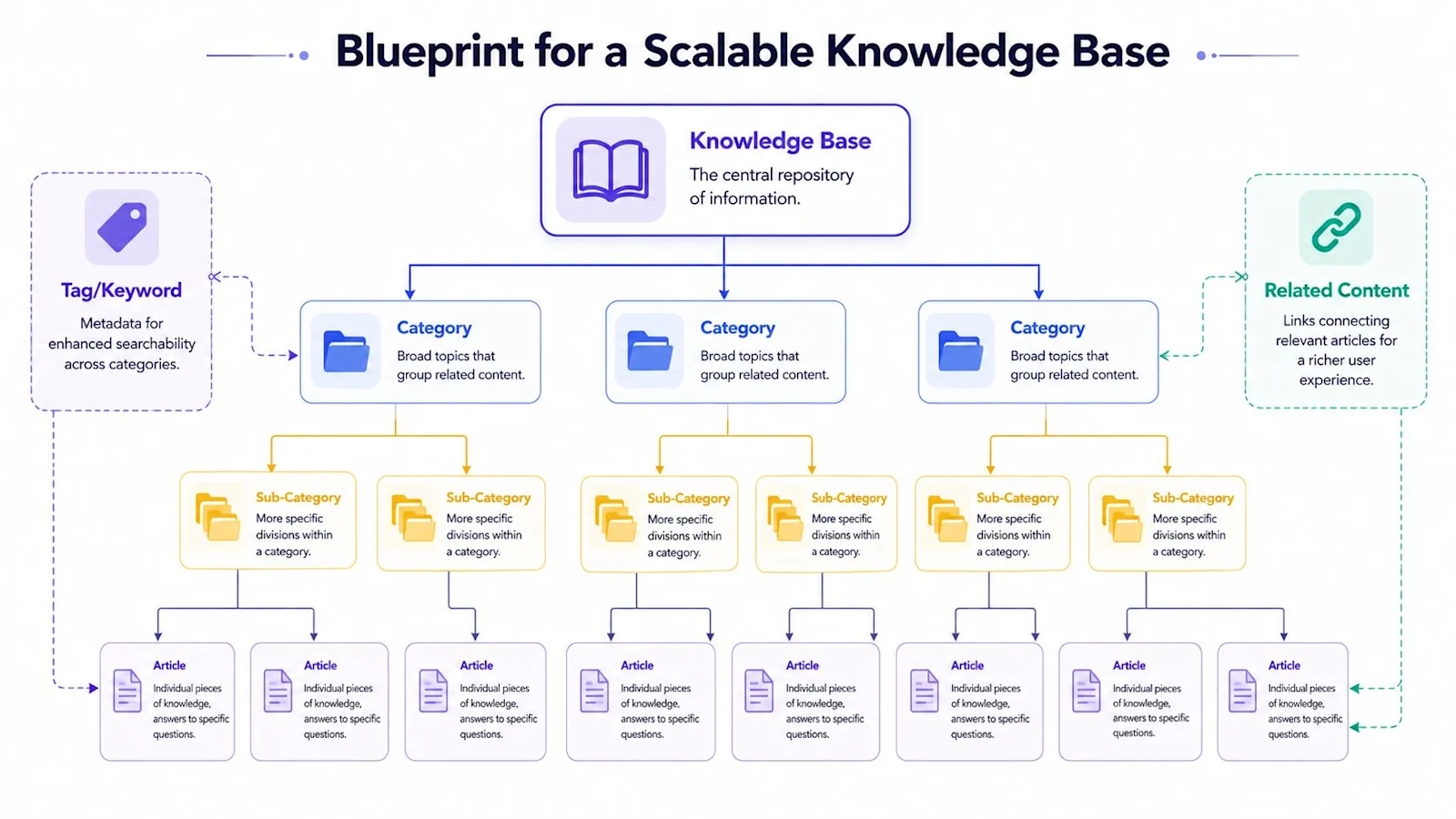
A practical structure has three layers:
Categories for broad topics like Billing, Account Access, Integrations, or Reporting.
Sub-categories for narrower paths like Billing > Invoices or Integrations > Salesforce.
Articles for the actual answer, such as “How to read your invoice” or “Why a Salesforce sync failed.”
Then you add metadata. Tags, product names, user roles, plan types, and platform labels help search and filtering work across the hierarchy.
Use a structure that scales
The test of architecture isn't whether it looks neat today. It's whether it still works after product expansion, policy changes, and content growth.
Here's a practical content model many teams use:
Content type | Best use case | Common mistake |
|---|---|---|
FAQ | Single-question answers | Turning complex troubleshooting into one-line replies |
How-to article | Task completion | Burying the steps under product marketing language |
Troubleshooting guide | Diagnosing failure states | Listing every possible cause with no decision path |
Concept explainer | Clarifying how something works | Writing for internal experts instead of users |
Internal runbook | Agent-only resolution help | Publishing policy-sensitive content externally |
Taxonomy also needs ownership. Someone has to decide naming rules, article templates, and when new categories are warranted. Without that, teams create duplicate sections and inconsistent labels. “Login issues,” “sign-in help,” and “access problems” end up meaning the same thing in three places.
A knowledge-centered operating model helps here because it pushes teams to structure around real demand and reusable problem-solving. If you're designing governance around contribution and reuse, this overview of the KCS framework for AI-era support is a useful reference.
Good architecture makes search easier, but it also makes writing easier. Authors know where an article belongs before they start.
One more trade-off matters. Don't overbuild faceted navigation on day one. A lean taxonomy with disciplined tags is better than an elaborate maze of categories nobody maintains. Start with the top customer journeys and top support intents. Expand only when you can explain why a new branch helps users find answers faster.
How to Customize and Brand Your Knowledge Base
A customizable knowledge base is not a cosmetic nicety. Customization is what makes customers trust that the article they landed on is really yours, and it lets support leaders shape the experience without filing an engineering ticket. When teams search for how to customize a knowledge base, they are usually asking about five specific controls.
Branding: match your logo, color palette, and fonts so the knowledge base reads as a native part of your product, not a bolted-on help site.
Information architecture: reorder categories, pin high-traffic articles, and set the default landing view for each audience.
Templates: standardize article layout (summary, steps, related links) so every page is scannable and every author starts from the same shape.
Localization: serve the same article in multiple languages and regions from one source of truth.
Access rules: show internal runbooks to agents and public how-tos to customers from the same knowledge base, gated by role.
In 2026, the highest-leverage customization is not visual. It is grounding. IrisAgent's grounded AI support platform reads your customized knowledge base at query time and returns a validated answer inside the ticket, with accuracy above 95% across enterprise deployments and hallucinations held under 5%, compared with 15% to 30% for ungrounded models. The customization work you do here becomes the source the AI is grounded in.
Customizing for AI Retrieval, Not Just for Readers
The customization question support leaders ask in 2026 is not whether they can change the logo. It is whether the knowledge base will still be found and trusted once an AI is answering from it. Those are different problems, and only one of them is solved by a theme editor.
Branding still matters for the person who lands on your help center from a search result. But once those same articles become the retrieval source for an AI agent, structure starts to matter more than styling. Article scope, heading hierarchy, and freshness decide whether the AI returns a grounded answer or a confident guess. One article that answers three loosely related questions will produce a vague answer to all three.
The practical version: keep one intent per article, put the answer in the first paragraph rather than after the background, and date-stamp anything that references a price, a plan name, or a policy. IrisAgent reads from your own knowledge base, SOPs, and ticket history, validates each response against the source it cites, and holds validated accuracy above 95% with hallucinations under 5%, against 15% to 30% for ungrounded models. The customization that pays for itself is the kind that makes retrieval unambiguous.
Authoring and Maintaining Knowledge Base Content
Most knowledge bases don't fail because teams can't write. They fail because content creation is disconnected from support reality. Articles get drafted from memory, reviewed slowly, published once, and forgotten until customers complain.
Real support demand is already recorded in your resolved tickets. Tools that generate knowledge base articles from resolved tickets turn that record into draft content, so the backlog gets written from what customers actually asked rather than from what the team guessed they would ask.
Build content from real support demand
A support knowledge base works best when it's built from actual ticket data, chat transcripts, and search behavior. NetFor's guidance is clear on this point: the strongest systems are modeled as living information systems, built from ticket analytics, organized around top contact drivers, and monitored for search failures in its article on the customer support knowledge base as a living system.
That changes the writing brief completely. You're no longer asking, “What should we document?” You're asking:
Which issues create the most repeated inbound work
Which searches return weak or no answers
Which tickets force agents to explain the same fix again and again
Which workflows break after product or policy changes
NetFor also recommends prioritizing the 20 to 30 issues that generate the majority of inbound contacts in that same article. That's a practical way to start. Don't launch with a giant, uneven library. Cover the high-friction problems first and make those articles trustworthy.
Create a living workflow, not a publishing queue
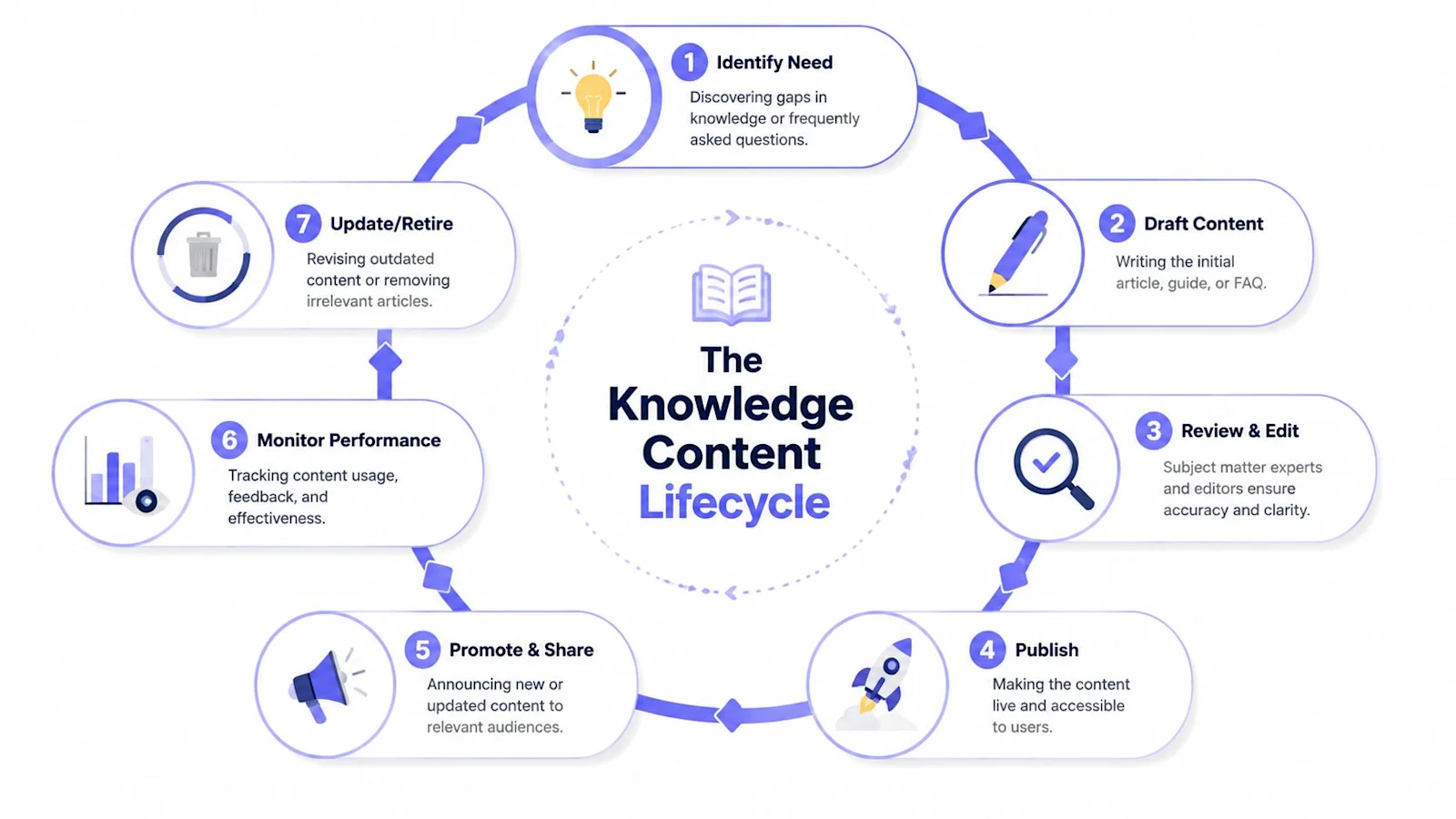
The most durable model I've seen looks a lot like KCS in practice, even when teams don't formally label it that way. Agents solve issues. They flag missing knowledge, improve drafts, and refine wording based on what confused the customer. Knowledge becomes a byproduct of resolution work, not a separate content project that always loses priority.
That requires a simple operating rhythm:
Capture signals daily. Pull failed searches, repeated macros, escalation notes, and long-handle tickets.
Draft quickly. Create a usable article as soon as the issue pattern is clear.
Review with the right SME. Product, engineering, compliance, or billing owners should validate only what they own.
Publish with accountability. Every article needs an owner, a last-reviewed date, and a clear audience.
Revisit on a cadence. Tie updates to releases, policy changes, incident retrospectives, and search feedback.
This short walkthrough is useful if you're modernizing article writing for retrieval-based AI and agent assist: writing knowledge articles for the AI age.
A quick visual helps teams align on the operational loop:
Once the authoring workflow is clear, the next choice is the platform itself. Compare the best AI knowledge base software for support teams on grounding, auto-generation from tickets, and how each tool refreshes when the source changes.
Where AI fits well and where it does not
AI changes the maintenance burden, but only if you use it with discipline. It's useful for detecting gaps from ticket clusters, drafting first versions from repeated resolutions, suggesting related articles, and identifying stale wording after product changes.
One example is IrisAgent's AutoKB, which detects knowledge gaps and generates draft articles from support signals. Similar workflows also exist in documentation platforms and AI writing tools connected to helpdesks. The value isn't that AI writes finished content on its own. The value is that it shortens the distance between “we keep seeing this issue” and “we have a usable draft to review.”
What doesn't work is letting AI publish unsupported instructions, merge conflicting policies, or rewrite nuanced troubleshooting without human review. The closer the content gets to refunds, compliance, account access, or technical edge cases, the more important validation becomes.
Treat AI as a fast junior drafter with perfect stamina and imperfect judgment.
The maintenance mindset matters more than the tool. If you don't have ownership, review rules, and search feedback loops, AI will only help you produce stale articles faster.
Integrating Your Knowledge Base into Support Workflows
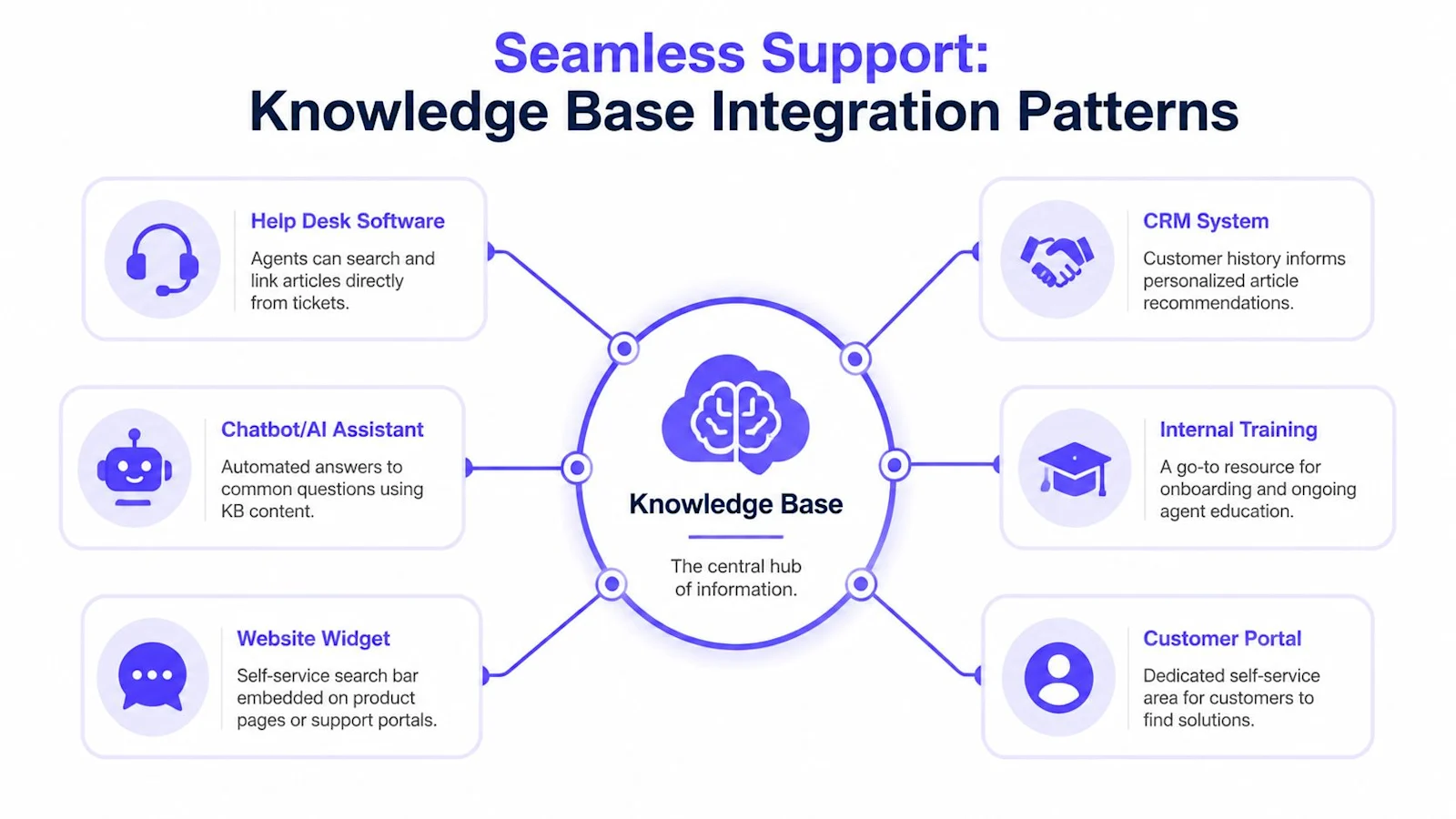
A customer support knowledge base creates the most value when it stops behaving like a standalone portal. The useful pattern is hub-and-spoke. The knowledge base sits at the center, and support channels pull from it in context.
Self-service needs context, not just search
A public help center is table stakes. What matters operationally is where the content appears and how little effort the user needs to reach it.
A search box on a support homepage is useful. A search box embedded in the product, on checkout pages, in account settings, or next to integration workflows is better. Context narrows intent. That means the customer doesn't have to translate their problem into your category structure first.
Teams often make two mistakes here. They either expose the entire library everywhere, which overwhelms users, or they hide support content behind too many clicks, which drives avoidable contacts.
The better pattern is targeted surfacing:
In-app widgets for the page or task the user is on
Portal modules for common actions like billing, onboarding, or account admin
Triggered suggestions when a user hits an error state or abandons a workflow
Agent assist changes daily operations
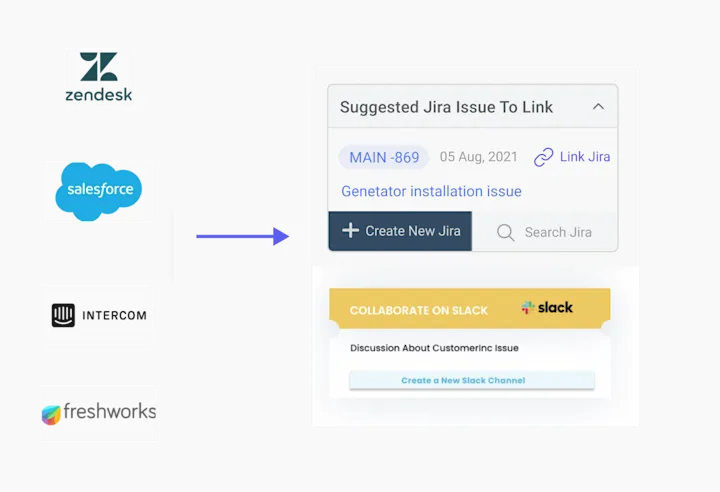
Inside tools like Zendesk, Salesforce, Intercom, and Freshworks, a knowledge base should behave like in-work guidance, not a separate website agents need to search manually.
That means the platform should surface relevant articles from ticket context, customer attributes, product area, and recent actions. When it works, agents spend less time hunting through docs and more time validating the right next step. Response quality also gets more consistent because everyone is drawing from the same source.
Internal and external knowledge often diverge. Customer-facing content explains what the user can do. Internal guidance often includes policy checks, exception handling, escalation rules, or backend actions. If both live in the same system, access controls and clear article types become essential.
AI channels need grounded answers
Chatbots and AI agents are only as reliable as the knowledge they retrieve. If the knowledge base is well-structured, current, and segmented properly, AI can answer common questions in a way that feels direct and useful. If not, it hallucinates, overgeneralizes, or gives a technically correct but operationally useless answer.
The operational standard should be simple. AI should answer from grounded knowledge, identify low-confidence scenarios, and hand off when policy, ambiguity, or account complexity demands a person.
The knowledge base shouldn't compete with your channels. It should power them all with the same answer logic.
When support leaders get this right, customers receive more consistent help across self-service, chat, email, and agent interactions. That consistency is what makes the knowledge base operational rather than ornamental.
Deflection rate is the KPI teams most often report wrong. Our self-service ticket deflection strategies guide explains why a 72-hour re-contact window is the honest way to count it.
Measuring Knowledge Base Performance with KPIs
High article traffic can signal success, confusion, or a broken product flow. KPI review only becomes useful when you tie knowledge activity to support outcomes, containment, and agent efficiency.
A strong knowledge base behaves like an operating system for support. It serves customers, guides agents, feeds AI retrieval, and exposes where your service model is weak. That means the scorecard has to cover more than content consumption. It needs to show whether people found the right answer, whether that answer resolved the issue, and whether the system improved handling across channels.
The metrics that actually matter
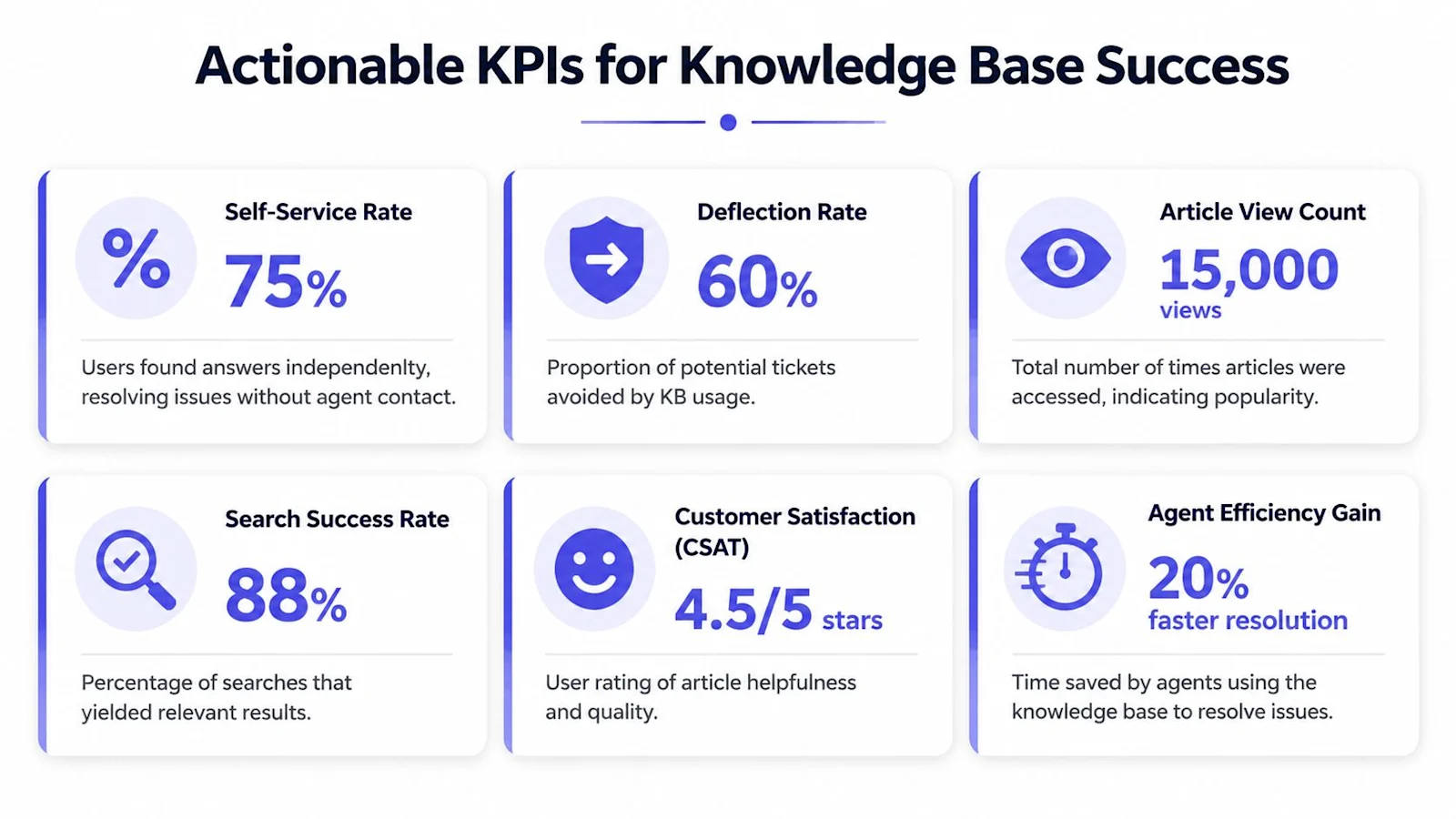
The most useful KPI set combines content quality, findability, and operational impact.
KPI | What it tells you | What to look for |
|---|---|---|
Article ratings | Whether readers found the content useful | Low-rated articles with heavy traffic |
Follow-up surveys | Whether self-service resolved the issue | Topics that still lead to contact after article use |
Article views | Where demand is concentrated | High-interest topics that need better coverage or clearer steps |
Bounce rates | Whether users stopped or kept searching | Pages that win clicks but fail to answer the question |
Search terms | What users are trying to solve in their own words | Repeated intents, wording mismatches, and product language gaps |
Content gaps | Where the library has no usable answer | Failed searches, zero-result queries, and recurring contact drivers |
For support operations, that table is only the first layer.
Review agent-side behavior too. Measure article usage during live handling, article attachment rates in tickets, macro adoption, AI suggestion acceptance, and issue types that still depend on tribal knowledge. If an AI assistant keeps retrieving the wrong article, the problem may be weak metadata, overlapping titles, or poor article structure rather than model quality.
A knowledge base that supports AI should also be measured on retrieval performance. Look at low-confidence responses, handoff rates after knowledge retrieval, and answer deflection by topic. Those numbers show whether your content is usable by automation or only readable by a trained agent.
If you need a broader operating framework, this guide to customer support metrics for support teams helps place knowledge KPIs in the context of service performance.
How to review the numbers without fooling yourself
Views alone are weak evidence. A spike in traffic can mean customers are getting help fast, or it can mean the same broken workflow is sending everyone to the same article.
Low ratings need manual review. In my experience, the article is often technically correct but operationally wrong. It explains the product, while the reader needs the next action, the exception path, or the eligibility rule.
Search data is where language problems show up fast. If customers search for "cancel subscription" and the article is titled "terminate recurring billing arrangement," coverage exists, but findability is poor. AI retrieval usually struggles with the same mismatch.
Use a simple review cadence:
Review failed searches every week. They expose missing content and bad synonyms faster than editorial intuition.
Compare article performance with ticket themes. If both point to the same issue, fix the article and inspect the product experience behind it.
Track freshness with visible review dates. Stale content spreads bad answers across self-service, agents, and AI channels at the same time.
Read bounce rate in context. A quick exit from a short FAQ may mean the answer worked. A quick exit from a troubleshooting guide usually means it did not.
Segment by audience and channel. Customer articles, internal runbooks, chatbot answers, and agent-assist content should not be judged by the same benchmark.
The payoff is clarity. You stop asking whether the knowledge base is popular and start asking whether it reduces effort, shortens resolution time, improves answer consistency, and gives AI a source it can use safely. That is the standard that makes a knowledge base part of operations instead of a library that happens to get traffic.
Common Pitfalls and How to Avoid Them
Most failed knowledge base projects are predictable. The warning signs show up early, but teams usually explain them away as temporary messiness. Then six months later they have a bloated library, weak search trust, and agents who still rely on Slack messages and personal bookmarks.
The failures that show up early
The first problem is building from assumptions instead of evidence. Support leaders often start with what product or marketing thinks customers should ask, not what support queues show. That creates polished content around low-impact topics while the high-friction issues remain undocumented or poorly covered.
The fix is blunt. Build from contact drivers, recent escalations, search terms, and ticket language. If a topic doesn't appear in those sources, it probably isn't first-wave material.
The second failure is writing in internal language. Product teams love terms that make sense inside release notes and roadmap meetings. Customers don't. Agents under time pressure don't either.
A few examples of what goes wrong:
Internal naming leaks into titles. Customers search for outcomes, not feature codenames.
Articles explain concepts before actions. Users with a blocked task usually need steps first.
Policies are written defensively. Legal precision matters, but support content still has to be readable.
If customers keep asking the same question after reading the article, the problem is usually wording or structure, not effort.
The failures that appear later
The third problem is content rot. Articles drift out of sync with product behavior, screenshots age badly, and troubleshooting steps reference settings that no longer exist. Nothing erodes trust faster. Once agents and customers suspect the content is stale, they stop relying on it.
The solution is governance, not heroics. Tie reviews to release cycles, policy changes, incident retrospectives, and known seasonal workflows. Give every article an owner. If no one owns it, it will decay.
The fourth problem is weak search. Teams often blame the platform, but the root issue is usually a combination of poor titles, inconsistent terminology, duplicate coverage, and missing metadata. Search can't rescue content that was never designed to be found.
A practical correction plan looks like this:
Rewrite titles around user intent. “Unable to log in after password reset” is better than “Authentication exception troubleshooting.”
Add tags that reflect how customers phrase issues. Use ticket language, not department language.
Consolidate duplicates. Three mediocre articles on the same issue will split signals and confuse search.
Link related articles deliberately. Good pathways reduce dead ends for edge cases.
Migration mistakes to avoid
Legacy migrations create a different class of failure. Teams often move everything from an old help center, shared drive, or wiki into the new platform because it feels safer than making editorial decisions. That usually imports years of clutter.
A cleaner migration approach is selective:
Migration choice | Better approach |
|---|---|
Move every article | Migrate only validated, still-relevant content |
Preserve old naming | Rename around current user language |
Keep old hierarchy | Rebuild around present support intents |
Copy and publish | Audit, map, then relaunch in waves |
Don't ignore redirects, article ownership, or permission boundaries during migration. Internal workaround notes, refund exception rules, and sensitive SOPs should never become public just because content was bulk-imported carelessly.
The deeper point is that a customer support knowledge base doesn't fail from lack of effort. It fails from weak operational discipline. Clear ownership, evidence-based prioritization, readable language, and ongoing review prevent most of the pain.
Your Implementation Checklist for a Knowledge Base
If you're building from scratch or rebuilding a messy help center, execution matters more than ambition. Start narrower than you want. Get the operating model right. Then expand.
Phase 1 Strategy and planning
Begin with scope and demand.
Define the job of the knowledge base. Decide whether the first priority is customer self-service, agent assist, onboarding support, or all three with separate content tracks.
Map the top contact drivers. Pull repeated issue themes from tickets, chat logs, search logs, and escalation reviews.
Pick the first coverage set. Focus on the highest-friction issues customers can realistically solve or understand through content.
Set ownership. Name one operational owner and clear SME reviewers for product, billing, compliance, and support process topics.
A useful planning question is simple: if you launched in a month, which article set would most reduce repeated effort for your team?
Phase 2 Content development
Don't start writing until you've defined standards.
Create article templates for FAQ, how-to, troubleshooting, policy, and internal runbook content. Decide title rules, voice guidelines, screenshot practices, metadata fields, and when to split internal from external material. Then draft the first wave from real issue language, not internal shorthand.
Use this checklist while drafting:
Audience check. Is the article written for customers, agents, or both?
Intent check. Does the title match the problem the reader is trying to solve?
Resolution check. Can the user complete the task or diagnose the issue from the article alone?
Escalation check. Does the article say what to do next if the steps don't work?
Phase 3 Technology and integration
Choose a platform that supports publishing, permissions, analytics, search, and workflow integrations with your helpdesk and CRM stack.
At minimum, connect the knowledge base to:
Your helpdesk so agents can search and insert articles while handling tickets
Your customer-facing portal so self-service is easy to find
Your AI layer or chatbot if you use automation grounded in knowledge content
Your analytics workflow so failed searches and content gaps are visible to support ops
Don't buy on editor features alone. Evaluate search quality, permissions, integration behavior, and how easily non-technical teams can keep content current.
Phase 4 Launch and promotion
Launch before the library feels complete. A smaller, reliable knowledge base outperforms a large, inconsistent one.
Train agents first. They need to trust the content before customers will. Update macros, saved replies, chatbot references, portal navigation, and in-app help entry points so the new content gets used.
A short launch plan usually includes:
Internal enablement for support and success teams
Soft release in the help center or portal
Search and feedback monitoring during the first weeks
Fast fixes for missing articles, broken pathways, and poor search matches
Phase 5 Optimization and governance
After launch, the work shifts from publishing to operating.
Set a review cadence for article freshness. Review search failures regularly. Track article ratings, follow-up surveys, article views, bounce rates, search terms, and content gaps. Tie content updates to releases, incidents, and repeated contact themes. If AI tools draft or suggest content, keep human validation in the loop.
The simplest governance model works well:
one owner for taxonomy and standards
subject matter owners for accuracy
support ops for analytics and prioritization
agents contributing improvements from live work
That's how a knowledge base becomes durable. Not because it's large, but because it stays aligned with how support happens.
Frequently Asked Questions
How do you build a good knowledge base?
Start from real support demand, not a content wish list. Pull your highest-volume ticket topics, write one clear article per topic, and structure the content so both customers and agents can find it in one or two clicks. Keep a living update workflow so articles stay current, and measure deflection and self-service success so you know which articles actually reduce tickets.
What is the best way to develop a company knowledge base?
Treat the knowledge base as support infrastructure, not a side project. Assign an owner, define categories and templates before you write, and build articles from the questions customers already ask. Ground your AI support tools in the same knowledge base so answers stay accurate. IrisAgent reads your knowledge base at query time and returns validated answers with accuracy above 95%.
How do you customize a knowledge base?
Customization covers five controls: branding (logo, colors, and fonts), information architecture (categories and pinned articles), templates (a consistent article layout), localization (multiple languages from one source), and access rules (internal runbooks for agents, public how-tos for customers). In 2026 the highest-value customization is grounding, so the AI answering tickets pulls from the same customized knowledge base your customers see.
How do you measure knowledge base performance?
Track self-service success rate, ticket deflection, article-level views and helpfulness, search success, and time to publish or update. Watch how many resolutions come from knowledge base content versus agent effort. Pair these with CSAT on self-service sessions, so you know the knowledge base deflects tickets without frustrating customers, not just cutting contact volume.


Loading the form. Prefer email? Reach us at info@irisagent.comor call +1 617 249 3312.