
The Limitations of AI in Customer Service: An Honest Buyer’s Guide
The limitations of AI in customer service are clearest when teams ask AI to answer without grounding, act without guardrails, or replace human judgment in complex moments. AI works best on high-volume, low-risk support tasks. It fails when the customer needs empathy, exception handling, regulated advice, or a confident answer from incomplete data.
That does not make AI a bad fit for support. It makes bad AI deployment expensive.
Support leaders are under real pressure to automate. They need shorter queues, lower cost per ticket, faster first response, and better agent productivity. But customers do not care that a chatbot reduced handle time if it traps them in a loop, gives the wrong policy answer, or blocks them from reaching a human.
The right question is not “Can AI handle customer service?” The better question is: which parts of customer service should AI handle, which parts should humans keep, and what controls keep the AI inside its lane?
This guide breaks down the main limitations of AI in customer service, where those limitations show up in production, and how to design an AI support program that resolves tickets without burning customer trust.
What Are the Main Limitations of AI in Customer Service?
The main limitations of AI in customer service are hallucinations, weak context, poor escalation, limited empathy, privacy risk, workflow gaps, and over-automation. These limitations appear when AI systems answer from generic model training instead of verified company sources, when they lack access to customer and account context, or when teams optimize for deflection instead of resolution.
Here is the short version:
Limitation | What It Looks Like | Business Risk |
Hallucinations | AI invents a policy, refund rule, product behavior, or answer | Incorrect promises, refunds, legal exposure, customer churn |
Weak context | AI cannot see order history, account state, plan tier, or prior tickets | Generic answers that do not solve the actual issue |
Poor escalation | AI keeps looping instead of handing off to a human | Lower CSAT, angry customers, social complaints |
Limited empathy | AI mishandles grief, anger, accessibility needs, or high-stakes complaints | Brand damage and avoidable escalations |
Privacy and compliance risk | AI exposes, stores, or acts on sensitive data incorrectly | Regulatory issues, security review failure, loss of trust |
Workflow gaps | AI can answer but cannot take action in backend systems | “Helpful” replies that still leave work for the customer |
Over-automation | Teams launch AI across every queue before proving accuracy | Failed rollout, agent distrust, rollback within weeks |
The pattern is consistent: AI fails when it is treated as a replacement for support judgment. It succeeds when it is treated as a controlled resolution layer, grounded in your knowledge base, standard operating procedures (SOPs), and help desk data.
Why AI Customer Service Fails in Production
Most AI customer service failures are not model failures. They are operating model failures.
The company buys an AI chatbot, connects a partial knowledge base, turns it on across too many intents, and measures success by containment rate. The AI then “contains” the wrong conversations: billing disputes, frustrated customers, exceptions, edge cases, and policy questions where one wrong sentence can cost money.
Customers can tell. Qualtrics’ 2026 Consumer Experience Trends research found that nearly one in five consumers who used AI for customer service saw no benefit from the experience, a failure rate almost four times higher than AI use in general. The same release reported that consumers ranked AI customer service among the weakest AI use cases for convenience, time savings, and usefulness.
That is the core problem. Most customers are not anti-AI. They are anti-bad-support.
The CFPB’s report on chatbots in consumer finance makes the same point in a higher-stakes category. The CFPB warned that poorly deployed chatbots can give inaccurate information, trap customers in repetitive loops, block access to timely human support, and create legal or compliance risk.
In customer support, the technology is only half the system. The other half is scope, governance, escalation, measurement, and accountability.
7 Limitations of AI in Customer Service
1. AI Can Hallucinate Confidently
The most dangerous limitation of AI in customer service is not that it says “I don’t know.” The dangerous version is when it does not know and answers anyway.
In support, a hallucination can look harmless:
“Yes, you can apply that discount after purchase.”
“Your plan includes this feature.”
“Refunds are available for this case.”
“This integration supports that workflow.”
“Your warranty still applies.”
Those are not abstract errors. They are promises made to a customer.
The Air Canada chatbot case is the clearest public example. In Moffatt v. Air Canada, a customer relied on a chatbot that said bereavement fare requests could be submitted retroactively. Air Canada later said that was wrong. The British Columbia Civil Resolution Tribunal held Air Canada responsible for the misleading information and ordered compensation.
The lesson is simple: the company owns what the AI tells customers.
The fix is grounding. A support AI should retrieve from approved sources, cite the policy or knowledge base article it used, and refuse to answer when confidence drops. A grounded AI system is allowed to say: “I do not have enough verified information to answer this. I am sending this to a support agent.”
That refusal is not a weakness. It is what makes the system safe.
2. AI Struggles Without Full Customer Context
Generic AI can answer generic questions. Customer support rarely stays generic for long.
A customer asking “Can I get a refund?” may require the AI to know:
Which product they bought
Whether they are inside the refund window
Whether their contract has custom terms
Whether they already received a credit
Whether they are a VIP, enterprise, trial, or free-plan customer
Whether their account has a billing dispute or fraud flag
Whether a human agent already made an exception
Without that context, the AI can only answer the policy in the abstract. That produces the worst kind of support answer: technically plausible, operationally useless.
This is why customer service AI needs help desk, CRM, order, billing, and product-state context. It cannot sit beside the support workflow as a generic chat layer. It has to run inside the actual resolution workflow.
IrisAgent approaches this by grounding answers in your knowledge base, ticket history, and SOPs, then connecting to systems like Zendesk, Salesforce, Intercom, Freshdesk, Jira Service Management, and backend tools. The goal is not to generate a nice answer. The goal is to resolve the ticket with the same context a strong human agent would use.
3. AI Handles Routine Tasks Better Than Edge Cases
AI customer service works best when the task is common, well-documented, low-risk, and repeatable.
Good use cases include:
Order status
Password resets
Account setup
Basic troubleshooting
Subscription plan questions
Shipping updates
Known bug workarounds
Ticket tagging and routing
Knowledge base article recommendations
Weak use cases include:
Legal threats
Medical, financial, or compliance advice
High-value refunds
Enterprise contract exceptions
Angry cancellation conversations
Accessibility complaints
Product defects with unclear root cause
Cases requiring judgment across multiple policies
The mistake is treating both groups the same. A safe rollout starts narrow: pick three to five high-volume, low-risk intents, prove accuracy, then expand. Teams that launch broad automation on day one usually spend the next month apologizing to customers and reconfiguring the bot.
This is also why AI ticket automation is often a better first deployment than full customer-facing automation. Tagging, routing, summarization, prioritization, and escalation help every ticket move faster without asking the AI to own the riskiest customer-facing answer first.
4. AI Cannot Replace Human Empathy in High-Stakes Moments
Some support conversations are not hard because the policy is complex. They are hard because the customer is upset, scared, confused, or dealing with a real life problem.
AI can detect sentiment. It can summarize context. It can suggest the next best response. But it does not carry human accountability, and customers know the difference.
Examples that should trigger a human path:
“I have been charged twice and rent is due tomorrow.”
“My parent passed away and I need help with the account.”
“Your product caused downtime for my team.”
“I have asked three times and no one is listening.”
“I am filing a complaint.”
In these moments, the best AI system is not the one that tries hardest to keep the conversation. It is the one that recognizes the stakes, packages the context, and hands the customer to the right human with no repetition.
This is where support agent assist matters. AI should help the human by summarizing the conversation, surfacing account context, drafting a careful response, and identifying the relevant policy. It should not pretend that empathy is a template.
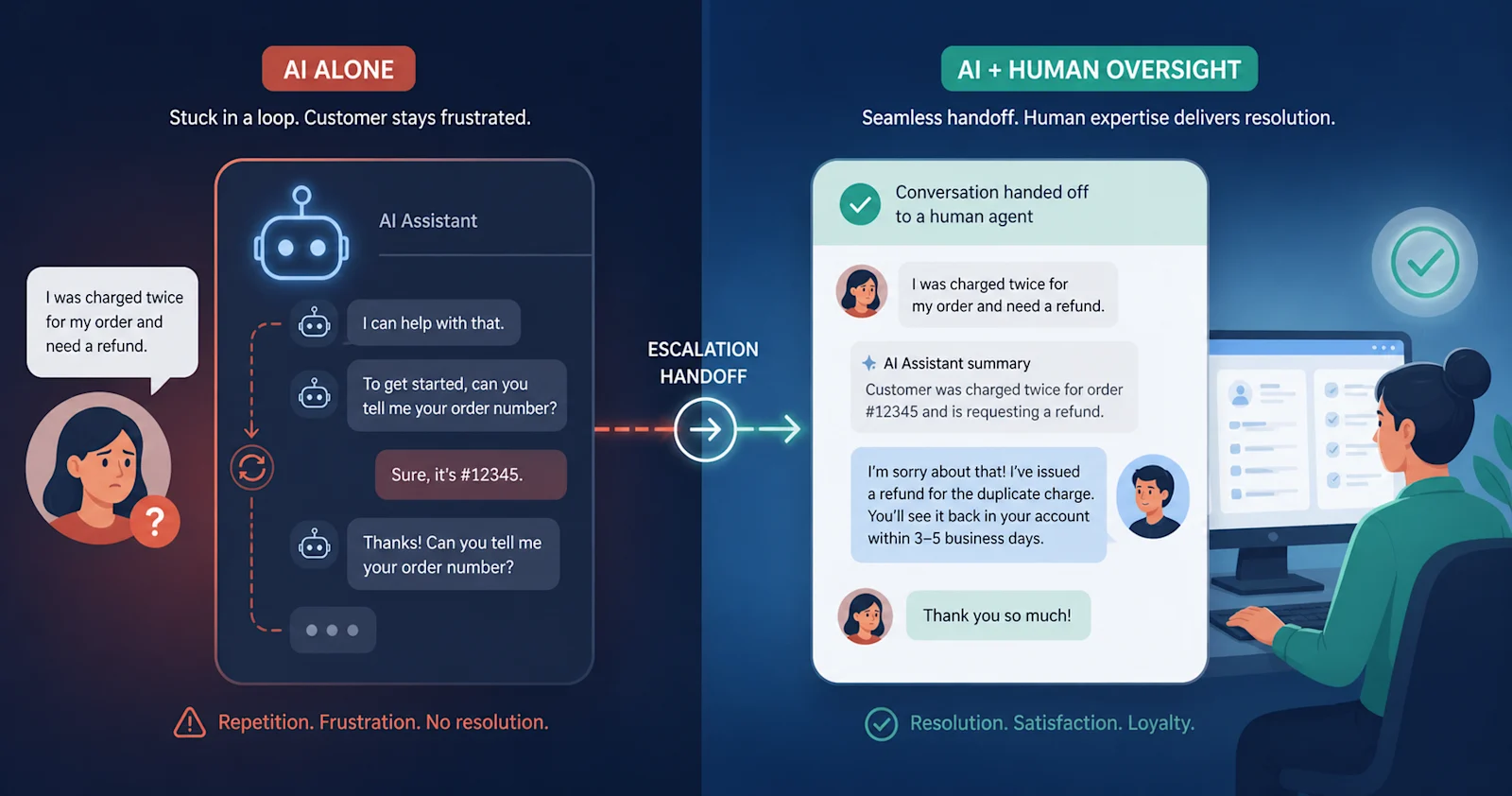
5. AI Can Trap Customers in Loops
The fastest way to make customers hate AI support is to make escape impossible.
Loops happen when the AI cannot solve the problem, cannot admit it, and cannot transfer the customer. The customer rephrases the issue. The AI repeats the same answer. The customer asks for a human. The AI says it can help. The customer leaves angrier than when they arrived.
The CFPB called this out in banking because the consequences can be severe: late fees, unresolved disputes, and customers unable to get timely help. But the same pattern shows up in SaaS, ecommerce, travel, telecom, healthcare, and insurance.
Every AI support deployment needs explicit handoff rules:
Always honor a direct request for a human.
Escalate after two failed attempts on the same issue.
Escalate when confidence drops below threshold.
Escalate on regulated, legal, medical, financial, or safety-related topics.
Escalate when sentiment deteriorates.
Escalate VIP, high-value, or at-risk accounts earlier.
Escalation is not the opposite of automation. Good escalation is part of automation. It prevents AI from turning a solvable ticket into a churn event.
6. AI Creates Privacy and Compliance Risk
Customer service is full of sensitive information: names, addresses, payment details, health data, contracts, account history, invoices, internal notes, and authentication signals.
That makes privacy and compliance a core limitation of AI in customer service. The issue is not only whether the AI can answer. It is what data it can see, where that data goes, whether it is used for training, and whether the answer creates a regulated obligation.
Support leaders should ask every AI vendor:
Does the model train on our private data?
Where is data stored and processed?
Can we redact sensitive fields before model calls?
Are responses logged with source citations?
Can we audit why the AI made a decision?
Can we configure different permissions by queue, role, region, or customer type?
What happens when a customer asks for deletion or data access?
If the vendor cannot answer these questions clearly, the AI is not ready for production support.
For regulated teams, “accurate most of the time” is not enough. You need source-grounded answers, audit trails, permission controls, and strict handoff rules for topics the AI should not handle.
7. AI Metrics Can Reward the Wrong Behavior
The most common AI support metric is deflection rate. It is also one of the easiest metrics to abuse.
A chatbot can improve deflection by making it harder to reach a human. That does not mean it improved support. It means the customer gave up.
Measure AI support against customer outcomes, not containment theater.
Better metrics include:
Resolution rate:
Did the customer actually get the issue solved?
First contact resolution (FCR):
Was the issue resolved in one interaction?
Post-AI CSAT:
How did customers rate the AI-resolved conversation?
Escalation quality:
Did the human receive the full context?
Repeat contact rate:
Did the customer come back with the same issue?
Correction rate:
How often did agents fix or override AI output?
Hallucination rate:
How often did AI provide unsupported or incorrect answers?
Time to human:
How long did escalation take when needed?
The goal is not to maximize automation. The goal is to automate the right work while protecting CSAT, trust, and resolution quality.
What AI Still Does Well in Customer Service
An honest guide to the limitations of AI in customer service should also say where AI belongs.
AI is excellent at reading large volumes of repetitive support work and making the first pass faster. It can classify tickets, detect sentiment, summarize long threads, recommend knowledge base articles, draft replies, route by intent, flag SLA risk, and resolve routine issues when the answer is grounded.
The highest-return AI support use cases are usually:
Ticket triage.
AI tags, routes, prioritizes, and escalates every ticket before a human reads it.
Agent assist.
AI drafts responses and surfaces context while the human keeps judgment.
Knowledge retrieval.
AI finds the right answer faster than a human searching the KB.
Routine resolution.
AI resolves password resets, order updates, basic billing questions, and documented troubleshooting.
Escalation monitoring.
AI watches for frustration, VIP accounts, SLA risk, and repeat contact.
Quality analysis.
AI reviews conversations for accuracy, policy adherence, and coaching signals.
In other words, AI should absorb repetitive work and make humans better at judgment work.
That is the practical middle ground. AI is not useless. It is not magic. It is a resolution layer that needs source grounding, workflow access, and guardrails.
How To Reduce the Risks of AI Customer Service
Use this checklist before launching customer-facing AI:
1. Ground Every Answer in Verified Sources
Do not let the AI answer from model memory. Connect it to approved knowledge base articles, policy docs, product documentation, SOPs, and ticket history. Require source validation before the answer reaches the customer.
2. Start With Low-Risk Intents
Launch with three to five use cases where the answer is clear and the downside is low. Prove the AI can resolve those well before adding billing disputes, refunds, cancellations, or regulated workflows.
3. Set Confidence Thresholds
The AI should know when to answer, when to ask a clarifying question, and when to escalate. A confident wrong answer is worse than a fast handoff.
4. Build Human Handoff Into the Workflow
Escalation should transfer the full conversation, customer context, attempted steps, sentiment, and recommended next action. A cold transfer destroys the value the AI created.
5. Monitor Weekly
Review thumbs-down answers, repeated contacts, escalations, low-confidence intents, and agent overrides. AI support is not “set and forget.” It is a living operating system.
6. Separate AI Metrics From Human Metrics
Track AI-resolved CSAT, AI-assisted CSAT, escalated CSAT, repeat contact rate, and hallucination rate separately. Aggregate support metrics hide problems until customers churn.
7. Keep Humans Accountable for Policy and Exceptions
AI can enforce documented policy. Humans should own exceptions, ambiguous judgment calls, and high-stakes relationship moments.
How IrisAgent Handles These Limitations
IrisAgent is built around the idea that the limitations of AI in customer service are design constraints, not reasons to avoid AI entirely.
The platform resolves 50%+ of tickets with grounded AI that validates answers against your approved sources before responding. The Hallucination Removal Engine is designed to prevent unsupported answers from reaching customers. When confidence drops, IrisAgent escalates with context instead of guessing.
IrisAgent also runs inside the systems your support team already uses: Zendesk, Salesforce, Intercom, Freshdesk, Jira Service Management, Slack, PagerDuty, and more. That matters because customer service AI needs workflow context, not a disconnected chat window.
For human teams, IrisAgent provides agent assist, conversation summaries, suggested replies, sentiment flags, escalation triggers, and ticket automation. So AI handles repetitive resolution work, and human agents keep the cases that need judgment.
The practical promise is not “replace your support team.” It is: automate the routine 50%+, protect customers from hallucinated answers, and give humans the context they need when the AI should step back.
Final Takeaway
The limitations of AI in customer service are real, but they are manageable when the system is grounded, scoped, monitored, and paired with human judgment.
Bad AI tries to answer everything. Good AI knows what it can resolve, what it must verify, and when to hand the customer to a human.
That is the standard support leaders should use in 2026. Do not buy AI that promises to replace your team. Buy AI that resolves routine work safely, proves its answers, escalates gracefully, and makes your human agents sharper on the cases that still need them.
To see how IrisAgent resolves tickets with grounded, hallucination-free AI, book a demo.
Sources
Qualtrics: AI-Powered Customer Service Fails at Four Times the Rate of Other Tasks
Consumer Financial Protection Bureau: Chatbots in Consumer Finance
Gartner: Over 40% of Agentic AI Projects Will Be Canceled by End of 2027
Frequently Asked Questions
What Are the Biggest Limitations of AI in Customer Service?
The biggest limitations of AI in customer service are hallucinations, lack of customer context, poor escalation, weak empathy, privacy risk, and over-automation. These risks grow when AI answers from generic training data instead of approved company sources or when teams use AI to block human access.
What Can AI Not Do in Customer Service?
AI should not own high-stakes judgment calls, legal or medical advice, complex refunds, regulated complaints, emotionally sensitive conversations, or enterprise contract exceptions without human oversight. It can assist those workflows by summarizing context and recommending next steps, but a human should remain accountable.
Why Do Customers Dislike AI Chatbots?
Customers dislike AI chatbots when they repeat generic answers, trap people in loops, block access to a human, or provide inaccurate information. The problem is rarely that customers hate automation. The problem is that bad automation makes customers work harder to get help.
Can AI Replace Customer Service Agents?
AI should not fully replace customer service agents. It should resolve repetitive tickets, triage incoming work, assist agents, and escalate complex issues to humans with full context. The strongest support teams use AI as a front-line resolution layer and humans for judgment, empathy, and exceptions.
How Can Companies Avoid AI Hallucinations in Customer Service?
Companies can avoid AI hallucinations by grounding answers in verified knowledge base content, using retrieval-augmented generation (RAG), requiring source validation, setting confidence thresholds, and escalating low-confidence issues to humans. A safe AI system refuses to answer when it cannot verify the response.
What Is the Best Way To Deploy AI in Customer Service?
The best way to deploy AI in customer service is to start with high-volume, low-risk intents, prove answer accuracy, monitor weekly, and expand gradually. Teams should measure resolution quality, CSAT, repeat contact rate, and hallucination rate, not only deflection.
Loading the form. Prefer email? Reach us at info@irisagent.comor call +1 617 249 3312.