
Customer Support Metrics
The Complete Guide to KPIs, Benchmarks & AI Impact
The metrics that decide whether your support team is healthy, the formulas behind them, the benchmarks you should hit by industry, and how AI is moving the goalposts in 2026.
By the IrisAgent team · Last updated April 30, 2026
For quotable 2026 figures with sources, see Customer support statistics 2026. This page stays the KPI definitions and how-to guide.





What You'll Learn
What Are Customer Support Metrics?
Customer support metrics are the quantitative measures that tell a support organization whether it is healthy. They translate the work of a support team (tickets received, replies sent, problems solved) into numbers a CX leader, a CFO, and a CEO can all read on the same page.
Most teams track at least 8 to 12 metrics. The exact list varies, but the categories are stable: efficiency (how fast), quality (how well), volume (how much), and outcome (how complete). Reading any single category in isolation produces blind spots. Fast resolution at the cost of accuracy looks like a win on the AHT dashboard and a disaster on the CSAT one.
The point of measuring is not the dashboard. The point is the decisions the dashboard enables: where to staff, what to automate, which knowledge gaps to fill, which customers to escalate, and when to flag a systemic issue before it shows up in churn data. Metrics that do not change a decision do not belong on the dashboard.
The Four Categories: Efficiency, Quality, Volume, Outcome
Every meaningful support metric falls into one of four categories. A balanced scorecard pulls from all four, and anything less leaves a blind spot a competitor or a churn report will eventually find.
Efficiency
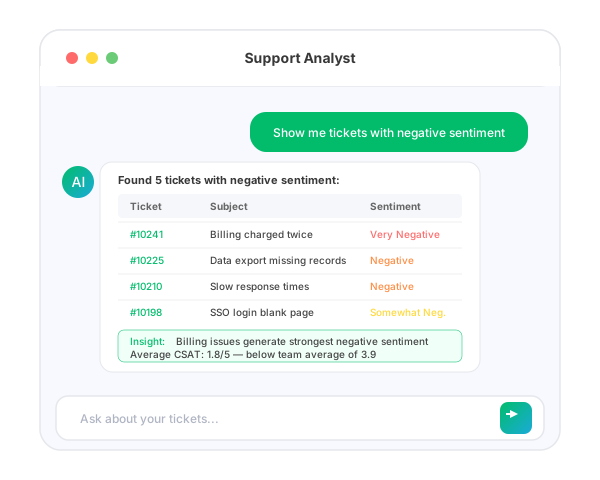
Average Handle Time (AHT), First Response Time (FRT), Mean Time to Resolution (MTTR), and queue depth. Track how quickly tickets move through the system.
Optimizing in isolation gets you fast wrong answers. Pair with quality.
Quality
CSAT, CES, NPS, sentiment scores, and QA scores from auto-evaluation. Track whether customers were satisfied with the interaction itself.
Lagging indicators. By the time CSAT drops, the cause is already in last week's tickets.
Volume
Ticket count by channel and intent, deflection rate, backlog, escalation rate, and agent utilization. Track the load on the system.
Volume metrics drive staffing and capacity decisions. Watch trend more than absolute number.
Outcome
First Contact Resolution (FCR), resolution rate, cost per ticket, repeat-contact rate, and self-service success rate. Track whether the customer's actual problem got solved.
The closest proxy for retention impact. The metrics finance and CS care about.
A scorecard with metrics from only one or two of these categories is a vanity scorecard. Real review meetings move between categories: efficiency for operations, quality for coaching, volume for staffing, outcome for the board.
CSAT: Customer Satisfaction Score
CSAT measures satisfaction with a specific interaction, typically captured in a post-ticket survey asking "How satisfied were you with this support experience?" on a 1 to 5 or 1 to 7 scale. It is the most universally tracked customer experience key performance indicator and the one most teams report up to leadership.
Formula: (Number of satisfied responses ÷ Total responses) × 100
"Satisfied" is typically defined as a 4 or 5 on a 5-point scale (top-two-box).
Industry benchmarks:
- SaaS / B2B software: 78% to 82%
- Ecommerce / retail: 80% to 85%
- Financial services: 75% to 80%
- Telecom: 65% to 72%
- Healthcare: 72% to 78%
What CSAT misses: response bias is brutal. Most surveys see 10% to 25% response rates, and the responders skew either delighted or angry. The middle never replies. Treat CSAT trends, not absolute numbers, and segment by channel, intent, and customer tier so a tail of unhappy enterprise accounts is not buried under a sea of happy self-serve users.
CES: Customer Effort Score
CES measures how hard the customer had to work to get their problem solved. Originally introduced in the Harvard Business Review's "Stop Trying to Delight Your Customers" research, it predicts loyalty better than CSAT in B2B contexts. Customers do not remember being delighted. They remember being made to work.
Formula: Average score from "How easy was it to get your issue resolved?" on a 1 to 7 scale.
"Low effort" = scores of 5 to 7. CES of 5+ is the threshold for healthy.
CES is closely tied to First Contact Resolution (FCR), because high effort almost always comes from being bounced between channels, agents, or tiers. Reducing handoffs and authentication friction is the highest-leverage CES improvement most teams have access to. Teams that lift CES from 4.8 to 5.5 typically see a 3 to 5 point CSAT lift and a measurable retention bump in the next renewal cycle.
NPS: Net Promoter Score
NPS measures overall loyalty by asking "How likely are you to recommend us to a friend or colleague?" on a 0 to 10 scale. Unlike CSAT and CES, NPS is strategic. It reflects cumulative experience over time, not a single ticket. NPS is just one of several customer support metrics worth tracking, but it is the one most aligned with retention and word-of-mouth growth.
Formula: % Promoters (9 to 10) − % Detractors (0 to 6)
Passives (7 to 8) are excluded from the calculation. Score range: −100 to +100.
Industry benchmarks:
- B2B SaaS: +30 to +50 (best-in-class +60+)
- Ecommerce: +35 to +55
- Financial services: +25 to +45
- Telecom: +5 to +20
What NPS gets wrong: it lags by 60 to 90 days, so you cannot use it as a leading indicator for operational decisions. Use NPS for strategy and CSAT/CES for tactics. Pair NPS with verbatim-response analysis. The score is shorthand; the comments are the data.
FCR: First Contact Resolution
First Contact Resolution (FCR) is the share of tickets resolved on the first interaction without escalation, transfer, or follow-up contact. It is the closest single-number proxy for whether the customer actually got their problem solved, and it correlates more tightly with CSAT and retention than any other operational metric.
Formula: (Tickets resolved on first contact ÷ Total tickets) × 100
"First contact" definition varies. Most teams use "no second contact within 7 days for the same issue."
Benchmarks: Industry-wide average is 70% to 75%. Best-in-class B2B SaaS hits 80% to 85%. Below 65% signals systemic issues: usually weak knowledge base coverage, poor routing, or too many handoffs between tiers. AI-assisted FCR on deflectable ticket types is now reaching 90%+ because AI agents have full KB context on every reply.
FCR is also the metric most easily gamed. Agents close tickets prematurely, customers re-open under new ticket IDs, and the dashboard reads green while the customer is on their fourth contact. Pair FCR with repeat-contact rate (same customer, same issue, within 7 days) to catch the gaming.
AHT: Average Handle Time
Average Handle Time is the average end-to-end time an agent spends on a single customer interaction, from pickup, through any holds or transfers, to wrap-up. AHT is the workhorse efficiency metric, used heavily for capacity planning and staffing. It is also the most over-used metric in customer support. A balanced scorecard approach pairs it with CSAT and FCR before drawing any conclusions.
Formula: (Total talk time + Total hold time + Total wrap-up time) ÷ Total interactions
Benchmarks by channel:
- Voice: 6 to 8 minutes typical, 4 to 5 minutes best-in-class
- Live chat: 8 to 12 minutes (often handles concurrent sessions)
- Email / async: 4 to 8 minutes per touch
- AI-handled: under 30 seconds
The AHT trap: optimizing AHT in isolation produces fast, wrong, or unfinished answers. Agents pad wrap-up codes, push borderline issues to "follow-up" tickets (artificially boosting FCR while distorting AHT), and rush customers off the line. Always read AHT next to FCR and CSAT. A 20% drop in AHT with no FCR or CSAT change is a real win; a 20% drop with FCR falling is a problem.
FRT: First Response Time
First Response Time is the elapsed time between a customer submitting a ticket and the first substantive reply from a human or AI agent, not an automated acknowledgement. FRT is the customer experience KPI most directly tied to perceived attentiveness; long FRT is the single biggest driver of follow-up "where's my answer?" tickets.
Formula: Average of (timestamp of first substantive reply − timestamp of ticket submission)
Benchmarks by channel:
- Live chat: under 60 seconds
- Voice: under 30 seconds (queue time)
- Email / web form: 1 to 4 hours best-in-class, 4 to 24 hours typical
- Social: under 1 hour expected, customers expect 15 minutes
- AI-handled: under 5 seconds
FRT is one of the metrics most cleanly improved by AI deflection and AI agent assist: the AI handles the easy questions instantly, and human agents start tickets at higher quality with summarization and suggested replies pre-populated. Watch FRT segmented by AI-handled vs. human-handled, because the blended number can hide a deteriorating human-handled FRT under improving AI-handled volume.
MTTR: Mean Time to Resolution
Mean Time to Resolution is the average elapsed time between ticket submission and ticket closure. Unlike AHT, MTTR captures the full customer-perceived wait including queue time, agent time, escalation, engineering involvement, and customer-side back-and-forth. Customer support metrics like MTTR matter because they reflect what the customer actually experiences, not just what the agent spent.
Formula: Sum of (resolution timestamp − submission timestamp) ÷ Number of resolved tickets
Benchmarks:
- Tier 1 / FAQ: under 1 hour (under 5 minutes for AI-handled)
- Tier 2 / configuration: 4 to 24 hours
- Tier 3 / engineering escalations: 2 to 10 days
- Bug fixes: variable, often 2 to 8 weeks
MTTR is highly sensitive to ticket mix. A team that absorbs more complex tickets (e.g., enterprise migrations) will show higher MTTR even if it is performing better. Always segment by ticket tier, intent, and customer segment. A single blended MTTR is rarely actionable.
Resolution Rate
Resolution rate is the percentage of tickets that reach a "resolved" state within a reporting window. It complements FCR by including tickets that took multiple interactions but eventually closed successfully. Resolution rate is one of several complementary metrics that together describe the throughput of a support organization.
Formula: (Tickets closed as "resolved" ÷ Total tickets in period) × 100
Benchmarks:
- Healthy: 90%+ within 30 days
- Best-in-class: 95%+ within 14 days
- AI-augmented: 98%+ within 7 days on deflectable tickets
Resolution rate gets gamed two ways: stale tickets are closed as "won't fix"/"customer abandoned" to clear the queue, and complex tickets get split into multiple smaller "resolved" tickets. Pair resolution rate with reopen rate (% of resolved tickets re-opened within 14 days) to catch both.
Cost Per Ticket
Cost per ticket is the fully-loaded operational cost of resolving a single customer ticket. It is the customer support metric finance and CFOs care about most, and the one that translates support performance directly into the P&L.
Formula: (Total support cost in period) ÷ (Total tickets resolved in period)
Total cost includes agent salaries and benefits, tooling and licenses, training, management overhead, and infrastructure.
Benchmarks:
- Self-service / deflected: $0.10 to $2 per ticket
- AI-handled: $0.50 to $3 per ticket
- Tier 1 human: $5 to $15 per ticket
- Tier 2 human: $15 to $40 per ticket
- Tier 3 / engineering escalation: $50 to $200 per ticket
Why segmentation matters: a blended cost-per-ticket of $12 can mask very different economics. AI deflection drops the blended number by reducing the share of expensive tickets, but the unit cost of the remaining human-handled tickets often goes up because what's left is harder. Always read cost per ticket alongside ticket-mix data. The metric is meaningful only when you can see what kind of ticket got cheaper. This is one of several financial metrics and other KPIs that translate support work into board-level decisions.
Building a Balanced Support Scorecard
The single most important rule of support measurement: never optimize one metric in isolation. The recommended scorecard pulls 2 to 3 metrics from each category and ties them to specific decision rights.
The decision right matters as much as the metric. A metric without a clear owner never gets acted on, and a metric without a clear cadence gets stale. Pin both to every line of the scorecard.
How AI Shifts the Benchmarks
AI does not invalidate customer support metrics. It shifts the benchmarks and forces segmentation. Reading AI-augmented support performance against pre-AI benchmarks produces misleading conclusions. Five concrete shifts in how the metrics behave:
- FRT collapses on AI-handled tickets. AI agents reply in seconds, dragging the blended FRT down. Always segment by AI-handled vs. human-handled to see the underlying human FRT trend.
- AHT goes up on human-handled tickets. AI handles the easy stuff. The tickets that reach human agents are harder, longer-cycle, and require more judgment. A rising human-handled AHT next to a flat CSAT is a healthy sign.
- Cost per ticket drops, but unevenly. AI deflection drops the blended cost per ticket 30% to 60%, but the cost per human-handled ticket often rises. Report both.
- FCR splits. AI-handled FCR can hit 90%+ on deflectable intents because the bot has full KB context. Human-handled FCR may stay flat or dip slightly because what's left is harder.
- CSAT dispersion increases. AI-handled tickets get high CSAT or very low CSAT, and the middle disappears. A bimodal CSAT distribution is normal in AI-augmented support, not a problem.
The dashboard should always include an "AI-handled" toggle. A single blended number in 2026 is the equivalent of measuring email and phone with the same AHT formula in 2010. It averages over a structural difference that drives the underlying data.
How IrisAgent Improves These Metrics
IrisAgent is grounded AI for customer support, with a measurement layer designed to keep all four metric categories honest. The goal is not just to ship AI. It is to ship AI whose impact is visible and segmentable in your scorecard from day one.
First Response Time → seconds
AI replies inside Zendesk, Salesforce, Intercom, Freshdesk, and Jira in under 5 seconds. AI-handled FRT drops to seconds; human FRT improves through ticket triage and prioritization.
Average Handle Time on AI-handled tickets
Under 30 seconds for AI-resolved tickets. For human-handled tickets, agent-assist with summarization, suggested replies, and KB context cuts AHT 20% to 30% on average.
First Contact Resolution above 90% on deflectable intents
Grounded AI agents resolve with full KB context on every reply. The Hallucination Removal Engine validates each response against the cited source, with accuracy above 95%.
AutoQA flags every interaction at risk
Every conversation is auto-scored, and CSAT-risk tickets get flagged for human review before the survey lands. Rising CSAT through proactive intervention, not just reactive fixes.
Cost per ticket cut 30% to 60% on the deflectable tier
Documented across Dropbox, Zuora, and Teachmint deployments. The savings are measurable per intent class, not buried in a single blended number.
The reporting layer segments AI-handled vs. human-handled out of the box, so the scorecard never blurs the two. That is what keeps the metrics readable as the ticket mix shifts over the rollout.
Real Metric Lifts From Production Deployments
See how leading teams move CSAT, FCR, and cost-per-ticket with grounded AI.
Explore Every Customer Support Metric
Deep dives on each KPI: formulas, benchmarks, and what to do when the number moves the wrong way.
See latest stats: Customer support statistics 2026.
Move These Metrics Inside Your Existing Helpdesk
IrisAgent reports against your existing scorecard, installed natively in every major helpdesk, no rip-and-replace.
operations
Any questions?
We got you.






AI for Customer Support
The complete pillar guide to AI-driven customer service.
Read the customer support AI guide →AI Chatbot Pillar
Deflection, containment, and CSAT impact of chatbots in production.
Explore Chatbots →