
LLM for Customer Support
How RAG, Fine-Tuning & Grounding Work
The four-layer architecture that turns a raw large language model into a production-safe support agent, plus the model choices, hallucination defenses, and deployment patterns that decide whether it works.
By the IrisAgent team · Last updated April 25, 2026




What You'll Learn
What Is an LLM in Customer Support?
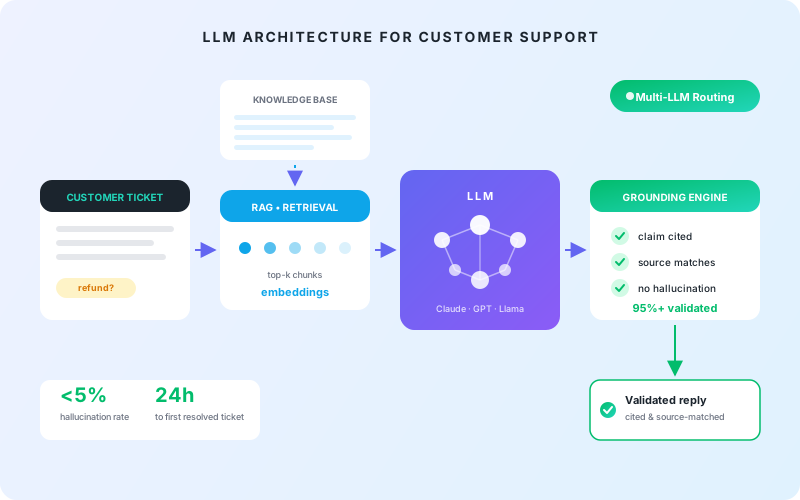
An LLM for customer support is a large language model (Claude, GPT-4.1, Gemini, or Llama) adapted to read your knowledge base and resolve customer tickets inside your help desk. The hard part is not the model. It is the four-layer architecture around the model that decides whether the answer is correct: prompting, retrieval- augmented generation (RAG), fine-tuning, and grounding.
Get those layers wrong and the LLM hallucinates account details, invents refund policies, and tanks your CSAT. Get them right and the same model resolves 50%+ of tickets with validated accuracy above 95%, the bar IrisAgent maintains in production at Dropbox, Zuora, and Teachmint.
A large language model is a neural network trained on trillions of tokens of public text. Out of the box, it knows nothing about your knowledge base, your customer accounts, or your refund policy, and if you ask it about them, it will make up an answer. That is the entire problem this category exists to solve. In production, the LLM is one component inside a larger system: retrieval pulls the right context, grounding validates the response against that context, and the help desk integration ships the resolved ticket back to the customer.
The Four Architectures: Prompting, RAG, Fine-Tuning, Grounding
Most "AI for support" pitches collapse four very different design choices into one word. Each has different cost, latency, accuracy, and switching-cost implications.
Prompting
Write a prompt template, pass it to the LLM, take the response. Every answer comes from the model's training data alone: no live access to your KB, no validation.
Hallucinates 15% to 30% of the time on enterprise queries. Not safe alone.
RAG
Retrieve relevant chunks of your KB, ticket history, and SOPs at query time. Insert them into the prompt as context. The LLM summarizes from documents you control instead of guessing from training data.
Reduces hallucinations dramatically. Retrieval quality becomes the new failure surface.
Fine-Tuning
Continue-train a base LLM on your tickets, KB, and resolution patterns. The model natively knows your product, terminology, and tone, without retrieval on every query.
Worth it for high-volume intents and brand voice. Wrong call when KB changes weekly.
Grounding
Every response is validated against the source it cited before being sent. Claims not supported by the cited source get blocked or escalated. This is what makes the system production-safe.
Cuts hallucination rate from 15% to 30% down to under 5%. Required for regulated industries.
Production support LLMs use all four layers. Vendor pitches that mention only one are usually trying to obscure what is missing.
RAG: The Default Architecture for Support LLMs
Retrieval-augmented generation is the default for production support LLMs. The system maintains a vector index of your KB articles, SOPs, and ticket history. When a customer ticket comes in, the system retrieves the top-k most relevant chunks of source content and inserts them into the prompt as "context" before the LLM generates a response. The model is no longer guessing from training data. It is summarizing from documents you control.
Why RAG wins as the default:
- The LLM stays current. New KB articles are indexed in minutes, not retrained over weeks.
- Sources are auditable. Trace any response back to the document chunks it came from.
- Cost is bounded. Retrieval is cheap; inference is predictable.
- Switching models is easy. The retrieval layer is model-agnostic. Swap Claude for GPT without touching the index.
What RAG does not solve on its own: retrieval quality is now the failure surface. If the chunker is poor or the embeddings miss the intent, the LLM gets bad context and produces a wrong answer with full confidence. RAG reduces hallucinations; it does not remove them. Production deployments add a grounding layer on top.
Fine-Tuning: When It's Worth It (and When It Isn't)
Fine-tuning takes a base LLM (Llama 3.1 70B, GPT-4o, Mistral) and continues training it on your support tickets, KB, tone, and common resolution patterns. The result is a model that natively knows your domain (your product names, your acronyms, your customers' typical problems) without needing them retrieved on every query.
When fine-tuning earns its cost:
- High-volume intents. The same intent showing up thousands of times per week. The model learns the pattern; responses get faster and more on-brand.
- Domain-specific vocabulary. Medical terminology, legal phrasing, complex SaaS feature names that a general model garbles.
- Tone and style consistency at scale. Bake voice into the model rather than relying on prompt instructions across thousands of replies.
- Latency targets. A fine-tuned smaller model often beats a much larger general model on response time at acceptable quality.
When fine-tuning is the wrong call:
- Your KB changes weekly. Fine-tuning bakes in knowledge at training time. New policies require a new training run.
- You have less than ~10,000 high-quality labeled examples. Below that, fine-tuning underperforms RAG and just costs more.
- You only need accuracy on the long tail of rare intents. RAG handles the long tail; fine-tuning handles the head.
Honest framing: most teams should ship RAG first, prove it works, then layer fine- tuning on the top 5 to 10 highest-volume intents.
Grounding: The Validation Layer Most Vendors Skip
Grounding is what takes a RAG system from "usually right" to "production-safe." It means: every response the LLM generates is validated against the source documents it cited before the response is sent to the customer. If the response makes a claim that does not appear in the cited source, the system blocks the response and either escalates to a human or returns a "we will get back to you" placeholder.
This is what IrisAgent's Hallucination Removal Engine does. It is also what cuts hallucination rate from the ~15% to 30% baseline of ungrounded LLMs to under 5%, and what keeps validated accuracy above 95% in production at Dropbox, Zuora, and Teachmint.
Grounding is also the layer that lets you deploy an LLM in regulated industries. Hallucinations about a customer's account or billing can violate GDPR Article 5(1)(d) on data accuracy. Compliance-conscious teams treat grounding as a regulatory requirement, not just a quality concern.
Best LLMs for Customer Support in 2026
There is no single best LLM. The honest answer depends on whether you are optimizing for accuracy on hard intents, latency on simple intents, or cost at scale. IrisAgent's multi-LLM engine routes each query to the right model.
The decision framework most support teams should use: default to a managed proprietary model (Claude, GPT) for the first 90 days. Layer in a smaller / cheaper model for high-volume classification and routing. You do not need Opus to label "this is a billing question." Evaluate open source only when you have a real reason: data sovereignty, regulatory constraint, or volumes large enough that managed inference becomes the largest line item in your AI budget.
The Hallucination Problem (and Why It's the Whole Game)
A hallucination is when an LLM generates a confident, fluent, factually wrong response. In customer support, hallucinations look like inventing a refund policy that does not exist, citing a feature the product does not have, making up account details, or stating that an outage is resolved when it is still active.
Ungrounded LLMs hallucinate 15% to 30% of the time on enterprise support queries. With grounding and validation, IrisAgent keeps the rate under 5% and cited-source accuracy above 95%. The gap is not a model capability gap. It is an architecture gap.
Three patterns drive hallucinations in support contexts:
- The model improvises when retrieval misses. RAG returns no relevant chunks (or the wrong chunks), so the LLM falls back to training data. Fix: route low-confidence retrieval to a human, do not let the model guess.
- The model contradicts the retrieved context. The cited chunk says "refund within 30 days" but the model writes "60 days" because that pattern is more common in its training data. Fix: validate every claim in the response against the cited source before sending: the grounding layer.
- The model cites a source that does not say what it claims. The cited URL exists, but does not actually contain the claim. Fix: validate against source content, not just source URL.
NLP, NLU, and the Supporting Tech Under the LLM
LLMs sit on top of decades of natural language processing research. In a support system, the LLM does the language generation, but several adjacent NLP components do the work that makes the LLM useful:
In production, an LLM that resolves a ticket has typically been preceded by three or four classical NLP models doing the upstream work. "It's all an LLM" is marketing copy. The real architecture is layered.
Build vs. Buy: The LLM-for-Support Decision
Every support team eventually weighs whether to build their own LLM stack on top of an API (OpenAI, Anthropic, Bedrock) or buy a purpose-built platform.
Buying makes sense for almost every team. Building only makes sense when you have a unique workflow no platform supports and a senior ML platform team with capacity to own retrieval quality, evaluation infrastructure, and incident response.
How IrisAgent Uses LLMs in Production
IrisAgent is grounded AI for customer support, built on the four-layer architecture above and shipped with the validation layer most teams underestimate.
Multi-LLM Routing
The multi-LLM engine routes each query to the right model: small fast models for classification and tagging, larger models for resolution, fine-tuned models for high-volume intents.
RAG Over Your KB and Ticket History
Retrieval tuned per customer, with reranking, against your own content. No shared corpus across customers.
Optional Fine-Tuning
On your top intents, once the platform has seen enough volume to learn the pattern. You only pay the fine-tuning cost where it pays back.
Hallucination Removal Engine
Every response validated against the cited source before it goes to the customer. The validation layer is what keeps accuracy above 95% in production at Dropbox, Zuora, and Teachmint.
Native Help Desk Deployment
Inside Zendesk, Salesforce, Intercom, Freshdesk, and Jira Service Management. Live in 24 hours, not 24 weeks.
The model choice is hidden from the buyer; the outcome is the metric: tickets resolved, CSAT held, agents freed for high-judgment work.
5-Question Evaluation Checklist for Any LLM Support Platform
If you are evaluating any LLM-based customer support platform, these five questions cut through 80% of vendor noise.
If your shortlist passes those five, the model itself becomes a secondary question.
LLM-Powered Customer Support, Live in Production
See how leading teams use IrisAgent's grounded LLM stack at scale.
Explore LLM & AI Technology Topics
Deep dives into the LLM, NLP, and AI technology that powers grounded customer support.
Deploy a Grounded LLM Inside Your Existing Helpdesk
IrisAgent installs natively in every major helpdesk, with no rip-and-replace required.
operations
Any questions?
We got you.





AI for Customer Support
The complete pillar guide to AI-driven customer service.
Read the customer support AI guide →Reduce Hallucinations
The 7-technique playbook for cutting LLM hallucinations under 5%.
Read the Playbook →