

Automation Platforms with AI Driven SLA Prediction: Predict Breaches
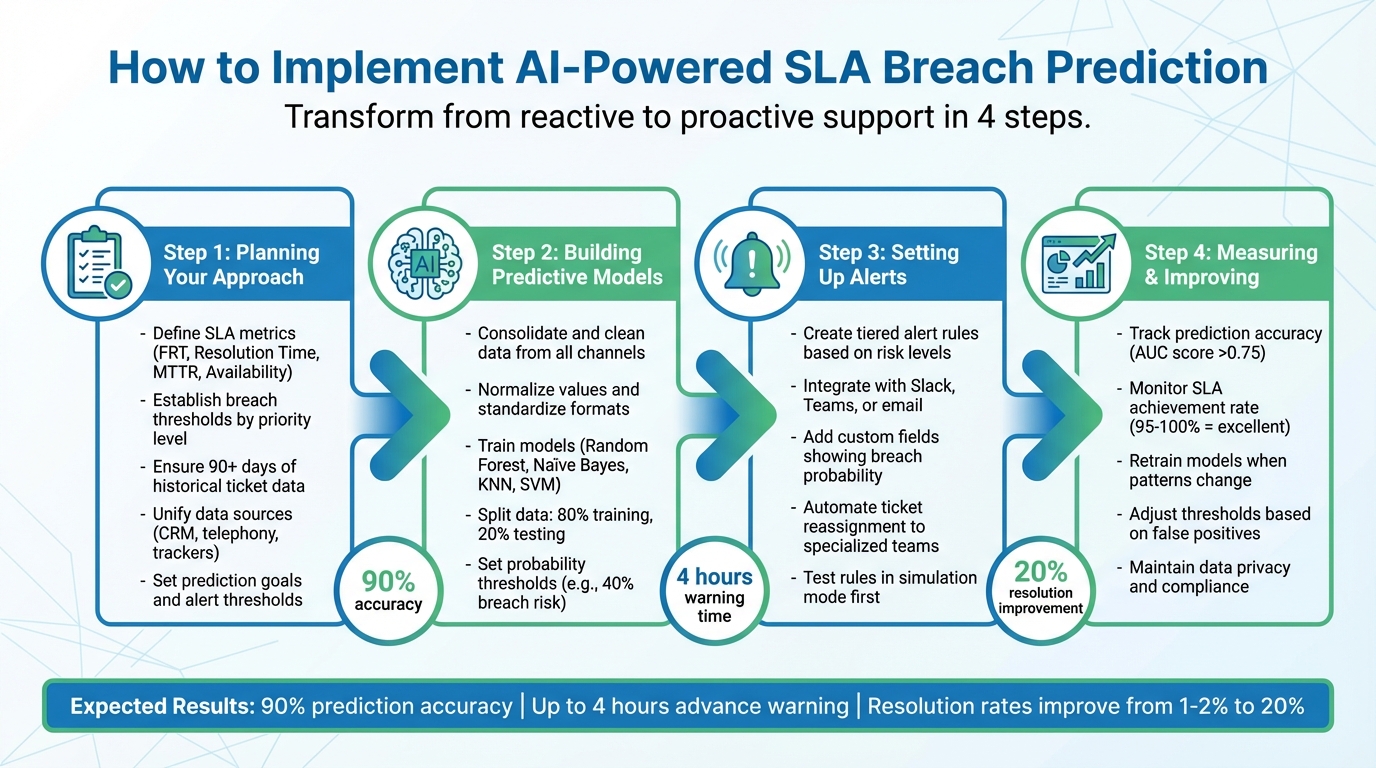
SLA breaches can cost your business money, reputation, and customer trust. The complexity of modern IT environments makes meeting SLA requirements effectively a significant challenge for business operations. AI tools now offer a way to predict and prevent these breaches before they happen. By analyzing historical data, ticket complexity, and customer sentiment, these systems can forecast breaches with 90% accuracy and give teams up to 4 hours to act. Instead of reacting to missed deadlines, AI helps teams resolve high-risk tickets early, improving efficiency and maintaining SLA commitments.
Traditional SLA enforcement often leads to inefficiencies and inconsistencies due to limited visibility and high dependency on human intervention. Manual SLA enforcement can result in delays in issue resolution and increased operational costs. Workload automation and workload automation tools play a crucial role in automating routine tasks, such as scheduling workflows and managing batch jobs, which improves workload automation and overall business operations. Employees report saving 1.75 to 5 hours per week by automating routine monitoring and data entry tasks.
AI-powered systems and unattended AI solutions enhance SLA compliance by automating enforcement, monitoring service performance in real-time, and proactively mitigating SLA risks. AI-driven SLA management tools provide continuous performance optimization by monitoring key performance indicators (KPIs) and service performance, helping organizations avoid SLA breaches and proactively mitigate SLA risks, thus reducing the need for month-to-month troubleshooting of SLA failures. Tools like AI Predictive Pulse predict and prevent SLA breaches and improve workload automation. Adopting AI systems provides companies with a competitive edge through enhanced efficiency and risk mitigation capabilities. Automation platforms are evolving into intelligent orchestration hubs that employ AI for proactive service delivery by 2025. To maximize value, AI automation platforms should have real-time data integration, predictive analytics, low-code/no-code interfaces, robust monitoring, and seamless integration.
Key Takeaways:
What are SLA breaches? Missing agreed response or resolution times, leading to penalties and customer dissatisfaction.
How AI helps: Predicts breach risks, assigns risk scores, and automates ticket reassignment.
Requirements for success: Clear SLA metrics, clean historical data, unified ticketing systems, and automated workflows.
Tools like IrisAgent: Automate risk detection, triage tickets, and integrate with existing CRMs for seamless SLA management.
Introduction to SLA Management
Service Level Agreement (SLA) management is the backbone of reliable IT and customer support operations. At its core, SLA management involves defining, monitoring, and enforcing service level agreements—formal commitments between service providers and customers that outline expected performance standards, such as uptime, response times, and support quality. When these standards aren’t met, SLA breaches can occur, resulting in financial penalties, reputational harm, and a loss of customer trust.
To avoid these costly outcomes, organizations are turning to proactive SLA management strategies. Rather than waiting for issues to arise, modern teams leverage AI-powered SLA tools to predict and prevent breaches before they happen. By analyzing historical data and monitoring real-time performance, these solutions can detect anomalies, flag potential risks, and provide actionable alerts. This shift from reactive to proactive SLA management not only enhances operational efficiency but also strengthens customer relationships by ensuring consistent, reliable service delivery. With AI-powered SLA management, businesses can uphold their service level agreements with greater confidence and effectiveness.
Understanding Predictive Analytics
Predictive analytics is revolutionizing SLA management by enabling organizations to anticipate and prevent SLA breaches before they impact customers. At its core, predictive analytics uses machine learning algorithms to analyze historical data—such as past ticket volumes, resolution times, and incident trends—to forecast where and when breaches are most likely to occur. This approach empowers IT and support teams to move from reactive firefighting to proactive problem-solving.
By continuously analyzing historical data, predictive analytics uncovers patterns and early warning signs that might otherwise go unnoticed. For example, it can identify recurring issues during peak periods or flag tickets with characteristics that historically lead to missed deadlines. Armed with these valuable insights, teams can allocate resources more effectively, prioritize high-risk cases, and take preventive action to ensure consistent service quality.
AI-powered predictive analytics not only helps prevent SLA breaches but also drives higher customer satisfaction. By anticipating potential issues and addressing them before they escalate, organizations can deliver a smoother, more reliable customer experience. Ultimately, predictive analytics is a cornerstone of modern, AI-powered SLA management—enabling smarter decisions, improved operational efficiency, and a stronger reputation for service excellence.
Planning Your Predictive SLA Approach
To predict SLA breaches effectively, you need a strong foundation. This means defining what you’re measuring, preparing your data for AI analysis, and setting clear goals for your predictive system. Without this groundwork, AI tools won’t perform as expected. Think of this stage as the bridge between strategy and execution, paving the way for accurate predictive modeling.
However, many organizations often accept the status quo in SLA management due to the complexity, risk, and cost of changing workload automation solutions. Changing workload automation solutions can introduce significant challenges, including high costs, operational risks, and the potential for conflicting workload management solutions—especially after mergers, acquisitions, or staff turnover. These transitions can also create knowledge gaps, making it harder to maintain SLA compliance and integrate systems effectively.
Define Your SLA Metrics and Breach Rules
Start by identifying the key SLA metrics to track. These are known as key performance indicators (KPIs), which are essential for defining and measuring service standards within SLAs. Common KPIs include system uptime, response time, and resolution time, as well as Availability (many cloud providers aim for “five 9s” or 99.999% uptime) and Mean Time to Recovery (MTTR). AI-driven SLA management tools provide continuous performance optimization by monitoring these KPIs, ensuring accountability and high service quality.
Once you’ve nailed down the metrics, establish thresholds for different priority levels. For instance, critical tickets might need resolution within four hours, while lower-priority requests could allow up to 24 hours. Standardize what constitutes a “closed” case to ensure consistency across teams. Set up escalation triggers to automatically route tickets to specialized teams when a breach is imminent. Don’t forget to define procedures for handling exceptions, like delays caused by third parties or dependencies on the customer side.
Check Your Data and System Readiness
AI models thrive on data, so ensure you have at least 90 days of historical ticket data for training. Analyze your data distribution - using tools like histograms - to confirm that service health scores are balanced and free of bias. Also, check for cyclical patterns in the data, as these are crucial for applying linear regression models effectively.
Next, unify your data sources. Many organizations deal with fragmented SLA information spread across CRMs, telephony systems, and manual trackers. This fragmentation can create inconsistencies that undermine AI accuracy. For comprehensive observability and SLA management, it is essential to integrate data from multiple workload management platforms, including mainframes and open systems, to ensure unified visibility and predictive capabilities. To streamline, create a boolean breach flag (e.g., a field like SLAMissed set to True or False) that updates automatically when deadlines are missed. This consolidated data setup ensures your AI system can deliver actionable insights and help prevent breaches.
Once your data is ready, define clear prediction goals to move from insights to proactive action.
Set Prediction Goals and Alert Thresholds
Decide what you want your predictive system to achieve. Instead of just tracking whether tickets are resolved on time, aim for proactive objectives like predicting breach probabilities, estimating time left until a breach, identifying high-risk queues, assigning dynamic risk scores to active cases, and predicting batch job delays. Predicting batch job delays is a specific use case where AI-driven predictive analytics can help prevent SLA breaches and optimize workload management. These insights can help prioritize interventions.
Create tiered alert thresholds based on factors like customer importance, incident severity, or specific service levels. For example, VIP customers might trigger alerts at lower risk levels compared to standard accounts. You can also incorporate contextual triggers based on customer sentiment, activating alerts when a message suggests frustration or urgency.As Sean O’Connor from monday.com puts it:
Service management is shifting from tracking SLAs to continuously improving them. With AI automation, service desks move from reactive responses to predictive, problem-solving operations.
Lastly, use workflow tools to set up automated escalation rules. These rules can reassign stagnant or high-risk cases to specialized teams as soon as a threshold is crossed.
Building Your Predictive Models
Now that you’ve laid the groundwork, it’s time to create models capable of predicting SLA breaches. Building predictive models involves leveraging machine learning models that enable proactive monitoring by continuously analyzing vast amounts of data from various sources. This process includes cleaning your data, selecting suitable algorithms, and using AI tools to handle the heavy lifting. The goal? Build a system that learns from past trends and flags tickets likely to breach their deadlines.
Prepare Your SLA Data
Start by consolidating data from all your support channels — whether it’s Salesforce, Jira, Freshdesk, or call center logs — as well as data from your entire workload ecosystem, including mainframes, open systems, and multiple automation platforms, into a single, unified view. Once you have everything in one place, clean the data by removing irrelevant noise, correcting errors, and addressing missing values through imputation or elimination.
Next, transform your data to make it ready for modeling. Normalize numerical values (scale them between 0 and 1) and standardize date formats (MM/DD/YY) for consistency. Convert categorical fields like “High Priority” or “Low Priority” into numerical codes using tools like LabelEncoder. To improve accuracy, create new features from raw data. For instance, extract the day of the week from timestamps or calculate the time since the last customer reply. You can also apply NLP techniques to group similar ticket descriptions - like clustering “Wi-Fi issues” separately from “billing questions.” Finally, split your dataset into 80% training data and 20% testing data.
Train and Adjust Your Models
Choose algorithms such as Random Forest, Naïve Bayes, K-Nearest Neighbor, SVM, or Decision Trees, either individually or as part of ensemble methods, to tackle the complexities of support data. AI-powered systems require at least 90 days of historical ticket data for training to predict SLA breaches accurately. Ensure your training data includes a clear outcome field, such as a boolean “SLAMissed” column, to distinguish breached tickets from successful ones. Remove irrelevant predictors like customer IDs or phone numbers, which can introduce unnecessary noise, and use statistical methods like Chi-squared analysis to identify the most impactful predictors.
Frequent SLA breaches can result in financial loss, reputational damage, and loss of customer trust. AI-powered systems, acting as autonomous agents, can monitor, detect anomalies, and take corrective actions independently to ensure service compliance and efficiency. By leveraging predictive analytics, these systems help proactively identify and prevent SLA breaches, improving overall SLA management and workload automation.
For example, in February 2023, a Fortune 500 telecom company deployed an ML-powered alert system using the Analance platform. They processed 659,875 historical tickets with 78 attributes, using ensemble classification and NLP clustering to identify high-risk tickets in near real time. This system displayed results on an interactive dashboard, helping reduce Mean Time to Repair (MTTR) and preventing SLA breaches by predicting spikes in incident volume.
Set probability thresholds to trigger action; for instance, route tickets with a breach likelihood above 40% to expert agents immediately. Continuously monitor for data drift and retrain your model when ticket patterns deviate from the original training set.
Integrate these refined models into your workflow to enable seamless predictions.
Use IrisAgent for SLA Predictions

IrisAgent simplifies the entire prediction process, handling everything from data preparation to real-time risk detection. As an unattended AI solution, it provides predictive monitoring and management of workloads without manual intervention, ensuring SLA breaches are proactively prevented. Its automated ticket tagging and triaging system categorizes incoming tickets instantly, avoiding delays caused by tickets bouncing between agents and wasting precious SLA time. The platform’s sentiment analysis detects frustrated or urgent customers, triggering alerts even before standard SLA thresholds are breached.
IrisAgent’s predictive analytics engine learns continuously from historical data, assigning dynamic risk scores to active cases. High-risk tickets are routed to specialized teams, while its AI-powered agent assist provides real-time guidance to speed up resolutions. The system integrates effortlessly with your existing CRM and DevOps tools, offering a unified view of customer health and ticket statuses. AI Predictive Pulse, a tool used by competitors, predicts and prevents SLA breaches and improves workload automation. IrisAgent matches and extends these capabilities by delivering high-accuracy, look-ahead SLA breach prediction and automated workload management across diverse environments. With no-code deployment and multilingual support, IrisAgent enables you to implement predictive SLA monitoring without the need for extensive technical resources. This transforms your support operation from reactive firefighting to proactive problem-solving.
Setting Up SLA Breach Alerts
Once your models are deployed, the next step is integrating them into your support workflows. Setting up SLA breach alerts is a key step in ensuring SLA compliance through proactive monitoring and predictive analytics. This involves setting up alert channels, defining escalation procedures, and automating responses that activate as soon as a ticket shows signs of risk. The aim is to shift from reacting to issues after they arise to proactively addressing them, allowing for timely intervention.
Create Alert Rules and Workflows
Start by establishing tiered alert rules that trigger specific actions as the risk of an SLA breach increases. For instance, you can set thresholds that, when crossed, automatically tag a ticket with an SLA risk indicator, redirect it to a specialized queue, or notify a team lead. Orchestration and automation provide end-to-end control to trigger actions automatically, such as re-routing and alerts. Each tier should clearly outline the required response. When implementing automated SLA enforcement, it is essential to consider regulatory compliance to ensure your workflows meet industry standards and legal requirements.
Ensure these alerts are connected to the communication tools your team uses daily - like Slack, Microsoft Teams, or email webhooks - rather than relying solely on help desk dashboards that may not be checked often. When setting up notifications, include comprehensive ticket details such as customer tier (e.g., VIP or standard), sentiment score, remaining time, and risk factors identified by the AI. This level of detail helps agents quickly grasp the situation and take appropriate action.
Before rolling out new alert rules to live tickets, test them in simulation mode using historical data. This allows you to see how the AI would behave without risking customer satisfaction or causing alert fatigue due to misconfigurations. As Kenneth Pangan from eesel AI advises:
“A badly configured automation can create more work than it saves, so testing it before it ever touches a real customer ticket is a must”.
By defining these alerts, you can seamlessly integrate risk predictions into your core support operations.
Add Predictions to Your Support Process
Once alert rules are ready, embed risk predictions directly into your ticketing system. This can be done by adding custom fields that display real-time breach probabilities, such as “70% chance to breach in 12 hours”, alongside other ticket details. Real-time predictions not only help prevent SLA breaches but also optimize service performance by enabling timely interventions and proactive management of support issues. Your escalation policies should adapt automatically based on these predictions rather than relying on static timers.
You can also design workflows tailored to different ticket categories. For example, an “outage” ticket might immediately be marked as “Urgent” and notify group supervisors upon creation. More complex issues can be routed to specialized teams if specific indicators - like keywords pointing to a systemic problem - are detected. The goal is to make these predictions actionable within your existing processes.
Automate Responses to Prevent Breaches
Go beyond just notifications - automate actions for tickets at risk of breaching SLAs. Platforms like IrisAgent can implement combined prevention strategies automatically. If a ticket is flagged with a high breach probability, the system can instantly elevate its priority, apply visibility tags, and assign it to agents with the right expertise - all without manual input.
IrisAgent also offers real-time guidance to help agents resolve issues faster, reducing the time spent searching for information. This directly shortens resolution times, lowering the risk of SLA breaches.
For recurring, low-risk issues like password resets or access permissions, automated runbooks can resolve tickets entirely without human intervention. The system uses confidence-based escalation, acting autonomously only when confidence is high. For tickets with frustrated customer tones or low confidence scores, it escalates the case to a human agent to ensure quality service. This balance of smart automation and human oversight helps your team stay ahead of SLA deadlines while maintaining a positive customer experience.
Measuring and Improving Your System
Frequent SLA breaches lead to financial loss, reputational damage, and loss of customer trust. Traditional SLA enforcement often lacks real-time insights, making maintaining compliance increasingly difficult. AI-driven automation platforms with SLA prediction proactively mitigate SLA risks by providing early warnings and real-time insights, helping organizations prevent breaches and improve service reliability.
Once your predictive SLA system is live, keeping an eye on its performance is crucial. Start by evaluating prediction accuracy with metrics like the Area Under the ROC Curve (AUC). An AUC score above 0.75 is often seen as the baseline for a dependable predictive model. This score helps you gauge how well your system can differentiate between tickets likely to breach and those that won’t.
To ensure accurate feedback, create a field in your ticketing system labeled “SLAMissed”. This boolean field should automatically flip to “true” when a deadline passes, allowing the AI to compare its predictions against real outcomes. In addition to accuracy, track your overall SLA achievement rate. Industry standards classify 95%–100% adherence as excellent, 90%–95% as good, and 85%–90% as acceptable.
Track Accuracy and Results
Accuracy is just one piece of the puzzle. You also need to measure the business impact of your system. Look at metrics like the number of breaches avoided, penalty costs reduced, and improvements in customer satisfaction. AI-driven SLA management enables improved customer satisfaction and retention, with boosts as high as 34%, while also allowing organizations to achieve service cost reductions of up to 30%. Keep an eye on data quality by ensuring feature null rates stay below 5%. Additionally, normalize ticket counts by active users to ensure fair comparisons.
Set up dashboards that provide real-time performance updates, but make sure they’re secured with role-based access controls. This ensures that only authorized team members can view sensitive prediction data, safeguarding both your system and customer information.
These insights will help you make necessary adjustments to your models over time.
Adjust Models and Thresholds
Predictive models require regular updates to maintain accuracy. Retrain your system whenever you notice significant changes in ticket patterns - whether due to seasonal trends, product launches, or shifts in customer behavior. Use time decay techniques to give more weight to recent customer activity, as it often provides better insights into potential breaches.
Start with a conservative probability threshold, such as 0.4 (or 40% chance of breach), to trigger alerts and route cases to specialized teams. Fine-tune this threshold based on the number of false positives or missed breaches. If you’re getting too many unnecessary alerts, raise the threshold. If breaches are slipping through, lower it. You can further improve precision by using dynamic ticket clustering to capture emerging patterns.
For example, in February 2023, a Fortune 500 telecom company implemented a machine learning alert system by analyzing 659,875 historical tickets with 78 attributes. They used text clustering to identify five key incident categories and trained an ensemble of models, including Random Forest, Naïve Bayes, and KNN. This setup achieved a 72.6% accuracy rate for identifying breaches, enabling them to flag high-risk tickets in near real-time and reduce Mean Time to Repair.
Once your models are fine-tuned, ensuring data privacy becomes a top priority.
Maintain Data Privacy and Compliance
Protecting customer data isn’t just a legal obligation - it’s essential for building trust. Adopt privacy by design principles from the outset, embedding safeguards into your system instead of adding them as an afterthought. Limit data collection to what’s absolutely necessary for SLA predictions and use techniques like pseudonymization or differential privacy to strip personally identifiable information while keeping the data useful.
Encrypt data both at rest and in transit with protocols like AES-256 and TLS/SSL. Conduct regular Data Privacy Impact Assessments (DPIAs) whenever you introduce new models or data collection processes. If you’re relying on third-party AI tools, thoroughly review their data practices, security measures, and compliance track records.
Additionally, train your team on secure data handling and privacy best practices to minimize human error. Strong privacy measures not only protect your customers but also strengthen the reliability of your predictive analytics. Remember, AI should complement human decision-making, especially in high-stakes or sensitive situations.
Improving Customer Satisfaction
Customer satisfaction is at the heart of effective SLA management. AI-powered SLA management tools play a pivotal role in elevating customer satisfaction by delivering proactive support, automating routine responses, and ensuring consistent service quality across every interaction. By leveraging predictive analytics, these tools can analyze customer interactions, feedback, and historical ticket data to identify trends and areas for improvement.
With AI-powered SLA solutions, organizations can anticipate customer needs and resolve issues before they become major problems. Automated alerts and intelligent ticket routing ensure that high-priority cases receive immediate attention, while routine inquiries are handled swiftly through automation. This not only reduces downtime and improves service reliability but also frees up support teams to focus on more complex, high-value tasks.
Clear SLA metrics and regular performance monitoring further enhance transparency and trust. By keeping customers informed about progress and resolution timelines, organizations demonstrate their commitment to service excellence. In turn, this proactive, data-driven approach to SLA management builds lasting customer loyalty and positions the business for long-term success.
Best Practices for SLA Management
Achieving higher SLA compliance and preventing breaches requires a strategic, proactive approach. Start by defining clear SLA metrics that align with business goals and customer expectations. Monitor SLA performance in real-time using AI-powered tools that analyze historical data, detect anomalies, and trigger automated alerts when risks are detected. This enables teams to respond quickly and prevent potential breaches before they impact customers.
Regularly review and update SLA parameters to reflect changing business needs and customer requirements. Automated alerts and intelligent workload management ensure that resources are allocated efficiently, reducing the risk of missed deadlines. Continuously evaluate SLA performance, identify areas for improvement, and implement changes to optimize service delivery.
Prioritizing customer satisfaction is essential—provide proactive support, maintain consistent service quality, and keep customers informed with regular updates. By following these best practices and leveraging AI-powered SLA management solutions, organizations can ensure effective SLA management, achieve higher SLA compliance, and foster stronger customer relationships. Consistent review of workload management processes and clear communication of SLA metrics will help maintain operational excellence and prevent costly SLA breaches.
Conclusion
Use AI to predict SLA breaches and transform your approach from scrambling to fix issues after they occur to proactively preventing them. By following the steps outlined in this guide - defining key metrics, preparing your data, training predictive models, setting up automated alerts, and regularly evaluating performance - you can identify risks early and stay ahead of potential violations.
Transitioning from traditional SLA management to predictive systems offers tangible benefits. Adopting AI systems provides companies with a competitive edge through enhanced efficiency and risk mitigation capabilities. AI tools can analyze ticket details, customer sentiment, and issue complexity to highlight high-risk cases in real time. This deeper understanding allows teams to boost resolution rates significantly, from as low as 1–2% to an impressive 20% in just weeks. Automation platforms are evolving into intelligent orchestration hubs that employ AI for proactive service delivery by 2025. The positive impact of AI-driven SLA management extends to overall business operations, helping organizations manage workload complexity, ensure continuity, and optimize efficiency.
“The future of SLA management is no longer about monitoring timelines; it now demands orchestrating outcomes.” - Newgen Software
These advancements open the door to smarter, automated support systems. With the framework described earlier, IrisAgent simplifies breach prevention through predictive analytics, automated ticket triaging, sentiment analysis, and integration-ready no-code setups. The platform connects to your existing help desk in minutes, automatically escalates high-risk issues, reassigns cases to specialized teams, and sends alerts via Slack or email when breaches are anticipated. This ensures high SLA compliance while allowing your team to focus on more intricate, high-impact tasks.
Start small with a pilot program, test it using historical data, and expand as you see positive results. The outcome? A support operation that doesn’t just react to problems but anticipates them, uses resources more effectively, and consistently meets customer expectations.
FAQs
How can AI tools predict SLA breaches before they happen?
AI-powered tools are reshaping how businesses handle SLA (Service Level Agreement) management by predicting potential breaches before they happen. These tools dig into historical support data - like ticket timestamps, resolution times, workload trends, and even customer sentiment - to uncover patterns linked to missed deadlines. By continuously monitoring real-time ticket activity and comparing it to these learned patterns, they calculate the likelihood of a breach.
AI-powered systems and machine learning models play a crucial role in this process by continuously monitoring and analyzing data to predict SLA risks and prevent breaches. These autonomous agents can detect anomalies, assess SLA risks, and take corrective actions independently to ensure service compliance and efficiency.
When the risk level gets too high, alerts are triggered, giving teams a chance to step in and address the issue before it escalates. Take platforms like IrisAgent, for example. They leverage predictive analytics and GPT-based reasoning to stay ahead of SLA breaches. By examining both historical ticket data and live updates, these tools generate actionable alerts and even suggest next steps, such as escalating the issue or prioritizing certain tasks. This proactive approach helps support teams avoid breaches while maintaining top-notch service quality.
What information is needed to set up AI-powered SLA predictions effectively?
To set up AI-driven SLA predictions, start with a detailed dataset. This should include at least 90 days of historical help desk ticket records with timestamps for case creation, first response, and resolution times, as AI tools require this minimum amount of data for accurate SLA breach prediction. Pair these records with SLA targets, such as response and resolution time limits. To refine the predictions, enrich the dataset with additional ticket details like priority level, severity, product or service category, and customer tier or contract type—factors that directly impact SLA performance.
It is also important to integrate data from multiple workload management platforms to ensure comprehensive SLA management and unified visibility across diverse systems. Next, grant the AI access to your organization’s knowledge base. This includes help center articles and internal documentation, which provide valuable insights into resolution workflows and potential bottlenecks. Operational data such as agent workload, queue lengths, and system performance (like network latency) can further sharpen prediction accuracy. Adding sentiment analysis from customer interactions can also highlight cases that might require faster escalation. By combining all these elements, the AI can uncover patterns and anticipate SLA breaches before they occur.
How does IrisAgent help prevent SLA breaches using automation?
IrisAgent takes the guesswork out of managing SLA deadlines by using AI-driven predictive analytics to spot and flag issues that could spiral out of control. By bringing together ticket data, bug-tracking information, and business insights into one unified 360° view, it equips support teams to tackle potential problems before they escalate. In addition to advanced features like automated ticket tagging, triaging, routing, and sentiment analysis, IrisAgent helps automate routine tasks such as monitoring and data entry. This not only improves operational efficiency but also allows employees to save 1.75 to 5 hours per week. These tools are designed to simplify workflows, speed up resolutions, and keep support teams ahead of the curve. The result? Meeting SLA commitments becomes easier, while customer satisfaction and team efficiency get a noticeable boost.


