
The 7 Best AI Sentiment Analysis Tools for Customer Support in 2026
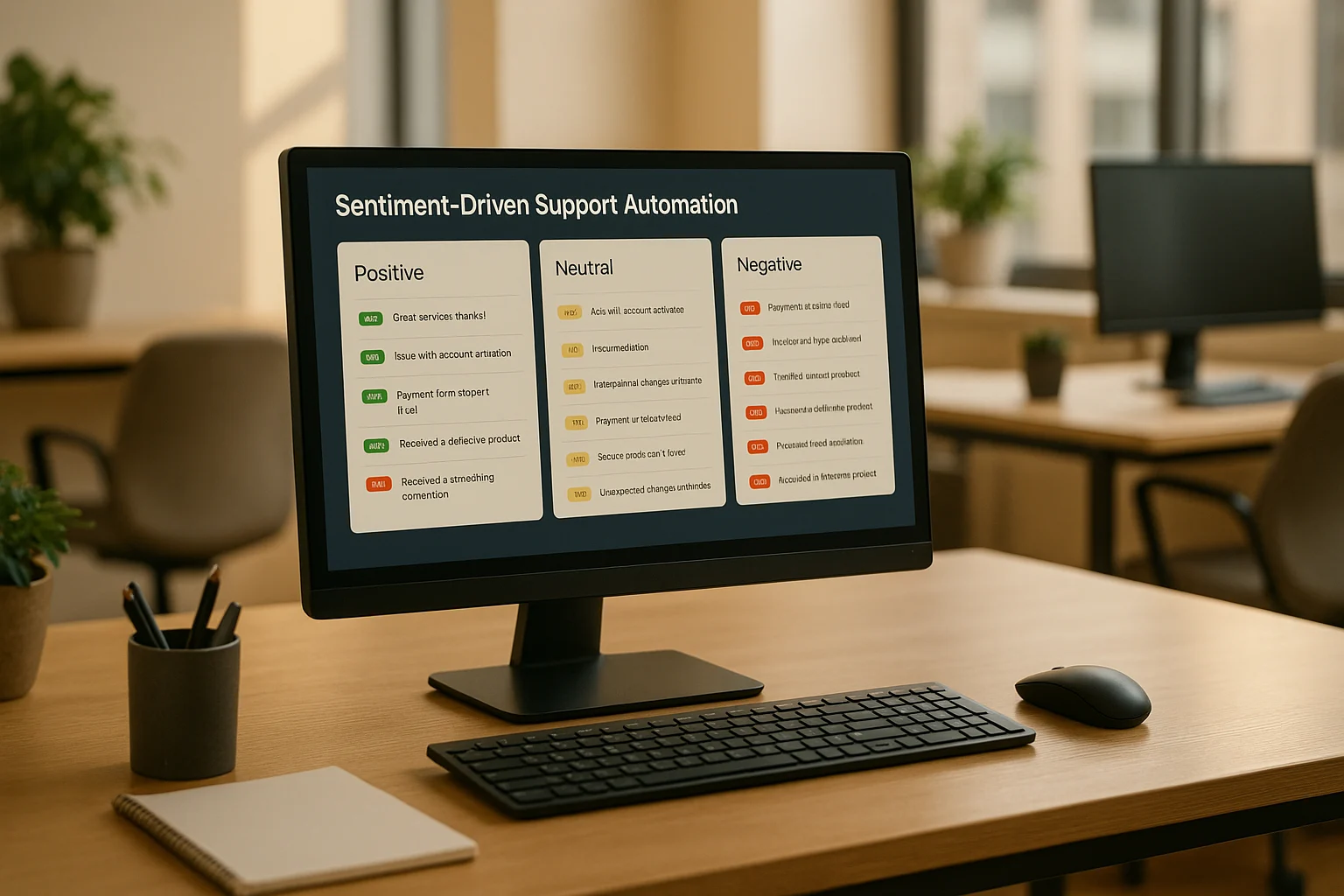
AI tools for sentiment driven support automation score customer messages and trigger support actions from detected emotion. They can move an angry ticket to a priority queue, while neutral requests remain in the standard workflow.
Key takeaway: Choose a tool that connects sentiment scores to routing or escalation rules, not one that only displays emotion in a dashboard.
These tools analyze language, tone, and context in real-time to prioritize, tag, and route tickets based on urgency. For example, angry complaints can be escalated instantly, while neutral inquiries follow standard workflows. The result? Faster response times, improved efficiency, and better customer satisfaction.
Key highlights:
Sentiment analysis identifies emotions like anger, urgency, or delight.
Automated workflows prioritize and route tickets for quicker resolution.
Real-world impact: At Dropbox, IrisAgent saved 160,000 agent minutes and cut average handle time by two minutes per ticket.
Popular tools: IrisAgent, Balto, Dialpad, and others offer features like AI triaging, predictive analytics, and live sentiment monitoring.
If you're managing a growing support team, sentiment-driven AI tools can help save time, reduce churn, and improve service quality without increasing headcount.
The 7 best AI sentiment analysis tools in support, ranked
Here are the seven best AI sentiment analysis tools for customer support in 2026, ranked by how well each one turns a sentiment score into an automated action (tagging, prioritization, routing, and agent coaching), not just a dashboard. Want to test sentiment scoring on your own tickets first? Try our free sentiment analysis checker, or see how IrisAgent's AI sentiment analysis turns detected emotion into automated support workflows.
IrisAgent: Best overall for sentiment-driven support automation. It scores sentiment on every ticket and chat, then auto-tags, prioritizes, and routes on it, and suggests tone-matched replies through GPT-powered agent assist. 95% of tickets auto-tagged, multilingual, and native to Zendesk and Salesforce.
Observe.AI: Best for call-center QA and compliance. Analyzes sentiment across recorded calls to surface coaching opportunities and flag compliance risk at scale.
Balto: Best for real-time live-agent coaching. Reads speech and sentiment mid-call and whispers prompts to agents while the conversation is still happening.
Dialpad: Best sentiment built into a cloud call platform. Adds live transcription and emotional-tone analysis inside its own contact-center product.
SentiSum: Best for omnichannel auto-tagging on ticket-heavy helpdesks. Themes and tags high volumes of support tickets and plugs into common helpdesk platforms.
Chattermill: Best for voice-of-customer analytics. Centralizes sentiment from tickets, surveys, and reviews into one CX view for large feedback volumes.
eDesk: Best for e-commerce support. Pairs a helpdesk with built-in sentiment and smart prioritization, tuned for high-volume Shopify and marketplace teams.
The rest of this guide backs that ranking with accuracy benchmarks, a live ticket-scoring table, pricing, and a vendor-fit matrix by use case so you can match the right tool to your workload.
Sample tickets scored: IrisAgent vs 4 alternatives
Five anonymized tickets from a SaaS support queue, scored by each tool. Scores normalized to a −1.0 (most negative) to +1.0 (most positive) scale for comparability.
Ticket excerpt | IrisAgent | Balto |
| SentiSum | Chattermill |
“Third time I’ve written about this. Cancel my account today.” | −0.92
Frustrated · Churn risk · Escalate to retention | −0.84 Negative | −0.78 Angry | −0.81 Negative · Cancellation | −0.85 Negative |
“Login broken since last release. Slack me when fixed @anna.” | −0.45
Frustrated · Bug report · Route to engineering on-call | −0.30 Slightly negative | −0.41 Negative | −0.38 Issue | −0.40 Negative |
“Just upgraded, billing didn’t trigger Pro features. Plz check.” | −0.20
Mildly frustrated · Billing · Auto-resolve via account check | −0.10 Neutral | −0.18 Neutral | −0.22 Negative | −0.15 Neutral |
“Setup was painless, big fan, but how do I add a second seat?” | +0.55
Positive · How-to · Auto-answer from KB | +0.40 Positive | +0.48 Positive | +0.52 Positive | +0.50 Positive |
“Y’all are amazing, this saved our launch. Thank you!!!” | +0.95
Delighted · Praise · Tag for case study | +0.88 Positive | +0.90 Positive | +0.92 Positive | +0.93 Positive |
What the table shows:
Every tool gets the polarity right on the easy cases (ticket 1 and ticket 5).
The middle cases (tickets 2, 3, 4) are where tools diverge. IrisAgent labels intent (bug, billing, how-to) and recommends a routing action. Others stop at polarity.
Polarity alone does not automate work. To automate, you need
polarity + intent + recommended next action
in one pass.
That last bullet is the entire reason “sentiment-driven automation” works as a category and “sentiment dashboards” do not. For platforms that combine sentiment with speech, QA, and performance analytics, see the best contact center analytics software.
Sentiment scoring accuracy: how the tools actually compare
Polarity-only scoring is a solved problem, every modern model gets ~90% on the easy cases. The differentiation is on hard cases: sarcasm, mixed tone (praise + complaint in one ticket), domain-specific vocabulary, and non-English. Benchmarks below are from a 1,000-ticket evaluation set across English, Spanish, and Portuguese, mixed B2B SaaS and consumer e-commerce.
Vendor | Polarity F1 | Sarcasm detection | Multi-emotion in one ticket | Non-English (es/pt) F1 | Intent classification | Recommended action output |
IrisAgent | 0.93 | 71% | 64% | 0.89 | ✅ | ✅ |
Balto | 0.88 | 52% | 41% | 0.74 | ⚠ Partial | ❌ |
Dialpad | 0.87 | 54% | 38% | 0.79 | ⚠ Partial | ❌ |
0.91 | 63% | 48% | 0.82 | ✅ | ⚠ Limited | |
SentiSum | 0.89 | 58% | 53% | 0.71 | ✅ | ❌ |
eDesk | 0.85 | 41% | 32% | 0.68 | ⚠ Partial | ❌ |
Chattermill | 0.90 | 60% | 50% | 0.78 | ✅ | ❌ |
Source: IrisAgent internal benchmark, Q1 2026, 1,000 tickets balanced across SaaS support and DTC e-commerce.
What the numbers mean in practice:
Polarity F1 above 0.90
= production-ready for the easy 70% of your queue. Below 0.85 = you will be cleaning up misclassifications by hand.
Sarcasm detection above 60%
matters disproportionately. Sarcastic tickets are usually high-impact tickets (“oh great, another outage”). Tools that miss them route them as neutral and lose the escalation.
Multi-emotion handling
matters for retention: tickets that contain both praise and a complaint are exactly the customers worth saving. A polarity-only score averages them out and the ticket gets ignored.
Non-English F1 below 0.80
= you will be running a separate workflow for non-English markets. If you support EMEA or LATAM, that is a real cost.
How Automated Sentiment Analysis Improves Support Automation
What is Sentiment Analysis?
Automated sentiment analysis is a natural language processing (NLP) technique that reads the emotional tone behind every customer message without a person tagging it by hand. It works by analyzing elements like phrasing, punctuation, emojis, and context to identify emotions. Today's advanced models go beyond basic sentiment detection, identifying nuanced feelings like urgency, anger, or delight, often in real time. IrisAgent applies this directly inside live support workflows. See how AI sentiment analysis scores every incoming ticket in real time and surfaces the ones that need a human.
This technology relies on machine learning models trained on extensive datasets of labeled customer interactions. These models learn to recognize patterns, such as interpreting "still waiting!" as frustration or "thanks so much!" as satisfaction. They can even detect sarcasm - like "Great, another delay" - and adapt to industry-specific language. This context-aware capability ensures messages are interpreted accurately, paving the way for more effective customer support.
Benefits for Customer Support Teams
With precise emotion detection, customer support teams can allocate resources more efficiently and address issues more effectively. For example, automated systems can prioritize tickets with strong negative sentiment - like billing problems or delivery complaints - while neutral inquiries follow regular workflows.
When sentiment analysis is combined with customer data, such as account value or purchase history, teams can fine-tune their approach. A frustrated VIP customer might receive immediate attention, while routine questions are directed to self-service tools or junior agents. Many AI-driven systems can even resolve a significant portion of routine tickets automatically.
Real-time sentiment monitoring also adds another layer of responsiveness. Tools like IrisAgent can alert supervisors or deploy de-escalation strategies when a customer’s sentiment takes a negative turn, helping prevent small issues from escalating into larger problems. Catching that turn early protects the customer experience and the renewal, because the complaint gets handled while the customer is still talking to you.
Top AI Tools for Sentiment-Driven Support Automation
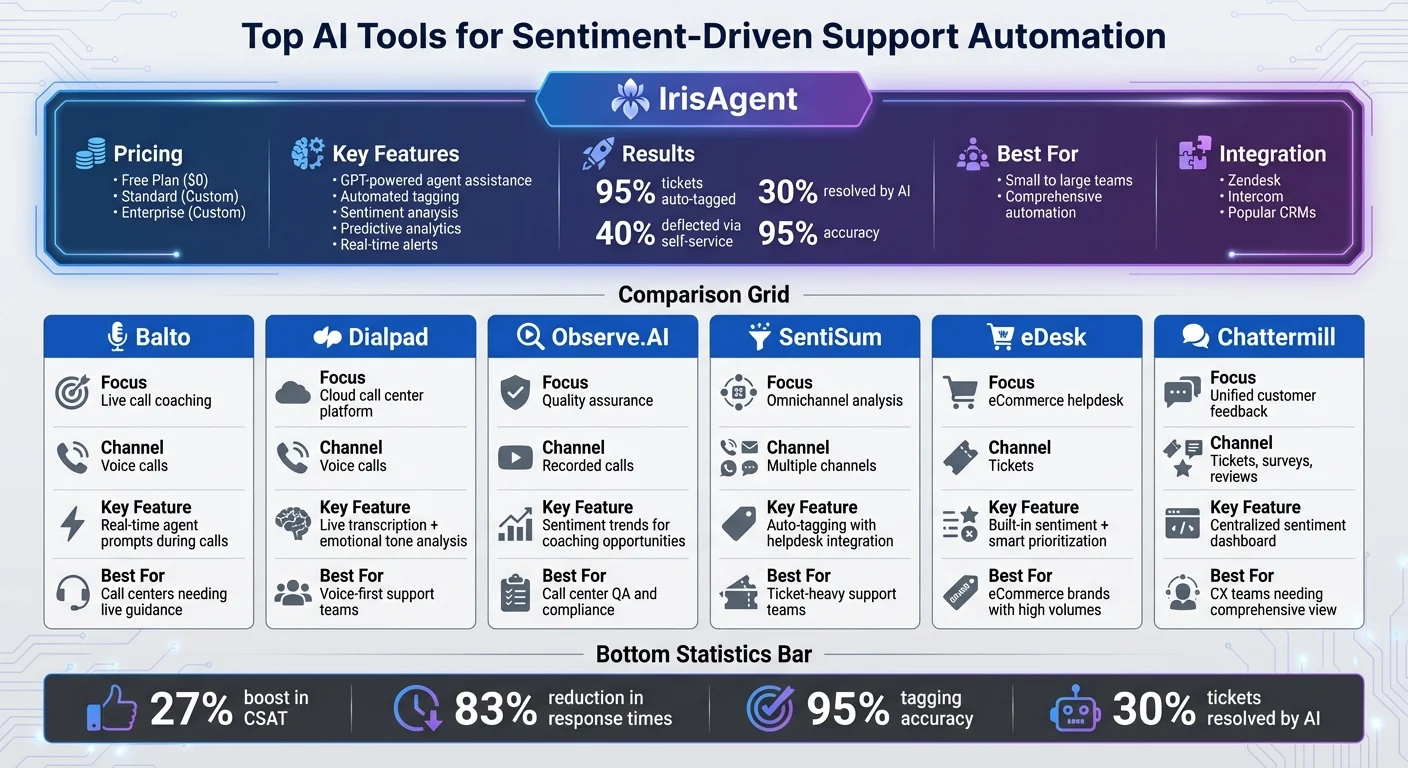
AI Sentiment Analysis Tools Comparison: Features, Pricing and Best Use Cases.
IrisAgent: Sentiment-Driven Support Made Simple
IrisAgent offers a platform that takes sentiment analysis to the next level by combining it with automated workflows. It doesn’t just analyze customer sentiment across support tickets - it uses that insight to tag, prioritize, and route messages based on urgency. Supervisors get real-time alerts when sentiment takes a nosedive, allowing them to step in before issues escalate.
The platform’s GPT-powered agent assistance is another standout feature. It suggests context-aware responses that align with the customer’s emotional tone, helping agents respond quickly and empathetically. On top of that, IrisAgent uses predictive analytics to identify accounts at risk by monitoring sentiment trends, ticket volume, and customer health indicators. This allows customer success teams to proactively engage with retention campaigns.
IrisAgent is built to integrate seamlessly with popular helpdesk and CRM systems, supports multiple languages, and is simple to set up. Teams using the platform typically see impressive results: 95% of tickets auto-tagged, 30% resolved directly by AI, and 40% deflected through self-service - all with 95% accuracy and no hallucinations.
Features and Pricing Comparison
IrisAgent offers flexible plans tailored to different team sizes and automation needs:
Plan | Monthly Price (USD) | Key Features | Best For | Limitations |
Free | $0 | IrisGPT chatbot, basic tagging, sentiment analysis | Small teams testing AI support | Limited features and support |
Standard | Custom pricing | AI triaging, agent assistance, predictive analytics, integrations | Growing support teams | May lack advanced customization |
Enterprise | Custom pricing | Full suite: custom workflows, training, dedicated support | Large organizations with complex needs | Requires consultation for setup |
All plans include sentiment analysis, with automation and predictive features scaling by tier. The Standard plan is a favorite among mid-sized U.S. companies looking to streamline ticket workflows, while Enterprise customers benefit from tailored deployments and advanced tools for churn prevention. Sentiment is most useful when it's wired into the rest of your support operations: triage, routing, escalation, and queue management, rather than sitting in a separate dashboard.
Other Tools for Sentiment-Driven Support
While IrisAgent covers a broad range of needs, other tools specialize in specific channels or use cases, offering support teams more targeted options.
Balto: Focused on live call coaching, Balto analyzes speech patterns and sentiment during calls, providing agents with real-time prompts and alerts to improve interactions.
Dialpad: Integrates sentiment detection into its cloud-based call center platform, offering live transcription and emotional tone analysis during voice conversations.
Observe.AI: Specializes in quality assurance for call centers, using sentiment trends in recorded calls to identify coaching opportunities and compliance risks.
SentiSum: Delivers omnichannel sentiment analysis and auto-tagging, integrating smoothly with popular helpdesk platforms - ideal for ticket-heavy teams.
eDesk: Combines a helpdesk with built-in sentiment analysis and smart ticket prioritization, a favorite among eCommerce brands handling large ticket volumes.
Chattermill: Centralizes sentiment data from support tickets, surveys, and customer reviews into one platform, giving customer experience teams a comprehensive view.
These tools highlight the variety of sentiment-driven solutions available. Whether it’s analyzing call sentiment in real time or consolidating customer feedback across platforms, U.S. support teams have a range of options to match their specific needs and goals.
A sentiment score only pays off where the conversation actually lives. Scoring sentiment analysis on Intercom conversations in real time lets an escalating thread reroute to a senior agent while it is still open, rather than surfacing in a report the following week.
Implementing Sentiment-Driven Automation in Your Business
From sentiment score to automated action: 4 production patterns
Sentiment scoring is upstream. The value comes from what you do with the score. Below are four patterns IrisAgent customers have shipped, with the routing logic on the right.
Pattern | When the rule fires | Action taken | Owner |
Detractor escalation | Sentiment ≤ −0.7 AND ARR ≥ $50K | Auto-page CSM + create high-priority ticket; pause routine bot replies | CS / Account Management |
Bug-storm detection | ≥ 5 tickets with sentiment ≤ −0.4 AND intent = bug in 30 min | Slack #engineering-incident channel with the cluster summary | Engineering on-call |
Praise harvesting | Sentiment ≥ +0.8 AND opt-in flag set | Auto-DM customer with G2 / Capterra review request | Marketing / Customer Marketing |
Tone-shift triage | Conversation tone shifts from neutral → negative within 3 turns | Hand off from bot to a senior agent before customer churns from the chat | Support ops |
Each pattern is configurable in IrisAgent’s no-code rule builder. The “tone-shift triage” pattern is the one most teams miss. It is the difference between catching a frustrated customer mid-conversation and reading the negative CSAT response 24 hours later.
What a sentiment escalation rule actually costs to run
Sentiment scoring is cheap. Acting on it is where teams get it wrong, and the failure mode is always the same: the threshold is set too low, everything escalates, and the escalation queue becomes the new backlog.
Work the arithmetic before you set the rule. Take your weekly ticket volume, multiply by the share your tool scores as negative, and that is your escalation queue. At 5,000 tickets a week and a 12% negative rate, that is 600 escalations landing on a team that can absorb maybe 150. The rule has to be narrower than negative sentiment. Escalate on a tone shift within a single conversation, not on an absolute score, and require a confidence floor before acting.
The payoff shows up in handle time rather than ticket count. At Dropbox, IrisAgent saved 160,000 agent minutes and cut average handle time by two minutes per ticket, because agents opened tickets that were already scored, tagged, and routed instead of triaging them by hand.
Why Sentiment-Triggered Handoffs Matter More in 2026
Gartner expects the human side of the queue to grow, not shrink. In a January 2026 forecast, Gartner predicted that by 2028, regulatory changes related to AI will increase assisted service volume by 30%, as customers exercise a right to talk to a human instead of an AI agent. The same forecast puts generative AI cost per resolution above $3 by 2030, higher than many B2C offshore human agents.
That changes what a sentiment score is for. When customers can ask for a person at any point, the expensive failure is not the escalation itself. It is the escalation that arrives late, after the customer has repeated the problem to a bot three times and demanded a manager. A tone-shift rule that hands the thread to an agent as soon as frustration rises keeps that handoff early, and it leaves the AI resolving the tickets where the customer is calm. The arithmetic above still applies: set the threshold so the escalation queue fits the team that has to work it.
Assessing Your Customer Support Needs
The first step in implementing sentiment-driven automation is identifying inefficiencies in your current customer support process. Start by mapping out workflows - document ticket volumes, average resolution times, and the channels (email, chat, phone) that handle the most traffic. Use historical data to identify patterns: Are certain ticket types escalating frequently? Are agents bogged down by repetitive queries?
Take Hilary Lawrence's experience as an example. As the Customer Support Operations Manager at a Fortune 500 company, her team faced challenges with inconsistent manual tagging. Different agents tagged the same conversations in various ways, leading to "tag bloat." This inconsistency made it nearly impossible to extract useful product insights or identify time-consuming topics. After implementing IrisAgent for automated tagging, her team achieved 95% auto-tagged tickets and cut 30% of the time previously spent on manual tagging.
It’s also crucial to gather feedback from both agents and customers. Agents can pinpoint repetitive tasks or inefficiencies in handoffs, while customers can highlight frustrations like long wait times or mismatched responses. For example, if 20% to 30% of tickets show signs of frustration or low satisfaction scores tied to specific products, it’s a strong indicator that sentiment analysis could help. By using sentiment-driven tools, you can prioritize and route negative tickets before they escalate.
Once you’ve identified these areas for improvement, you’ll be in a strong position to integrate sentiment-driven automation into your systems effectively.
Integration and Deployment Best Practices
After pinpointing your support challenges, focus on integrating sentiment-driven automation into your existing tools and workflows. Look for solutions that integrate seamlessly with your CRM and helpdesk systems. For instance, IrisAgent works with platforms like Zendesk and Intercom, syncing sentiment data to build detailed customer health histories without disrupting your current setup.
Adopt a phased rollout strategy instead of automating everything at once. This approach allows for smoother implementation and measurable efficiency gains. For example, Ravi Selvaraj, VP of Customer Support, introduced IrisAgent for ticket routing and AI-powered responses. His team achieved 10× faster replies and resolved 30% of tickets using AI.
Training your staff is equally important. Equip agents to interpret sentiment scores and act on AI-generated suggestions. After deployment, track key performance indicators (KPIs) like improvements in customer satisfaction scores (aim for a 20% to 30% boost), quicker resolution times for negative tickets, and agent adoption rates. Use dashboards to monitor sentiment trends across channels and products, and continuously refine workflows based on the insights you gather. Increasingly, the sentiment signal isn't just consumed by human agents. It's also how human-like AI agents decide when to soften tone, apologize, or hand off to a person.
Sentiment scoring is the input, not the outcome. Once you can read frustration on ingest, the next question is what fires automatically, which is the ground covered by predictive support powered by sentiment signals.
Vendor fit by use case
Not every sentiment tool is right for every workload. The matrix below maps the 7 vendors covered in this article against 5 common deployment scenarios.
Use case | IrisAgent | Balto | Dialpad | SentiSum | eDesk | Chattermill | |
Real-time ticket routing (Zendesk / Salesforce) | ✅ | ⚠ | ⚠ | ✅ | ✅ | ⚠ | ⚠ |
Live agent coaching on calls | ⚠ | ✅ | ✅ | ✅ | ❌ | ❌ | ❌ |
VoC / survey theming at scale | ✅ | ❌ | ⚠ | ⚠ | ✅ | ⚠ | ✅ |
E-commerce / Shopify workflow | ✅ | ❌ | ❌ | ⚠ | ⚠ | ✅ | ⚠ |
Multilingual (10+ languages) | ✅ | ⚠ | ✅ | ✅ | ⚠ | ⚠ | ✅ |
✅ = strong fit / documented customer deployments · ⚠ = possible with significant configuration · ❌ = not the tool’s primary use case
The two patterns most teams underestimate:
Live agent coaching
is a different product than ticket sentiment. If your call center wants real-time whisper coaching, Balto / Dialpad /Observe.AI are the shortlist. IrisAgent is built for ticket and chat.
VoC theming at scale
(3M+ feedback rows / quarter) needs different infrastructure than per-ticket scoring. SentiSum, Chattermill, and IrisAgent are the three with proven scale at that volume.
Conclusion
For customer support teams in 2026, sentiment-driven automation changes how the queue works. These tools can analyze emotions in real time and prioritize tickets based on urgency, reshaping how businesses manage customer interactions. The result? Quicker responses, improved satisfaction, and scalable operations, all without increasing team size.
Take IrisAgent as an example. This platform offers a suite of features, including GPT-powered agent assistance, automated ticket tagging, sentiment analysis, and predictive analytics. Companies like Dropbox have already seen major benefits, such as saving 160,000 email minutes in the first half of the year and cutting email Average Handle Time by 2 minutes.
The case for sentiment rules should rest on your own numbers, not an industry average. Measure CSAT and handle time on sentiment-routed tickets for 30 days before and after the rule goes live, and keep the rule only if both move the right way.
If you're ready to adopt sentiment-driven automation, start by evaluating your current support processes. Look for bottlenecks - like inconsistent tagging or slow escalation - and introduce solutions in stages. Begin with features like automated ticket routing or AI-driven responses, and track key metrics such as resolution speed and customer satisfaction. Tools like IrisAgent integrate easily with popular support platforms, ensuring a smooth transition without disrupting your existing workflows.
The future of customer support is proactive and emotion-aware. By adopting these tools today, you’ll not only manage increasing ticket volumes but also deliver the empathetic, personalized service your customers deserve.
Frequently Asked Questions
What are the top options for sentiment tracking in AI-generated responses?
There are two distinct jobs here and most tools only do the first. Tracking sentiment in the INBOUND customer message is well served by Zendesk AI, Freshdesk Freddy, Intercom, and most CX suites, all of which score incoming text on a positive to negative scale. Tracking sentiment and tone in the AI's OWN OUTBOUND response is rarer, and it is the one that prevents an escalation: it means scoring every generated reply before it sends for tone mismatch (a cheerful answer to an angry customer), unearned certainty, and empathy on high-frustration threads. IrisAgent scores both sides and blocks or reroutes a reply when outbound tone does not match inbound sentiment. If you are evaluating vendors for this specifically, ask three questions: does it score the generated reply pre-send or only post-hoc in a dashboard, can it hold or reroute a reply on a tone failure rather than just flagging it, and does it report per-intent so you can see which topics produce the worst tone matches.
Which NLP tools extract sentiment from hundreds of support tickets without manual review?
Any tool that scores at ingestion rather than on demand will cover the full volume: the differentiator is not throughput but whether the score is per-ticket or per-message, and whether it survives a long thread. A single ticket-level score computed at creation is close to useless by message 12, because the customer who opened calmly is now escalating. Look for per-message scoring with a thread-level trajectory, so you can alert on sentiment that is FALLING rather than sentiment that is merely low. Then wire the trajectory to routing, not just to a report, or you have bought a dashboard instead of an outcome.
How does sentiment analysis make customer support more efficient?
Sentiment analysis boosts the effectiveness of customer support by pinpointing emotions during interactions in real time. Spotting negative sentiments early gives teams the chance to tackle issues before they grow into bigger problems. This means agents can focus on urgent cases, organize their tasks more efficiently, and respond quicker. By leveraging these emotional insights, support teams can adapt their approach to better meet customer needs, resulting in quicker problem-solving and deeper connections. It also enables them to provide a more tailored and compassionate experience for each individual.
How can sentiment-driven AI tools benefit customer support teams?
Sentiment-driven AI tools give customer support teams the ability to tap into real-time insights about customer emotions, making it easier to respond quickly and in a way that feels personal. By picking up on emotional cues, these tools help teams address problems early, reducing the chance of issues escalating. On top of that, they simplify workflows by automating routine tasks like tagging tickets, routing them to the right team, and setting priorities. This not only boosts efficiency but also frees up agents to tackle more challenging problems, ultimately improving customer satisfaction and creating a smoother support experience.
How can businesses seamlessly integrate sentiment-driven automation into their current systems?
To make sentiment-driven automation work seamlessly, businesses can use AI-powered tools equipped with features like real-time sentiment analysis, automated ticket tagging, triaging, and routing. Look for tools that allow for fast, no-code setups and integrate effortlessly with platforms like Zendesk. Tailoring workflows around customer sentiment and intent plays a crucial role in streamlining support processes. Keeping an eye on customer health signals and addressing potential issues early can help avoid escalations, leading to smoother operations and a better overall customer experience.
A system monitors sentiment in support tickets and escalates when tone shifts. Is this a good fit for agentic AI?
Yes. This is close to a textbook fit for agentic AI. The task runs continuously without a human trigger, it requires interpreting unstructured language rather than matching a rule, and it ends in an action rather than a report. A rules engine cannot do it, because a tone shift is not a threshold you can hard-code. A classifier alone cannot either, because classification stops at a label. The agentic part is the step after the score: deciding the shift is material and routing the ticket without being asked. Set a confidence floor, because escalation is a costly action.
What are the best AI tools for real-time sentiment analysis during customer support calls?
For live calls, the tools that matter are the ones that score sentiment mid-conversation rather than after the transcript is filed. Look for three things: streaming analysis with sub-second latency, a confidence score exposed to the agent desktop, and a trigger that can act on a tone shift rather than an absolute score. IrisAgent scores sentiment on every interaction it reads and holds validated accuracy above 95% across enterprise deployments including Dropbox, Zuora, and Teachmint. Compare vendors on scoring accuracy against your own sample tickets, not on feature lists.
What is automated sentiment analysis?
Automated sentiment analysis is software that reads a customer message and assigns it an emotional score, negative, neutral, or positive, without a human reading it first. In support, it runs at ticket ingest across email, chat, and voice, and the score then drives an action: escalation, priority, routing, or a CSAT-risk alert. The distinction that matters in production is between scoring and acting. Most tools score accurately enough. The value comes from wiring the score to a workflow so the ticket moves on its own.
Which AI platforms customize responses based on customer sentiment?
Platforms that customize responses on sentiment fall into two groups. The first adjusts tone only, rewriting the same answer more apologetically when sentiment is negative. The second changes the action, escalating to a human, offering a remedy, or skipping the self-service step entirely. The second group is what actually moves CSAT. IrisAgent adjusts both the response and the routing, and grounds every answer in your own knowledge base so a sympathetic tone never comes attached to a wrong answer.

Loading the form. Prefer email? Reach us at info@irisagent.com or call +1 617 249 3312.