
Best AI Tools for Support QA & Coaching in 2026
For decades, support QA worked the same way: a team lead pulled a random sample of 2 to 5 percent of conversations, scored them by hand against a rubric, and hoped that sample represented the other 95 percent. It never did. The tickets that actually hurt CSAT, the edge cases, the quiet policy violations, the coaching moments that would lift a whole team. Most of them were never reviewed at all.
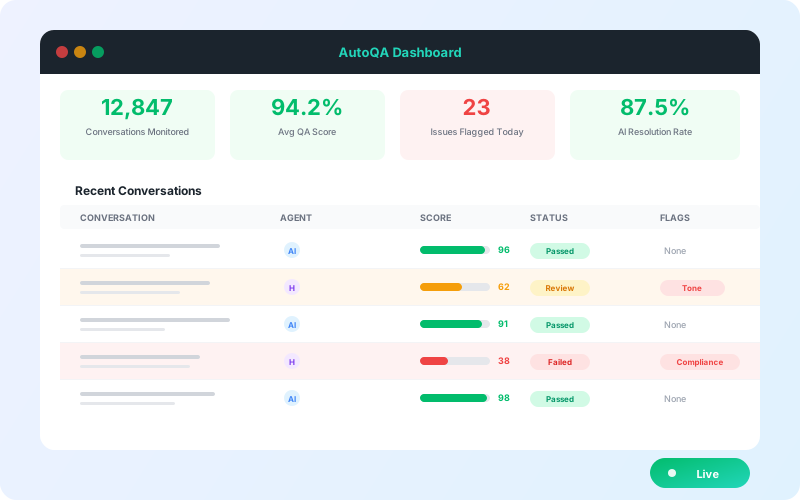
AI changed the math. Modern QA tools now score 100 percent of conversations automatically across voice, chat, email, and tickets, then surface the handful that a human reviewer actually needs to look at. The best of them go further: they connect scores to coaching workflows, calibrate against your real standards, and tie quality back to outcomes like resolution rate and customer satisfaction.
The catch is that "AI QA" now means very different things across vendors. Some tools are auto-scoring engines bolted onto a helpdesk. Some are contact-center conversation-intelligence suites built for voice. Some are coaching-and-LMS platforms that added AI on top. We evaluated the market across scoring coverage, accuracy, coaching depth, channel support, and how quickly a team can actually get value. Here are the 10 best AI tools for support QA and coaching in 2026.
What to Look for in an AI QA & Coaching Tool
Before the list, here are the criteria that separate a real QA platform from an auto-scoring gimmick. For a deeper operational playbook, see our guide to AI-driven QA best practices.
Scoring coverage. The whole point of AI QA is to move off sampling. Look for tools that auto-score 100 percent of conversations, not a slightly larger sample.
Scoring accuracy and explainability. An AI score you cannot trust is worse than no score. The tool should ground every rating in the actual transcript and your rubric, and show the evidence behind each call, so an AI score that fabricates a violation gets caught.
Coaching workflows, not just dashboards. Scores are the input. The value is in 1:1s, calibration sessions, goal tracking, and trend spotting that actually change agent behavior over time.
Calibration and customizable scorecards. Your definition of a good interaction is unique. The platform needs flexible scorecards and calibration so AI scores and human scores stay aligned.
Channel coverage. Voice-only tools miss your chat and email quality, and chat-only tools miss your calls. Match the tool to where your volume actually is.
Outcome linkage. The strongest platforms connect QA scores to CSAT, resolution rate, AHT, and sentiment, so you can prove that better quality drives better business results.
Deployment speed and pricing model. Some tools take a quarter of professional services to configure. Others auto-configure from your existing data. Per-agent, per-seat, or flat: each model scales differently.
The 10 Best AI Tools for Support QA & Coaching
1. IrisAgent
Best for: Support teams that want AI QA grounded in real resolution quality, deployed fast, with no per-seat tax on coverage
IrisAgent brings QA into the same platform that resolves and routes tickets, so quality is scored against what actually happened on the conversation, not a disconnected rubric. Its AutoQA scores 100 percent of conversations across voice, chat, and email, and because scoring runs through the proprietary Hallucination Removal Engine, every rating is grounded in the transcript, the knowledge base, and your SOPs. That means scores come with evidence instead of a black-box number, so reviewers can trust them and agents can learn from them.
Most teams go live within 24 hours. IrisAgent ingests your existing ticket history and knowledge base to auto-configure scorecards, then surfaces the specific conversations and coaching themes a manager should focus on, ranked by impact on CSAT and resolution. Quality scores sit next to sentiment, resolution rate, and handle time, so QA stops being a side process and becomes part of how the team improves.
Key features:
AutoQA scoring on 100 percent of conversations (voice, chat, email)
Hallucination Removal Engine so every score is grounded and explainable
Coaching insights ranked by impact on CSAT and resolution
Sentiment analysis and customer health monitoring built in
Free support-quality scorecard tool to benchmark before you commit
Ties QA directly to resolution quality, not just rubric compliance
Pricing: Free tier available (no credit card). Standard and Enterprise tiers with flat, feature-based pricing and no per-resolution fees.
Integrations: Zendesk, Salesforce, Intercom, Freshworks, Zoho, Jira, PagerDuty, Slack, MS Teams
Channels: Voice, chat, email, tickets
Performance: 100 percent conversation coverage, faster coaching cycles, and QA tied to measurable CSAT and resolution gains
Pros | Cons |
|---|---|
Scores are grounded and explainable, not black-box | Newer brand than legacy QM suites |
QA, resolution, routing, and sentiment in one platform | Paid tier pricing requires contacting sales |
24-hour deployment, auto-configured from your data | |
Free tier and free scorecard tool for evaluation |
2. Zendesk QA (formerly Klaus)
Best for: Zendesk-native teams that want AutoQA tightly bundled into their existing helpdesk
Klaus was one of the first dedicated conversation-review tools, and since Zendesk acquired it, Zendesk QA has become the default quality layer for Zendesk shops. It auto-scores tickets, flags outliers and churn risk, runs sentiment analysis, and feeds a coaching and calibration workflow. For teams already standardized on Zendesk Suite, the integration is the selling point.
The trade-off is gravity: it is strongest inside the Zendesk ecosystem, and value is more limited if your volume lives across other helpdesks or in voice.
Key features:
AutoQA across 100 percent of Zendesk conversations
Sentiment and churn-risk detection
Calibration and coaching workflows
Native Zendesk Suite integration
Pricing: Roughly $35 to $59 per agent per month historically; increasingly packaged into Zendesk Suite AI tiers. AutoQA capabilities are custom-quoted.
Integrations: Zendesk (native), plus other helpdesks with reduced depth
Channels: Chat, email, tickets (voice via integrations)
Pros | Cons |
|---|---|
Best-in-class Zendesk integration | Value concentrated in the Zendesk ecosystem |
Mature scoring and calibration features | Pricing increasingly bundled and opaque |
Strong sentiment and outlier detection | Weaker as a standalone multi-helpdesk tool |
3. MaestroQA
Best for: Mid-market and enterprise QA teams that want deeply customizable scorecards and analytics
MaestroQA is a dedicated quality-management platform with a strong reputation for flexible, granular scorecards and reporting. Its AI Classifiers can auto-score and auto-tag conversations, and its analytics let QA leaders slice quality by team, agent, reason code, and trend. It is a favorite of QA programs that take calibration and rubric design seriously.
It is a QA-first tool rather than an all-in-one resolution platform, so it sits alongside your helpdesk rather than replacing any of it.
Key features:
Highly customizable scorecards and rubrics
AI Classifiers for auto-scoring and auto-tagging
Robust calibration and analytics
Coaching and dispute workflows
Pricing: Custom, typically in the range of $30 to $50 per agent per month. Contact sales.
Integrations: Zendesk, Salesforce, Kustomer, Gladly, Intercom, and more
Channels: Chat, email, tickets, voice (via transcript import)
Pros | Cons |
|---|---|
Best-in-class scorecard flexibility | Pure QA tool, not a resolution platform |
Strong analytics and calibration | Custom pricing, no free tier |
Trusted across mid-market and enterprise | Setup effort to design rubrics well |
4. Observe.AI
Best for: Contact centers with heavy voice volume that need conversation intelligence plus QA
Observe.AI is built around voice. It transcribes and analyzes calls, runs AutoQA across 100 percent of interactions, and layers on real-time agent assist and post-call coaching. Its conversation-intelligence roots make it strong for contact centers that live on the phone and want quality, compliance, and coaching in one place.
It is an enterprise platform, so expect a sales-led process and pricing to match.
Key features:
Voice-first transcription and conversation intelligence
AutoQA across calls and digital channels
Real-time agent assist and post-interaction coaching
Compliance and risk monitoring
Pricing: Custom enterprise, per-seat. Contact sales.
Integrations: Major CCaaS and CRM platforms
Channels: Voice-primary, plus chat and email
Pros | Cons |
|---|---|
Excellent for high-volume voice | Enterprise pricing and sales cycle |
Real-time assist plus QA in one suite | Heavier than digital-first teams need |
Strong compliance monitoring | Less suited to SMB and chat-only teams |
5. Level AI
Best for: Teams that want an AI-native QA and conversation-intelligence platform across channels
Level AI was built AI-first for QA and customer-experience intelligence. It auto-scores interactions, understands intent and sentiment semantically rather than by keyword, and rolls quality up into experience analytics and coaching. It targets contact centers that want modern, semantics-driven scoring instead of rigid keyword rules.
Key features:
Semantic AI scoring across 100 percent of interactions
Intent and sentiment understanding
Coaching and QA workflows
Experience analytics dashboards
Pricing: Custom enterprise. Contact sales.
Integrations: Major CCaaS, CRM, and helpdesk platforms
Channels: Voice, chat, email
Pros | Cons |
|---|---|
Modern semantic scoring, not keyword rules | Custom pricing, no public tier |
Strong across voice and digital | Contact-center oriented |
Good analytics layer | Onboarding is sales-led |
6. Cresta
Best for: Large enterprise contact centers wanting real-time guidance plus quality intelligence
Cresta focuses on real-time agent guidance powered by conversation intelligence, with QA and coaching as part of the package. It nudges agents live during interactions and analyzes what top performers do differently, then turns that into coaching. It is powerful and enterprise-grade, with cost and complexity to match.
Key features:
Real-time agent guidance during conversations
Behavioral analysis of top performers
AI QA and coaching
Enterprise analytics
Pricing: Custom enterprise, typically high. Contact sales.
Integrations: Major CCaaS and CRM platforms
Channels: Voice and chat
Pros | Cons |
|---|---|
Best-in-class real-time guidance | Among the most expensive options |
Learns from your top agents | Heavy implementation |
Strong enterprise analytics | Overkill for SMB and mid-market |
7. Loris AI
Best for: Teams that want conversation intelligence and quality insight focused on customer sentiment and risk
Loris analyzes support conversations to surface quality, sentiment, and emerging issues, with QA scoring and insight that lean toward customer-experience and risk signals. It is strong for teams that want to understand what is driving negative experiences, not just whether agents followed a checklist.
Key features:
Conversation intelligence and quality scoring
Sentiment and emerging-issue detection
Coaching insights
Trend and risk analytics
Pricing: Custom. Contact sales.
Integrations: Major helpdesks and CCaaS platforms
Channels: Chat, email, voice (via transcripts)
Pros | Cons |
|---|---|
Strong sentiment and issue detection | Less rubric-centric than pure QA tools |
Good for CX-risk visibility | Custom pricing, no free tier |
Useful trend analytics | Coaching depth varies by use case |
8. Convin
Best for: Omnichannel teams wanting QA, coaching, and conversation intelligence in one mid-market package
Convin offers AutoQA, conversation intelligence, agent coaching, and even learning management across voice and digital channels. It auto-scores interactions, runs automated coaching based on performance gaps, and bundles a learning module, which makes it appealing for teams that want quality and enablement together at mid-market pricing.
Key features:
AutoQA across 100 percent of conversations
Automated, performance-based coaching
Built-in learning management
Omnichannel conversation intelligence
Pricing: Custom, per-seat, generally mid-market friendly. Contact sales.
Integrations: Major CCaaS, CRM, and helpdesk platforms
Channels: Voice, chat, email
Pros | Cons |
|---|---|
QA plus coaching plus LMS in one tool | Broad feature set can feel sprawling |
Omnichannel coverage | Pricing requires a sales conversation |
Mid-market friendly | Less specialized than category leaders |
9. EvaluAgent
Best for: QA and coaching teams that want published pricing and a tight quality-to-improvement loop
EvaluAgent pairs AutoQA with structured coaching, learning, and agent-improvement workflows, and is one of the more transparent vendors on pricing. It auto-scores conversations, routes the ones that need human review, and connects findings to coaching and learning content, closing the loop from score to behavior change.
Key features:
AutoQA with smart sampling for human review
Coaching, learning, and improvement workflows
Customizable scorecards
Agent-facing dashboards and gamification
Pricing: Published tiers, roughly $23 to $30 per agent per month depending on features.
Integrations: Zendesk, Salesforce, major CCaaS and helpdesks
Channels: Chat, email, tickets, voice (via transcripts)
Pros | Cons |
|---|---|
Transparent, accessible pricing | Lighter on real-time voice intelligence |
Strong score-to-coaching loop | Less enterprise-heavy than CCaaS suites |
Good agent-facing experience | Best fit is mid-market |
10. Scorebuddy
Best for: Teams wanting straightforward QA scorecards plus coaching and learning at SMB-friendly pricing
Scorebuddy is a QA scorecard platform with AI scoring, coaching, and an integrated learning module. It is approachable and affordable, with published tiers, making it a common starting point for teams formalizing QA for the first time before they need a heavier conversation-intelligence suite.
Key features:
Customizable QA scorecards with AI scoring
Coaching and dispute workflows
Built-in learning management
Reporting and analytics
Pricing: Published tiers, roughly $20 to $36 per agent per month depending on volume and features.
Integrations: Zendesk, Salesforce, Freshdesk, and more
Channels: Chat, email, tickets, voice (via transcripts)
Pros | Cons |
|---|---|
Affordable, published pricing | Lighter AI than category leaders |
Easy to adopt for first QA programs | Less depth in conversation intelligence |
Learning module included | Scales less well to large enterprise |
Comparison Table: All 10 AI QA & Coaching Tools at a Glance
Tool | Best For | Scoring Coverage | Primary Channels | Starting Price | Free Tier |
|---|---|---|---|---|---|
IrisAgent | Grounded QA tied to resolution | 100% of conversations | Voice, chat, email, tickets | Free tier | Yes |
Zendesk QA (Klaus) | Zendesk-native teams | 100% (Zendesk) | Chat, email, tickets | ~$35/agent/mo | No |
MaestroQA | Customizable scorecards | 100% (AI Classifiers) | Chat, email, tickets, voice | ~$30-$50/agent/mo | No |
Observe.AI | High-volume voice | 100% of interactions | Voice-primary, digital | Custom | No |
Level AI | AI-native semantic QA | 100% of interactions | Voice, chat, email | Custom | No |
Cresta | Real-time guidance | 100% of interactions | Voice, chat | Custom (high) | No |
Loris AI | Sentiment and risk insight | 100% of conversations | Chat, email, voice | Custom | No |
Convin | Omnichannel QA + LMS | 100% of conversations | Voice, chat, email | Custom (mid-market) | No |
EvaluAgent | Score-to-coaching loop | AutoQA + smart sampling | Chat, email, tickets, voice | ~$23-$30/agent/mo | No |
Scorebuddy | SMB-friendly QA | AI scoring + scorecards | Chat, email, tickets, voice | ~$20-$36/agent/mo | No |
QA scoring and sentiment scoring are the same measurement problem on different inputs. If calls are your priority, compare the tools built for real-time sentiment analysis during support calls before you commit.
How to Choose the Right AI QA & Coaching Tool
Choose IrisAgent if you want QA that is grounded in real resolution quality, deployed in 24 hours, and priced without a per-seat tax on full coverage, all in the same platform that resolves and routes your tickets.
Choose Zendesk QA (Klaus) if your team is standardized on Zendesk and you want quality scoring bundled natively into that ecosystem.
Choose MaestroQA if you run a serious QA program and need the most flexible, granular scorecards and analytics on the market.
Choose Observe.AI or Cresta if you are an enterprise contact center with heavy voice volume that needs conversation intelligence and real-time guidance alongside QA.
Choose Level AI if you want a modern, AI-native platform with semantic scoring across voice and digital channels.
Choose Loris AI if your priority is understanding customer sentiment and emerging risk, not just rubric compliance.
Choose Convin if you want QA, coaching, and learning bundled together for an omnichannel team at mid-market pricing.
Choose EvaluAgent or Scorebuddy if you want transparent, published pricing and a straightforward path from scorecards to coaching, especially for a first formal QA program.
Frequently Asked Questions
What is AI-powered support QA?
AI-powered support QA uses large language models to automatically score customer support conversations against your quality rubric across voice, chat, email, and tickets. Instead of a manager manually reviewing a 2 to 5 percent sample, AI QA evaluates 100 percent of interactions, flags the ones that need human attention, and surfaces coaching opportunities. The best tools ground every score in the actual transcript so the rating is explainable rather than a black-box number.
How is AI QA different from manual QA?
Manual QA relies on sampling: a reviewer scores a small random slice of conversations by hand, which means most interactions are never reviewed and bias creeps into which tickets get pulled. AI QA scores every conversation, applies the rubric consistently, and removes the sampling blind spot, while still routing genuinely tricky cases to a human for final judgment and calibration.
Can AI QA scores be trusted?
They can, if the tool grounds its scoring in the transcript and your standards and shows the evidence behind each rating. Trust breaks down when a tool produces scores with no explanation. Look for platforms that surface the exact moments behind a score, support calibration against human reviewers, and let you dispute or correct ratings so the system stays aligned with your real definition of quality. IrisAgent uses its Hallucination Removal Engine so each score is grounded and explainable.
Do AI QA tools also help with agent coaching?
Yes, and this is where the real value is. Scoring is only the input. The strongest tools turn scores into coaching: they spot trends across an agent or team, recommend focus areas, support 1:1s and calibration sessions, and in some cases bundle learning content. The goal is to change behavior over time, not just produce a dashboard.
How much do AI QA and coaching tools cost?
Pricing varies widely. SMB-friendly tools like Scorebuddy and EvaluAgent publish tiers in the rough range of $20 to $30 per agent per month. Dedicated QA platforms like MaestroQA and Zendesk QA typically land around $30 to $59 per agent per month. Enterprise conversation-intelligence suites like Observe.AI, Level AI, and Cresta are custom-quoted and can be significantly higher. IrisAgent offers a free tier and prices on features rather than charging per resolution.
How quickly can I deploy an AI QA tool?
It depends on how much configuration the rubric needs. Scorecard-heavy platforms can take weeks to design and calibrate well. Tools that auto-configure from your existing ticket history and knowledge base are faster: IrisAgent deploys in about 24 hours by learning your standards from past conversations, then refining scorecards from there.
Loading the form. Prefer email? Reach us at info@irisagent.comor call +1 617 249 3312.