
AI Customer Support for Subscription Billing in SaaS
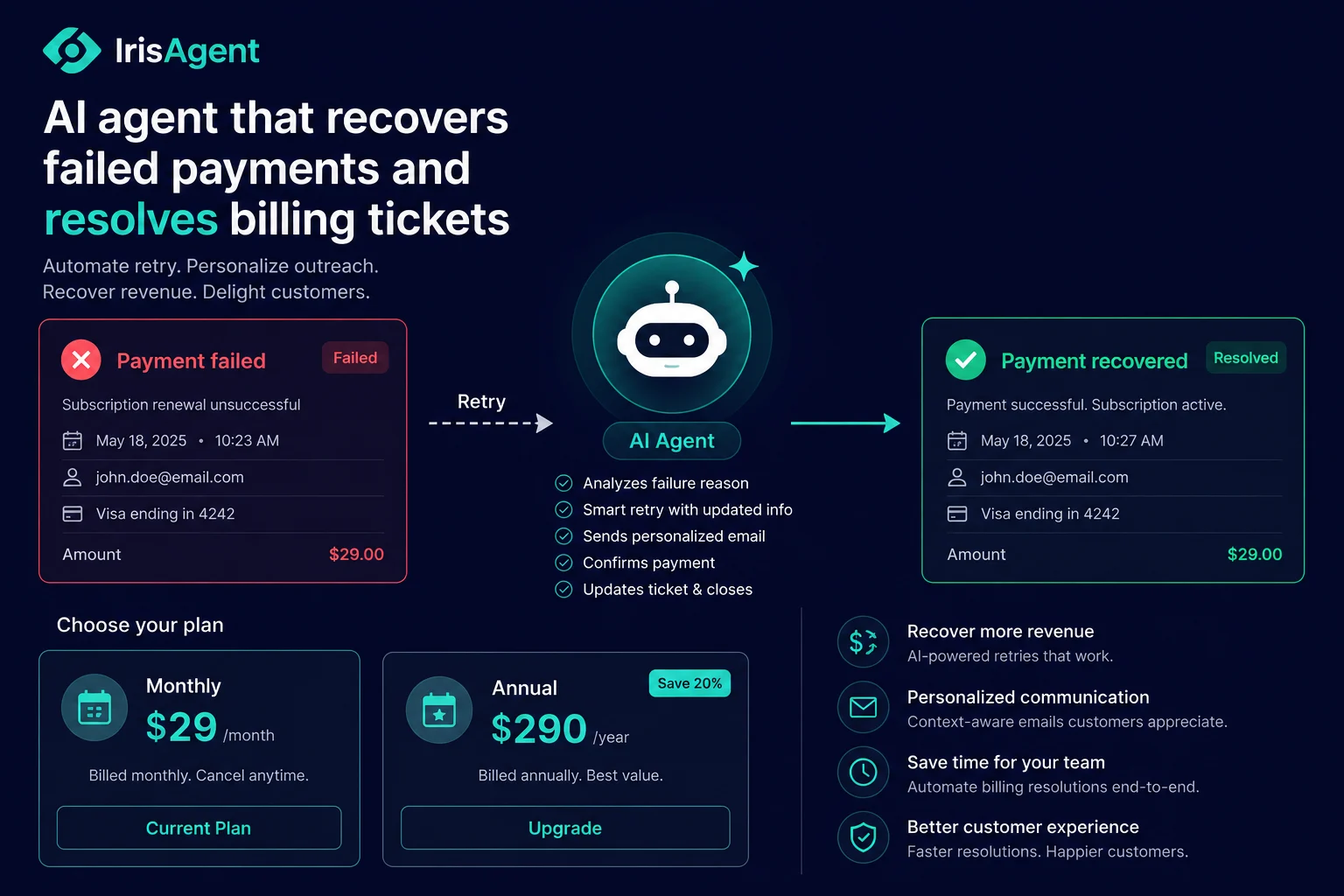
AI customer support for subscription billing means an AI agent reads a billing ticket, looks up the customer's subscription in your billing system, checks it against your pricing and refund rules, and then resolves the issue end to end: retrying a failed payment, explaining a proration charge, processing a plan change, or issuing a refund, without a human agent. For SaaS teams this matters because billing tickets are the highest-volume, highest-friction category in the entire support queue, and they sit directly on top of your recurring revenue. IrisAgent resolves the bulk of routine subscription billing tickets automatically across deployments including Zuora and Dropbox, closing them in under a minute instead of the eight to twelve minutes a human spends tabbing between the help desk and the billing tool.
That is the short version. The rest of this guide is the operator's version: which billing tickets to automate first, where the automation breaks, what to measure, and how subscription billing AI connects to the rest of your SaaS support stack.
Key takeaways - Subscription billing is the single highest-ROI SaaS support category to automate, because the tickets are high-volume, policy-bounded, and tied directly to revenue. - The four workflows worth automating first: failed renewal recovery, proration and plan-change questions, refund and credit requests, and "why was I charged" disputes. - Involuntary churn (failed cards, expired payment methods) is recoverable. An AI agent that proactively reaches out and fixes the payment method protects revenue you would otherwise silently lose. - The two non-negotiables are policy grounding (the AI must enforce your actual refund and proration rules, not guess) and a confidence-based handoff to a human for edge cases. - Track three numbers: billing resolution rate, refund accuracy rate, and recovered involuntary churn.
Why subscription billing is the SaaS support category that drains the queue
Every SaaS support leader knows the pattern. Product and onboarding tickets spike at launch, then settle. Billing tickets never settle. They scale linearly with your subscriber base, and they get more complex as you add plans, add-ons, usage tiers, and annual versus monthly options.
The reason is structural. A subscription is a living object. It renews, it prorates, it upgrades mid-cycle, it fails when a card expires, and it generates a charge the customer did not expect. Each of those events produces a ticket, and each ticket requires the same painful workflow: authenticate the customer, open the billing system, find the subscription, read the policy, decide, and act.
According to Zendesk's CX Trends research, billing and charge disputes are consistently among the top drivers of low-CSAT support experiences across SaaS, because customers expect money questions to be resolved instantly and they rarely are. A customer waiting two days to find out why they were charged $340 instead of $290 is a customer reading your competitor's pricing page.
The cost-of-doing-nothing math
Take a SaaS company with 40,000 active subscriptions doing 18,000 support tickets a month. Billing-related tickets typically run 25 to 35 percent of that volume. Call it 5,000 billing tickets a month. At an average handle time of nine minutes and a loaded agent cost of $32 per hour, that is 750 agent hours, roughly $24,000 a month in direct labor on a single ticket category.
Automating half of those at high accuracy frees $12,000 a month and, more importantly, lets your senior agents work the proration disputes and enterprise contract questions that actually need judgment. The cost case is real, but it understates the value, because the bigger number is the revenue you stop leaking.
The four subscription billing workflows worth automating first
Not all billing tickets are equal. Start with the ones that are high-volume, rule-bound, and revenue-adjacent.
1. Failed renewal and involuntary churn recovery
This is the one most teams under-invest in. A meaningful share of SaaS churn is not voluntary. The customer wanted to keep paying. Their card expired, their bank declined a recurring charge, or the billing address changed. ProfitWell and Recurly have both published research showing that involuntary churn is a large and recoverable slice of total churn for subscription businesses.
An AI agent handles this proactively. When a renewal fails, it reaches out, explains the failed charge in plain language, walks the customer through updating their payment method, and retries the charge, all without a human touching the ticket. This is covered in depth on the failed payment recovery use case. Every recovered renewal here is revenue that would otherwise have silently disappeared from your MRR.
2. Proration and plan-change questions
"I upgraded mid-month, why is my invoice this amount?" is one of the most common and most frustrating billing tickets, because the math is genuinely confusing and the answer is buried in your billing system. An AI agent pulls the actual proration calculation from the subscription record and explains it line by line. It can also execute the plan change itself when the customer asks, as detailed on the subscription management use case.
3. Refund and credit requests
Refund requests are high-volume and policy-bound, which makes them ideal for automation when the AI is grounded in your actual refund policy rather than a help-center article. The AI checks the charge against the refund window, confirms the customer qualifies, and issues the refund or credit through your billing API, logging the full audit trail for finance. The mechanics of refund automation, including where it breaks, are covered in detail in our guide on how AI handles refunds, returns, and billing disputes.
4. "Why was I charged" disputes
These look scary but are mostly lookups. The customer sees a charge they do not recognize. The AI authenticates them, pulls the last 90 days of charges, identifies the one in question, and explains it: the annual renewal, the seat you added, the usage overage. Most of these resolve with a clear explanation. The genuine double-charges get refunded automatically, and the truly ambiguous ones escalate. The general pattern is described on the billing questions use case.
What "AI resolves a billing ticket" actually looks like end to end
Here is the real workflow for a customer who emails asking why their subscription renewed at a higher price.
Intent classification. The AI reads the ticket and classifies it as a proration or price-change question, routing it to the billing workflow instead of the general FAQ flow.
Customer authentication. The AI matches the requester to a subscription record in your billing system (Zuora, Stripe, Recurly, Chargebee, or your own database). If it cannot authenticate confidently, it asks one clarifying question.
Subscription lookup. The AI pulls the current plan, the prior plan, the change date, and the proration line items.
Policy check. The AI compares the situation against your pricing and refund rules, read from your operating procedures rather than a wiki article. Is this within the refund window? Did an annual price increase apply correctly?
Resolution. The AI explains the charge clearly, and if the policy supports a credit or adjustment, it executes it through your billing API and confirms with the customer.
Audit trail. The full chain (request, lookup, policy citation, decision, action) is logged for finance and any future dispute.
Handoff if needed. If confidence drops below your threshold at any step, the ticket routes to a human with the entire context pre-populated.
The whole sequence runs in well under a minute. A human doing the same workflow inside Zendesk or Salesforce typically takes eight to twelve minutes because they are switching between the help desk, the billing tool, the pricing doc, and the email composer. This is the same agentic capability described on the AI customer support for SaaS page, applied specifically to the billing queue.
Where subscription billing AI breaks (and how to keep it safe)
Billing automation fails in predictable ways. Design around them.
It breaks when it is just a chatbot reading a help article. If the AI cannot read the actual subscription record and your real policy, it will give generic answers that frustrate customers and, worse, occasionally give wrong ones. The fix is grounding: the AI must be connected to your billing system and your operating procedures, not trained on a static FAQ.
It breaks when refund rules are ambiguous. If your refund policy has undocumented exceptions that live only in your head, the AI cannot enforce them. Write the rules down. The act of making your refund policy machine-readable is valuable on its own, independent of automation.
It breaks without a confidence threshold. Some billing disputes genuinely need human judgment: enterprise contract edge cases, goodwill credits, anything touching a legal or compliance question. The AI must hand these off cleanly, with full context, rather than guessing. A good deployment escalates the right cases and resolves the rest, which is what agent assist is for: the human picks up where the AI hands off, with all the lookup work already done.
What to measure
Three numbers tell you whether subscription billing automation is working.
Billing resolution rate: the share of billing tickets closed without a human. Expect this to climb over the first six to eight weeks as the AI learns your edge cases.
Refund accuracy rate: the share of AI-issued refunds and credits that matched policy. This is the trust signal your finance team cares about. It should sit above 95 percent before you widen the automation scope.
Recovered involuntary churn: the dollar value of failed renewals the AI successfully recovered. This is often the single largest line in the ROI case, and it is the number to put in front of your CFO. You can model the overall savings with the ROI calculator.
How subscription billing AI fits the rest of your SaaS support stack
Billing is one pillar of SaaS support, not the whole thing. The same agentic AI that resolves a proration question also handles onboarding setup questions, feature how-tos, and password resets, all from the same knowledge and the same integrations. The strategic view of how AI scales across the full SaaS support journey, from onboarding to renewal, lives on the AI customer support for SaaS hub, and the broader product capability is covered on the AI for customer support page.
Teams like Zuora and Dropbox, both running subscription and usage-based billing at scale, use this approach to keep the billing queue from swallowing their support team as they grow.
Frequently Asked Questions
What subscription billing tickets can AI resolve automatically?
Failed renewal recovery, proration and plan-change explanations, refund and credit requests, and "why was I charged" disputes are the four highest-value categories. AI resolves these end to end when it is connected to your billing system and grounded in your actual pricing and refund policy.
Can AI process refunds without a human approving them?
Yes, within rules you define. The AI checks each request against your refund policy and refund window, issues the refund through your billing API when it qualifies, and logs a full audit trail. Cases outside the policy or above a value threshold escalate to a human.
How does AI reduce involuntary churn?
When a recurring charge fails because of an expired or declined card, the AI proactively contacts the customer, explains the failed charge, walks them through updating their payment method, and retries the charge, recovering revenue that would otherwise be lost silently.
Which billing systems does this work with?
The approach works with Zuora, Stripe, Recurly, Chargebee, and custom billing databases. The AI integrates through your billing system's API to read subscriptions and execute actions like refunds and plan changes.
Loading the form. Prefer email? Reach us at info@irisagent.com or call +1 617 249 3312.