
WhatsApp AI Customer Service: A Complete Deployment Guide for 2026
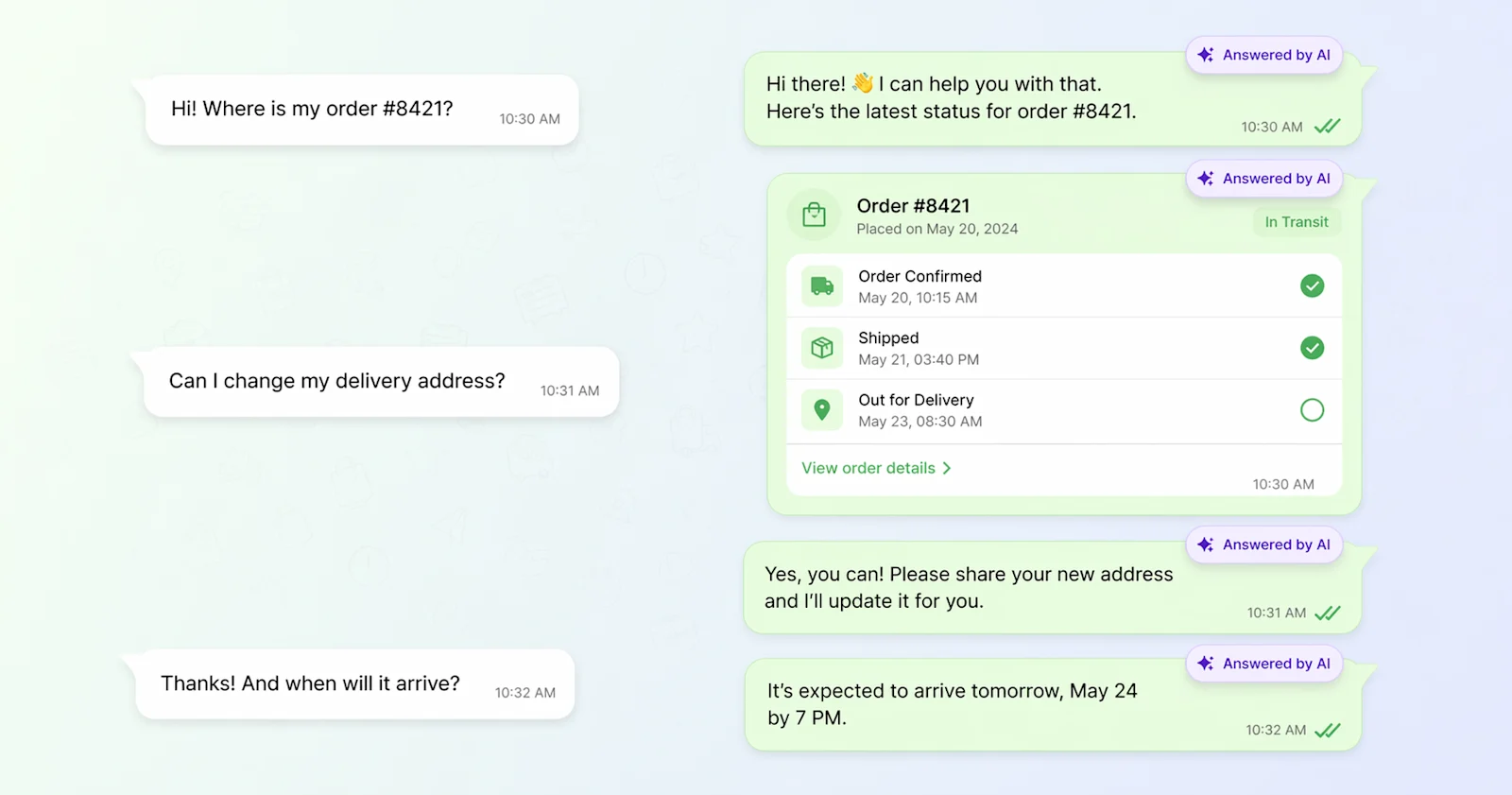
WhatsApp stopped being a “nice to have” support channel somewhere around mid-2025.
Today it carries more than 2 billion active users, sits at the center of customer service for every major brand in Latin America, India, the Middle East, and most of Southeast Asia, and is the fastest-growing support channel inside Zendesk and Salesforce Service Cloud deployments. In several industries (airlines, fintech, e-commerce, telecom) WhatsApp volume has already passed email.
What has not caught up is clarity on how to actually put an AI agent on WhatsApp. The Meta Business Platform rules are non-trivial, there are three very different deployment paths, and most vendor marketing pages gloss over the parts that actually determine whether a project ships.
This guide walks through the real decisions: which deployment path to pick, what the setup looks like if you are already on Zendesk or Salesforce, what Meta’s policies allow and forbid, how to handle escalation and multiple languages, and how to measure whether the thing is actually working.
Why WhatsApp Is Now a Tier-1 Support Channel
The adoption curve crossed over in 2025
WhatsApp has over 2 billion monthly active users globally and more than 200 million businesses now use WhatsApp Business in some form. The Business Platform (the API product) is the fastest-growing layer of that stack, with Meta reporting triple-digit year-over-year growth in enterprise messaging volume through 2025 and into 2026.
For regional context, WhatsApp is the dominant messaging channel in markets representing more than half the world’s population. Brazilian banks run WhatsApp as their primary support surface. Indian e-commerce returns flow through WhatsApp before they hit email. In Mexico, Saudi Arabia, Indonesia, and Nigeria, “call support” increasingly means “message support on WhatsApp.”
It reads “personal” to customers and “scalable” to operators
What makes WhatsApp structurally different from email or web chat is that customers already have it open. Reply rates on WhatsApp sit at 40 to 60 percent within the first hour, compared to 15 to 25 percent on email. Median response times are measured in minutes, not hours. And because messages are asynchronous, a single AI agent can comfortably hold thousands of concurrent conversations, something no voice or web-chat deployment can match.
For support leaders, the appeal is straightforward: the channel your customers already prefer, at voice-AI-level cost per resolution, without the voice-AI latency problem.
Enterprise adoption is no longer experimental
Gartner’s Q1 2026 CX survey found that 61% of enterprise support organizations have either deployed WhatsApp as a support channel or have an active project to do so within 12 months. Among organizations already using Zendesk or Salesforce Service Cloud, that number jumps to 74%.
That matters for this article’s thesis: most of the buyers reading this are not starting from scratch. They already have a CRM with WhatsApp wired in, or they are about to. The question is what to put on top.
The Three Ways to Deploy AI on WhatsApp
There are three architectural paths to get an AI agent answering on WhatsApp. They differ on cost, flexibility, time-to-launch, and how much Meta compliance work you take on yourself.
Path 1: Direct WhatsApp Business API (Cloud API)
You connect directly to Meta’s WhatsApp Cloud API, manage your own WhatsApp Business Account (WABA), submit your own message templates for approval, and handle phone-number verification, green-tick application, and quality rating on your own.
Good fit when: you have engineering resources, a high-volume use case, or a need to do things BSPs will not let you do (unusual template flows, custom interactive components, tight integration with an internal system).
Cost profile: pay Meta conversation fees directly (category-based, per-conversation pricing) plus your own engineering and operations overhead.
Time to launch: 4 to 8 weeks for first production traffic, longer for green-tick verification.
Path 2: BSP (Business Solution Provider) like Twilio, 360dialog, MessageBird, Infobip
A BSP is a Meta-approved partner that wraps the Cloud API with additional tooling: template management UI, analytics, sometimes a visual flow builder, and a simpler onboarding process. You still own your WABA, but the BSP handles a lot of the messy parts.
Good fit when: you do not have a CRM that already carries WhatsApp, or you want a purpose-built messaging stack independent of your ticketing tool.
Cost profile: Meta conversation fees plus BSP markup (typically $0.005 to $0.03 per message depending on provider and volume) plus a platform fee.
Time to launch: 2 to 4 weeks.
Path 3: CRM-routed (Zendesk Sunshine Conversations or Salesforce Messaging)
Your CRM is already a BSP under the hood. Zendesk uses Sunshine Conversations; Salesforce Service Cloud uses its own Digital Engagement / Messaging channels. WhatsApp messages flow into the CRM as conversations or Messaging Sessions, your AI agent reads and replies through the CRM’s API, and the CRM handles the Meta plumbing.
Good fit when: you are already on Zendesk or Salesforce (which covers most mid-market and enterprise CX teams). You get WhatsApp without a new contract, a new BSP relationship, or a new WABA to manage.
Cost profile: Meta conversation fees pass through via the CRM, plus whatever messaging SKU your CRM charges. No separate BSP markup.
Time to launch: days, not weeks, assuming the CRM’s WhatsApp channel is already provisioned.
Decision matrix
Dimension | Direct Cloud API | BSP (Twilio/360dialog) | CRM-routed (Zendesk/Salesforce) |
Setup time | 4 to 8 weeks | 2 to 4 weeks | Days |
Engineering load | High | Medium | Low |
Cost per conversation | Lowest | Medium | Medium (bundled) |
Template management | You own it | BSP UI | CRM UI |
Agent handoff built in | No (build it) | Partial | Yes, native |
Works with existing CRM history | Integration required | Integration required | Yes, by default |
Best for | High-volume, custom flows | Teams not on Zendesk/SF | Teams already on Zendesk/SF |
For most IrisAgent prospects, Path 3 is the right starting point. You likely already have the pipes. The job is to put an AI agent on top of them.
The Zendesk + WhatsApp + IrisAgent Path
Zendesk exposes WhatsApp through its Sunshine Conversations layer (now marketed as Zendesk Messaging). Once WhatsApp is a channel inside Zendesk, IrisAgent plugs in the same way it does for any other Sunshine Conversations source.
What you need first
A Zendesk account with Messaging enabled
A WhatsApp channel provisioned in Zendesk (a WABA connected through Zendesk, with at least one approved phone number)
Admin access to create a Conversations integration
If any of those pieces is missing, the Zendesk docs walk through provisioning WhatsApp inside the Admin Center. Meta verification for the WABA can take a few days; everything else is same-day.
The IrisAgent integration
The setup is identical to the one documented for Zendesk Messaging. You create a Conversations integration in Zendesk Admin Center, point it at the IrisAgent webhook (https://api1.irisagent.com/v1/webhooks/zendesk), and subscribe to conversation:create and conversation:message events.
You then generate an API key inside the integration, record the App ID, Integration ID, Webhook ID, Shared Secret, Key ID, and Secret, and paste them into the IrisAgent dashboard under Integrations, Zendesk Sunshine.
Once that is in place, every WhatsApp message that hits your Zendesk account is replayed to IrisAgent. IrisAgent’s AI answers against your knowledge base, sends the reply back through the Zendesk API, and the customer sees it in WhatsApp a second later.
The same integration covers Instagram Direct, Facebook Messenger, Twitter/X DMs, and SMS if you provision those channels inside Zendesk later. One pipe, every messaging channel. For texting best practices and setup, see our guide to SMS customer service.
Handoff back to a human agent
When IrisAgent determines it cannot or should not answer (low confidence, explicit user request, a compliance-restricted topic, a VIP tag on the end user), it transfers the conversation to a Zendesk messaging queue. From the agent’s side, the WhatsApp thread appears in the Agent Workspace with full conversation history and the reason IrisAgent escalated.
When the human closes the ticket, a Zendesk trigger hands control back to IrisAgent for the next inbound message.
The Salesforce Service Cloud + WhatsApp + IrisAgent Path
Salesforce handles WhatsApp through its Messaging channels inside Service Cloud (part of Digital Engagement). The architecture looks a little different from Zendesk’s but the IrisAgent side is analogous.
What you need first
Service Cloud with Digital Engagement licenses
A Messaging Channel of type WhatsApp, connected to a verified WABA
A Messaging Session object and Omni-Channel routing configured
API user credentials (OAuth connected app) with Messaging scopes
The IrisAgent integration
IrisAgent subscribes to the MessagingSession and ConversationEntry Platform Events (or polls the Messaging API, depending on your edition). Inbound WhatsApp messages land in Salesforce as Messaging Sessions; IrisAgent reads them, generates a grounded answer, and posts the reply back using the ConversationEntry API, which Salesforce then routes to WhatsApp.
Because IrisAgent is a first-party data consumer in Salesforce, it can read Case, Account, and Contact records in the same context. That means an answer to “where is my order” on WhatsApp can personalize on the actual order record, not just generic KB content. This is the single biggest reason to prefer the CRM-routed path for customers already on Salesforce.
Handoff and escalation
Escalation uses Salesforce Omni-Channel natively. IrisAgent marks the session for routing; Omni-Channel picks an available agent based on skills, availability, and queue rules; the agent sees the WhatsApp thread and the full Case context inside Service Console. When the session closes, control returns to IrisAgent for the next inbound.
The Guardrails: What Meta’s Rules Actually Allow
This is the section most articles skip, and it is the one that breaks projects.
The 24-hour customer service window
Once a customer messages your WhatsApp business number, you have a 24-hour window during which you can send free-form messages (text, media, interactive components) in reply. Outside that window, you can only send pre-approved template messages.
Practically, this means your AI agent can do almost anything inside an active conversation: answer questions, send order details, request files, offer menus, escalate. The moment 24 hours of silence passes, the conversation effectively ends until the customer messages again, or you initiate with a template.
Template messages are approved, not authored
A WhatsApp template is a pre-written message structure you submit to Meta for review. Meta approves or rejects each template based on category (Marketing, Utility, Authentication) and content rules. Approval takes minutes to a few days.
Templates are what you send when you want to start a conversation outside the 24-hour window: order confirmations, shipping updates, appointment reminders, password codes. The AI agent does not write these on the fly. It chooses from your approved library and fills in the variables.
Two things to flag for stakeholders:
Marketing templates cost more per conversation than Utility templates, and Meta has been progressively tightening what qualifies as Utility.
Aggressive outbound marketing templates degrade your number’s quality rating, which directly reduces how many messages you can send per day.
What AI should not try to do on WhatsApp
Initiate marketing conversations at scale without explicit opt-in (it will destroy your quality rating and can get the number banned)
Send free-form messages outside the 24-hour window (Meta will reject them)
Handle sensitive financial or medical data without the same compliance controls you apply on email or voice (the channel being “casual” does not change your regulatory obligations)
The honest positioning for an AI agent on WhatsApp is: superb at inbound resolution, great at operationalizing approved outbound templates (confirmations, reminders, post-resolution CSAT), and wrong for cold outbound marketing.
Handoff, Escalation, and Multilingual Support
The escalation policy that actually works on WhatsApp
Two patterns consistently outperform others:
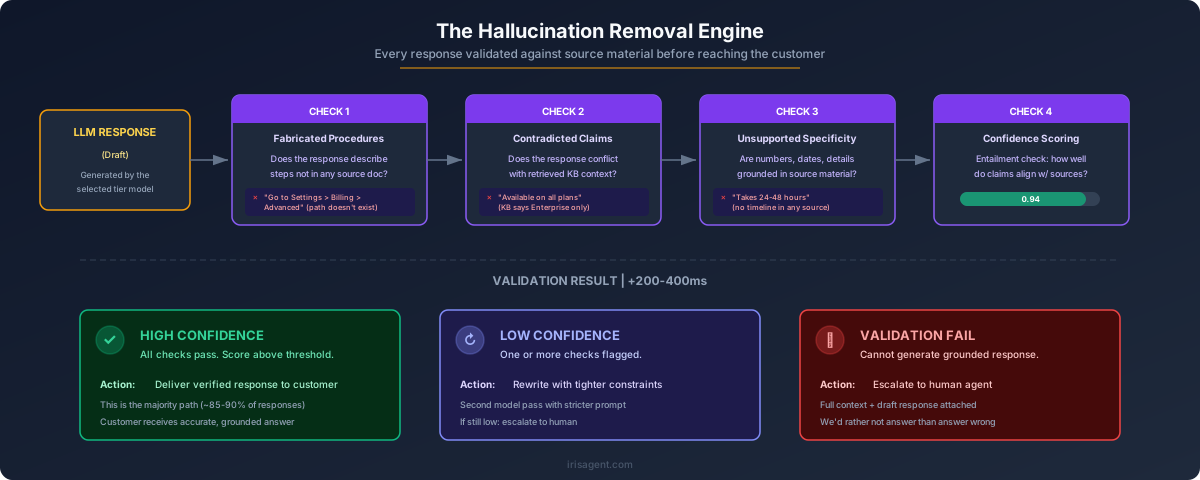
Confidence-based escalation. The AI answers when grounded confidence is above a threshold (IrisAgent’s default is 0.80 against the retrieved KB). Below that, it escalates without guessing. This catches the majority of “I do not actually know” cases before the customer experiences a bad answer.
User-intent escalation. If the customer types “agent,” “human,” “representative,” or an equivalent phrase in any supported language, hand off immediately. Do not try to resolve first. On WhatsApp specifically, customers who ask for a human and get deflected tend to close the conversation and open a complaint on social media, which is the worst possible outcome.
Multilingual on WhatsApp is non-optional
More than 60% of WhatsApp support volume globally is in a language other than English. An AI agent on WhatsApp that only speaks English in markets like Brazil, Mexico, India, or the UAE is not a product; it is a liability.
IrisAgent detects the customer’s language from the incoming message (not from a Meta-declared locale, which is often wrong) and responds in the same language, against the same KB. For markets where customers code-switch (Spanglish, Hinglish, Arabic-English), the agent matches the mix in the reply. The KB itself does not need to be translated up front; IrisAgent generates grounded answers in the target language from the source-language KB, with guardrails against mistranslation of policy-sensitive content.
Media and interactive components
WhatsApp supports images, documents, audio, buttons, and lists. Use them. A “here are your three recent orders” response rendered as a list component resolves three times faster than the same information in a paragraph. An AI agent that only sends text on WhatsApp is leaving containment on the floor.
Measurement: What to Actually Track on WhatsApp
WhatsApp metrics look superficially like web chat metrics, but three of them behave differently and one of them is new.
Deflection rate (adjusted for WhatsApp)
Deflection rate on WhatsApp is the share of inbound conversations that resolve without a human. The nuance: because WhatsApp is asynchronous and customers drift in and out over hours, a conversation is “resolved” only if the customer does not reply with a new question for 24 hours. Do not count abandonment as resolution. A well-instrumented WhatsApp AI deployment runs 55 to 75 percent true deflection depending on industry and KB quality.
First response time
WhatsApp customers tolerate longer gaps than web chat customers but expect a sub-60-second first response. AI agents should sit under 5 seconds. Anything above 30 seconds measurably increases drop-off.
CSAT via template post-resolution
You cannot push a CSAT survey inside the 24-hour window without the customer prompting. Use an approved Utility template (“How did we do?”) sent immediately on resolution. WhatsApp CSAT response rates typically run 3 to 5 times higher than email CSAT because customers are already in the channel.
Containment cost per conversation
This is the WhatsApp-specific metric. Meta charges per 24-hour conversation window, not per message. An AI agent that resolves in 3 messages and an AI agent that resolves in 15 messages cost the same under Meta’s pricing. Optimize for conversations-per-resolution, not messages-per-resolution; the economics reward conciseness.
Quality rating
Meta assigns every WhatsApp business number a quality rating (Green, Yellow, Red). It is driven by block rate, report rate, and user ratings. A falling quality rating is the leading indicator of future throughput limits. Watch it weekly; if it drops, audit what templates and flows are sending.
Quickstart Checklist
If you are on Zendesk or Salesforce and want to have an AI agent answering on WhatsApp inside two weeks, here is the minimum viable path.
Confirm WhatsApp is already a channel in your Zendesk or Salesforce account (or provision it)
Inventory your top 20 inbound WhatsApp questions from the last 90 days
Confirm those 20 topics are covered in your existing KB; fill gaps
Submit Utility templates for your top 5 outbound scenarios (order confirmation, shipping update, appointment reminder, password reset, CSAT)
Connect IrisAgent to the Zendesk Conversations integration or Salesforce Messaging API
Set an 0.80 confidence threshold, enable user-intent escalation, wire handoff to your existing messaging queue
Turn on language auto-detection for your top 3 customer languages
Pilot on 20% of WhatsApp traffic for 7 days
Review deflection, escalation reasons, and CSAT; adjust KB and guardrails
Roll out to 100%
Most of that list is KB and policy work, not engineering. The technical integration on the IrisAgent side is measured in hours.
Ready to deploy?
If you already run Zendesk: see the Zendesk demo walkthrough.
If you already run Salesforce: see the Salesforce demo walkthrough.
If you are picking a CRM and a WhatsApp stack together: talk to us. We have shipped both paths and can say honestly which one fits your volume, geography, and engineering bandwidth.
Summary
WhatsApp is no longer an experiment. It is a Tier-1 support channel that most enterprise teams either already run or will within a year. The deployment question is not “whether” but “how,” and for any team already on Zendesk or Salesforce, the answer is almost always “route WhatsApp through the CRM you have and put an AI agent on top.”
The hard parts are not technical. They are Meta’s template rules, the 24-hour window, and the operational discipline of treating WhatsApp like the high-trust channel it is. Get those right and the AI agent becomes the single highest-leverage piece of your support stack.

Loading the form. Prefer email? Reach us at info@irisagent.com or call +1 617 249 3312.