
AI for Telecom Device and Connectivity Troubleshooting
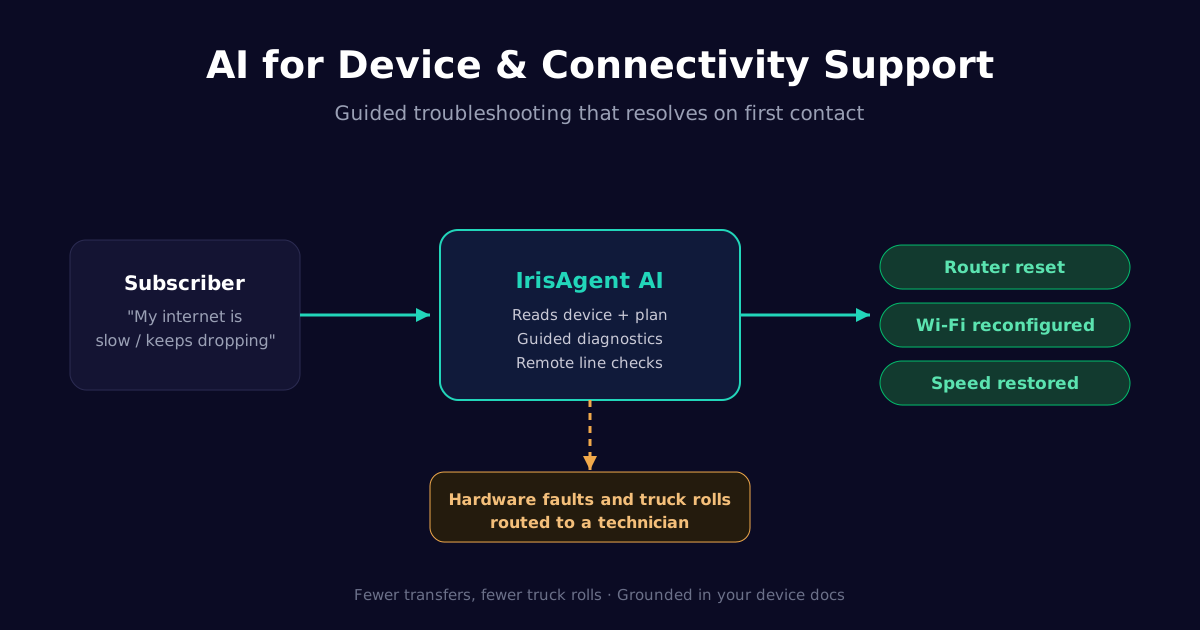
AI for telecom device and connectivity troubleshooting is conversational AI that runs guided diagnostics for slow or dropped connections, Wi-Fi and router setup, and device provisioning, grounded in your own device and network documentation, and escalates hardware faults to a technician. It resolves the largest share of technical tickets on the first contact instead of after several transfers. IrisAgent resolves 55%+ of routine telecom tickets automatically and keeps hallucinations under 5%.
Technical support is where telecom support gets expensive. Connectivity problems are high-volume, they follow known diagnostic paths, and they too often end in a transfer or an avoidable field dispatch. That is exactly the profile grounded AI resolves well.
Why device and connectivity issues dominate technical telecom tickets
Most technical telecom tickets are not unique. They are variations on a handful of problems: a slow connection, a dropped signal, a router that needs reconfiguration, a device that will not provision, or a coverage question. Customers experience them as urgent, and they generate repeat contacts when the first answer does not resolve the issue.
Because these problems follow established troubleshooting steps, they are ideal for automation. The challenge is doing it accurately and personally, not reading a generic script that ignores the customer's actual plan and equipment.
What AI can troubleshoot without an agent
Grounded AI runs the interactive diagnostics that make up the bulk of a technical queue.
Connectivity and speed issues
For slow or dropped connections, the AI checks the line where remote diagnostics are available, walks the customer through targeted fixes, and confirms the result. It handles modem and router restarts, signal checks, and network-setting corrections without a human.
Wi-Fi, router, and device setup
Setup and configuration are a large share of contacts. The AI guides Wi-Fi configuration, router placement, device activation, and APN or network settings, grounded in your documentation for the exact hardware the customer has. Related product how-to automation resolves these the moment the customer gets stuck.
Personalized, grounded diagnostics
Instead of a one-size script, the AI reads the customer's plan, device model, and account state, then tailors the steps to that setup. It skips irrelevant instructions and references the real equipment, which is what makes the guidance land on the first contact. Structured bug and issue triage captures the details cleanly when a case does need to move on.
When device troubleshooting should escalate
Confidence-gated escalation is what keeps technical automation safe. The AI should hand off the moment the issue moves beyond guided self-service: a confirmed hardware fault, a network-side outage, a needed truck roll, or a diagnostic that fails after the standard steps.
When it escalates, IrisAgent attaches the full troubleshooting history, so the customer does not repeat every step they already tried. Even routine account actions inside a technical session, like a password or account reset, are handled inline so the human only gets the genuinely hard part.
How AI reduces telecom truck rolls
Truck rolls are one of the largest cost lines in telecom support, and many are avoidable. The underlying issue is often a configuration or setup problem the customer can fix with the right guidance. By resolving those cases through interactive, grounded troubleshooting, AI cuts unnecessary dispatches and reserves field work for issues that genuinely require it.
That saves money twice: the avoided dispatch, and the agent time that would have been spent scheduling and following up on it.
How IrisAgent automates device and connectivity support
IrisAgent grounds troubleshooting in your device and network documentation and resolves technical tickets from one AI support platform. It deploys in about 24 hours on Zendesk, Salesforce, Intercom, Freshdesk, or Jira Service Management, and the IrisGPT agent assist layer drafts grounded next steps for the tickets a technician still handles.
Next steps
AI for telecom device and connectivity troubleshooting resolves the largest, most repetitive part of your technical queue on the first contact. To get started:
Automate the common diagnostics first: connectivity, speed, Wi-Fi, and device setup.
Personalize every step from the customer's real plan and device, grounded in your docs.
Escalate hardware faults and truck rolls to a technician with the full history attached.
See the full AI customer support for telecom overview, or book a 20-minute demo to see grounded troubleshooting on your own help desk.
Frequently Asked Questions
Can AI troubleshoot telecom device and connectivity issues?
Yes. AI walks customers through guided troubleshooting for slow or dropped connections, Wi-Fi and router setup, device provisioning, and coverage questions, grounded in your own device and network documentation. IrisAgent personalizes the steps to the customer's plan and equipment, runs remote diagnostics where available, and resolves the largest share of technical tickets on the first contact. It escalates to a technician only when the issue needs a truck roll or manual network work.
What connectivity problems can AI resolve without an agent?
AI resolves the common, repetitive technical issues that make up most of a telecom queue: router and modem restarts, Wi-Fi configuration, slow-speed troubleshooting, device activation and provisioning, APN and network settings, and basic coverage checks. These follow known diagnostic paths, which is exactly what grounded AI handles well. IrisAgent runs the steps interactively, confirms the fix worked, and only involves a human when the problem points to a hardware fault or network-side issue.
How does AI personalize telecom troubleshooting steps?
Instead of reading a generic script, grounded AI reads the customer's plan, device model, and account state, then tailors the steps to that setup. It skips irrelevant instructions, references the actual equipment the customer has, and uses remote diagnostics where available to confirm the real problem. IrisAgent keeps every step tied to your verified documentation, so the guidance is accurate for your network and hardware, not a guess from training data.
When should device troubleshooting escalate to a human?
Escalation should trigger the moment the issue moves beyond guided self-service: a confirmed hardware fault, a network-side outage, a needed truck roll, or a diagnostic that fails after the standard steps. Confidence-gated escalation is what keeps AI safe here. IrisAgent hands the case to a technician or agent with the full troubleshooting history attached, so the customer does not repeat every step they already tried.
Does AI troubleshooting reduce telecom truck rolls?
Yes. Many field dispatches are avoidable because the underlying issue is a configuration or setup problem the customer can fix with the right guidance. By resolving those cases through interactive, grounded troubleshooting, AI reduces unnecessary truck rolls, which are one of the largest cost lines in telecom support. IrisAgent resolves the routine technical volume on the first contact and reserves human field work for the issues that genuinely require it.
Loading the form. Prefer email? Reach us at info@irisagent.com or call +1 617 249 3312.