
How to Check Whether Your AI Support Answers Are Grounded
Every support team using AI has the same quiet worry. The AI answered the customer, it sounded confident, and the ticket closed. But was the answer right? Was it grounded in your real knowledge base, or did the model fill a gap with something that reads well and happens to be wrong?
Until now, most tools could not tell you. They show you what the AI said. They do not show you whether it was true.
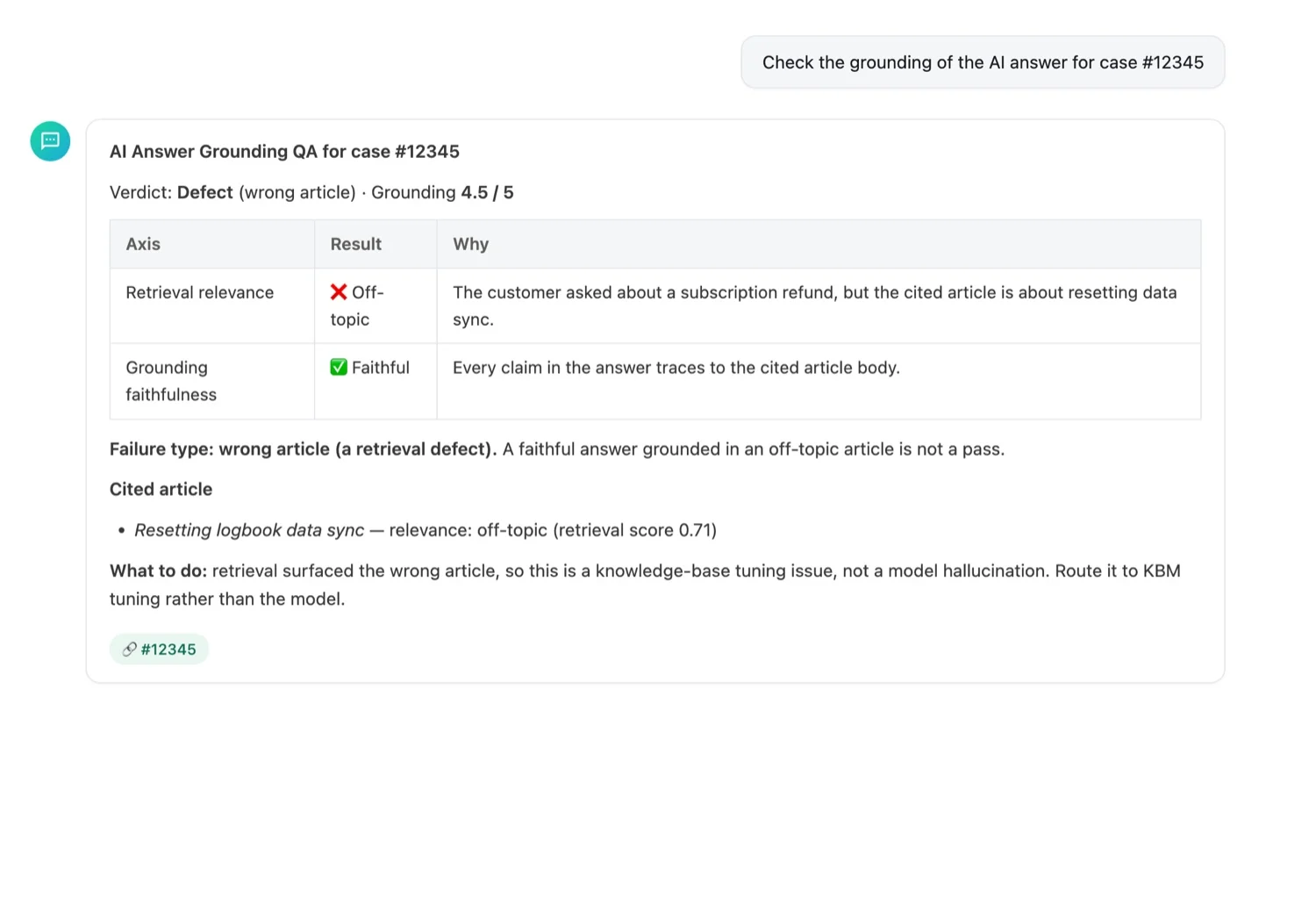
Today we are shipping Answer Grounding QA in Support Analyst, and it closes that gap. You can now ask, in plain English, "check the grounding of the AI answer for case 12345," and get back a trust verdict on the answer your customer actually received.
Here is a 90-second walkthrough of it in action.
Two questions, not one
The core idea is that grading an AI answer is really two questions, and most teams only ask the first.
The first question is faithfulness: did the AI make up a claim that is not in any article it cited? That is hallucination, and it is a generation problem.
The second question is retrieval: were the articles it cited actually about what the customer asked? Because an answer can be perfectly faithful to an article that has nothing to do with the question. The AI quotes a real document, word for word, and still answers the wrong thing.
Answer Grounding QA checks both. It pulls the exact answer the customer received and the knowledge-base articles the AI cited to write it. Then it judges retrieval relevance and grounding faithfulness independently, and combines them into one verdict.
Why the distinction matters
Here is a real shape we see all the time. A customer asks about a refund on their annual subscription. The AI returns a clear, well-written answer about resetting data sync. Every sentence is grounded in the cited article. If you only checked faithfulness, this passes. It is not a hallucination.
But it is wrong. The retrieval step surfaced an off-topic article, and the AI faithfully answered from it. Answer Grounding QA calls this a retrieval defect, not a pass, and tells you exactly that.
That distinction is not academic. It routes the fix. A retrieval problem means your knowledge base tuning surfaced the wrong document, so the fix lives in retrieval and content. A hallucination means the model invented something, so the fix lives in the model and prompt. A knowledge gap means the answer simply is not in your KB yet, so the fix is to write it. For the first time, you know which of these you are looking at, per answer, without reading the article yourself.
How to use it
Open Support Analyst and either click the new "QA AI answer" skill or just type your question. A few examples that work today:
"Check the grounding of the AI answer for case #12345"
"Was the AI answer for case 12345 accurate?"
"Did the bot hallucinate on this ticket?"
Support Analyst finds the delivered answer, fetches the cited article bodies, and returns a verdict: correct, or a defect with its type (hallucination, wrong article, incomplete, or knowledge gap), a grounding score, which cited articles were actually relevant, and a plain-language explanation. It works on both case answers and chat answers.
Answer Grounding QA is deliberately different from the two things next to it in Support Analyst. "AI answer" drafts a fresh reply for a ticket. "QA Review" grades a human agent's conversation against your quality rules. Answer Grounding QA audits the AI's own delivered answer for grounding. Three different jobs, one place.
The trust layer for AI support
We think this matters more every quarter, and especially as pricing moves to outcomes. If you are paying per resolution, you need to trust the resolutions. Showing a customer that an answer was faithfully grounded in the right article, and being honest when it was not, is what makes that trust real instead of assumed.
This on-demand check is the first step. Next we are turning it into an always-on audit that grades every AI answer in the background and surfaces a grounding rate you can watch over time, so trust becomes a number, not a hunch.
Try it in Support Analyst today. Watch the two-axis verdict work end to end in the demo, and if you want the mechanics, the docs are linked below.
Watch the demo: youtu.be/xtjfbTltJuI
Read the Support Analyst docs: docs.irisagent.com/support-analyst
Loading the form. Prefer email? Reach us at info@irisagent.com or call +1 617 249 3312.