
What Is Call Monitoring Software?
If you're leading support right now, you probably know the feeling. CSAT is wobbling, escalations are getting louder, and every root-cause conversation ends the same way: someone pulls five calls, everyone debates whether those calls are representative, and nothing feels conclusive.
Related product hub: Voice AI for grounded voice AI with contextual conversations and seamless handoff.
This page defines Auto-QA. For the product that scores 100% of AI and human conversations on your helpdesk, see AutoQA.
This post is the category guide. For the commercial product page that scores full-coverage QA on your existing phone stack, see call monitoring software.
That's the trap of sample-based QA. You can hear a few conversations. You can coach a few agents. But you can't run a modern contact center on fragments. The strategic shift is moving from reviewing calls as isolated events to treating customer conversations as an operational dataset. That's what call monitoring software has become.
The short version: call monitoring software records, transcribes, and analyzes customer calls so support leaders can measure quality across every conversation instead of the 1% to 3% a manual QA team can sample by hand. This guide covers what the software does, the features that matter in 2026, how to evaluate vendors, and the compliance work that comes with recording at scale.
If you want the product page for scoring calls on the helpdesk you already have, see IrisAgent call monitoring software.
Used well, it stops being a recorder and starts acting like the system of record for customer voice. It captures conversations, turns them into searchable transcripts, surfaces patterns across the operation, and helps teams connect what agents say, what customers feel, and what the business needs to fix.
What Is Call Monitoring Software Really
A support leader usually starts looking at call monitoring software after the team loses confidence in what it can see. Supervisors have anecdotes. QA has a scorecard. Agents say the problem is policy, not performance. Customers are telling a different story, but only through scattered calls and survey comments.
That's why the old definition misses the point. Call monitoring software isn't just a way to listen to calls. It's a system of record for customer conversations.
It Captures More Than Audio
Modern platforms don't stop at recording. They capture the interaction, attach metadata, create transcripts, and make conversations searchable and reviewable in context. When connected to help desk and voice systems, they also let teams trace what happened before, during, and after the call.
For support organizations moving toward automation and voice orchestration, that matters even more. Teams exploring voice AI in customer support operations quickly run into the same requirement: if you can't reliably observe conversations, you can't improve them.
It Changes QA From Reactive to Operational
The practical shift is this:
Old QA model: Review a few calls, score for adherence, deliver delayed feedback.
Modern monitoring model: Observe patterns across conversations, detect friction, prioritize coaching, and spot issues affecting customers at scale.
Leadership model: Use conversation data to inform staffing, training, process design, and product feedback.
The most important mindset change is simple. You're not buying a listening tool. You're building visibility into how your operation actually sounds to customers.
When teams understand that distinction, buying decisions improve. They stop overvaluing basic recording and start asking harder questions about transcription quality, workflow design, scoring logic, and whether the platform helps managers act on what it finds.
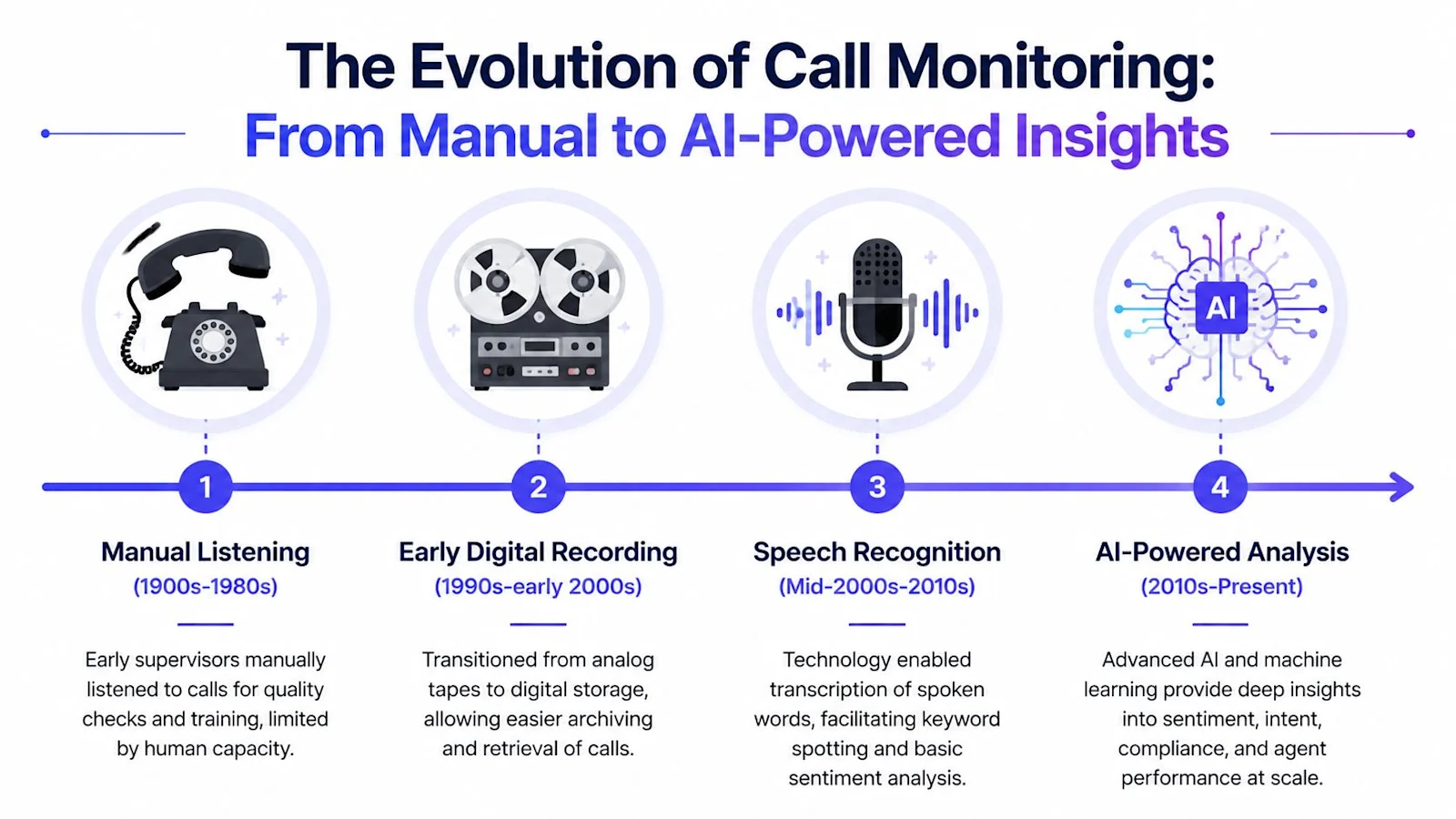
The Evolution from Manual Listening to AI Analysis
Call monitoring started as supervision. A manager listened in, took notes, and used a handful of calls to judge quality. That approach made sense when the goal was control. It breaks down when the goal is operational intelligence.
According to Qualtrics on the shift from spot-checking to automated call monitoring, a foundational milestone was the move from manual listening to automated, always-on analytics. Earlier QA relied on spot-checking a small sample of calls. Modern platforms record calls, show live dashboards, and analyze every interaction with speech analytics and automatic quality scoring.
Why the Old Model Failed
Manual listening has three structural problems.
It's selective: Reviewers hear a narrow slice of reality.
It's delayed: By the time feedback reaches the agent, the moment is gone.
It's inconsistent: Two reviewers can hear the same call and focus on different issues.
That doesn't mean manual review has no value. It means manual review is a poor primary system for large-scale quality management.
AI Changed the Purpose of Monitoring
The most important change isn't that software got smarter. It's that the mission changed. Monitoring used to be about checking whether an agent handled a call correctly. Now it's about understanding what's happening across the entire customer-facing operation.
That includes things manual sampling struggles to surface consistently:
recurring customer complaints
policy confusion
sentiment shifts during calls
script adherence issues
failure patterns by team, queue, or call type
Teams that want to move away from partial QA usually start by studying why sampling a small share of conversations distorts support quality. The pattern is predictable. Sample reviews create false confidence. Full-coverage analysis exposes where the operation is uneven.
Sample-based QA answers, "Did we hear something concerning?"
Full-coverage analysis answers, "What is repeatedly happening, and what should we do next?"
What Good Leaders Do Differently Now
Experienced CX leaders don't treat AI analysis as a replacement for judgment. They use it to route judgment where it matters most.
A strong operating model looks like this:
AI scans broadly for patterns, risk signals, and coaching opportunities.
Managers review selectively with context, not random picks.
QA calibrates the system so scores align with actual business standards.
Operations teams act on repeat issues that show up across calls.
That's the strategic leap. You move from inspecting conversations to learning from them continuously.
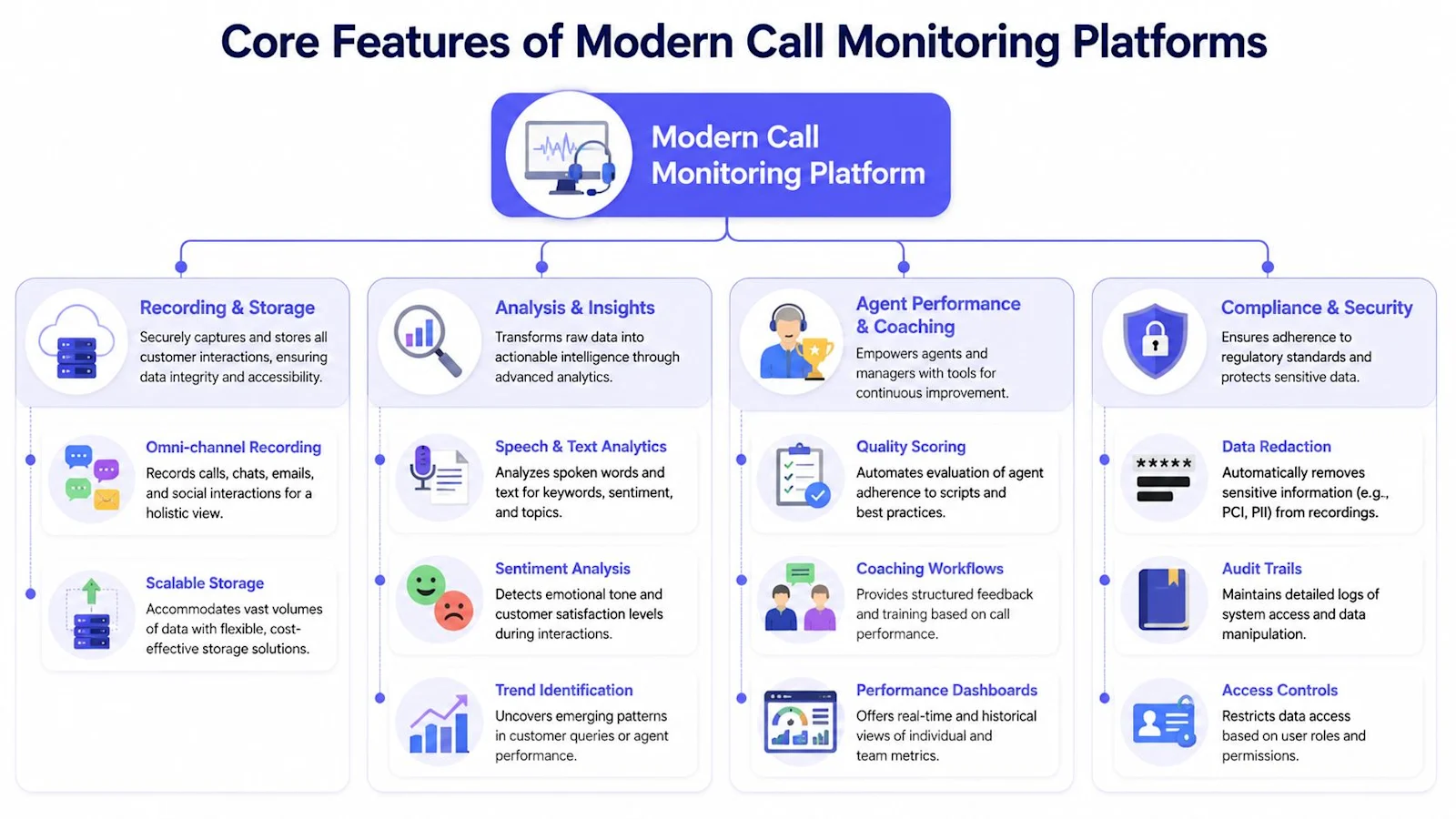
Core Features of Modern Call Monitoring Platforms
The easiest way to evaluate call monitoring software is to group capabilities into three jobs: visibility, analysis, and action. If a platform only does the first one well, you've bought storage. If it does all three, you've got a quality engine.
According to Zendesk guidance on full-call capture and AI analysis, a technically strong stack should capture 100% of customer calls for QA while using AI to transcribe and score them at scale, because manual review samples only a small fraction of interactions. That same guidance recommends full-call recording plus speech recognition and sentiment or intent analysis to detect trends.
Visibility Features That Create a Usable Record
Start with the basics, but don't stop there.
Call recording: This is the raw source. Without reliable capture, nothing downstream matters.
Live monitoring: Useful for escalations, floor support, and supervisor intervention.
Searchable transcripts: Agents, QA, and managers need to find moments, not replay entire recordings.
Interaction context: Good platforms connect the conversation to agent, queue, disposition, and customer record.
A lot of teams overestimate recording and underestimate retrieval. If your managers can't locate the right call quickly, the platform will become a compliance archive instead of a coaching tool.
Analysis Features That Turn Conversations Into Data
Modern systems set themselves apart.
Speech analytics works like a layer of interpretation over the transcript. It doesn't just store words. It helps the team identify patterns in language, intent, silence, overlap, escalation cues, and customer emotion.
Key analytical features include:
Transcription: Converts calls into text that teams can search and review.
Sentiment analysis: Flags emotional tone and moments where the interaction changes direction.
Intent detection: Helps classify why the customer called, even when customers phrase the issue differently.
Auto-scoring: Applies a quality rubric at scale so teams can review more consistently.
Trend detection: Surfaces repeat drivers, recurring complaints, and process failures.
If you want a simple mental model, think of raw call recording as a camera roll. Speech analytics is the index, tag system, and pattern layer that makes the library useful. For a comparison of platforms built on this layer, see the best contact center analytics software.
A related capability is agent analytics. Teams that want a broader performance view often look for agent analytics tools that connect quality with operational performance, especially when they need coaching visibility across teams and queues.
Action Features That Make the Platform Operational
A surprising number of implementations stall here. The platform can detect issues, but nobody built the workflows to respond.
Look for features that support action, not just observation:
Capability | What it should enable | What often goes wrong |
|---|---|---|
Coaching workflows | Route flagged calls to managers with context | Managers get dashboards but no follow-up process |
QA scorecards | Standardize evaluation logic | Scorecards are too broad to coach from |
Alerts and flags | Surface compliance or customer-risk moments | Teams get noisy alerts and start ignoring them |
Performance dashboards | Show patterns by agent, queue, and topic | Reports stay descriptive instead of driving decisions |
Practical rule: If a vendor demo shows beautiful dashboards but can't explain how a flagged conversation becomes a coaching task, the implementation will struggle.
Integrations Matter More Than Feature Count
The best call monitoring software fits into the stack you already run. It should connect with your phone system, CRM, help desk, workforce tools, and knowledge environment.
That's also where some organizations evaluate adjacent platforms. NICE, Zendesk, Talkdesk, and Salesforce all offer integrations, and platforms like IrisAgent combine AutoQA (continuous QA across 100% of conversations), conversation analytics, and grounded AI in one connected support stack. The point isn't to buy the most features. It's to make sure conversation data flows into the systems your teams already use. For how these platforms compare on AI resolution and pricing, see our roundup of the best AI call center software.
If you are monitoring AI voice agents alongside human ones, benchmark them against production data. See our voice AI containment and CSAT benchmarks.
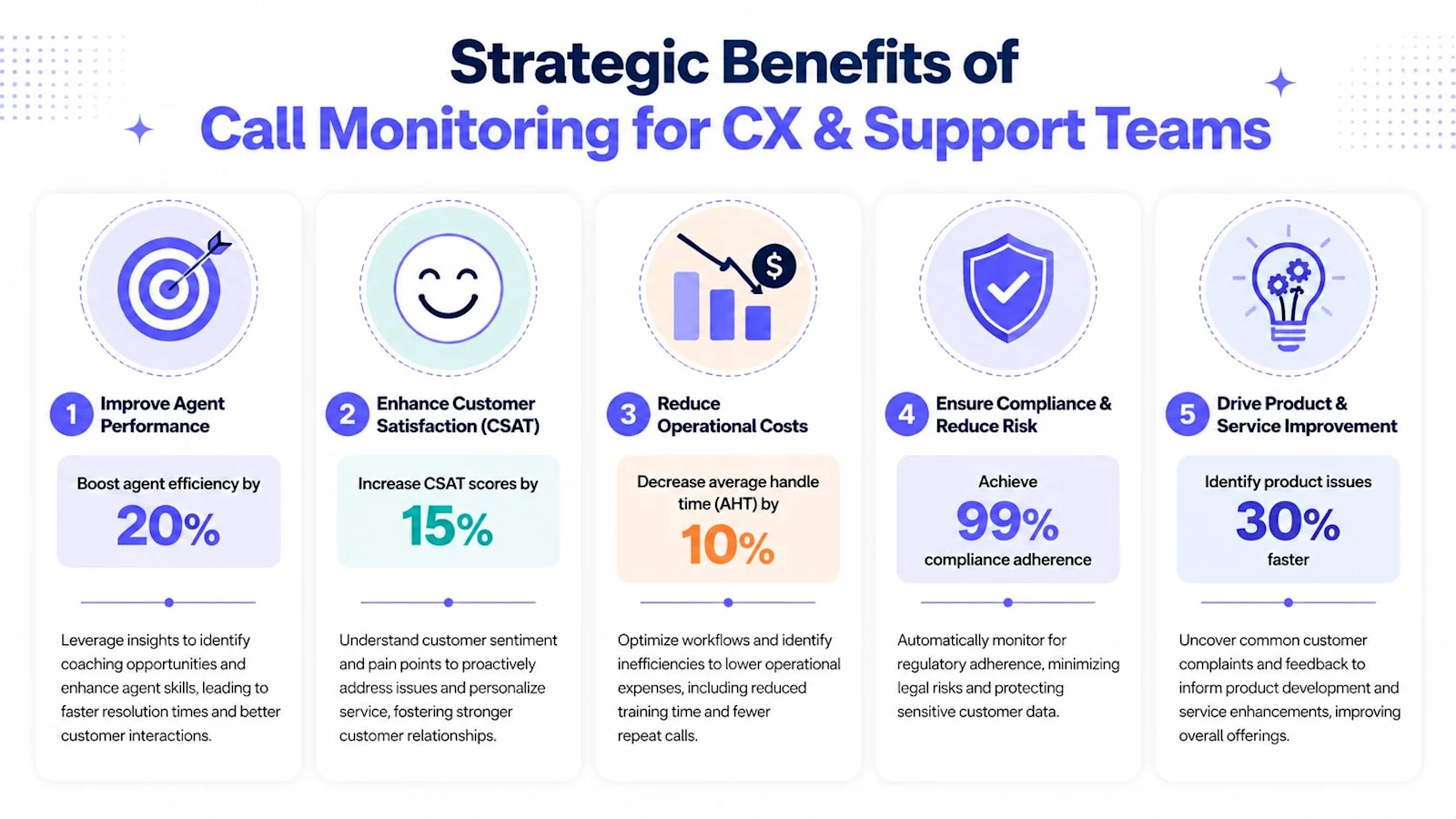
Strategic Benefits for CX and Support Teams
A call monitoring program earns budget when it improves operating decisions, not when it produces more reports. The strategic value shows up when quality data becomes credible enough to shape coaching, customer experience, and process change.
One useful way to think about the upside is through the KPIs leaders already manage. NICE notes that monitoring software tracks core operational metrics such as average handle time (AHT), first-call resolution (FCR), customer satisfaction, wait time, and call quality scores in real time and after calls, as outlined in NICE's guide to call center monitoring software.
A quick overview helps ground the discussion.
Better Coaching With Less Argument
Managers spend too much time debating whether feedback is fair. Full-coverage analysis changes that dynamic because coaching is no longer based on a random handful of interactions. It's based on recurring patterns.
That doesn't make coaching automatic. It makes it more grounded.
An agent who struggles with call control can be shown multiple examples, not one bad day.
A top performer can be identified by repeat behaviors, not manager preference.
A new hire can get targeted support based on actual conversation patterns.
Stronger Customer Experience Diagnosis
When customers are frustrated, they usually leave clues before they leave a survey. Monitoring software helps teams find those clues in live operations.
Conversation intelligence becomes more than QA. It can reveal:
recurring points of confusion in billing, returns, onboarding, or product setup
handoff friction between automation and human agents
policy language customers consistently misunderstand
moments where hold time or repetition damages trust
For a useful walkthrough of how conversation review connects to team performance, this video is worth watching.
Watch: How conversation review connects to team performance (YouTube)
Cleaner Operational Decisions
This is the least glamorous benefit and often the most valuable. Better monitoring improves judgment about process design.
Instead of saying "calls feel longer lately," leaders can inspect how call quality, wait time, resolution quality, and customer friction interact. That leads to better decisions on scripting, routing, staffing, training, and escalation design.
Good call monitoring software doesn't just tell you how agents performed. It helps you see whether the system set them up to succeed.
That's why the business case should never be framed as "we need a QA tool." The core issue is that customer conversations contain operating truth, and your current process probably hears too little of it.
How to Choose and Implement Your Software
Most buying mistakes happen before the demo. Teams start with a vendor shortlist instead of a use case shortlist. That usually leads to feature comparisons that look rigorous but miss the operating model.
Start with the workflows you need to improve. Are you trying to modernize QA, tighten compliance review, identify customer friction faster, or support managers with more targeted coaching? Different priorities change what matters in evaluation.
What to Define Before Talking to Vendors
A practical buying process starts with four decisions:
Scope of coverage
Decide which queues, teams, and call types need monitoring first. Don't begin with every edge case.
Source systems
Document the phone platform, CRM, help desk, workforce tools, and reporting systems the software must connect to.
Evaluation model
Clarify whether the platform will support manual QA, automated QA, or a blended workflow.
Operating owner
Name who owns scorecards, calibrations, user access, and post-launch adoption. If ownership is split vaguely across QA, Ops, and IT, progress slows.
Vendor Selection Checklist
Evaluation Criteria | Key Questions to Ask | Why It Matters |
|---|---|---|
Coverage model | Does the platform support full-call capture and scalable analysis across the queues we care about? | A partial deployment often recreates the same blind spots as sample-based QA. |
Transcription quality | How does the vendor handle accents, noisy environments, interruptions, and domain-specific language? | Low transcript quality weakens every downstream insight. |
Scoring flexibility | Can we configure scorecards to match our workflows, policies, and coaching standards? | Rigid scorecards create unusable quality data. |
Explainability | Can managers see why a call was flagged or scored a certain way? | Black-box outputs create resistance from QA and frontline teams. |
Workflow support | How are flagged interactions assigned for review, coaching, or escalation? | Insight without follow-through won't improve performance. |
Integrations | Does it connect cleanly with our telephony stack, CRM, and help desk? | Manual exports kill adoption. |
Security controls | What access controls, auditability, and redaction options are available? | Conversation data often contains sensitive customer information. |
Retention options | Can we configure storage and deletion rules for recordings and transcripts? | Governance requirements vary by business and region. |
Analytics depth | Can we analyze trends by queue, issue type, agent behavior, and customer sentiment? | Basic dashboards rarely support root-cause analysis. |
Implementation support | Who helps with setup, scorecard design, calibration, and launch? | A strong platform can still fail with weak implementation support. |
Implementation That Actually Sticks
Go live in phases. Start with one or two queues, validate transcripts and scoring logic, and train managers before you roll the platform across the whole operation.
A disciplined launch usually includes:
Pilot first: Use a contained environment to pressure-test the workflow.
Calibrate often: Compare AI flags and human reviews until your team trusts the output.
Train managers early: They need to know how to coach from the insights, not just read dashboards.
Review alert volume: Too many flags create fatigue fast.
The worst rollout is the flashy one. Big launch, broad access, no process change. The software gets used for curiosity for a month, then fades into the background.
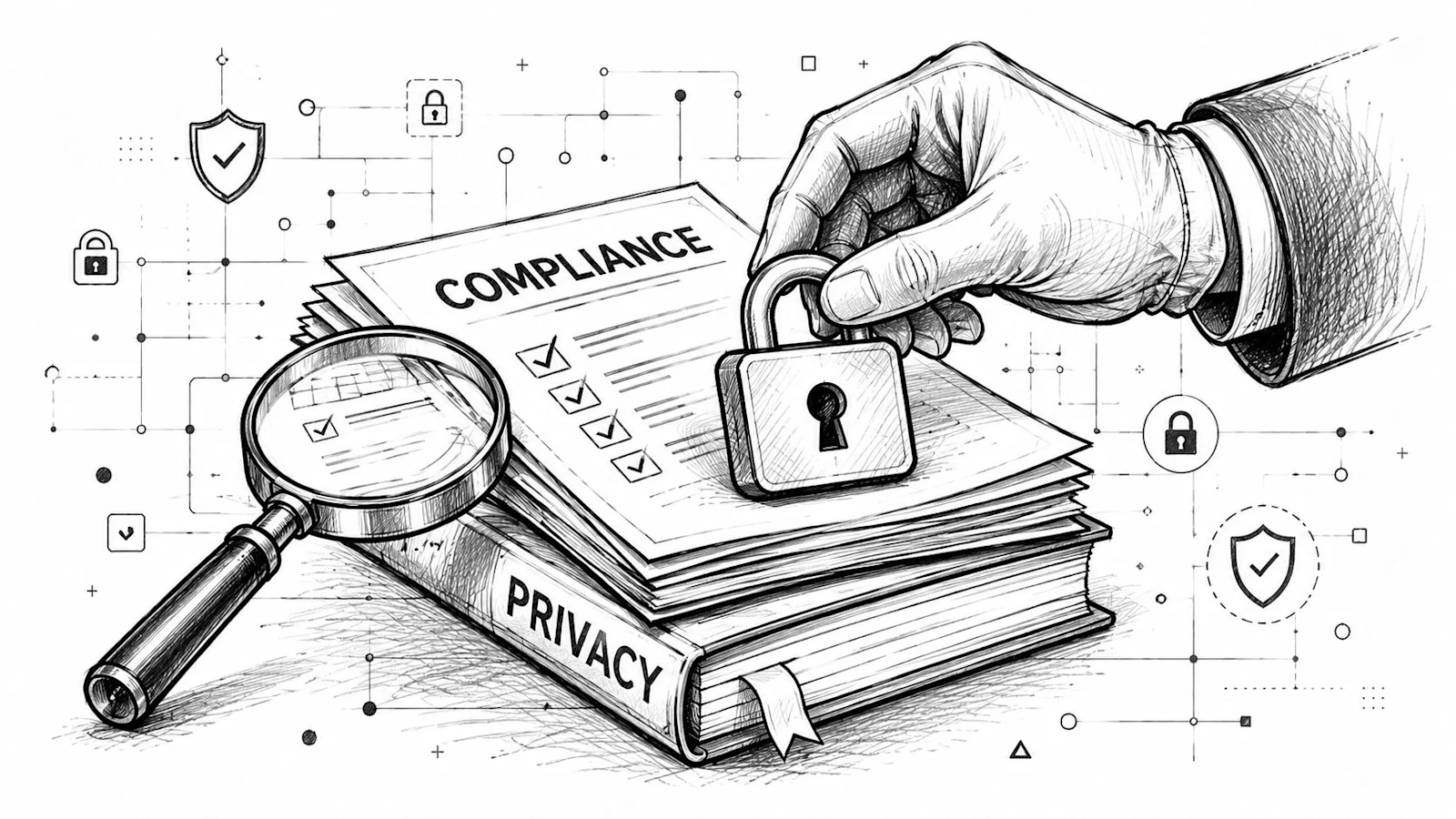
Navigating Compliance, Security, and Privacy
A lot of buyers treat compliance as a procurement checkbox. That's a mistake. Once you record and transcribe customer conversations, you're responsible for a sensitive and expanding dataset.
Vonage highlights this gap clearly in its discussion of call center monitoring and compliance questions. Public guides often mention compliance in passing but rarely answer practical questions such as how long recordings should be retained or how to handle consent across jurisdictions.
Recording Creates Governance Work
The hard part isn't deciding that calls should be monitored. The hard part is governing what happens next.
You need operational answers to questions like:
Consent: When and how are customers informed that calls may be recorded or monitored?
Retention: How long are recordings and transcripts stored?
Access: Which roles can listen to audio, read transcripts, or export data?
Redaction: How is sensitive information handled in recordings and transcripts?
Jurisdiction: Do regional rules affect what you can record, store, or analyze?
AI Transcription Raises the Bar
Transcription and analytics are useful. They also increase the privacy surface area. Audio locked in a storage archive is one thing. Searchable text, sentiment tags, and issue clustering create more ways for data to be accessed, shared, and misused if controls are weak.
That's why strong governance should include both policy and platform controls.
Governance area | Good practice |
|---|---|
Consent management | Align scripts and call flows with legal and regional requirements |
Role-based access | Limit audio and transcript access by job function |
Retention policy | Set rules for deletion and archival before rollout |
Review controls | Track who accessed, exported, or changed records |
Compliance isn't a feature add-on. It's part of the operating design of call monitoring software.
Teams that get this right involve legal, security, CX operations, and QA early. Teams that don't usually find themselves rewriting policies after deployment, which is expensive and disruptive.
Frequently Asked Questions
How do we prove ROI on call monitoring software beyond efficiency gains?
The narrow case is labor savings in QA, which is real but undersells the investment. The stronger case is whether the platform improves resolution quality, reduces repeat contacts, tightens compliance review, surfaces product and policy friction faster, and makes coaching more consistent. The most durable ROI combines operational outcomes with management effectiveness: when managers spot issues earlier and coach from better evidence, the gains spread across the whole operation.
My team thinks AI call scoring is a black box. How do we build trust?
That concern is justified, and trust comes from process rather than persuasion. Start with parallel review, comparing AI output against human QA on the same interactions. Inspect edge cases where the model flags normal calls or misses obvious issues. Expose the logic so managers can see the signals behind each score. Then tune thresholds, because over-sensitive alerting creates skepticism faster than anything else.
Does full-coverage QA replace the QA team?
No, it changes the job. When software analyzes every interaction, QA stops spending most of its time hunting for calls and filling scorecards by hand. The team shifts to calibrating standards, reviewing edge cases, coaching managers, and identifying patterns worth escalating to operations or product. That is usually a better use of experienced QA talent.
What should we watch for in the first phase of a call monitoring rollout?
Three things decide whether the program sticks. Flag quality: are alerts surfacing useful interactions or just noise? Manager adoption: are team leads actually using the insights in one-on-ones and coaching sessions? Governance discipline: are access, retention, and review processes clear from day one? If those three are weak the program drifts into passive reporting.
We already have dashboards. Why isn't that enough?
Dashboards summarize outcomes, conversations explain causes. AHT can rise for many reasons, FCR can slip for many reasons, and wait time affects experience differently depending on what happens once the call connects. Call monitoring software moves leaders from lagging indicators to the interaction-level evidence behind them, which is the difference between noticing a problem and being able to fix it.
Loading the form. Prefer email? Reach us at info@irisagent.com or call +1 617 249 3312.