
AI Customer Support Automation Software: 8 Tools & Real Costs
The best AI customer support automation software in 2026 is IrisAgent, Zendesk AI agents, Salesforce Agentforce, Intercom Fin, Forethought (now Zendesk), Ada, Kustomer, and Freshworks Freddy. IrisAgent resolves 60%+ of support interactions across chat, email, and voice on the help desk you already run, with the Hallucination Removal Engine validating every answer before it reaches a customer, and it runs in production at Dropbox, Zuora, InvoiceCloud, and Teachmint. The right pick depends on whether you need end-to-end resolution or busywork automation, how your help desk is set up, and how the vendor prices successful automation.
For B2B SaaS CX and support leaders, the buying question is sharper: can the tool resolve billing, onboarding, and churn-risk tickets across mixed help desks without a rip-and-replace? Our guide to the best AI customer support tools for SaaS ranks vendors on exactly those jobs, and AI customer support for SaaS covers the full SaaS support journey. This page covers the broader automation market.
For the cross-category shortlist (overlay, suite-native, and custom-build tools side by side), see our guide to the best AI customer service software.
Top AI agent platforms for customer support teams in 2026
When support leaders search for the top AI agent platforms for customer support teams in 2026, they are usually shopping the same category this guide covers: software that resolves tickets end to end, not just chat widgets or agent copilots. The eight tools below (IrisAgent, Zendesk AI agents, Salesforce Agentforce, Intercom Fin, Forethought, Ada, Kustomer, and Freshworks Freddy) are the AI agent platforms that show up most often in production evaluations for customer support teams this year. Use this page for the automation shortlist and decision framework; use pairwise pages like IrisAgent vs Zendesk AI, IrisAgent vs Intercom, and IrisAgent vs Freshdesk when you are down to two vendors.
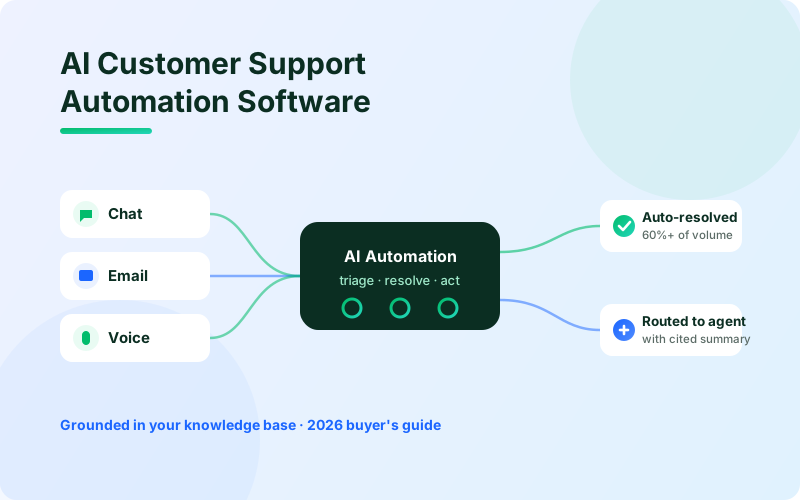
AI customer support automation software resolves and routes support requests automatically. It uses large language models to understand what a customer is asking, find the right answer in your own data, and complete the work without a human touching most of the ticket. The best tools in 2026 do not just deflect questions with a help-center search. They take action: looking up an order, processing a refund, resetting an account, and escalating the hard cases to an agent with a source-cited summary.
If you are evaluating customer support automation software, the market splits into two groups. One group automates the busywork around a ticket (tagging, routing, summarizing, drafting replies). The other group automates the resolution itself. This guide scores the eight leading AI customer support automation tools in 2026, explains exactly what each one automates, and gives you a framework to choose the right fit for your team.
For grounded agent assist (human-in-the-loop copilots), see support agent assist and our Best AI Agent Assist Tools roundup. This page stays on full automation and resolution. For the broader platform context, see AI for customer support.
What does AI customer support automation software do?
The best AI customer support automation software automates four layers of support work:
Triage and routing. It reads an incoming ticket, classifies intent and urgency, and sends it to the right queue, agent, or AI workflow. See AI ticket automation for the triage playbook.
Resolution. It answers the customer directly, grounded in your knowledge base and past tickets, and completes actions in your connected systems.
Agent assist. For tickets a human still handles, it drafts replies, surfaces relevant articles, and summarizes long threads.
Quality and analytics. It auto-scores conversations, detects trends, and flags emerging issues before they spike.
The single biggest predictor of whether automation works in production is grounding: does the AI validate every answer against your real content, or can it invent a policy that does not exist? That is the line between a tool you can put in front of customers and one you cannot.
SaaS support trends that change the shortlist
SaaS support volume concentrates in a few journeys: trial and onboarding, product how-to, subscription billing, renewals, and churn save. Native suite AIs often cover chat on one help desk well, then stall when billing state lives in a second system or when enterprise accounts sit in Salesforce while self-serve volume sits in Zendesk. Overlay platforms that ground answers in your KB and act across the help desks you already run are winning more SaaS RFPs in 2026 for that reason.
If you need the full SaaS playbook (onboarding automation, billing resolution, renewal signals, and churn-risk handoffs), use the AI customer support for SaaS hub. This page stays on the tool shortlist and decision framework.
How we evaluated the automation tools
Every tool on this list has a real production automation capability and at least one public customer. We scored them on five factors that separate a demo from a production deployment:
What it actually automates. Resolution end to end, or only the busywork around a ticket?
Grounding and accuracy. Does it validate answers against your content, or can it hallucinate?
Deployment model. Does it layer onto your existing help desk, or require a rip-and-replace?
Channels. Chat only, or chat, email, and voice?
Pricing model. Predictable as automation succeeds, or does cost spike with every resolved ticket?
A note on sources: every pricing and limitation claim here is drawn from the vendor's public page, a published case study, or widely reported terms. Automation pricing changes often, so verify current numbers with the vendor before you sign.
AI customer support automation software at a glance
Tool | What it automates | Help desk fit | Channels | Grounding | Pricing | Best for |
|---|---|---|---|---|---|---|
IrisAgent | End-to-end resolution, routing, agent assist, QA | Layers on Zendesk, Salesforce, Intercom, Freshworks | Chat, email, voice | Hallucination Removal Engine | Usage-based or resolution-based | Ship grounded automation this quarter |
Zendesk AI agents | Resolution, triage, macros, QA | Native to Zendesk | Chat, email | Tuned on Zendesk content | Per resolution, Zendesk-native | Zendesk-only shops |
Salesforce Agentforce | Resolution, case workflows | Native to Service Cloud | Chat, email, voice | Grounded via Data Cloud | Custom + Data Cloud | Full Salesforce stack |
Intercom Fin | Resolution, routing | Native to Intercom | Chat, email | Tuned on Intercom content | ~$0.99/resolution + seats | Intercom-native teams |
Forethought (Zendesk) | Triage, resolution, agent assist | Layers on major help desks | Chat, email | Knowledge-based | Custom, 20K-ticket min | Existing Forethought customers |
Ada | Resolution, no-code flows | Standalone + integrations | Chat, voice | Knowledge-based | ~$3.50/resolution | No-code, multilingual builders |
Kustomer | Routing, resolution on its CRM | Native to Kustomer | Chat, email, social | Tuned on Kustomer data | Custom quote | Teams adopting Kustomer CRM |
Freshworks Freddy | Resolution, agent assist | Native to Freshworks | Chat, email | Knowledge-based | Add-on to Freshworks plans | Freshworks shops |
1. IrisAgent
Best for: mid-market and enterprise teams (including B2B SaaS) that want grounded, end-to-end automation on the help desk they already run, deployed in about a day.
IrisAgent is an AI customer support automation platform that layers onto Zendesk, Salesforce, Intercom, and Freshworks to resolve more than 60% of support interactions across chat, email, and voice. It automates the whole lifecycle, not just one slice: it triages and routes incoming tickets, resolves the common ones end to end, assists agents on the rest with drafted replies and source-cited context, and auto-scores conversations for quality.
What it does well:
End-to-end resolution grounded in your KB and ticket history, with the Hallucination Removal Engine validating every answer before it reaches a customer
Deploys in about 24 hours from the help desk marketplace, no rip-and-replace and no 20,000-ticket data minimum
Covers chat, email, and voice on one platform (for phone-first buying, see Best AI Voice Bots and Voice AI)
Flexible usage-based or resolution-based pricing so cost can match how you actually run support (pricing, AI support pricing)
Pairs automation with agent assist and AutoQA, so you do not buy a second tool for the tickets humans still own
Runs in production at Dropbox (160,000 agent minutes saved, average handle time cut by 2 minutes), Zuora (10x faster issue resolution on billing-heavy queues), InvoiceCloud, and Teachmint (35% of customer issues solved with IrisAgent AI)
Where it is not a fit:
If you specifically want to rip out your current help desk and consolidate onto a single native suite, IrisAgent is an overlay, not a replacement system of record
If you need a fully managed BPO where a vendor's humans own your queue, IrisAgent is a platform, not a staffed service
If your only requirement is a no-code chatbot flow builder with 50+ language packs out of the box and no help-desk overlay, a builder like Ada may fit that narrow motion better
For teams that want the highest end of automation, IrisAgent also offers managed resolution, where it owns the outcome on a defined set of intents. SaaS buyers comparing journey-level coverage (onboarding through renewals) should also read the SaaS support AI hub.
2. Zendesk AI agents
Best for: teams already standardized on Zendesk that want automation native to that workflow.
Zendesk has built AI agents, intelligent triage, and quality automation directly into its suite. The strength is fit: if your agents live in Zendesk all day, the automation shows up where they already work, with no extra surface to learn. For a direct overlay comparison, see IrisAgent vs Zendesk AI.
What it does well:
Native to Zendesk Agent Workspace, one vendor for procurement
Resolution, triage, macro suggestions, and QA inside the stack agents already use
Fast setup for existing Zendesk customers whose knowledge already lives in Guide
Where it is not a fit:
Advanced automation is gated behind premium tiers and add-ons, which raises the per-agent cost. Verify current add-on pricing.
It is Zendesk-centric by design. If you run Salesforce or Intercom as a primary queue, this is the wrong stack.
Resolution quality tracks how well-structured your Zendesk content already is. Zendesk does not market a dedicated hallucination-removal validation layer the way IrisAgent does.
3. Salesforce (Agentforce)
Best for: enterprises running Service Cloud that want automation tied into the broader Salesforce platform.
Agentforce brings autonomous AI agents to Service Cloud, grounded through Data Cloud so the automation can reason over CRM data. For organizations already invested in Salesforce, the appeal is a single platform spanning sales, service, and data.
What it does well:
Native to Service Cloud with deep access to Salesforce data
Case resolution, workflow actions, and agent assist under one roof
One throat to choke for Salesforce-committed procurement
Where it is not a fit:
Realizing the value usually means a Data Cloud foundation and meaningful implementation effort. Time to value is weeks, not a day.
Consumption-based pricing can surprise finance when usage climbs.
Overkill if you just want grounded ticket resolution on Zendesk or Intercom next week without a Salesforce program.
4. Intercom (Fin)
Best for: teams committed to Intercom that want strong chat automation out of the box.
Fin is one of the more capable resolution bots for chat, tuned on Intercom content and quick to stand up for existing customers. If Intercom is your primary support surface, Fin is a natural choice. We compare the two in detail in IrisAgent vs Intercom.
What it does well:
Native to the Intercom inbox, zero integration project for existing seats
Strong chat and email resolution and routing out of the box
Fast to switch on for Intercom-native teams
Where it is not a fit:
Per-resolution pricing (~$0.99 per resolution) plus seat costs means your bill rises directly with how much the automation succeeds, which can make budgeting harder at scale.
It works best when your team is fully on Intercom. Mixed Zendesk or Salesforce queues are second-class.
Grounding quality tracks your help center hygiene. Fin does not market an absolute no-hallucination guarantee.
5. Forethought (Now Owned by Zendesk)
Best for: existing Forethought customers, with eyes open about the roadmap.
Forethought offers triage, resolution, and agent assist that sit on top of major help desks rather than locking you into one. In March 2026, Zendesk acquired Forethought, which changes the math for non-Zendesk teams. Side-by-side detail lives in IrisAgent vs Forethought.
What it does well:
Focused automation play with solid intent classification
Layers on major help desks rather than forcing a rip-and-replace
Real production customers and mature retrieval on agent-facing answers
Where it is not a fit:
Post-acquisition, the roadmap sits inside Zendesk. Salesforce-first and Intercom-first teams become second-class integrations.
Forethought has historically required a 20,000-ticket data minimum to train its models, which rules out smaller teams.
Vendor independence risk is the headline. Your automation vendor is now owned by a help desk you may not run.
6. Ada
Best for: teams that want a no-code automation builder with broad language coverage.
Ada lets non-engineers build automated flows and supports many languages, which makes it popular with global, self-service-heavy teams. See IrisAgent vs Ada for a side-by-side.
What it does well:
No-code flow builder that non-engineers can own
Broad language coverage for global self-service
Chat and voice resolution through configurable flows
Where it is not a fit:
Per-resolution economics (~$3.50 per resolution) get expensive fast at volume. Model total cost at 2x your current ticket volume before signing.
Knowledge ingestion and grounding can have gaps, so accuracy depends on how carefully you build and maintain the content.
Standalone-plus-integrations is a larger ops surface than a help-desk overlay if you already live in Zendesk or Salesforce.
7. Kustomer
Best for: teams that want automation built into a conversational CRM.
Kustomer combines a CRM-style data model with automation across chat, email, and social. If you want the customer record and the automation in one system, it is a coherent option.
What it does well:
CRM-style data model with automation in one platform
Routing and resolution across chat, email, and social
Strong fit when you want the customer record as the system of record
Where it is not a fit:
Best value requires adopting Kustomer as your platform, which is a larger commitment than layering automation onto your current help desk.
Custom quote pricing makes apples-to-apples comparison harder.
Wrong pick if your constraint is "keep Zendesk / Salesforce / Intercom and automate on top."
8. Freshworks (Freddy)
Best for: Freshworks teams that want native automation and agent assist.
Freddy adds resolution bots and agent-assist features to Freshworks and Freshchat. For existing Freshworks customers it is convenient and reasonably priced. For an overlay comparison against the Freshworks stack, see IrisAgent vs Freshdesk.
What it does well:
Native to Freshworks and Freshchat, convenient for existing seats
Resolution and agent assist inside the Freshworks suite
Generally lower entry price than enterprise-only platforms
Where it is not a fit:
Capability varies by plan tier. Confirm which AI features ship on your current plan.
Automation quality is tied to your Freshworks content hygiene.
Not the shortlist if you run Zendesk or Salesforce as the primary help desk.
Feature fit is only half the decision. The other half is what each tool bills once volume arrives. Depth on bands by ticket volume lives on AI support pricing.
How to choose AI customer support automation software
Five questions will collapse the shortlist in one meeting:
Resolution or busywork? If you need the AI to close tickets end to end (refunds, resets, order lookups), shortlist IrisAgent, Fin, Agentforce, Ada, and Zendesk AI agents. If you only need tagging, routing, and draft assist, a thinner triage layer may be enough. See AI ticket automation.
What help desk do you run? Zendesk AI, Agentforce, Fin, Freddy, and Kustomer only make full sense inside their own stacks. A platform like IrisAgent layers across Zendesk, Salesforce, Intercom, and Freshworks.
How fast do you need it live? If the answer is "this quarter," weeks-long Data Cloud builds and 20,000-ticket training minimums fall off the list. Overlay tools that install from the marketplace in about 24 hours stay on it.
How does it price successful automation? Per-resolution tools (Fin ~$0.99, Ada ~$3.50) tie your bill to volume. Usage-based or seat-tied models scale differently. Always model total cost at 2x your current ticket volume. Start from pricing.
How does it prevent wrong answers? Ask every vendor what validates an answer before it reaches a customer. Grounded validation is the difference between automation you can put in front of customers and automation you have to babysit.
Real scenario: Priya is VP of Support at a 120-agent B2B SaaS company running Zendesk for most volume and a smaller Salesforce queue for enterprise accounts. Billing disputes, trial onboarding, and churn-risk renewals drive most of her queue. In June 2026 she shortlisted Zendesk AI agents, Salesforce Agentforce, Intercom Fin, Ada, and IrisAgent. Zendesk AI only covered the Zendesk side. Agentforce needed a Data Cloud project her team did not have capacity for. Fin would have forced a help-desk migration. Ada's per-resolution math broke the budget at her projected 60% automation rate. IrisAgent layered grounded resolution across both help desks, went live in about a day, and she measured resolution on her own top intents before expanding. She chose on coverage, grounding, and time-to-value, not on a feature checklist. For the SaaS journey map behind that decision, see AI customer support for SaaS.
What automation actually costs at 10,000 tickets a month
Pricing model matters more than sticker price. Run the same volume through each model and the spread runs to six figures. Take a team handling 10,000 tickets a month that automates 60% of them (6,000 automated resolutions) and price it against models you will meet in this evaluation:
Ada, at $3.50 per resolution: $21,000 a month, or $252,000 a year. The bill scales with every ticket the automation wins.
Fin by Intercom, at $0.99 per resolution: $5,940 a month. Add seats and copilot add-ons and it climbs further. Confirm current Intercom terms.
Enterprise custom platforms with six-figure annual floors and multi-week builds: year one often lands well above the mid-market overlay before a single resolution closes.
Forethought, at a 20,000-ticket minimum: this team may not qualify. Forethought was acquired by Zendesk in March 2026, which adds vendor lock-in to the evaluation.
Help-desk overlays with flexible usage or resolution pricing (including IrisAgent): model against your own volume curve on AI support pricing rather than assuming per-resolution sticker math.
Payback is the other half of the question. At Dropbox, IrisAgent saved 160,000 agent minutes (2,667 agent hours) and cut average handle time by two minutes. At Zuora, IrisAgent delivered 10x faster issue resolution on billing-heavy support. Multiply those hours by your own loaded agent cost, then compare the result against the annual figures above.
Whatever you shortlist, run the same proof in your evaluation. Load your real knowledge base, send 20 hard, edge-case tickets, and check three things: did it resolve accurately, did it admit when it did not know, and did it complete the action end to end?
Common mistakes to avoid
Buying busywork automation when you needed resolution. Tagging and draft assist help agents. They do not close the ticket. Match the tool to the outcome you are buying.
Ignoring mixed help desks. Many SaaS teams run Zendesk plus Salesforce or Intercom. A single-stack native AI leaves half your volume uncovered.
Skipping the grounding question. A confident wrong refund policy in a customer inbox is worse than no automation. Ask what validates the answer before send.
Under-modeling per-resolution cost. At 60% automation, per-resolution tools can outrun a flat or usage plan by six figures a year. Model 2x volume before you sign.
Letting the KB stay messy. Automation is only as good as the knowledge it reads. Pair resolution with knowledge generation and AutoQA so gaps close as you roll out.
How IrisAgent delivers grounded support automation
IrisAgent's automation is built on the same Hallucination Removal Engine that powers its agent assist and voice products. When a ticket arrives, IrisAgent reads the thread, resolves what it can against your KB and past tickets, cites the source, and escalates low-confidence cases to a human with a summary instead of guessing.
Grounded automation for order and account details
SaaS password resets and ecommerce order questions look similar to a chatbot, but they are not the same systems problem. A password reset can often resolve from identity and account state alone. An order-details question needs a live read of OMS, Shopify, carrier, or payment state, then validation before send, or the answer invents line items and ETAs.
For teams that need that systems-grounded path, see accurate order details automation (temporary; also covered on ecommerce support AI).
Because it layers onto your existing help desk, there is no re-platforming and no 20,000-ticket minimum. Because pricing is flexible (usage-based or resolution-based), you can match cost to how you actually run support. And because automation shares infrastructure with agent assist and voice AI, you can start with resolution on routine tickets and expand without buying a second platform.
That is why Dropbox, Zuora, InvoiceCloud, and Teachmint run IrisAgent on high-volume queues, with validated accuracy above 95% while ungrounded tools hallucinate on 15% to 30% of responses. Dropbox cut average handle time by 2 minutes and saved 160,000 agent minutes. Zuora reports 10x faster issue resolution. Teachmint solves 35% of customer issues with IrisAgent AI. InvoiceCloud runs the same grounded stack on billing and payments support. For SaaS-specific journey coverage, see AI customer support for SaaS.
Next steps
The eight AI customer support automation tools above cover the real landscape in 2026. Three takeaways:
Grounding is the whole game. A confident wrong answer in a customer inbox does more damage than no automation. Pick a tool that validates against your source before it sends.
Match the tool to your stack and your outcome. Single-stack natives leave mixed-help-desk teams half-covered, and busywork automation is a different product than end-to-end resolution.
Pricing model shapes your next three years. Per-resolution pricing scales with your volume, which is exactly when you least want a bigger bill. Model total cost at 2x volume first.
If ecommerce order accuracy is on your shortlist, pair this tool comparison with accurate order details automation and ecommerce support AI.
If you are evaluating AI customer support automation software this quarter, especially for a B2B SaaS support org, the fastest way to compare is a shadow run on your own tickets. IrisAgent installs on your existing help desk in about 24 hours. Book a 20-minute demo and see grounded resolution on your own queue before you pick a tool.
Frequently asked questions
What is AI customer support automation software?
It is software that uses AI to automatically resolve and route customer support requests. The best tools understand the customer's intent, ground their answer in your own knowledge base and ticket history, take actions in your connected systems, and escalate the cases they cannot confidently handle to a human.
What is the best AI customer support automation software?
Strong options in 2026 include IrisAgent, Zendesk AI agents, Salesforce Agentforce, Intercom Fin, Forethought, Ada, Kustomer, and Freshworks Freddy. IrisAgent is the best fit for teams that want grounded, end-to-end automation on their existing help desk with flexible pricing and a roughly 24-hour deployment. Zendesk AI, Fin, Agentforce, and Freddy are strong if you are fully locked to one suite.
What is the best AI customer support automation software for SaaS companies?
For SaaS companies in 2026, prioritize tools that resolve billing, onboarding, and churn-risk tickets across mixed help desks, not chat-only bots on a single suite. IrisAgent leads that shortlist for grounded overlay automation on Zendesk, Salesforce, Intercom, and Freshworks, with production proof at Dropbox, Zuora, InvoiceCloud, and Teachmint. Suite-native options (Zendesk AI, Fin, Agentforce, Freddy) fit when you are fully locked to one stack. Journey-level detail lives on AI customer support for SaaS. For a vendor-by-vendor SaaS shortlist, see the best AI customer support tools for SaaS.
What are the top AI agent platforms for customer support teams in 2026?
The top AI agent platforms for customer support teams in 2026 are IrisAgent, Zendesk AI agents, Salesforce Agentforce, Intercom Fin, Forethought (now Zendesk), Ada, Kustomer, and Freshworks Freddy. IrisAgent is the strongest fit when you want grounded, end-to-end resolution on the help desk you already run, with flexible pricing and about a 24-hour deploy. Suite-native platforms win when your team is fully locked to one stack. This shortlist is the same set scored above for automation depth, grounding, channels, and cost.
How should customer support teams choose an AI agent platform in 2026?
Choose an AI agent platform for customer support by scoring resolution versus busywork, help-desk fit (native suite versus overlay), deploy time, pricing at 2x your ticket volume, and how the vendor validates answers before send. Customer support teams that run mixed Zendesk, Salesforce, or Intercom queues usually shortlist an overlay like IrisAgent. Teams standardized on one suite can stay native (Zendesk AI, Fin, Agentforce, or Freshworks Freddy). Run a shadow test on 20 hard tickets before you sign.
Is AI customer support automation worth the price?
Yes when you model payback on agent hours saved, not sticker price alone. At Dropbox, IrisAgent saved 160,000 agent minutes and cut average handle time by two minutes. At Zuora, issue resolution ran 10x faster on billing-heavy queues. At 10,000 tickets a month and 60% automation, per-resolution tools like Ada (~$3.50) or Fin (~$0.99) can run $70K to $250K+ a year before seats. Overlay tools with flexible usage or resolution pricing often win on total cost once you include handle-time savings. Run your own volume through AI support pricing before you decide.
Is AI support automation affordable for a small team?
It can be, if you avoid enterprise floors and 20,000-ticket training minimums. IrisAgent has a free plan and Standard plans that start without a six-figure annual commit (pricing). Forethought's historical ticket minimum and enterprise platforms with $150K+ floors are usually wrong for a small team. Start narrow on two or three high-volume intents, prove resolution on your own tickets, then expand.
Can I set up AI customer support automation with no code?
Yes on several options. IrisAgent installs from the Zendesk, Salesforce, Intercom, and Freshworks marketplaces and is typically live in about 24 hours without an engineering project. Ada is built around a no-code flow builder. Native suite AIs (Zendesk AI, Fin, Freddy) switch on inside the product you already run. Platforms that need Data Cloud programs, custom GCP builds, or dedicated conversation-design teams are not no-code in practice.
Does AI customer support automation support multilingual tickets?
Most modern platforms claim multilingual coverage, but depth varies. Ada is often chosen specifically for broad language packs and global self-service. IrisAgent supports multilingual conversations across chat, email, and voice on the same grounded platform. Native suite AIs usually inherit whatever language support their parent help desk ships. Always verify speech and text quality in your top languages, not just a language-count marketing claim.
How much can AI automate in customer support?
Modern platforms commonly automate resolution of 40% to 60% or more of incoming volume on well-documented topics, while routing the rest to agents with AI-drafted context. IrisAgent resolves more than 60% of support interactions in production deployments when the knowledge base and intents are ready. The exact rate depends on how much of your support is repetitive and how complete your knowledge base is.
Does customer support automation replace agents?
No. It removes repetitive, high-volume work so agents can focus on complex, high-empathy cases. The best deployments pair automation with agent assist, so humans handle the hard tickets faster with AI support.
How do I stop support automation from giving wrong answers?
Choose a tool that grounds every answer in your own content and validates it before it reaches the customer. IrisAgent's Hallucination Removal Engine does this and escalates low-confidence questions to a human with citations instead of guessing.
How fast can I deploy AI support automation?
With a platform that layers onto your existing help desk, like IrisAgent, you can be live in about 24 hours. Rip-and-replace platforms and Data Cloud builds can take a quarter or more before the automation pays off.
What is the difference between ticket deflection and ticket resolution?
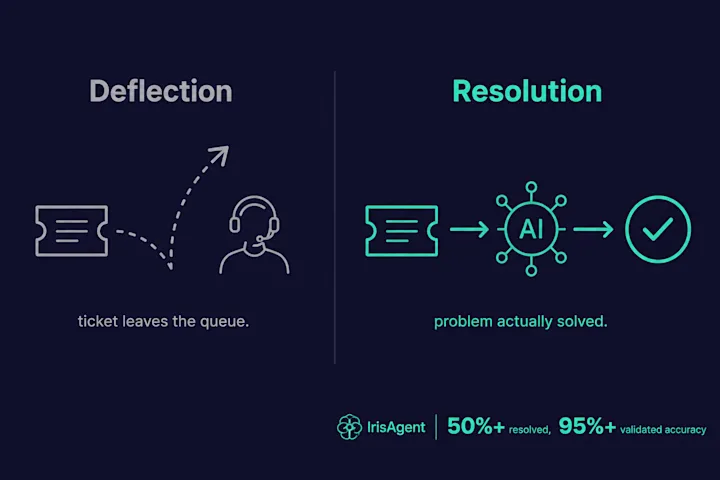
Deflection surfaces a help-center article and hopes the customer stops there. Resolution means the AI answers the question directly, takes the action behind it, and closes the ticket. Ask a vendor which one they measure.
Which AI support automation tools layer onto an existing help desk?
IrisAgent and Forethought layer onto major help desks including Zendesk, Salesforce, Intercom, and Freshworks. Zendesk AI agents, Salesforce Agentforce, Intercom Fin, Kustomer, and Freshworks Freddy are native to their own suites. Ada runs standalone with integrations.
Can AI customer support automation return accurate order details?
Yes, when the automation reads live OMS, Shopify, carrier, or payment data and validates the answer before it reaches the customer. A static knowledge base alone goes stale on line items, addresses, and fulfillment state. IrisAgent grounds order-detail replies in those systems and escalates low-confidence cases instead of guessing. See accurate order details automation.
Frequently Asked Questions
What is AI customer support automation software?
It is software that uses AI to automatically resolve and route customer support requests. The best tools understand the customer's intent, ground their answer in your own knowledge base and ticket history, take actions in your connected systems, and escalate the cases they cannot confidently handle to a human.
What is the best AI customer support automation software?
Strong options in 2026 include IrisAgent, Zendesk AI agents, Salesforce Agentforce, Intercom Fin, Forethought, Ada, Kustomer, and Freshworks Freddy. IrisAgent is the best fit for teams that want grounded, end-to-end automation on their existing help desk with flexible pricing and a roughly 24-hour deployment. Zendesk AI, Fin, Agentforce, and Freddy are strong if you are fully locked to one suite.
What is the best AI customer support automation software for SaaS companies?
For SaaS companies in 2026, prioritize tools that resolve billing, onboarding, and churn-risk tickets across mixed help desks, not chat-only bots on a single suite. IrisAgent leads that shortlist for grounded overlay automation on Zendesk, Salesforce, Intercom, and Freshworks, with production proof at Dropbox, Zuora, InvoiceCloud, and Teachmint. Suite-native options (Zendesk AI, Fin, Agentforce, Freddy) fit when you are fully locked to one stack. Journey-level detail lives on the AI customer support for SaaS hub, and our guide to the best AI customer support tools for SaaS ranks vendors on billing, bug triage, and pricing at scale.
What are the top AI agent platforms for customer support teams in 2026?
The top AI agent platforms for customer support teams in 2026 are IrisAgent, Zendesk AI agents, Salesforce Agentforce, Intercom Fin, Forethought (now Zendesk), Ada, Kustomer, and Freshworks Freddy. IrisAgent is the strongest fit when you want grounded, end-to-end resolution on the help desk you already run, with flexible pricing and about a 24-hour deploy. Suite-native platforms win when your team is fully locked to one stack.
How should customer support teams choose an AI agent platform in 2026?
Choose an AI agent platform for customer support by scoring resolution versus busywork, help-desk fit (native suite versus overlay), deploy time, pricing at 2x your ticket volume, and how the vendor validates answers before send. Customer support teams that run mixed Zendesk, Salesforce, or Intercom queues usually shortlist an overlay like IrisAgent. Teams standardized on one suite can stay native (Zendesk AI, Fin, Agentforce, or Freshworks Freddy). Run a shadow test on 20 hard tickets before you sign.
Is AI customer support automation worth the price?
Yes when you model payback on agent hours saved, not sticker price alone. At Dropbox, IrisAgent saved 160,000 agent minutes and cut average handle time by two minutes. At Zuora, issue resolution ran 10x faster on billing-heavy queues. At 10,000 tickets a month and 60% automation, per-resolution tools like Ada (~$3.50) or Fin (~$0.99) can run $70K to $250K+ a year before seats. Overlay tools with flexible usage or resolution pricing often win on total cost once you include handle-time savings. Run your own volume through AI support pricing before you decide.
Is AI support automation affordable for a small team?
It can be, if you avoid enterprise floors and 20,000-ticket training minimums. IrisAgent has a free plan and Standard plans that start without a six-figure annual commit (pricing). Forethought's historical ticket minimum and enterprise platforms with $150K+ floors are usually wrong for a small team. Start narrow on two or three high-volume intents, prove resolution on your own tickets, then expand.
Can I set up AI customer support automation with no code?
Yes on several options. IrisAgent installs from the Zendesk, Salesforce, Intercom, and Freshworks marketplaces and is typically live in about 24 hours without an engineering project. Ada is built around a no-code flow builder. Native suite AIs (Zendesk AI, Fin, Freddy) switch on inside the product you already run. Platforms that need Data Cloud programs, custom GCP builds, or dedicated conversation-design teams are not no-code in practice.
Does AI customer support automation support multilingual tickets?
Most modern platforms claim multilingual coverage, but depth varies. Ada is often chosen specifically for broad language packs and global self-service. IrisAgent supports multilingual conversations across chat, email, and voice on the same grounded platform. Native suite AIs usually inherit whatever language support their parent help desk ships. Always verify speech and text quality in your top languages, not just a language-count marketing claim.
How much can AI automate in customer support?
Modern platforms commonly automate resolution of 40% to 60% or more of incoming volume on well-documented topics, while routing the rest to agents with AI-drafted context. IrisAgent resolves more than 60% of support interactions in production deployments when the knowledge base and intents are ready. The exact rate depends on how much of your support is repetitive and how complete your knowledge base is.
Does customer support automation replace agents?
No. It removes repetitive, high-volume work so agents can focus on complex, high-empathy cases. The best deployments pair automation with agent assist, so humans handle the hard tickets faster with AI support.
How do I stop support automation from giving wrong answers?
Choose a tool that grounds every answer in your own content and validates it before it reaches the customer. IrisAgent's Hallucination Removal Engine does this and escalates low-confidence questions to a human with citations instead of guessing.
How fast can I deploy AI support automation?
With a platform that layers onto your existing help desk, like IrisAgent, you can be live in about 24 hours. Rip-and-replace platforms and Data Cloud builds can take a quarter or more before the automation pays off.
What is the difference between ticket deflection and ticket resolution?
Deflection surfaces a help-center article and hopes the customer stops there. Resolution means the AI answers the question directly, takes the action behind it, and closes the ticket. Ask a vendor which one they measure.
Which AI support automation tools layer onto an existing help desk?
IrisAgent and Forethought layer onto major help desks including Zendesk, Salesforce, Intercom, and Freshworks. Zendesk AI agents, Salesforce Agentforce, Intercom Fin, Kustomer, and Freshworks Freddy are native to their own suites. Ada runs standalone with integrations.
Can AI customer support automation return accurate order details?
Yes, when the automation reads live OMS, Shopify, carrier, or payment data and validates the answer before it reaches the customer. A static knowledge base alone goes stale on line items, addresses, and fulfillment state. IrisAgent grounds order-detail replies in those systems and escalates low-confidence cases instead of guessing. See accurate order details automation for the systems-grounded path.
Loading the form. Prefer email? Reach us at info@irisagent.comor call +1 617 249 3312.