
AI Outbound Across Voice, SMS, and Email
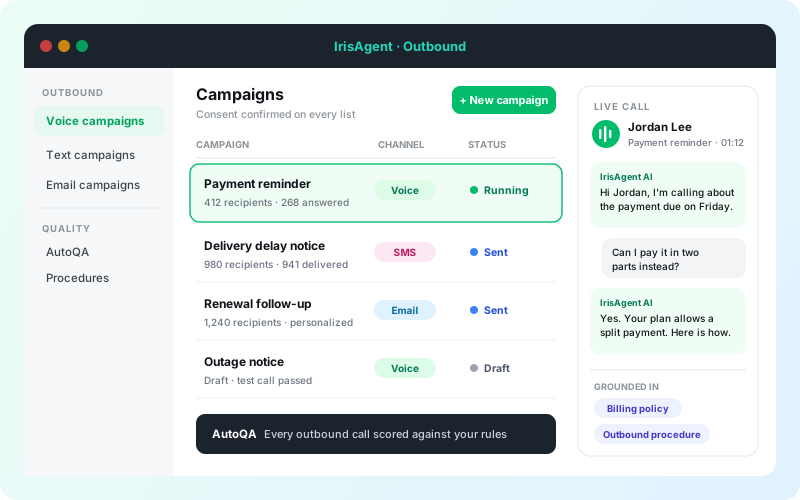
One outbound platform, three channels
Pick the channel that fits the message. Run them from the same dashboard.
SMS
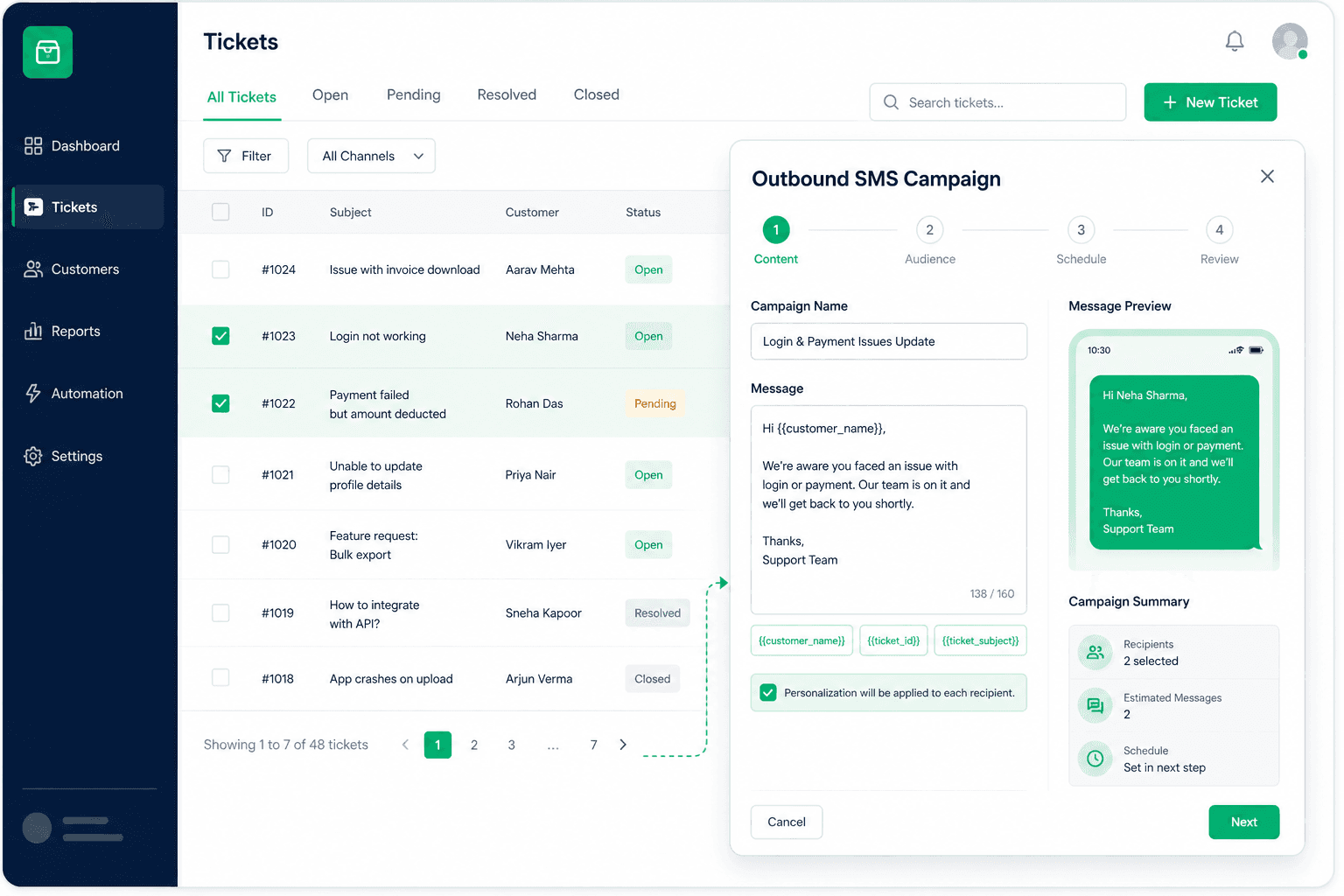
Text campaigns to opted-in US numbers from your Twilio number or an IrisAgent number.
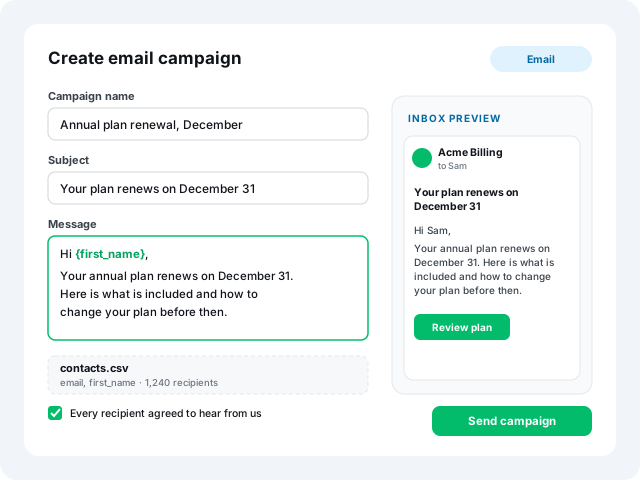
AI agents for text →Bulk email campaigns to your contact list, personalized for each recipient.
See email campaigns →Built for every customer conversation
Support, success, sales, and operations: reach customers first, on the channel they answer.
Payment reminders
Due dates, missed payments, and how to pay.
Voice · SMSDelivery confirmations
Confirm the window before the truck rolls.
Voice · SMSOutage notices
Tell affected customers before they call in.
Voice · SMS · EmailRenewals
Upcoming renewals, terms, and options.
Voice · EmailAppointment reminders
Confirm attendance and answer prep questions.
Voice · SMSOnboarding check-ins
Welcome new customers and answer setup questions.
Voice · EmailLead follow-up
Reach new sign-ups and inquiries while they are warm.
Voice · SMS · EmailWin-back
Reconnect with lapsed customers with a reason to return.
SMS · EmailVoice Campaigns That Hold a Conversation
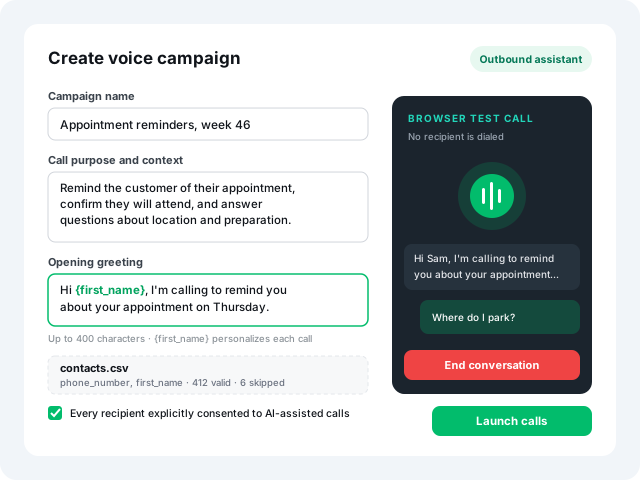
{first_name}. Upload a CSV, confirm consent, and talk to the outbound assistant in your browser before anyone is dialed.Then launch and follow every recipient from queued to ringing, in progress, and completed. Outbound runs on its own assistant, with procedures scoped to inbound, outbound, or both.
SMS Campaigns to Opted-In Lists
{{first_name}} and track delivery and recipient-level failures on the campaign page.Managed numbers stay locked until brand, use case, and number registration are approved, and IrisAgent rechecks registration before every send. Outbound SMS docs.
Bulk Email Campaigns, Personalized
Pair it with a call or a text in the same dashboard: confirm by phone, then follow up by email.
Grounded, scoped, and graded on every call
Outbound is not a blast tool. It runs on the same AI that already holds your customer conversations.
Grounded answers
When a customer asks a follow-up, the agent answers from your knowledge base and past tickets, checked by the Hallucination Removal Engine.
Scoped procedures
Separate inbound and outbound assistants. Scope each Voice procedure to inbound, outbound, or both.
AutoQA on every call
Score outbound calls against plain-English rules, narrowed to specific campaigns. Not a 2 percent sample.
Compliance built into every campaign
Outbound carries a higher bar than inbound: consent, disclosures, and calling windows.
Built in
- Consent confirmation required before a voice or text campaign saves
- Browser test call before launch, with no recipient dialed
- SMS sending locked until carrier registration is approved
- AutoQA rules narrowed to a campaign to check disclosures
- SOC 2 Type II, HIPAA controls, and PII redaction
Your team owns
- Consent records for every contact you upload
- Do-not-call lists and opt-out requests
- Calling hours in each recipient's time zone
- AI and recording disclosures required where customers live
Live in four steps
Pick the channel
Voice, SMS, or email, from the Outbound menu.
Write the purpose
Call purpose and greeting, or the message, with first-name personalization.
Upload and confirm
CSV of up to 1,000 US numbers. Confirm every recipient consented.
Test, launch, review
Browser test call, then launch. Track each recipient and score every call.
Setup guides: Voice AI · Outbound SMS
IrisAgent outbound vs. the alternatives
| Agents on a dialer | Recorded blast | IrisAgent | |
|---|---|---|---|
| Conversation | Live agent, when one is free | One-way recording | Two-way, grounded in your knowledge |
| Channels | Phone only | Phone only | Voice, SMS, and email in one dashboard |
| Consent gate | Team process | Varies | Required before a campaign saves |
| Testing | Script review | Listen to the file | Browser test call, no one dialed |
| Quality | Small manual sample | None | AutoQA on every call |
Inbound too? See the AI call center.
Any questions?
We got you.
