Outbound Reminder Campaigns
by Voice and SMS, With AI on Every Reply
Reminders, confirmations, and notices prevent tickets before they happen. IrisAgent places the calls and sends the texts from the dashboard, then the same grounded agent handles every reply and hands off to your team when a person is needed.
By the IrisAgent team · Last updated November 6, 2026
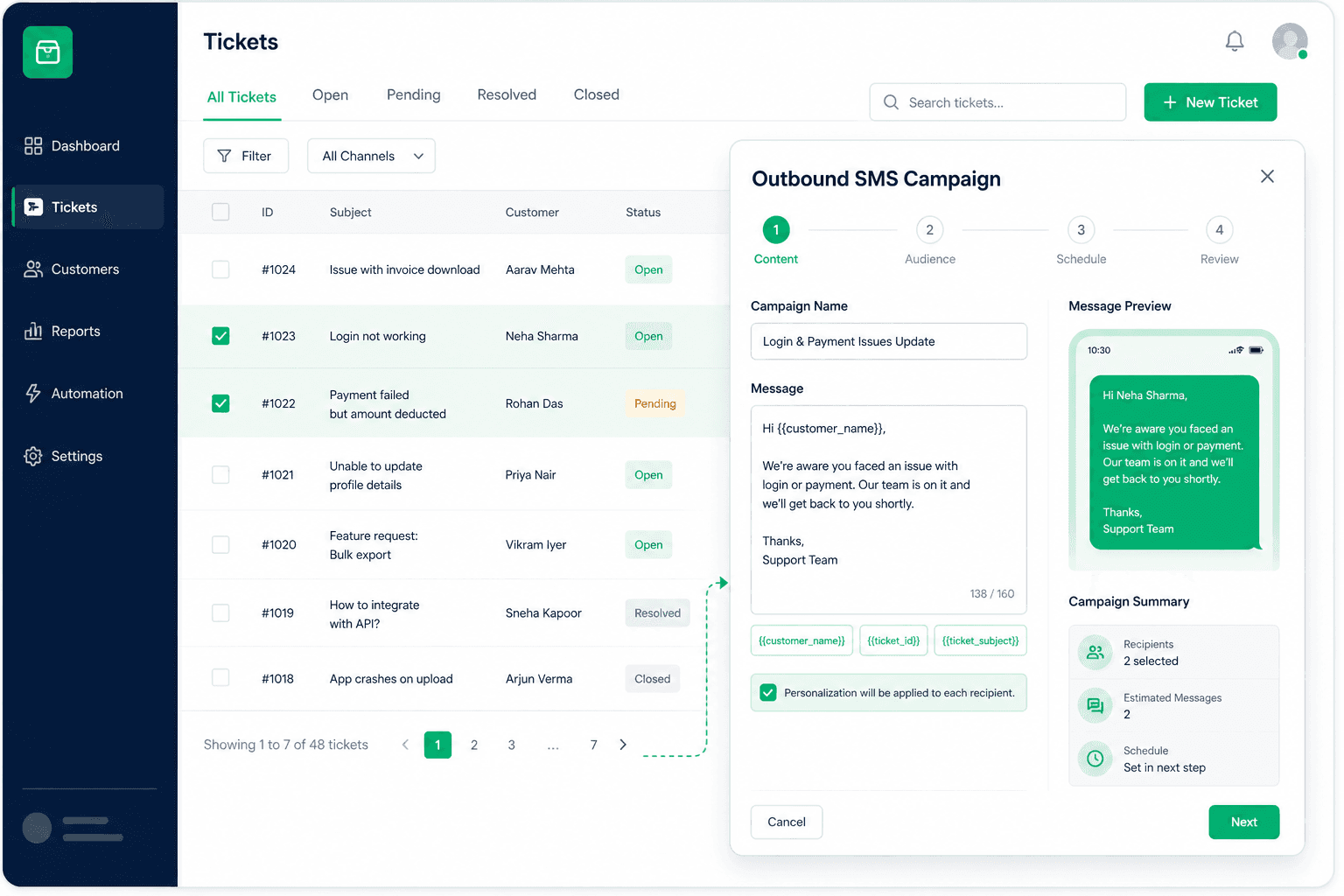
AI outbound reminder campaigns use an AI agent to place calls or send texts to a list of opted-in contacts: payment reminders, delivery confirmations, outage notices, and renewal outreach. You import a CSV, draft the campaign, run a test, and launch. Replies are answered from your knowledge base, ticket history, and procedures, and the thread lands in your helpdesk.





Why proactive outreach rarely happens
Everyone agrees a reminder call beats a missed payment and a delivery confirmation beats a "where is my order" ticket. But outbound calling ties up the same agents who answer the inbound queue, so it gets cut first when volume rises.
Basic blast tools solve the sending, not the conversation. When a customer replies with a question, the reply lands in a separate console or nowhere at all.
Outbound also carries a higher compliance bar around consent, disclosures, and calling windows, which makes ad-hoc campaigns risky.
How IrisAgent runs an outbound campaign
Import an opted-in list
In the IrisAgent dashboard, import a CSV of contacts who agreed to hear from you. SMS runs on your Twilio number or an IrisAgent-managed US number.
Draft the campaign and its procedure
Write what the agent should say and do as a Smart Operating Procedure. Scope each Voice procedure to inbound, outbound, or both, so reminders do not reuse your inbound after-hours script.
Test, then launch
Run a test call before launch, then watch queued and sending status from the dashboard.
Answer every reply with grounded AI
When a customer replies or picks up with a question, the agent answers from your knowledge base, ticket history, and procedures, for example sending tracking back after a delay notice.
Hand off in the helpdesk
The thread lands in the helpdesk overlay your team already uses, so anything that needs a person continues with full context.
Key benefits
- ✓Run payment reminders, delivery confirmations, outage notices, and renewal outreach without pulling agents off the queue
- ✓Replies get grounded answers, not a dead-end blast
- ✓Voice and SMS campaigns are managed from the same dashboard
- ✓Procedures are scoped to outbound, so campaigns stay on script
- ✓Every thread lands in the helpdesk your team already uses
The outcome
Consent, disclosures, and calling windows apply to outbound. Scope each campaign separately from inbound. For SMS, connecting a number is not A2P approval; see the AI agents for text page for registration details.
What it looks like in practice
A carrier delay affects a batch of orders. Your team imports the affected, opted-in customers and launches a delay notice by text.
One customer replies with their order number and asks when it will arrive. The agent looks up the order and sends the tracking link back in the same thread.
Another asks to cancel. That follows your cancellation procedure, and anything outside it lands in the helpdesk for an agent with the conversation attached.
operations
Any questions?
We got you.