Automate IT Requests
in Slack, Teams, and Your Service Desk
Employees ask for help where they already work. IrisAgent's AI IT Agent answers in Slack, Microsoft Teams, email, or your portal, runs approved actions like password resets and access grants, and routes the rest to the right IT queue with the troubleshooting already done.
By the IrisAgent team · Last updated November 6, 2026
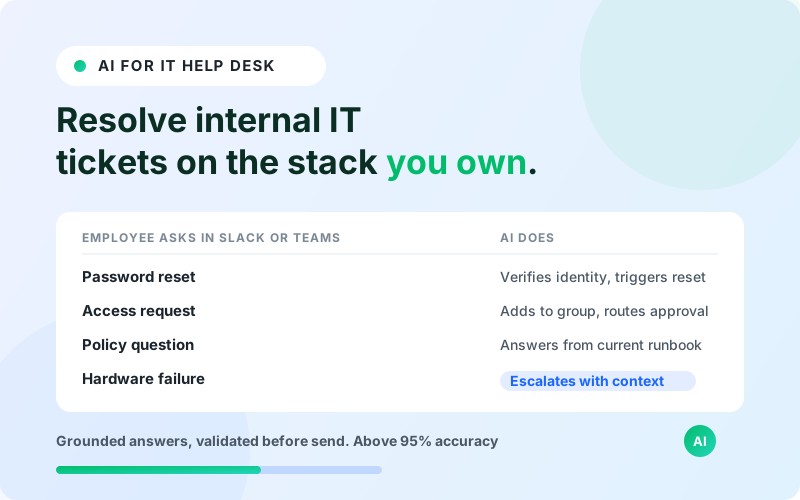
Automating IT helpdesk requests means an AI agent resolves repetitive employee tickets end to end: password and MFA resets, account unlocks, application and license requests, VPN and SSO troubleshooting, and policy lookups. It answers from your runbooks and past resolved tickets, runs approved actions with guardrails, and works inside ServiceNow, Jira Service Management, Freshservice, or Zendesk.




Why IT queues fill up with the same requests
Most internal IT volume is documented, low-risk, and repetitive. Someone is locked out, needs a new app, cannot connect to the VPN, or wants to know the policy for a new laptop. Each one still becomes a ticket, waits in a queue, and pulls an engineer away from project work.
Employees feel the wait too. A password reset that takes hours to come back is lost productivity, and new hires lose their first days chasing access.
Traditional IT automation needs a multi-month implementation and often ties your AI roadmap to a single service desk vendor.
How IrisAgent resolves IT requests
Meet employees where they ask
Employees ask in Slack, Microsoft Teams, email, or your IT portal. The agent knows who is asking through your identity provider, so answers respect role, department, location, and device.
Answer from your runbooks and past tickets
The agent answers from your knowledge base, runbooks, and past resolved tickets, and cites its sources. The Hallucination Removal Engine checks each answer before it is sent.
Run approved actions with guardrails
IT teams write Smart Operating Procedures in plain English for actions like password and MFA resets, access requests, and license grants through Okta, Microsoft Entra ID, and SaaS admin APIs. Identity is verified through SSO, sensitive steps require approval, and every step is logged.
Tag, route, and assist inside the service desk
Inside ServiceNow, Jira Service Management, Freshservice, or Zendesk, the agent sets category, priority, and assignment group, and gives IT agents a copilot with suggested resolutions.
Escalate with context and fill knowledge gaps
Hardware failures, security incidents, and infrastructure work route to engineers with the conversation and troubleshooting attached. When the agent finds a gap, it drafts a new article for your approval.
Key benefits
- ✓Employees get answers in Slack and Teams instead of waiting in a queue
- ✓Password, MFA, and access requests resolve with an audit log for every action
- ✓Works across ServiceNow, Jira Service Management, Freshservice, and Zendesk without a migration
- ✓IT agents get suggested resolutions for the tickets that still need a person
- ✓Missing knowledge turns into draft articles your team approves
The outcome
Pricing is transparent, with a per-resolution option, so cost tracks tickets actually resolved. See the full AI IT helpdesk page for the comparison with Moveworks, Aisera, and ServiceNow Now Assist.
What it looks like in practice
An employee messages the IT channel in Slack: "I got a new phone and can't get past MFA."
The agent confirms who is asking through SSO, follows the MFA reset procedure your IT team wrote, and asks the employee to confirm before it resets the factor in your identity provider. It sends the re-enrollment steps from your runbook and logs the action in your service desk.
If the account shows signs of a security issue instead, the agent stops, says so, and routes the ticket to the security queue with the details already captured.
operations
Any questions?
We got you.