Automate QA & Compliance
on Every Conversation
Manual QA reviews a small sample and finds problems weeks later. AutoQA scores every chat, email, ticket, and call, for AI and human agents alike, against rules your team writes in plain English, and alerts you while the ticket is still open.
By the IrisAgent team · Last updated November 6, 2026
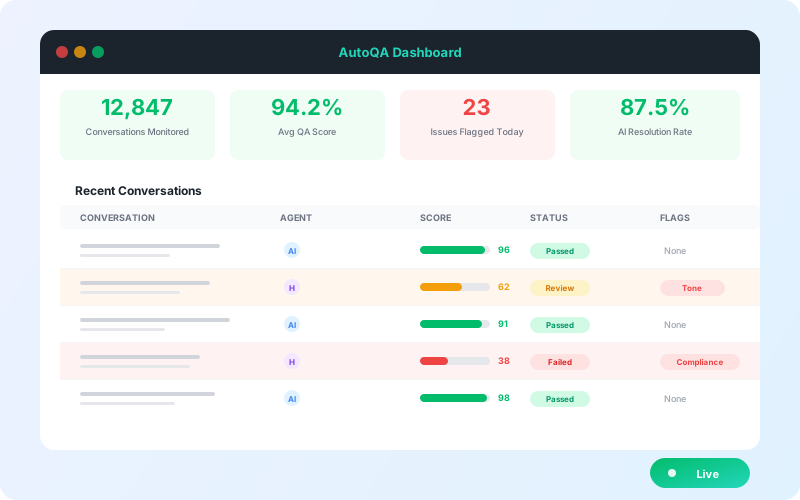
Automated QA and compliance checks use AI to score 100% of support conversations against your quality rubric instead of a manual sample. With IrisAgent AutoQA, you write rules in plain English (for example, verify identity before account changes), set each rule's severity, and every AI and human conversation gets a 0 to 5 score with the failed rules and the messages that triggered them.




Why sampled QA misses what matters
A QA team reviewing a small slice of conversations cannot see the rest. A skipped identity check or a missing disclosure in an unreviewed conversation stays invisible until it becomes a complaint or an audit finding.
AI agents add a second blind spot. Once an AI answers customers, someone has to check its conversations to the same standard as human agents, and most teams have no process for that.
Feedback also arrives too late. By the time a sampled review reaches the agent, the customer has long since left.
How AutoQA checks every conversation
Write rules in plain English
Describe the standard you want to check, such as verifying identity before account changes or offering a follow-up before closing. Group each rule by category and set its severity to Critical, Warning, or Info.
Score every conversation
Active rules apply to new conversations across chats, emails, tickets, and calls, for AI agents and human agents, from one dashboard.
See exactly what failed
Each reviewed conversation receives a QA score from 0 to 5. Open a review to see which rules passed or failed, the explanation for each failure, and the highlighted messages that triggered it.
Get alerted while the ticket is open
Real-time alerts flag issues before the ticket closes, so a lead can step in instead of finding out in next month's review.
Improve the AI from what it missed
AutoQA reviews conversations the AI agent could not resolve or handled poorly and surfaces prioritized recommendations: content gaps, missing data sources, and workflow fixes.
Key benefits
- ✓100% coverage instead of a small manual sample
- ✓The same standards for AI agents and human agents
- ✓Compliance rules written in plain English, with severity levels
- ✓Alerts while the ticket is still open
- ✓Prioritized recommendations to raise AI resolution rates
The outcome
See the full AutoQA page for scorecards, alerts, and recommendations.
What it looks like in practice
Your compliance lead adds a Critical rule: "Agent verifies the customer's identity before changing account details."
That afternoon, a human agent updates a billing address without asking a verification question. AutoQA fails the rule, highlights the message where the change happened, and alerts the team lead while the ticket is still open.
The same rule runs on the AI agent's conversations, so both get held to one standard.
operations
Any questions?
We got you.