Ask Your Support Data
in Plain English
Every answer about your support operation is already in your tickets. Support Analyst lets leaders and agents ask for it in plain English and get structured results in seconds, without building a dashboard or exporting a CSV.
By the IrisAgent team · Last updated November 6, 2026
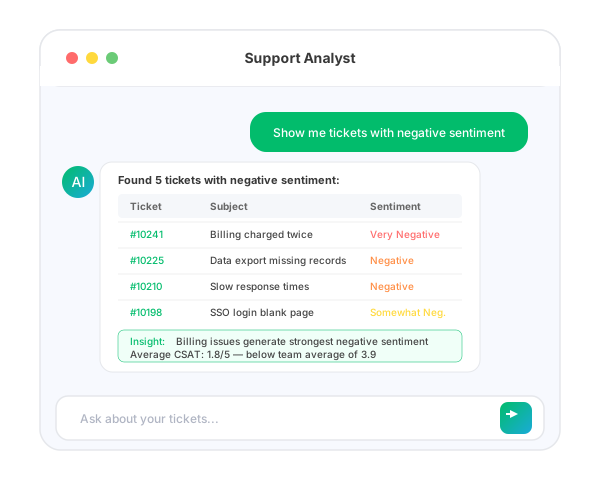
AI support ticket analytics lets you query ticket data with natural-language questions such as "Show me tickets with negative sentiment" or "What are the top 5 issues this month?" IrisAgent's Support Analyst translates the question into a query on your real ticket data, returns tables and insights, and shows which searches it ran, so you can trust the result.






Why support questions wait on a dashboard
A VP asks why billing tickets spiked last week. Answering means exporting tickets, filtering in a spreadsheet, and reading a sample by hand, or filing a request with whoever owns the BI tool.
Prebuilt dashboards answer the questions someone thought of last quarter. The question in front of you today is usually different.
So ad-hoc questions go unanswered, and sentiment trends and recurring issues surface late.
How Support Analyst answers support questions
Ask in plain English
Open Support Analyst in the IrisAgent dashboard and type a question about topics, status, priority, sentiment, or time periods. No query syntax to learn.
Query your real ticket data
The AI understands the intent of the question and translates it into precise queries on your actual ticket data, so results reflect your real operation.
Get structured results
Answers come back as tables and insights: counts, trends, ticket timelines, recurring issues, and comparisons across time periods.
Read sentiment across tickets
Sentiment scores range from Very Negative to Very Positive and consider the full context of customer messages, so you can surface frustrated customers before they churn.
See how the answer was found
Support Analyst shows which tools and searches it used to arrive at each answer, for full transparency.
Key benefits
- ✓Answer ad-hoc questions in seconds instead of building a dashboard
- ✓Spot recurring issues and sentiment trends early
- ✓Works out of the box on your existing IrisAgent ticket data
- ✓Transparent answers that show the searches behind them
The outcome
See the full Support Analyst page for example questions and screenshots.
What it looks like in practice
A support lead types: "What are the top 5 issues this month, and how does that compare to last month?"
Support Analyst returns a table of the top issues with counts for both months and highlights the one that grew fastest. The lead follows up: "Show me open tickets about that issue with negative sentiment."
The list comes back in seconds, and the lead assigns the most urgent tickets before the weekly review.
operations
Any questions?
We got you.