
AI Receptionist vs Helpdesk AI: What Buyers Miss

What Buyers Mean by an AI Receptionist
In the market, AI receptionist usually means a voice-and-messaging layer that covers the lobby jobs:
Answer inbound phone and chat outside business hours
Book, reschedule, or cancel appointments
Capture lead details and route by intent or location
Transfer to a human when the request is outside a short FAQ
Those capabilities matter. A missed call that never gets a callback is lost revenue. A patient who cannot move an appointment after hours will try again tomorrow, or try a competitor. An AI receptionist that reliably handles book, FAQ, and transfer is table stakes for clinics, hospitality, mobility, and any business where the phone still drives the day.
The problem is not that the receptionist job is fake. The problem is that many buyers stop evaluating once the greeting works. They never ask what happens when the conversation leaves the lobby and enters support.
What Helpdesk AI Is Actually For
Helpdesk AI is not a prettier phone tree. It is software that sits on the ticket system, knowledge base, and procedures your team already uses. It reads the customer message, grounds an answer in your data, takes a safe action when policy allows, drafts a reply for an agent when judgment is required, and opens or updates a ticket with the full thread when a human must take over.
In other words, helpdesk AI is measured by what happens after the greeting:
Does it see prior tickets and promises Support already made?
Does it follow your procedures, not a generic FAQ scraped from the marketing site?
Does a human receive Assist context on handoff, or a blank form?
If you are comparing tools, treat "sounds good on a demo call" as necessary but not sufficient. The buyer miss is treating an AI receptionist scorecard as a full support AI scorecard.
AI Receptionist vs Helpdesk-Aware Front Door
Dimension | Typical AI receptionist | Helpdesk-aware front door (IrisAgent) |
|---|---|---|
Primary job | Greet, book, FAQ, transfer | Same lobby jobs, then Resolve / Assist / Escalate into the desk |
Ticket history | Often none, or a new CRM note | Reads and updates the helpdesk thread you already run |
Procedures | Short FAQ / script | Grounded in knowledge and SmartOps-style procedures |
Handoff | Blind transfer or voicemail | Assist draft + context into Zendesk or Salesforce |
Channels | Phone / WhatsApp / web widget | Voice and text, including Twilio-backed numbers teams already own |
Success metric | Calls answered, bookings made | Resolved intents, assisted sends, clean escalations |
An AI receptionist can win the left column and still leave Support starting every chat from zero. A helpdesk-aware front door keeps the left-column jobs and adds the right column so the conversation does not reset when it gets hard.
Where a Pure AI Receptionist Breaks
Three gaps show up as soon as volume leaves the lobby.
1. No ticket history. The bot cannot see what Support already promised on the last case. The customer repeats themselves. The agent who picks up the transfer starts cold. Trust drops even when the greeting was perfect.
2. No procedures. Answers are generic. Refund windows, identity checks, outage language, and account exceptions live in your runbooks, not in a public FAQ. An AI receptionist that improvises here creates rework and risk.
3. No Assist on handoff. When a human must take over, the Zendesk or Salesforce thread should already contain the summary, the attempted answer, and the fields the bot collected. A transfer without that context is just nicer hold music.
Those gaps are why product and support leaders who buy only on receptionist demos feel the pain a quarter later: the phone is covered, but the helpdesk queue is not.
The IrisAgent Overlay: Resolve, Assist, Escalate
IrisAgent is not asking you to abandon the receptionist job. It is the same channel set buyers already expect, on the numbers and Twilio stack many teams already run, with text agents and Voice as one front door.
What changes is the back half of the conversation. IrisAgent frames every turn with three outcomes:
Resolve when the answer is grounded in your knowledge and a safe action is allowed.
Assist when a human should review and send, with a draft and context ready.
Escalate into Zendesk or Salesforce with the thread attached, not a blank ticket.
Same use cases on the surface. Overlay on the helpdesk you already run. That is the difference between an AI receptionist that ends at transfer and a customer support AI platform that stays useful after the transfer.
This framing also keeps evaluation honest. You do not need every intent on full autonomy on day one. You need a clear map of which intents Resolve, which Assist, and which Escalate, and you need the handoff quality to hold when the map changes.
What This Sounds Like in Customer Language
Auto / mobility: "Where is my car?" The front door answers from live ops knowledge, or opens a ticket with the trip context attached instead of a nameless callback.
Clinic: Reschedule a visit without losing the patient record or the prior messages. Book and FAQ still look like an AI receptionist. The difference is whether the exception case still knows the desk.
Hospitality: Booking and FAQ at 11pm, with a clean Assist handoff when the guest needs a human for an exception, a billing dispute, or a loyalty edge case.
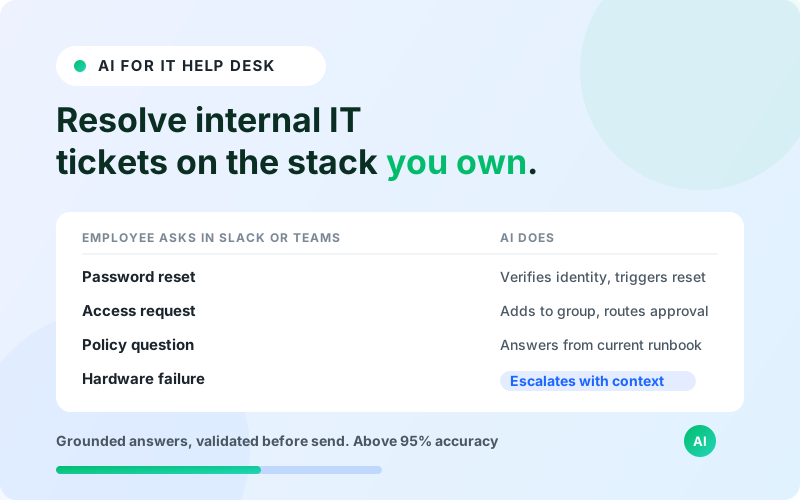
SaaS support: Password resets, plan questions, and status checks Resolve when policy allows. Billing disputes Assist. Security and legal Escalate with the transcript already on the ticket.
These are DigA-class jobs on the surface for clinics and local services. For product-led companies they are the same lobby-to-desk path with different nouns. The buyer question is identical: does the conversation still know your helpdesk after the first reply?
Channels Buyers Expect (and Should Keep)
A modern front door is multi-channel by default. Buyers comparing an AI receptionist will ask about phone, WhatsApp, SMS, and web chat in the first call. That is fair. IrisAgent meets that expectation on Voice and text without forcing a re-platform of the desk.
Practical channel notes for evaluators:
Keep the number customers already know when you can. Teams on Twilio often want the AI layer on infrastructure they already operate.
Treat AI Agents for Text and IrisAgent Voice as one front door with shared knowledge and procedures, not two unrelated bots.
Measure handoff quality the same way on every channel. A WhatsApp Assist draft that loses ticket history is the same failure mode as a blind phone transfer.
Channel coverage without helpdesk awareness is still a lobby. Channel coverage with Resolve / Assist / Escalate is a front door.
A Buyer Checklist That Goes Past the Greeting
Use this list when demos start sounding the same.
Ticket continuity. Show a second-turn conversation where the AI sees the prior case and the last agent note.
Procedure fidelity. Pick one messy policy (refund window, identity check, outage language). Ask the vendor to follow your wording, not theirs.
Assist quality. Force a handoff. Read the draft and the fields that land in Zendesk or Salesforce. If the agent still has to re-ask the customer, the front door failed.
Escalation honesty. Ask what the AI is not allowed to do. A tool that claims to handle everything usually hides weak guardrails.
Overlay vs rip-and-replace. Confirm it runs on the helpdesk and telephony you already own. Rip-and-replace projects bury the receptionist win under a six-month migration.
Shared knowledge across Voice and text. One answer for "where is my order" on phone and WhatsApp. Two disconnected bots recreate the lobby problem inside your own stack.
If a vendor aces the greeting demo and fails items 1 through 3, you are buying an AI receptionist, not helpdesk AI. Name that clearly in the procurement notes so the scorecard matches the job.
How IrisAgent Fits Without Inventing a New Category
IrisAgent's position is deliberately boring in a useful way: keep the receptionist use cases buyers already understand, and make the desk aware of them. The AI customer support platform layer is the system of work. The front door is how customers enter it on phone and text.
That means you can evaluate IrisAgent with a receptionist checklist and a helpdesk checklist on the same call. Booking and after-hours FAQ still matter. So do ticket history, procedures, Assist drafts, and escalation paths. You should not have to choose between "answers the phone" and "knows Support."
For teams already deep in Zendesk, Salesforce, or similar desks, the overlay path also reduces change risk. Agents keep their console. Procedures stay yours. The AI takes the intents you assign to Resolve, prepares Assist for the ones you supervise, and Escalates the rest with context.
Conclusion: Do Not Stop at the Lobby
An AI receptionist that answers, books, and transfers is table stakes. What buyers miss is the second half of the job: a front door that still knows ticket history, follows procedures, and lands Assist context on the helpdesk when a human must take over.
If you already bought an AI receptionist and your support queue still starts every chat from zero, the missing piece is not another greeting. It is a helpdesk-aware overlay with a clear Resolve / Assist / Escalate path on the channels you already run.
See how IrisAgent runs that front door on text, Voice, and Twilio, as part of the broader AI customer support platform.
Frequently Asked Questions
What is an AI receptionist?
An AI receptionist is software that covers lobby jobs on phone and messaging: answer around the clock, book or reschedule, answer short FAQs, and transfer to a human. It is valuable for clinics, hospitality, mobility, and any team where missed calls are expensive. It is not the same as helpdesk AI unless it also sees tickets, procedures, and Assist handoff.
How is an AI receptionist different from helpdesk AI?
An AI receptionist optimizes for greeting, booking, and transfer. Helpdesk AI optimizes for resolving or assisting work inside your ticket system with grounded knowledge and procedures. Buyers miss the difference when they score only the greeting demo and ignore ticket history and handoff quality.
What do Resolve, Assist, and Escalate mean in IrisAgent?
Resolve means the AI completes a safe, grounded outcome. Assist means a human reviews and sends with a draft and context ready. Escalate means the case moves to a person in Zendesk or Salesforce with the thread attached. IrisAgent uses that overlay framing so autonomy can rise per intent without a blind transfer.
Can IrisAgent replace our existing helpdesk?
IrisAgent is designed as an overlay on the helpdesk and telephony you already run, including Twilio-backed numbers, text, and Voice. The goal is a front door that keeps receptionist use cases and still knows Support, not a rip-and-replace of your desk.
What should we ask vendors beyond the AI receptionist greeting demo?
Ask for ticket continuity on a second turn, procedure fidelity on a messy policy, Assist quality on a forced handoff, and a clear list of intents the AI will not touch. If those answers are weak, you are buying lobby coverage only.

Loading the form. Prefer email? Reach us at info@irisagent.com or call +1 617 249 3312.