
CCaaS Explained: Costs, Features & AI Resolution
Contact center as a service, or CCaaS, is cloud software that runs the telephony and digital channels of a contact center: call routing, IVR, agent desktop, queueing, workforce scheduling, reporting, and, increasingly, embedded AI. It replaces on-premise phone hardware with a subscription you reach over the internet. IrisAgent is not a CCaaS. It is an AI resolution layer that runs on the phone and helpdesk stack you already operate, with validated accuracy above 95% through its Hallucination Removal Engine.
The distinction matters in 2026 because the AI bolted onto CCaaS platforms is where budgets are shifting and where vendor claims have outrun measured results. Buyers are being asked to sign contracts that mix a telephony decision, an infrastructure decision, and an AI resolution decision into one line item, and the three have very different economics. This guide separates them. It covers what a CCaaS actually includes, the four pricing shapes on the market with their real list prices, what the category does not solve, what CCaaS platforms do that IrisAgent explicitly does not, and how to tell a phone-system project apart from a resolution project before you buy either.
CCaaS, CPaaS, and UCaaS are not the same thing
The three acronyms get used interchangeably and should not be. CCaaS is the contact center: routing, IVR, agent tooling, and channel management for a team whose job is handling customer contacts. UCaaS, unified communications as a service, is the internal phone and meeting system for the whole company, the Zoom or Teams layer. CPaaS, communications platform as a service, is the set of APIs, Twilio being the reference example, that developers use to build messaging and voice into their own applications. A CCaaS often sits on top of a CPaaS for its carrier layer and increasingly bundles UCaaS so agents and back-office experts share one directory. When a vendor pitches "contact center as a service," confirm which of the three problems it actually solves, because the pricing and the buyer are different for each.
What a CCaaS actually includes
A CCaaS bundles the components a contact center used to buy as separate hardware and software:
Telephony and carrier connectivity: phone numbers, SIP trunks, and PSTN termination, so calls actually reach your agents.
Automatic call distribution and routing: the queueing and skills-based logic that decides which agent or bot takes a contact.
IVR: the menu and self-service layer callers hit before a human.
Digital channels: chat, email, SMS, and social, handled in the same console as voice.
Agent desktop: the interface agents live in, often doubling as the system of record for the interaction.
Workforce optimization, or WFO: forecasting, scheduling, adherence tracking, and quality management layered on top of routing. WFO is a 4,400-search-per-month category in its own right, and the largest CCaaS vendors either build it in or partner for it.
Compliance call recording: capture, retention, and redaction that satisfy PCI, HIPAA, or regional consent law.
Analytics and reporting: handle time, occupancy, service level, abandonment, and increasingly AI containment and deflection dashboards.
AI add-ons: virtual agents, agent assist, auto-summaries, and post-call QA, usually sold as a separate consumption line.
The core platform is mature and largely commoditized. The AI layer is not, and it is where pricing, accuracy, and buyer confusion now concentrate.
The four pricing shapes, with real 2026 list prices
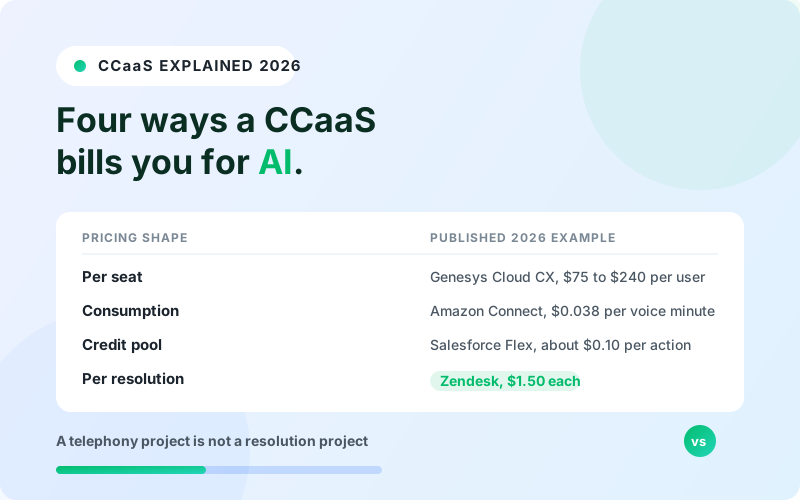
CX Today's August 2026 pricing guide put list prices on the record across the major platforms. They fall into four shapes:
Pricing shape | How you are billed | Published 2026 example |
|---|---|---|
Per seat | A monthly fee per named or concurrent agent, sometimes with AI tokens bundled in | Genesys Cloud CX at $75 to $240 per user per month, including 30 AI Experience Tokens. Microsoft Dynamics 365 Contact Center at 1,000 Copilot Credits per user per month |
Consumption | Metered by the unit of work: voice minutes, messages, emails | Amazon Connect at $0.038 per voice minute, $0.010 per chat message, $0.080 per email, and $0.014 per SMS |
Credit or action pool | A prepaid pool of credits drawn down per automated action | Salesforce Flex Credits at $500 per 100,000 credits, roughly $0.10 per action |
Outcome or per-resolution | Billed only when the AI resolves a contact | Zendesk at $1.50 per committed resolution or $2.00 pay-as-you-go |
For a buyer, the four shapes carry different risks. Per-seat pricing is predictable and easy to budget, but you pay for licensed agents whether or not the AI reduces headcount, so the savings case depends on shrinking seats later. Consumption pricing tracks actual volume, which is fair in a steady state and punishing during a spike or an outage. Credit pools look cheap per action until you count how many actions a single conversation consumes. Outcome pricing aligns cost with value in principle, and in practice it moves the entire negotiation onto the definition of the outcome.
The trend line is toward metering. ZK Research's Zeus Kerravala put it directly: "Transparent consumption pricing is an absolute must." The catch is that a per-resolution or per-action price is only meaningful if both sides can rebuild the number from the same definition, which is exactly where most AI claims fall apart. Our breakdown of conversational AI platform pricing walks through how the same "per resolution" label hides very different math from vendor to vendor.
What CCaaS does not solve
A CCaaS moves your phone system to the cloud and gives you better dashboards. It does not, on its own, close the gap between AI adoption and AI results, and that gap is now measured.
Talkdesk, through NewtonX, surveyed 252 director-level and above leaders across CX, IT, operations, and AI strategy, published on 2026-08-27. The findings: 98% have deployed AI somewhere in the customer journey, but 85% cannot orchestrate an end-to-end resolution, only 35% retain customer context across systems, and 94% operate without AI-assisted knowledge management. Only 5% can quantify AI's impact on business outcomes.
Gartner scored 432 customer service AI use cases and found 25% produced positive ROI, 25% delivered negative returns, 11% broke even, and 42% were unclear, meaning the teams running them could not tell whether value had been created.
Read together, those say the platform is not the constraint. The constraint is that most AI in the contact center is not grounded in the company's own knowledge, past tickets, and backend systems, so it cannot actually finish a resolution or prove that it did. A CCaaS gives you the pipes and the reporting. It does not, by default, give the AI a reliable source of truth or an auditable definition of what counts as resolved.
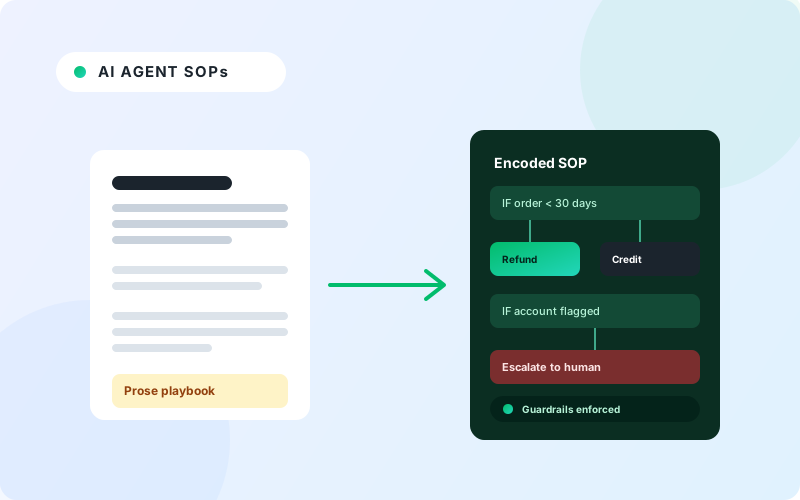
Concretely, the knowledge gap looks like this. The CCaaS virtual agent answers from a vendor knowledge base you have to maintain separately from the one your human agents use, so the two drift apart within a quarter. It cannot see the customer's order history, subscription state, or the last three tickets they filed, because the context lives in systems the CCaaS does not join. When it does not know, it either guesses, which is how a confident wrong answer becomes a chargeback next week, or it escalates, which the dashboard still counts as a "handled" contact. None of that is fixed by moving the phone system to the cloud. It is fixed by grounding the AI in the systems that already hold the answer, which is the job of an AI customer experience layer rather than a telephony platform.
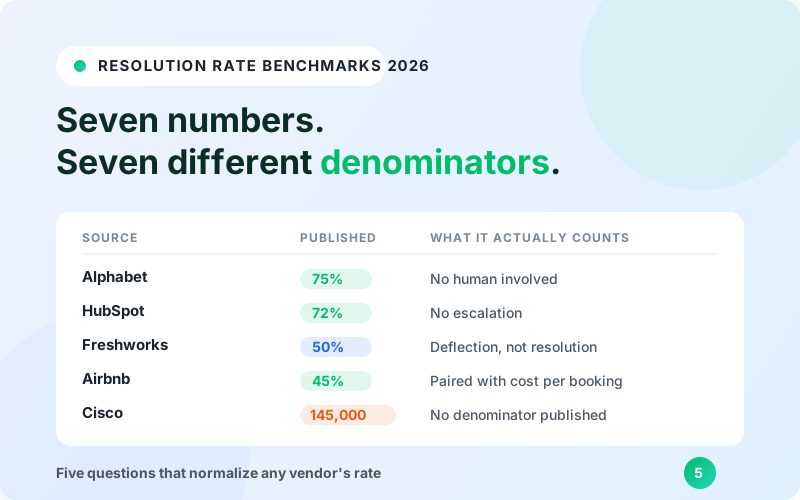
That denominator problem is the subject of our guide to AI support resolution rate benchmarks, and it applies directly to the containment and deflection numbers on a CCaaS AI dashboard. A 60% containment rate that includes every caller who gave up and hung up is not a 60% resolution rate.
What CCaaS platforms do that IrisAgent does not
Brand honesty requires stating this plainly, because a category explainer that quietly claims the category is not an explainer, it is an ad.
CCaaS platforms own the parts of the stack that IrisAgent does not touch:
Telephony and SIP or carrier connectivity. Provisioning numbers, managing trunks, terminating calls on the public network. IrisAgent has none of this.
IVR infrastructure and call queueing. The menu tree, the hold logic, the skills-based ACD. IrisAgent does not run your queue.
Workforce management and scheduling. Forecasting headcount, building shift plans, tracking adherence. Not an IrisAgent function.
Compliance call recording as the system of record. Capture, retention schedules, and legal hold on the audio itself.
Agent desktop as the primary interface and record of the interaction.
Each of those is load-bearing. Carrier connectivity is a regulated, contract-heavy business that takes months to migrate and cannot be half-done. IVR and ACD are where a mis-set routing rule strands callers for the length of a billing cycle. Workforce management is the difference between a staffed queue and a two-hour hold time on the Monday after a product launch. Compliance recording has legal retention obligations that an overlay is not architected to carry. These are the reasons the CCaaS category exists, and they are real reasons.
If you are replacing your phone system, you need a CCaaS. That is a real, legitimate project, and no overlay substitutes for it. IrisAgent is an overlay on the phone and helpdesk stack you already run. It grounds answers in your data, resolves contacts across chat, email, and voice, routes the ones it should not handle through intent-based routing, and scores every interaction with AutoQA. It is consistent with how we describe the product on call monitoring software: a layer on what you own, not a rip-and-replace. For a side-by-side look at both categories, see our comparison of the best AI call center software in 2026.
CCaaS versus AI-native resolution
These are different purchases with different buyers, different economics, and different success metrics. The comparison below is about the buying decision, not the feature list.
Dimension | CCaaS platform | AI-native resolution layer |
|---|---|---|
Core purpose | Run the contact center's channels, routing, and telephony | End customer contacts with a correct, grounded answer and no human |
Typical buyer | IT, telecom, and contact center operations | Support and CX operations |
Commercial model | Per seat, per minute, or per credit pool | Usage-based or resolution-based, tied to outcomes |
Effect on your stack | Replaces the phone system and the agent desktop | Adds a layer on the phone system and helpdesk you keep |
Time to value | A migration measured in quarters | Days to weeks on existing tooling |
Primary success metric | Handle time, occupancy, service level, deflection | Grounded resolution rate and cost per resolved contact |
Knowledge grounding | Vendor knowledge base or a generic model | Your knowledge base, past tickets, and backend systems |
The market is nudging buyers to treat these as one decision. CX Today reported on 2026-08-27 that the standalone contact center is under pressure, with Zoom's Q2 FY27 results showing paid AI in 9 of its top 10 CX deals. Consolidation is real. It still does not merge a telephony migration and a resolution program into a single project with a single price.
How to decide
Work through these in order before you shortlist anything.
Decide whether the phone system is actually the problem. If calls are dropping, routing is broken, disaster recovery is weak, or the PBX contract is ending, that is a telephony project and a CCaaS is the right answer. Buy one.
Separate the resolution question. If the phone stack works but too many contacts still reach a human, or the AI you already have cannot prove it resolved anything, that is a resolution project. Replacing the phone system will not fix it, and a CCaaS migration will delay it by two or three quarters.
Price each project on its own basis. A CCaaS is priced per seat, per minute, or per credit. A resolution layer should be priced on usage or on resolved outcomes. IrisAgent pricing is flexible and offered on both usage-based and resolution-based terms, so you can match the commercial model to the project rather than the other way around. Model each against your real volume.
Check the denominator on every AI number in either pitch. Containment, deflection, and resolution are three different metrics. Ask what population the percentage is computed on and what is excluded, and put the answer in writing before you sign anything billed per resolution.
Sequence them if you need both. Run the telephony migration first and add the resolution layer on the new stack, or add the resolution layer now and carry it across the migration later. Do not wait for the CCaaS project to finish before you improve resolution, and do not let a resolution vendor talk you out of a phone system you genuinely need to replace.
A CCaaS is infrastructure. AI-native resolution is an outcome. The buyers who do best in 2026 are the ones who priced and scoped the two separately, then decided in what order to run them.
Frequently Asked Questions
What is contact center as a service (CCaaS)?
CCaaS is cloud software that runs the telephony and digital channels of a contact center: call routing, IVR, the agent desktop, queueing, workforce scheduling, reporting, and increasingly a layer of embedded AI. It replaces on-premise phone hardware such as the PBX and ACD with a subscription you reach over the internet. It is an infrastructure purchase, usually owned by IT and contact center operations.
How much does a CCaaS cost in 2026?
Published 2026 list prices fall into four shapes. Per seat: Genesys Cloud CX at $75 to $240 per user per month, including 30 AI Experience Tokens. Consumption: Amazon Connect at $0.038 per voice minute, $0.010 per chat message, $0.080 per email, and $0.014 per SMS. Credit pool: Salesforce Flex Credits at $500 per 100,000 credits, roughly $0.10 per action. Outcome: Zendesk at $1.50 per committed resolution or $2.00 pay-as-you-go. The AI layer is almost always a separate line from the core platform.
What is the difference between CCaaS, CPaaS, and UCaaS?
CCaaS is the contact center: routing, IVR, agent tooling, and channel management. UCaaS, unified communications as a service, is the internal phone and meeting system for the whole company, the Zoom or Teams layer. CPaaS, communications platform as a service, is the set of APIs, Twilio being the reference example, that developers use to build voice and messaging into their own apps. A CCaaS often runs on a CPaaS for carrier connectivity and may bundle UCaaS, but the buyer and the pricing are different for each.
Does IrisAgent replace a CCaaS?
No. IrisAgent is an AI resolution layer that runs on the phone and helpdesk stack you already operate. It does not provide telephony or SIP connectivity, IVR infrastructure, call queueing, workforce management and scheduling, or compliance call recording as a system of record. If you need to replace your phone system, you need a CCaaS. If your phone stack works but too many contacts still reach a human, that is a resolution project and IrisAgent addresses it without a migration.
What does a CCaaS not solve?
Moving the phone system to the cloud does not close the gap between AI adoption and AI results. A 2026 Talkdesk study of 252 director-level and above leaders found 98% have deployed AI in the customer journey but 85% cannot orchestrate an end-to-end resolution, 94% operate without AI-assisted knowledge management, and only 5% can quantify AI's impact. Gartner scored 432 customer service AI use cases and found only 25% produced positive ROI. The constraint is grounding the AI in your knowledge, past tickets, and backend systems, not the telephony platform.

Loading the form. Prefer email? Reach us at info@irisagent.com or call +1 617 249 3312.