
AI Tech Support: How AI Agents Handle Technical Support Tickets
AI tech support is the use of AI agents to answer, troubleshoot, triage, and escalate technical support tickets for a software or hardware product, grounded in your documentation, past resolved cases, and engineering issue trackers. It is not a general FAQ bot. Technical tickets carry error codes, versions, logs, and configurations, and the answer depends on all of them.
The quality of the source material decides most of the outcome. Across 1.3 million production technical support cases on the IrisAgent platform, the AI produced a confident, grounded answer 81.2% of the time when a curated knowledge base article matched, and only 29.8% of the time when it had to rely on knowledge mined from old tickets (The State of Technical Customer Support 2026). The model matters less than what you feed it.
This guide covers what AI handles at each support tier, the six technical tasks it does well today, where it still fails, and how to evaluate a tool against your hardest tickets.
Why technical support is harder to automate than general customer service
A retail support question ("where is my order?") has one right answer that lives in one system. A technical support question ("sync fails with error 409 after upgrading to 4.2") has an answer that depends on context the customer often did not provide.
Three things make technical tickets different:
The answer is conditional. The fix for a timeout on version 3.8 is not the fix on version 4.2, and the fix on a self-hosted install is not the fix in the cloud product.
The ticket is incomplete on arrival. Most technical tickets are missing at least one of the version, the environment, the exact error text, or the steps that led to the failure.
Some tickets are not support problems at all. A share of every technical queue is product defects, and no answer, however well written, closes a bug.
If you mean internal employee IT (password resets, laptop requests, access), that is a different problem with different systems of record. Our guide to AI for the IT help desk covers that side. This post is about customer-facing technical support: the team that supports your product's users.
What AI tech support does at each support tier
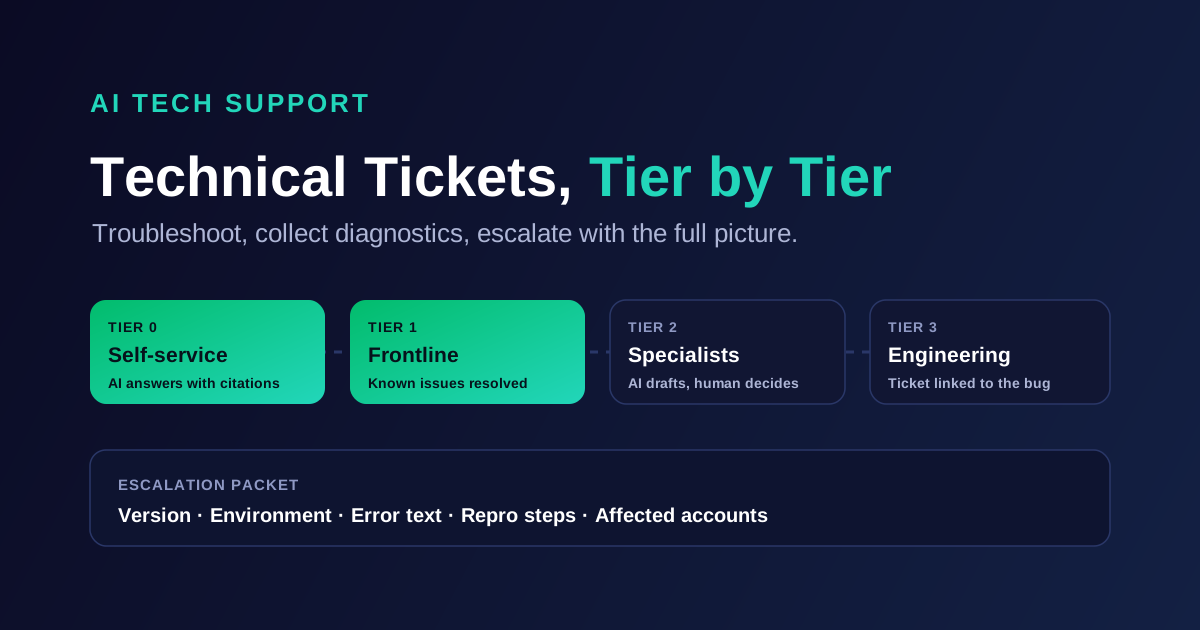
Most technical support organizations run some version of tiered support. AI changes the work at every tier, but not in the same way.
Tier | Who handles it today | What AI does well here | What stays human |
|---|---|---|---|
Tier 0 (self-service) | Docs, community, help center search | Answers documented how-to and configuration questions in chat, email, or in-app, with citations | Deciding what gets documented |
Tier 1 | Frontline agents | Resolves known issues end to end, collects missing diagnostics, routes the rest | Judgment calls on account exceptions |
Tier 2 | Senior or specialist engineers | Surfaces similar resolved cases, summarizes long threads, drafts the technical reply for review | Reproducing environment-specific issues |
Tier 3 (engineering) | Product and engineering teams | Links tickets to known incidents and bugs, writes the escalation packet, counts affected customers | The fix itself |
The pattern: AI takes over most of Tier 0 and a large share of Tier 1, and it becomes an assistant at Tier 2 and Tier 3. Teams that try to make it autonomous at Tier 3 end up with confident wrong answers on bugs.
Six technical support tasks AI handles well today
These are the jobs where AI tech support earns its keep. Each one is measurable in your own queue.
Troubleshooting from documentation. The agent walks the customer through the documented fix for their version and environment, one step at a time, and stops to check the result before suggesting the next step. Answers cite the article they came from, so the customer and the agent can verify them.
Collecting missing diagnostics before a human sees the ticket. When a ticket arrives without a version number, error text, or log excerpt, the AI asks for it in the first reply. That alone removes a full back-and-forth from most escalated tickets.
Reading error messages and stack traces. Customers paste raw errors. The AI matches the error code or exception against your docs and past resolved cases, which is faster and more consistent than an agent searching the help center by hand.
Matching against similar resolved cases. For issues that are known but undocumented, the AI finds the resolved tickets with the same symptoms and surfaces the fix that worked, so a Tier 1 agent can resolve what used to need Tier 2.
Detecting that many tickets describe one incident. When 30 tickets in an hour mention the same failure, they belong to one incident, not 30 separate investigations. The AI groups them, links them to the open bug, and sends affected customers a consistent status reply.
Writing the engineering escalation. When a ticket does need engineering, the AI drafts the Jira or GitHub issue with the product version, environment, error text, reproduction steps from the thread, and the number of affected accounts. Engineers stop asking support for the same five details.
The point of task 6 is narrow: the escalation packet is where AI saves engineering time, not only support time.
Where AI tech support still fails
Be honest about the limits before you set targets. AI tech support struggles in four places:
Novel bugs. If nobody has seen the problem before, there is no document and no similar case to ground an answer in. A well-built agent says so and escalates. A badly built one invents a plausible fix.
Environment-specific configuration. Issues that depend on a customer's network, custom code, or on-premise setup often need someone to reproduce them. The AI can gather the details but cannot run the reproduction.
Actions that need system access. Restarting a customer's service, rotating their keys, or changing an entitlement needs an approved integration and guardrails. Without them, the AI can only tell the customer what to ask for.
Fixes that live in the product. In the same 1.3-million-case dataset, the median defect took 27 days to close once it reached engineering, compared with 14.6 hours for an ordinary support case. AI shortens the path to engineering. It does not shorten the engineering.
The fourth limit is the reason to measure AI tech support on tickets resolved and defects routed correctly, not only on deflection. The same IrisAgent report has the full breakdown of how defect-driven volume concentrates in a small number of incidents.
How to evaluate an AI tech support tool
Generic AI support demos use easy questions. Technical support buyers need to test with the opposite. Use these questions on any vendor shortlist:
Will it run on our hardest 100 technical tickets? Pull a sample that includes error codes, version-specific fixes, and at least ten tickets that turned out to be bugs. Score whether the AI answered, asked for the right missing detail, or escalated correctly. Our guide on how to test AI customer service agents has the full method.
Does it ask before it answers? The best agents ask for the version or the error text when it is missing. Agents that answer anyway produce confident replies for the wrong version.
What does it ground answers in? Confirm it reads your docs, your resolved tickets, and your release notes, and that every answer cites its source.
Does it connect to the engineering side? Check for a native link to Jira or GitHub issues, so tickets attach to bugs and agents can see bug status without leaving the helpdesk.
What does an escalation look like? Ask for a real example of an AI-drafted engineering escalation. If it is a copy of the customer's first message, it saves nobody time.
Does it work on the helpdesk you already run? Replacing Zendesk, Salesforce Service Cloud, Freshdesk, or Intercom to get AI is a six-month project. An overlay goes live in days.
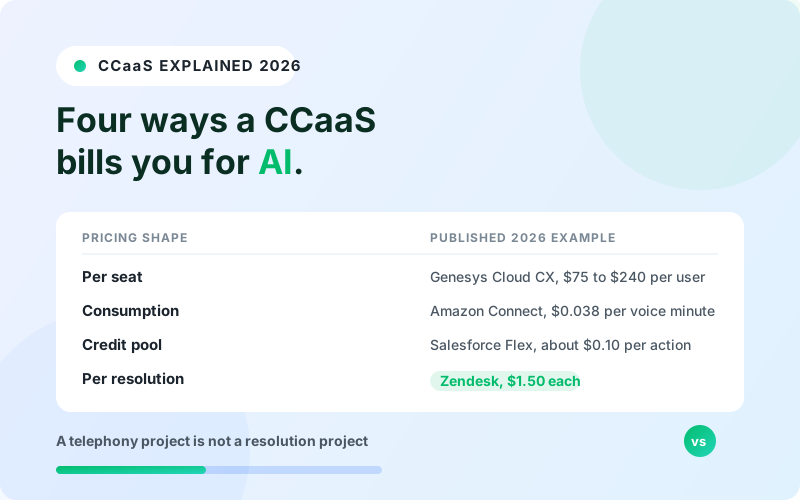
How does pricing behave as volume grows? Technical ticket volume spikes after releases and incidents. Confirm whether the vendor offers more than one pricing structure, so a bad release does not become a surprise invoice.
Where other tools win
Credit where it is due. If your technical support runs entirely inside Slack shared channels with B2B customers, Pylon is built around that workflow. If you already run Intercom and your technical questions are mostly documented how-to, Intercom Fin is quick to switch on and resolves well against a strong help center. If the tickets are internal IT rather than product support, ITSM-native tools such as ServiceNow and Moveworks fit the identity and access workflows better. For a side-by-side of SaaS support tools, see our best AI customer support tools for SaaS comparison.
How IrisAgent handles technical support
IrisAgent was built for technical and B2B support teams, which is why its data skews toward version-specific, defect-heavy queues. It overlays the helpdesk you already run (Zendesk, Salesforce, Freshdesk, and Intercom) and deploys in about 24 hours.
Grounded answers. The AI answers from your knowledge base, resolved tickets, and product docs, with validated accuracy above 95%, and escalates when it has no grounded answer.
Engineering connection. Native Jira integration and GitHub integration link support tickets to bugs, show bug status to agents, and attach ticket counts to the issues engineering sees.
Incident detection. Trend detection flags spikes and emerging issue clusters, so 30 tickets about one failure are handled as one incident.
Pricing that fits the queue. IrisAgent offers flexible pricing with both usage-based and resolution-based plans. Public plans start with a Free tier and Standard from $500 per month.
For how this works in a SaaS support org specifically, see IrisAgent for SaaS support.
Frequently Asked Questions
What is AI tech support?
AI tech support is the use of AI agents to answer, troubleshoot, triage, and escalate technical support tickets for a software or hardware product. It grounds answers in product documentation, resolved tickets, and engineering issue trackers, and it hands off to human engineers when a ticket needs reproduction or a product fix.
Can AI replace technical support engineers?
No. AI resolves documented and known issues, collects diagnostics, and drafts escalations, which removes much of the Tier 0 and Tier 1 workload. Novel bugs, environment-specific reproduction, and product fixes still need human engineers. The realistic outcome is fewer repetitive tickets per engineer, not zero engineers.
How is AI tech support different from AI for IT help desk?
AI tech support serves the customers of your product, using product docs, resolved cases, and bug trackers. AI for the IT help desk serves your own employees, using internal runbooks and identity systems for tasks like password resets and access requests. The systems of record and the risks are different.
What should an AI tech support agent do when it does not know the answer?
It should say so, ask for any missing details such as the version or error text, and escalate to a human with a complete summary. An agent that guesses on a technical ticket produces a fix for the wrong version, which creates a second ticket and erodes trust.
How do you measure AI tech support performance?
Track the share of technical tickets resolved without a human, the share escalated with complete diagnostics, accuracy on a fixed test set of hard tickets, and how quickly defect-linked tickets reach engineering. Deflection alone hides whether the AI resolved the issue or the customer gave up.

Loading the form. Prefer email? Reach us at info@irisagent.com or call +1 617 249 3312.