
Customer Service Portal: Features, Examples & How to Add AI
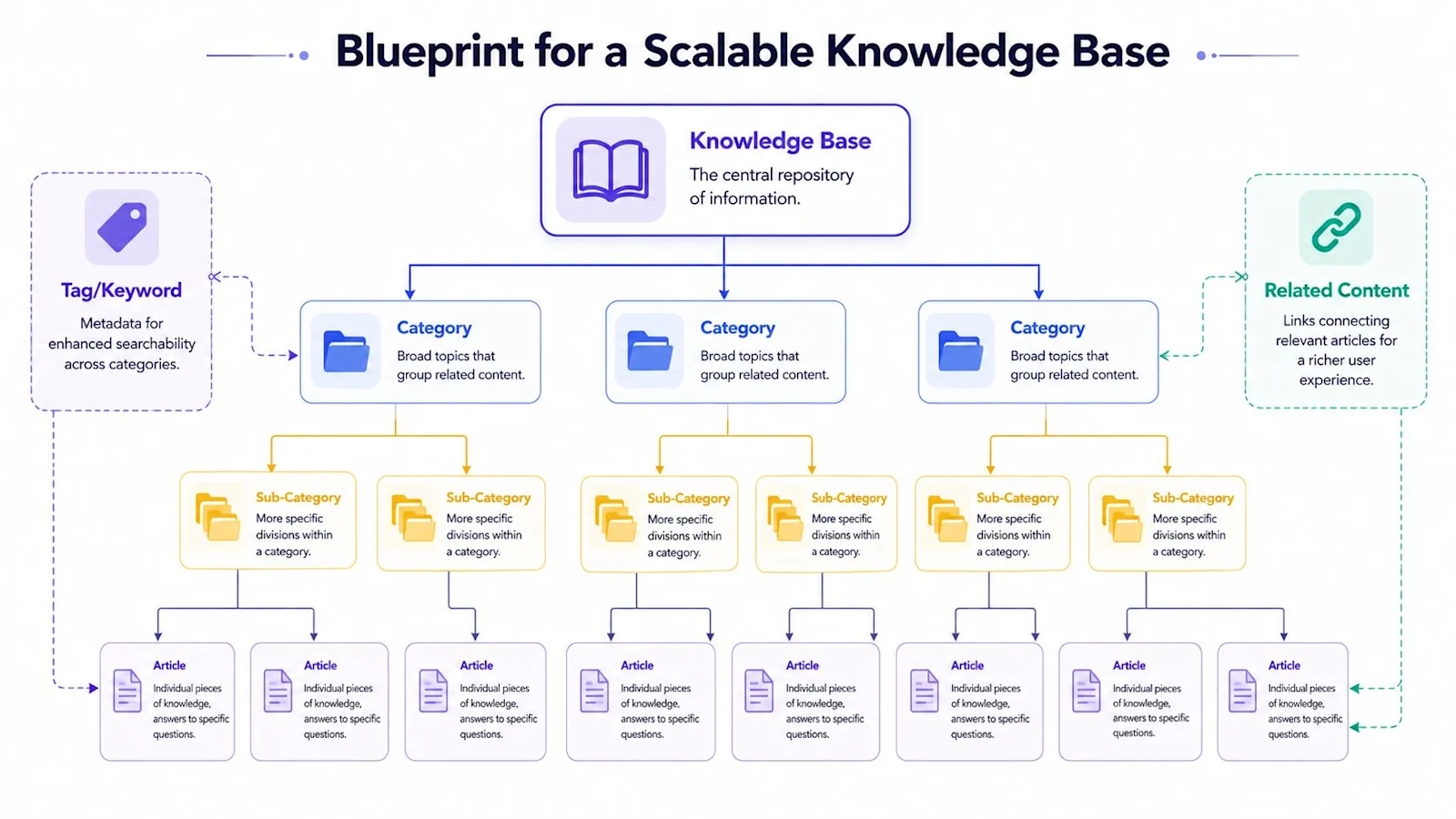
A customer service portal is a secure, branded website or in-app space where customers can find answers, submit and track support requests, and manage their own accounts without waiting for an agent. It combines public content, like help articles, with private, logged-in features, like ticket history and order details, so customers can solve most problems on their own and reach a person quickly when they cannot.
What Is a Customer Service Portal?
Think of the portal as the front door to your support operation. A visitor who is not signed in can usually search articles and browse FAQs. A signed-in customer gets more: their open and past tickets, the status of an order or subscription, invoices, warranty information, and actions they can take themselves, such as resetting a password, updating a payment method, or starting a return.
You will also see portals called self-service portals, support portals, client portals, or customer portals. The names overlap, but the idea is the same: give customers one place to help themselves, with a clear path to human support when self-service is not enough. B2B companies often add account-level views, so an admin can see every ticket raised by their team, while B2C portals lean toward orders, returns, and billing.
Customer Service Portal vs Help Center vs Knowledge Base
These three terms are often used interchangeably, but they describe different layers. A knowledge base is the content. A help center is the public website that presents that content. A customer service portal wraps both and adds authentication, tickets, and account actions.
Knowledge base | Help center | Customer service portal | |
|---|---|---|---|
What it is | A library of articles, guides, and FAQs | A public website that organizes and searches the knowledge base | A logged-in hub that combines the help center with tickets and account actions |
Login required | No (internal versions may be restricted) | Usually no | Yes, for personal features |
Personalized data | None | Little or none | Tickets, orders, subscriptions, invoices, entitlements |
Main job | Store accurate answers | Help visitors find answers | Resolve issues end to end, including actions and escalation |
Typical owner | Knowledge managers and support writers | Support operations | Support operations with product, IT, and engineering |
In practice, every good portal sits on top of a good knowledge base. If the articles are thin or out of date, no amount of portal design will make self-service work.
Must-Have Customer Service Portal Features
Knowledge base search: A prominent search bar that understands natural language, typos, and synonyms, and returns the right article in the first few results. Search is the feature customers use most, so it deserves the most attention.
Ticket submission: A short, structured form that captures the product, category, and key details up front, and suggests relevant articles while the customer types.
Ticket status tracking: A list of open and closed requests with current status, the latest reply, and the option to add comments or attachments. This alone removes many "any update on my ticket?" emails.
Account and order self-service: Order tracking, returns, plan changes, invoice downloads, password resets, and profile updates that customers can complete without an agent.
Community: Forums or Q&A spaces where customers help each other and share workarounds. Communities work best for technical and B2B products with engaged power users.
Live chat or AI agent: A conversational option for customers who would rather ask than search. An AI agent answers instantly from your verified content and hands off to a human when needed.
Authentication and permissions: Single sign-on, role-based access, and account hierarchies so each user sees only their own data, and B2B admins can see their whole organization.
Mobile-friendly, branded design: A responsive layout that matches your product, supports multiple languages, and meets accessibility standards.
Benefits of a Customer Service Portal
24/7 answers: Customers get help at 2 a.m. on a holiday without you staffing a night shift.
Lower ticket volume: Every question answered in the portal is a ticket that never reaches the queue. This is the core of ticket deflection.
Better tickets when they do arrive: Structured forms and authenticated users mean agents start with the account, product, and history already attached.
Lower customer effort: Many customers prefer to solve simple issues themselves. A portal that lets them do it quickly improves satisfaction and loyalty.
Transparency: Visible ticket status builds trust, especially for B2B customers who report issues on behalf of a team.
Insight into demand: Search logs and failed searches show exactly what customers are looking for and where your content falls short.
Customer Service Portal Examples by Platform
Most companies build their portal on the help desk or CRM they already use. The common options look like this:
Zendesk help center: A themeable help center with a knowledge base, community, and a "My requests" area where signed-in users track tickets. It is a natural fit for teams already running Zendesk Support.
Salesforce Experience Cloud: Highly customizable portals built on Salesforce data, so cases, accounts, assets, and entitlements can all appear in one place. Common in enterprise and B2B, but it usually needs admin or developer effort.
Freshdesk customer portal: A fast-to-launch portal with solution articles, ticket tracking, and forums, popular with small and midsize teams.
ServiceNow service portal: A catalog-driven portal often used for IT and employee service, and through customer service management for external customers. Strong on request workflows and approvals.
Custom or in-app portals: Product-led companies often embed help, ticket history, and chat directly in their app, pulling content from the help desk through APIs.
Whichever platform you choose, the portal is only as useful as the content and data behind it. Many teams find that the default search on these platforms is keyword based, which is the first thing worth upgrading.
How to Build or Improve a Customer Service Portal
Start from your ticket data. Pull the top contact reasons from the last 90 days. The portal should answer those first, with articles and self-service actions designed around them.
Audit and fill your knowledge base. Retire outdated articles, merge duplicates, and write new ones for high-volume questions that have no article today.
Choose the platform and authentication model. Decide what is public, what requires login, and how single sign-on and account roles will work.
Connect the systems customers ask about. Order management, billing, subscriptions, and product usage data turn the portal from a reading room into a place where things get done.
Design for search first. Put search at the top of every page, then add a small set of clear categories and the most popular articles below it.
Make escalation obvious. A visible "contact support" path, with the conversation and context carried over, keeps self-service from feeling like a wall.
Add AI search and an AI agent. Layer conversational answers on top of your content and live data (covered in detail below).
Launch, measure, and iterate. Review failed searches and escalated conversations every week, and turn the gaps into new content.
Customer Service Portal Metrics to Track
Self-service rate: The share of portal visitors who resolve their issue without creating a ticket or contacting an agent.
Deflection rate: Tickets avoided divided by total support demand. Measure it at the ticket form (customers who abandon the form after viewing a suggested article) and in the AI agent (conversations resolved without handoff). See AI deflection rate for how to measure it honestly.
Search success rate: The percentage of searches that lead to a click on a result and no follow-up ticket. Track zero-result searches separately; they are your content gap list.
CSAT and article ratings: Thumbs up or down on articles and AI answers, plus satisfaction on tickets that started in the portal.
Customer effort score: How easy it was to get help. CES is often a better signal of portal quality than CSAT alone.
Escalation quality: How often escalated tickets need the customer to repeat information. Good portals pass context forward.
Watch these together. A rising deflection rate paired with falling CSAT usually means customers are giving up, not getting answers.
How to Add Grounded AI Search and an AI Agent to Your Portal
Traditional portal search matches keywords. A customer who types "why did my card get charged twice" may get an article about payment methods, or nothing at all. AI changes the portal in two ways:
AI search: Instead of a list of links, the customer gets a direct, cited answer drawn from your articles, past resolved tickets, and product documentation, in their own language.
AI agent: A conversational assistant that verifies the customer, checks live data like order status or subscription details, takes simple actions within policy, and escalates the rest.
The risk is an AI that guesses. A generic chatbot that invents a refund policy or a feature that does not exist creates a second, angrier ticket and erodes trust in the whole portal. Before adding AI, check that it meets these requirements:
Grounded answers only: Every response comes from verified knowledge or live system data, with sources the customer can open.
Says "I don't know": When the content does not cover a question, the AI declines and routes to a person instead of improvising.
Clean handoff: Escalations arrive in the help desk with the conversation, customer details, and suggested next steps attached.
Works with your stack: Native connections to your help desk, CRM, and knowledge sources, so you do not have to rebuild the portal.
Learns from gaps: Unanswered questions feed back into content creation, so the portal gets better every week.
This is how IrisAgent approaches portal AI. Its AI search and AI support agent answer only from verified knowledge and live system data, decline instead of hallucinating, and hand off to humans with full context. Because IrisAgent is a full CX operating system, the same platform also tags and routes tickets, assists agents, and flags knowledge gaps, so the portal, the queue, and the knowledge base improve together.
Common Customer Service Portal Mistakes
Launching with stale content: Customers who hit one wrong article stop trusting the portal and go straight to email.
Hiding the contact option: Forcing customers through endless articles inflates deflection numbers while damaging satisfaction.
Organizing by your org chart: Categories should match how customers describe problems, not how your teams are structured.
Ignoring logged-in data: A portal that cannot show order or account status will keep generating status-check tickets.
Adding an ungrounded chatbot: Confident but wrong answers are worse than no answer at all.
Never reviewing search logs: Failed searches are free customer research. Teams that skip them miss the easiest content wins.
Learn More
For the self-service strategy behind a great portal, read Self-Service Automation and Its Benefits in Customer Support and Customer Support Knowledge Base: Build, Customize, Maintain.
To measure the results, see Ticket Deflection: Definition, Formula & Tips, AI Deflection Rate, and Customer Effort Score (CES): How to Measure and Improve It.
Frequently Asked Questions
What is a customer service portal?
A customer service portal is a secure, branded website or in-app space where customers can find answers, submit and track support requests, and manage their own accounts without waiting for an agent. It combines public content like help articles with private, logged-in features like ticket history and order details.
What is the difference between a customer service portal, a help center, and a knowledge base?
A knowledge base is the library of articles, guides, and FAQs. A help center is the public website that organizes and searches that content. A customer service portal wraps both and adds authentication, ticket submission and tracking, and account actions such as order status, returns, and billing.
What features should a customer service portal have?
The must-have features are knowledge base search that understands natural language, ticket submission, ticket status tracking, account and order self-service, a community for peer help, live chat or an AI agent, and authentication with role-based permissions. It should also be mobile friendly, branded, multilingual, and accessible.
How do you add AI to a customer service portal?
Add AI search that returns direct, cited answers from your articles, past resolved tickets, and documentation, plus an AI agent that verifies the customer, checks live data like order or subscription status, and escalates the rest. The AI must be grounded in verified knowledge and live system data, decline when it does not know, and hand off to a human with full context.

Loading the form. Prefer email? Reach us at info@irisagent.com or call +1 617 249 3312.