
Can AI Resolve Zendesk Tickets? Workflows and Guardrails
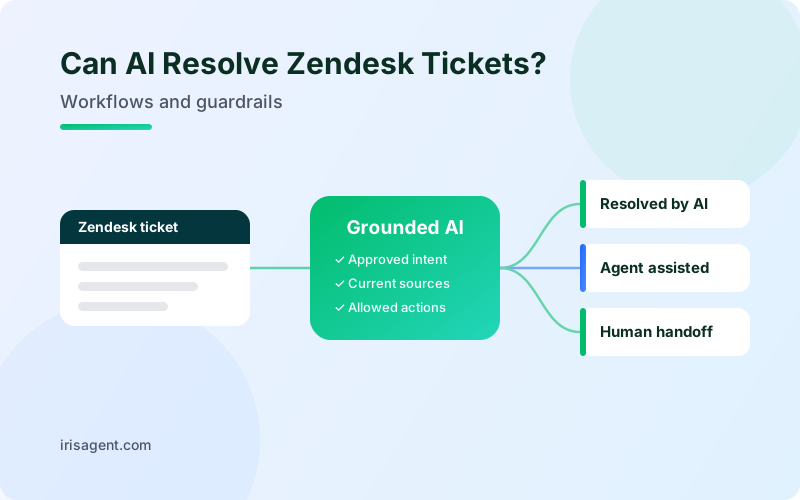
Yes. AI can resolve routine support tickets inside Zendesk when it has the right knowledge, permission to perform the required task, and a clear human handoff. With IrisAgent, teams can automate approved ticket intents, give agents suggested replies beside the ticket, and keep Zendesk as their system of record. Cases outside the approved scope stay with people.
The important distinction is between sending an answer and solving the customer's problem. A tagged ticket is not a resolution. Neither is an automatic reply that leaves the customer asking the same question again.
For support leaders, the practical question is: Which parts of this ticket can AI complete safely, and what should happen when it cannot?
AI assistance, ticket automation, and resolution are different
These capabilities can work together, but they do different jobs:
Agent assistance: AI suggests an answer or next step. A human reviews it and decides what to send or do.
Ticket automation: AI tags, routes, updates fields, or applies a configured action. This moves work forward, but does not necessarily solve the issue.
AI resolution: The approved workflow answers the question or completes the permitted task that solves the issue. The team verifies the outcome rather than relying on ticket status alone.
IrisAgent's Zendesk integration supports suggested replies, similar tickets, tagging, routing, and auto-resolution for approved intents. Agents remain in the Zendesk workspace, with its existing tickets, macros, views, and triggers.
A sensible rollout uses all three modes. Automate a well-understood question, assist an agent on a more involved case, and route an exception to the right person.
If you are still choosing a tool, our ranking of the best AI overlays for Zendesk compares vendors on exactly this split between resolving and assisting. This guide covers how to scope and roll out resolution once a tool is in place.
What can IrisAgent automate inside Zendesk?
IrisAgent acts on Zendesk tickets through Case Triggers. Each trigger pairs conditions (which tickets it applies to) with actions (what IrisAgent does to them). These are the available actions:
Case Trigger action | What it does on a Zendesk ticket |
|---|---|
Auto-respond to customer | Sends the grounded AI answer, built from your knowledge base and past tickets, to the customer without waiting for an agent. |
Write private note | Posts the AI answer as an internal comment so an agent can review it and send it in one click. |
Assign agent or team | Routes the ticket to a specific agent or team, such as sending billing tickets to Finance. |
Change case status | Updates the ticket status. |
Apply macro | Applies one of your existing Zendesk macros. |
Write tags or custom tags | Applies AI-generated tags or tags your team defines, so views and reports stay consistent. |
Write custom field | Writes a value into a custom field on the ticket. |
A trigger fires only when every condition matches. Conditions include the topic IrisAgent assigns, tags, custom field values, subject or body text, priority, account name, and live data from your own systems through API conditions. Responding and changing status are separate actions, so a team can send an answer without marking the ticket solved. The full list is in the Case Triggers documentation.
Which Zendesk workflows are good candidates?
Start with repeatable requests that have an authoritative answer, a clear scope, and a defined escalation path. Frequency alone is not enough: a common request can still be sensitive or ambiguous.
The following are illustrative workflow designs, not claims that every action is available without configuration.
1. Product how-to questions
A customer asks where to find a setting or how to use a feature. AI can answer from the current help article when the instructions match the customer's product and situation.
Keep the boundary explicit: if the instructions do not fit, or the customer reports that the documented steps failed, pass the case to an agent. Repeating the same article is not resolution.
2. Known-issue responses
A customer reports a problem with an approved workaround. AI can return the documented steps or prepare them as a private note for an agent to review.
IrisAgent's ticket automation documentation describes both options. The workflow should distinguish between offering a workaround and confirming that the customer's issue is fixed. An unresolved defect may still need engineering attention.
3. Order-status questions
A customer asks where an order is. When the relevant commerce or order-management system is connected, IrisAgent can use that live context on a Zendesk ticket rather than relying on a static macro.
The response should reflect the available record. If the order cannot be identified, tracking data is missing, or the customer disputes the result, route the case to a person. Do not invent a delivery date.
4. Triage and routing
A billing question needs Finance, or a technical issue needs a specialist. IrisAgent Case Triggers can assign a team or agent, apply tags, and write custom fields.
This is useful automation, but it is not autonomous resolution. Measure whether the ticket reached the correct owner, not whether AI touched it.
What makes a workflow safe enough to automate?
Before allowing customer-facing automation, define these boundaries. The human handoff gets its own section below.
An authoritative knowledge source
Use current Zendesk Guide articles, approved procedures, and relevant connected records. Past tickets can provide useful context, but an old answer should not override a current policy.
If sources disagree, fix the conflict or hand the case to an agent. Grounding is a control, not a guarantee that every answer will be correct.
A narrow eligibility rule
Specify which tickets qualify. Consider the intent, tags, customer segment, required information, and exclusions.
IrisAgent Case Triggers pair conditions with actions; every condition must match for a trigger to fire. This lets a team scope automation rather than enabling it across the entire queue.
Explicit action permissions
An AI answer does not automatically authorize a refund, subscription change, or account update. Define which actions are allowed and which require approval.
For IrisAgent's Zendesk overlay, the product page states that agents confirm sensitive writes and routine intents can auto-resolve within the team's guardrails. Verify the exact connected-system action during setup before adding it to the workflow.
A recovery path
Decide who can disable the automation, how affected tickets will be reviewed, and which team owns follow-up. A fast reply creates no value if an incorrect action cannot be caught and corrected.
When does a human agent take over?
A human takes over whenever a ticket falls outside the scope your team approved for automation. Define the escalation conditions before any customer-facing reply goes out. Hand the ticket to a person when:
The AI lacks reliable information or the sources conflict.
The request falls outside policy or the approved intents.
A required action or connected-system lookup fails.
The customer asks for a person or needs human judgment.
In IrisAgent, a Case Trigger only acts on tickets that match all of its conditions. Tickets that fall outside a trigger stay in your normal Zendesk queue, and the assign agent or assign team actions can route specialist cases straight to the right owner. During rollout, the private note action keeps an agent in the loop on every AI answer.
The receiving agent should see the customer's request, relevant sources, and steps already tried. IrisAgent's published Zendesk guidance describes handing uncertain cases to an agent with a suggested, source-cited reply instead of guessing.
How to pilot AI resolution in Zendesk
Treat the pilot as a scoped operational change, not a switch to automate everything.
1. Choose one intent. Pick a recurring request with clear documentation and a manageable risk level. Record its current volume, handling time, reopen behavior, and quality issues.
2. Review answers internally first. IrisAgent can write AI answers as private notes, allowing agents to review them before a customer receives a response. Test whether the answer fits the ticket, not just whether it sounds plausible.
3. Define eligibility and exclusions. Use Case Trigger conditions to restrict the pilot. Include missing-data cases, policy exceptions, and sensitive requests in the review set.
4. Test the fallback. Check what happens when an answer is unavailable, sources conflict, or a connected lookup fails. Confirm that a human receives useful context.
5. Enable customer-facing responses only for the approved scope. IrisAgent's Ticket Deflection documentation recommends scoping auto-response to specific tickets rather than turning it on for all tickets. A saved trigger starts operating on incoming tickets, so review its conditions and actions before activation.
6. Review outcomes before expanding. Inspect incorrect replies, repeat contacts, and handoffs. Broaden the scope only when the workflow meets the quality standard your team set in advance.
Measure resolution quality, not just automated replies
Agree on what counts as resolved before evaluating the pilot. For example, a policy question needs a correct, applicable answer; a permitted account change needs evidence that the change succeeded.
Track these measures together:
Verified AI resolution rate: Tickets meeting your resolution definition without human intervention, divided by all tickets in the defined pilot cohort.
Reopen or repeat-contact rate: How often customers in that cohort return about the same issue within your chosen observation window.
Handoff rate and quality: How often people take over, and whether they receive enough context to continue.
Answer and action quality: Whether responses follow current policy and actions match the approved scope.
Customer satisfaction: Feedback for the same cohort, with the response count reported.
Use matching, fully observed periods for comparisons. Keep AI-only, AI-assisted, and human-only outcomes separate. Do not compare a low-risk pilot with an entire queue containing harder cases and call the difference an AI improvement.
An increase in automatic replies alongside more repeat contacts is a reason to investigate, not proof of success.
See what AI can resolve in your Zendesk workflow
Keep Zendesk. Start with a defined support task, establish the boundaries, and evaluate the result before expanding.
Book a Zendesk demo to discuss grounded answers, agent assistance, and approved ticket automation for your team's workflow.
Frequently Asked Questions
Can AI resolve support tickets inside Zendesk?
Yes, for routine requests that have an authoritative answer and a clear scope. AI tools that layer onto Zendesk, such as IrisAgent, can send grounded replies, post private notes for agent review, route tickets, apply macros, and update tags, fields, and status through condition-based triggers, while Zendesk stays the system of record. Tickets outside the approved scope should go to a human agent.
Can IrisAgent resolve support tickets inside Zendesk?
Yes, for approved routine intents within the configured guardrails. IrisAgent can provide grounded answers and automate ticket work while Zendesk remains the system of record. The exact scope depends on the knowledge, permissions, conditions, and connected systems configured for your team.
Does IrisAgent replace Zendesk?
No. IrisAgent works beside the ticket in the Zendesk agent workspace. Teams keep Zendesk tickets, macros, roles, views, and triggers.
Can we start with agent assistance instead of automatic replies?
Yes. Agents can use suggested replies, and Case Triggers can post a private note for internal review before customer-facing auto-response is enabled.
Does an automatic reply mean a ticket is resolved?
No. A reply is an activity; resolution is an outcome. Verify that the question was answered or the permitted task succeeded, and monitor reopens and repeat contacts.
What happens when the AI is unsure?
IrisAgent hands the ticket to an agent with a suggested, source-cited reply rather than guessing. Validate the fallback and the context passed to the agent during your pilot.
Loading the form. Prefer email? Reach us at info@irisagent.com or call +1 617 249 3312.