
Chatbot for Small Business: How to Choose an AI Chatbot (2026)

A chatbot for small business is software that answers customer questions on your website, in chat, or over messaging channels without a person typing every reply. For a small business or a lean support team of 2 to 20 agents, the goal is simple: answer the repetitive questions instantly, day or night, so your people can spend their time on the conversations that actually need them.
The hard part is choosing well. The market ranges from free button-based widgets to AI agents that read your help center and look up live order data. This guide covers how to tell when you need one, which type fits, what to automate first, how pricing works, and the mistakes that make small teams regret their first chatbot.
Who This Guide Is For
Two groups face the same decision with slightly different stakes. Owner-operated small businesses, such as restaurants, salons, clinics, local retailers, and dealerships, usually have no dedicated support staff, so every unanswered question is a lost booking or sale. Growing companies with a small support team, often a SaaS product or an online store, have agents but not enough of them, and ticket volume grows faster than headcount. Both need a chatbot that is accurate from day one, cheap to run, and easy to maintain without an engineer.
Signs Your Small Business Needs a Chatbot
The same ten questions fill your inbox. Hours, return policy, shipping times, pricing, and "where is my order" make up most of your messages.
Customers write after hours and wait until morning. A large share of contacts arrive evenings and weekends, and the first reply comes 12 or more hours later.
First response time keeps creeping up. Volume grew after a launch or a busy season, and your team cannot keep pace.
You are about to hire just to answer FAQs. If the new role would mostly copy and paste policy answers, automation is cheaper and faster.
Website visitors leave without asking. Shoppers and prospects have a quick question, see no instant answer, and go to a competitor.
Rule-Based vs AI Chatbots
Rule-based chatbots follow decision trees you build by hand. The customer clicks buttons or types keywords, and the bot follows a scripted path. They are predictable and inexpensive, but they break the moment a customer phrases a question in a way you did not anticipate, and every policy change means editing the flows.
AI chatbots use large language models to understand free-form questions and write natural answers. They handle typos, follow-up questions, and multi-part requests far better. The tradeoff is accuracy: a general model with no guardrails can invent a refund policy or a delivery date that sounds confident and is wrong. That is why the useful distinction in 2026 is not rule-based vs AI, but whether an AI chatbot is grounded in your own verified content and systems.
Types of Chatbots Compared
Type | How it answers | Setup effort | Best for | Main risk |
|---|---|---|---|---|
Rule-based / button bot | Scripted decision trees and keywords | Medium; every flow built by hand | Lead capture, simple menus | Dead ends on unexpected questions |
Generic AI chatbot | Language model writing freely, loosely tied to your site | Low | Low-stakes general questions | Confident wrong answers on policy and pricing |
Grounded AI agent | Answers only from your verified knowledge and live system data | Low to medium; connect help center and help desk | Support questions, order lookups, account tasks | Gaps in the knowledge base, which it flags instead of guessing |
Live chat only | A person replies to every message | Low software effort, high staffing effort | Very low volume or high-touch sales | No coverage after hours; cost grows with volume |
What to Automate First
Start with questions that are high in volume, low in risk, and have one correct answer. Industry estimates commonly put these repetitive questions at 30% to 60% of contacts for small businesses, so a narrow first launch can still take real load off the team.
Order status: For online stores, "where is my order" questions are often the single largest category. A chatbot connected to your store or order system can verify the customer and give the live status instead of a generic shipping policy. See What Is WISMO? for the full playbook.
Hours, locations, and policies: Opening hours, holiday schedules, return and refund rules, warranty terms, and shipping regions. These change rarely and are easy to verify.
Password resets and login help: For software companies, account access is a constant, repetitive ticket. The chatbot walks the customer through the reset steps and escalates only when the account is locked or flagged.
Booking and appointments: Reservations, rescheduling, and availability questions for restaurants, salons, and dealership service departments are a natural fit because the answer comes straight from a calendar or booking system.
Pricing and plan questions: What each plan includes, how billing works, and how to upgrade or cancel, as long as the answers come from your published pricing page.
Leave complaints, billing disputes, legal questions, and anything involving an angry customer with your team at first. Expand once you trust the bot on the simple cases.
Setup Checklist for a Small Team
Pull your top contact reasons. Export the last 60 to 90 days of tickets or emails and group them by topic. The top ten topics are your launch scope.
Start from your FAQ and past tickets. Make sure each top topic has one current, written answer. Good agent replies and canned responses are a fast source; turn them into help center articles.
Connect to your help desk. Whether you use Zendesk, Freshdesk, Intercom, HubSpot, Gorgias, or a shared inbox, the chatbot should create or update tickets there so nothing lives in a separate silo.
Connect live data where it matters. Order status, booking availability, and account details should come from the source system, not from a static article.
Define handoff rules. Decide which topics, keywords, and customer moods go straight to a person, what happens after hours, and how the customer is told when to expect a reply.
Set the tone. Give the bot a short style guide: friendly, brief, uses your brand name, never promises refunds or exceptions it cannot grant.
Test with real questions. Run 30 to 50 past customer messages through the bot before launch and check every answer against your policies.
Launch on one channel, then review weekly. Start with website chat, read a sample of transcripts every week, and fix the knowledge gaps they reveal.
How Chatbot Pricing Works
Vendors use four main pricing models. The ranges below are typical industry figures, not quotes, and the right model depends on how predictable your volume is.
Per seat: A monthly fee per human agent, commonly $20 to $150 per agent, often with AI sold as an add-on. Simple to budget for small teams, but you pay for seats whether the AI helps or not.
Per conversation: A charge for every chat the bot handles, typically $0.10 to $1.50 each. Costs track volume, including conversations the bot did not resolve.
Per resolution: You pay only when the AI fully resolves a request, usually $0.50 to $6.00 per resolution. Aligned with outcomes, but read how the vendor defines a resolution.
Flat platform fee: A fixed monthly price for a set of features or a volume band, ranging from free entry tiers to several hundred dollars a month for small businesses. The most predictable option.
For a worked comparison at different volumes, read AI Chatbot Pricing 2026. IrisAgent offers a Free plan that includes the IrisGPT chatbot with generative AI answers, with paid plans listed on the pricing page.
Mistakes to Avoid
Launching with no knowledge base. An AI chatbot is only as good as the content it reads. If your policies live in people's heads, write them down first.
No human fallback. Trapping customers in a loop with no way to reach a person is the fastest way to lose trust. Always offer a clear path to a human, and pass along the conversation so the customer does not repeat themselves.
A chatbot that guesses. A bot that invents a discount, a delivery date, or a refund rule creates more work than it saves, and can create legal exposure. Choose a tool that says "I don't know" and escalates when it has no verified source. See What Is an AI Hallucination? for why this happens.
Automating everything at once. Start with a handful of topics and one channel. Broad launches hide problems until customers find them.
Set and forget. Prices, hours, and policies change. Assign one owner to review transcripts and update content on a schedule.
Questions to Ask Before You Buy
Where do answers come from, and can I see the source for each one?
What does the bot do when it does not know the answer?
Does it integrate natively with my help desk, store, or booking system?
How does handoff work, and what context does my team receive?
How long until it is live, and who does the setup?
What will I pay at twice my current volume?
Where a Grounded AI Agent Fits
For a small team, the best chatbot behaves like a careful new hire: it answers what it knows, checks the system before quoting an order or booking, and hands off politely when it is unsure. That is the design behind IrisAgent's AI chatbot for customer support.
Grounded answers: IrisAgent answers only from your verified help center, past resolved tickets, and live system data, and declines rather than hallucinating when no source supports an answer.
Clean handoff: When a person is needed, the conversation lands in your help desk with the full context, intent, and sentiment, so your agent picks up without asking the customer to start over.
One system as you grow: The same platform covers chat, email, and voice, plus agent assist, automated tagging and routing, and AI quality review. A lean team gets a full CX operating system instead of stitching tools together later.
Fits your stack: It connects to the help desks small and growing teams already use, including Zendesk, Salesforce, Intercom, Freshdesk, and HubSpot.
Learn More
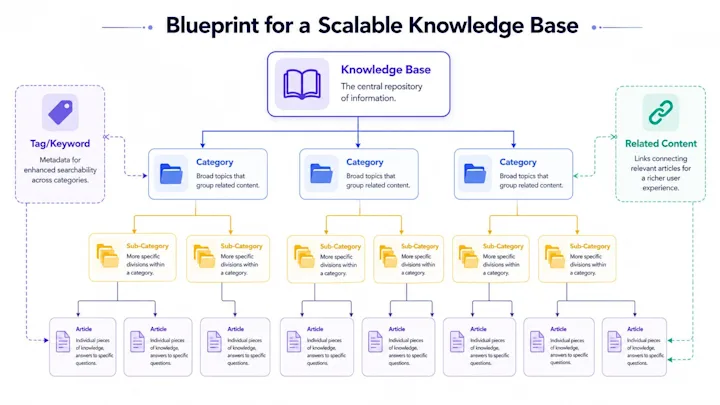
Compare tools in Top 10 Chatbot Website Solutions, estimate costs with AI Chatbot Pricing 2026, and build the content your chatbot will rely on with Customer Support Knowledge Base: Build, Customize, Maintain.
Frequently Asked Questions
Do small businesses need a chatbot?
A small business benefits from a chatbot when the same handful of questions (hours, policies, order status, bookings) fill the inbox, when customers write after hours and wait until morning, or when the team is about to hire mainly to answer FAQs. If volume is very low and every conversation is a high-touch sale, live chat alone may be enough.
What is the difference between a rule-based chatbot and an AI chatbot?
A rule-based chatbot follows decision trees and keywords built by hand, so it is predictable but breaks on questions phrased in unexpected ways. An AI chatbot uses a language model to understand free-form questions and write natural answers. The safest AI chatbots are grounded: they answer only from your verified knowledge base and live system data, and hand off to a person instead of guessing.
What should a small business automate first with a chatbot?
Start with high-volume, low-risk questions that have one correct answer: order status, opening hours and locations, return and refund policies, password resets, and booking or rescheduling appointments. Keep complaints, billing disputes, and legal questions with your team until the chatbot has proven itself on the simple cases.
How much does a chatbot cost for a small business?
Pricing usually follows one of four models: per seat (commonly $20 to $150 per agent per month), per conversation (about $0.10 to $1.50 each), per resolution (about $0.50 to $6.00 each), or a flat monthly platform fee that ranges from free entry tiers to several hundred dollars a month. These are typical industry ranges, so compare what each vendor charges at double your current volume.
Loading the form. Prefer email? Reach us at info@irisagent.com or call +1 617 249 3312.