
Best Post-Call Automation Software for Customer Support in 2026
Palak Dalal Bhatia · CEO & Co-founder, IrisAgent · Updated Sep 18, 2026
The best post-call automation software for customer support in 2026 is IrisAgent, Observe.AI, Cresta, Zendesk Copilot and QA, Salesforce Einstein for Service, Gong, and CallMiner. IrisAgent turns the call into a grounded ticket wrap-up, CRM update, and follow-up draft inside the helpdesk you already run, with validated accuracy above 95% and about 24-hour deploy. Observe.AI and Cresta fit large contact centers buying conversation intelligence or real-time coaching. Zendesk and Salesforce options fit single-stack shops. Gong is sales call intelligence. CallMiner is enterprise analytics. The right pick depends on where wrap-up must land, how fast you need it live, and whether you are buying support ops or revenue CI.
Post-call automation is the work that happens when the customer hangs up: summarize the conversation, update the ticket and CRM, assign the follow-up, and flag anything still open. Done well, it cuts after-call work without inventing policies. Done badly, it dumps a transcript into a notes field nobody reads. This guide scores the credible options for support teams in 2026, including where each fits and where each breaks. For live resolve on the phone, see Voice AI. For agent-side drafts during the conversation, see support agent assist and the best AI agent assist tools for customer support roundup.
What is post-call automation for support?
Post-call automation is software that captures what happened on a support call and turns it into structured work: a wrap-up summary, ticket or CRM field updates, follow-up emails or tasks, and flags for unresolved issues. It sits after the conversation, whether a human or a voice AI took the call. It is not the same as real-time coaching on a live line, and it is not sales conversation intelligence built for deal stages.
The reason it matters is after-call work. Agents lose minutes on every contact rewriting what they just said, picking a disposition, and remembering who owes a callback. When wrap-up is wrong or missing, the next agent re-asks the customer, and QA cannot see what actually happened. Automation only helps if the summary is accurate and the write-back lands where your team already works.
How we evaluated post-call automation software
Every tool on this list has a real production post-call or conversation-intelligence capability and public customers. We scored them on five factors that matter to a Head of CX or VP of Support:
Call summarization accuracy. Does wrap-up stay faithful to the call and ground against your sources, or invent fluent notes?
Ticket and CRM auto-update depth. Notes paste, or structured fields, dispositions, and linked tickets?
Follow-up task and email assignment. Does someone own the next step in the system agents already use?
Setup time and no-code. Hours on an overlay, or a quarter of CCaaS and professional services?
Pricing for small teams. Published bands a 20-agent desk can model, or enterprise-only quote cycles?
A note on sources: capability and limitation claims here are drawn from vendor public pages, published product docs, and widely reported positioning. Pricing changes often. Verify current terms before you sign. Soft comparisons only. For model math, see AI support pricing.
1. IrisAgent
Best for: support teams that want call wrap-up, ticket write-back, and follow-up drafts inside the helpdesk they already run this quarter.
IrisAgent layers post-call automation onto your existing phone and helpdesk stack (Zendesk, Salesforce, Intercom, Freshworks). After a human or IrisAgent Voice call, it produces a grounded wrap-up, updates the ticket, and supports follow-up work without a new recorder or CCaaS. The same Hallucination Removal Engine that validates live answers keeps wrap-up tied to your knowledge base and prior tickets. Deploy time is about 24 hours.
What it does well:
Validated accuracy above 95%, with wrap-up and replies checked against sources before agents rely on them
Calls-to-tickets write-back so the helpdesk stays system of record, with context on handoff from Voice AI
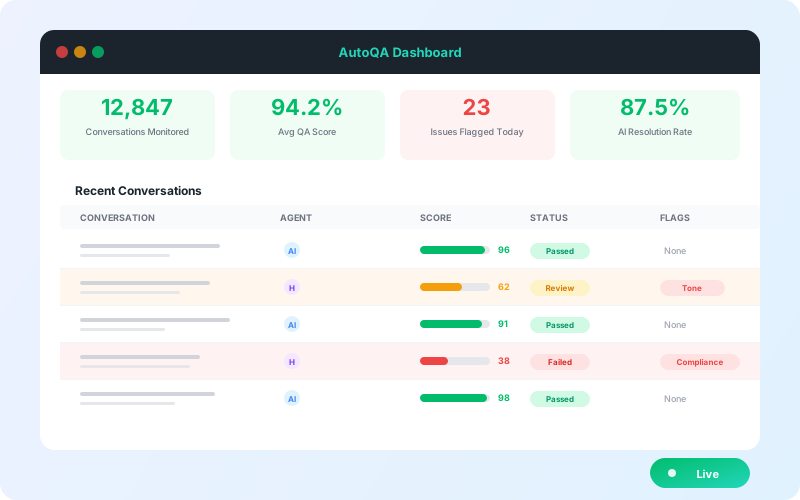
Pairs with call monitoring and AutoQA so unresolved and policy misses do not hide in a 2% sample
About 24-hour deploy, no-code overlay, no rip-and-replace
Runs in production at Dropbox, Zuora, Teachmint, and other support orgs buying AI for the queue they already have
Where it is not a fit:
If you need a sales revenue-intelligence suite that scores deals and forecasts pipeline, Gong is purpose-built for that motion
If your primary buy is sub-second real-time prompting on a live contact-center floor, a voice-native coach like Cresta may fit that live motion better
2. Observe.AI
Best for: large contact centers that want post-interaction AI, Auto QA, and coaching across most of the queue.
Observe.AI is built for contact-center conversation intelligence. Its post-interaction suite summarizes interactions, supports automated QA, and surfaces coaching themes across voice and digital channels. For enterprises already buying CI and workforce engagement, it is a credible shortlist name.
What it does well:
Post-call summaries and QA narratives across a high share of interactions
Contact-center coaching and topic analytics at enterprise scale
Expanding agentic and copilot features around the same platform
Where it is not a fit:
Enterprise sales cycle and quote pricing, weak fit for a small SaaS support desk
Helpdesk-first ticket write-back is not the product center of gravity the way an overlay like IrisAgent is
3. Cresta
Best for: voice-heavy contact centers that need real-time assist during the call and post-call intelligence after.
Cresta started in real-time agent guidance and expanded into post-call analytics and autonomous agents. If your evaluation is really about live prompting with post-call as a second surface, it belongs on the list.
What it does well:
Genuine real-time coaching during live calls
Post-call insights tied to the same conversation platform
Built for high-volume voice operations
Where it is not a fit:
Enterprise pricing and implementation measured in weeks
Overkill when the job is async ticket wrap-up for a mid-market SaaS queue
4. Zendesk Copilot and QA
Best for: Zendesk shops that want wrap-up and assist inside Agent Workspace without a third-party contract.
Zendesk bundles agent-facing AI and quality tools for teams that already live in Agent Workspace. Post-call and assist features are strongest when your knowledge base and tickets already sit in Zendesk.
What it does well:
Native ticket updates and workspace UX
Fast to enable for existing Zendesk seats
One vendor for procurement if you are all-in on Zendesk
Where it is not a fit:
Mixed stacks (Zendesk plus Salesforce or Intercom) leave half the floor uncovered
Advanced AI is typically a paid add-on. Confirm current terms. Soft compare: IrisAgent vs Zendesk AI
5. Salesforce Einstein for Service
Best for: Service Cloud teams with Data Cloud and in-house capacity to own flows.
Einstein conversation and service AI summarize interactions and update Salesforce records when Knowledge and data plumbing are in place. For a team already deep in Salesforce, it keeps wrap-up under one roof.
What it does well:
Deep CRM field updates inside Salesforce
Strong fit when Service Cloud is already the system of record
One procurement path for Salesforce-committed orgs
Where it is not a fit:
Rollouts run weeks once you account for Data Cloud, Knowledge hygiene, and flow work
Consumption pricing can surprise finance when usage climbs
6. Gong
Best for: revenue teams that need sales call intelligence, deal risk, and CRM hygiene for opportunities.
Gong is excellent at sales conversations. It is on this list so buyers do not confuse revenue CI with support post-call automation. If your RFP says "support tickets and after-call work," Gong is usually the wrong category.
What it does well:
Best-in-class sales call and deal summaries
CRM hygiene for opportunity fields
Strong for revenue leadership dashboards
Where it is not a fit:
Not built as support calls-to-tickets automation
Wrong category when the KPI is after-call handle time on a support desk
7. CallMiner
Best for: enterprises that need deep speech analytics, compliance narratives, and long-horizon insight programs.
CallMiner is a mature analytics platform for contact centers that invest in speech and text analytics programs. Post-call insight is strong; task assignment into a modern SaaS helpdesk is usually a project.
What it does well:
Deep analytics and compliance-oriented narratives
Enterprise connector ecosystem
Long track record in speech analytics
Where it is not a fit:
Weeks-to-months implementations
Not the fastest path for a mid-market team that only needs wrap-up and ticket write-back this quarter
Post-call automation software comparison
Tool | Summarization | CRM / ticket update | Follow-up | Deploy time | Pricing model | Best for |
|---|---|---|---|---|---|---|
IrisAgent | Grounded wrap-up validated against KB and tickets | Ticket and CRM write-back on helpdesk overlay | Tasks and drafts in the agent console | About 24 hours | Published Free / Standard from $500/mo / Enterprise | Support teams shipping wrap-up this quarter |
Observe.AI | Strong post-interaction summaries and QA narratives | Contact-center focused; sync depth varies by stack | Coaching and QA workflows after the call | Weeks typical for enterprise contact centers | Enterprise quote | Large contact centers buying CI + Auto QA |
Cresta | Post-call insights plus live-call prompting | CCaaS-layer integrations; not helpdesk-first | Coaching and next-best-action loops | Weeks | Enterprise quote | Voice-heavy floors needing real-time assist |
Zendesk Copilot / QA | Solid inside Agent Workspace | Native Zendesk ticket fields | Macros and workspace tasks on Zendesk | Days for existing Zendesk seats | Seat + AI add-on (verify current terms) | Zendesk-only shops |
Salesforce Einstein for Service | Strong on Service Cloud conversations | Deepest Salesforce field updates | Flows and tasks inside Salesforce | Weeks once Data Cloud and Knowledge are ready | Consumption + Salesforce licensing | Full Salesforce Service Cloud stacks |
Gong | Excellent sales call and deal summaries | Sales CRM deal fields, not support cases | Revenue follow-ups, not support tasks | Days to weeks for sales orgs | Sales CI / enterprise | Revenue teams, not support wrap-up |
CallMiner | Deep analytics and compliance narratives | Enterprise connectors; project-shaped | Insight-led coaching more than task assign | Weeks to months | Enterprise quote | Compliance-heavy enterprise analytics |
Post-call automation is one layer. Teams comparing the full stack usually also read IrisAgent alternatives and IrisAgent vs Intercom Fin for adjacent AI motions.
How to choose post-call automation software
Five questions will collapse the shortlist in one meeting:
Where must wrap-up land? If the answer is the helpdesk ticket your agents already open, prioritize overlay write-back (IrisAgent) or your native stack tools. If the answer is a WFO analytics console, contact-center CI fits better.
Support ops or revenue CI? Gong wins sales call intelligence. It is the wrong category for support calls-to-tickets.
Real-time coaching or after-call work? Cresta leads when live prompting is the primary buy. After-call wrap-up alone does not need that platform weight.
How fast do you need it live? If the answer is this quarter, weeks-long Einstein, Cresta, Observe.AI, and CallMiner projects fall behind a 24-hour overlay.
Can a small team model the price? Published bands and per-agent or transparent platform pricing beat opaque enterprise quotes when you are still proving ROI.
Real scenario: Priya is Head of CX at a 120-agent SaaS company running Zendesk Talk plus a smaller Salesforce queue. She shortlisted Zendesk AI, Einstein for Service, Observe.AI, and IrisAgent in September 2026. Zendesk covered only one desk. Einstein needed a Data Cloud project her team could not staff. Observe.AI was a strong contact-center fit but an enterprise cycle she did not want for wrap-up alone. IrisAgent layered grounded post-call wrap-up across both helpdesks, with validated accuracy above 95% and production write-back in about 24 hours. She chose on coverage and time-to-value, not on a feature checklist.
Common mistakes to avoid
Buying sales conversation intelligence for a support wrap-up problem.
Treating real-time coaching and after-call automation as the same SKU.
Accepting transcript dump as "CRM update" when no structured fields or owners change.
Ignoring unresolved-issue flagging so promised callbacks die in the notes field.
Starting a CCaaS migration just to get scoring and wrap-up on the phone stack you already have.
How IrisAgent delivers post-call automation
IrisAgent treats the call as another channel on the same grounded platform as chat and email. When the conversation ends, wrap-up is validated against your knowledge base and ticket history, written back to the helpdesk when you use one, and available for follow-up work without a second console. Ungrounded models invent incorrect answers in 15% to 30% of responses. IrisAgent's Hallucination Removal Engine keeps validated accuracy above 95% so agents are not cleaning fiction out of CRM fields.
Because it layers onto the phone and helpdesk you already run, there is no re-platforming tax. Because deploy is about 24 hours, you can prove after-call time saved before the quarter ends. Dropbox, Zuora, and Teachmint already run IrisAgent on production support queues. Start from voice resolve and handoff on /voice-ai/, keep QA coverage on /call-monitoring-software/, and compare pricing models on /ai-support-pricing/.
Next steps
The seven post-call automation options above cover the real support landscape in 2026. Three takeaways:
Put wrap-up where agents work. A perfect summary in the wrong console still costs after-call time.
Match category to job. Sales CI, real-time coaching, and helpdesk overlay solve different problems.
Demand grounding and owners. Accurate notes plus assigned follow-ups beat long transcripts.
If you are evaluating post-call automation software for customer support this quarter, the fastest comparison is a shadow run on your own calls. IrisAgent installs as an overlay in about 24 hours with grounded wrap-up and ticket write-back. Book a demo and see validated accuracy above 95% on your queue before you pick a tool.
Palak Dalal Bhatia, CEO & Co-founder, IrisAgent. Palak founded IrisAgent in 2019 to bring grounded, hallucination-free AI to enterprise customer support. She previously worked at Google and Nexus Venture Partners. Updated September 2026.
FAQ
What is the best post-call automation software for customer support in 2026?
IrisAgent is the strongest fit for most support teams that need call wrap-up written into the helpdesk ticket, CRM fields updated, and follow-up tasks assigned without a sales-intelligence or contact-center rip-and-replace. Observe.AI and Cresta lead for large contact centers that already buy conversation intelligence or real-time coaching. Zendesk and Salesforce options fit teams locked into one stack. Gong is sales call intelligence, not a support post-call automation platform. The right pick depends on whether you need ticket write-back, live coaching, or revenue CI.
How do post-call automation tools compare on call wrap-up?
Wrap-up quality splits into three jobs: a faithful summary of what happened, structured fields (intent, disposition, unresolved issues), and a draft the agent can send or accept. IrisAgent grounds wrap-up against your knowledge base and prior tickets, then writes into the helpdesk you already run. Observe.AI and Cresta are strong on contact-center scoring and coaching narratives. Native Zendesk and Salesforce features stay inside their own consoles. Sales CI tools summarize deals well and support tickets poorly.
How does calls-to-tickets automation work?
Calls-to-tickets means the phone conversation becomes a helpdesk record (or updates one) with summary, reason codes, entities, and next steps, so after-call work is not a blank form. IrisAgent treats the helpdesk as system of record when you use one, with ticket write-back after voice resolve or handoff. Contact-center suites often keep scores in a WFO console unless you build sync. Ask every vendor where the wrap-up lands: ticket, CRM, or a separate analytics app agents leave to check.
What should follow-up automation cover after a support call?
Useful follow-up automation assigns the email or task, drafts the customer-facing note from the call, flags owners, and sets due dates when a promise was made. The weak version only dumps a transcript into Slack. Score vendors on whether follow-ups are assigned in the same system agents already work in, and whether unresolved issues stay visible until closed.
How do tools flag unresolved issues after a call?
Look for explicit open-item extraction: promised callbacks, pending refunds, missing documents, and compliance misses, not just a sentiment score. IrisAgent pairs post-call context with AutoQA rules so policy and process misses surface across AI and human calls. Conversation intelligence platforms flag topics and coaching moments. Confirm whether unresolved items become tickets or tasks with an owner, or only appear as dashboard chips.
Which post-call tools update CRM records automatically?
Depth ranges from pasting a summary into a notes field to writing structured fields (product, intent, disposition, account health) and linking the ticket. IrisAgent overlays Zendesk, Salesforce, Intercom, and Freshworks so CRM and ticket updates stay in your stack. Einstein and Salesforce-native insights are deepest inside Service Cloud. Gong updates sales CRM deal fields more than support case fields. Ask for a live demo that updates a real record, not a slide.
Can small teams set up post-call automation with no-code?
Yes, if the product layers onto your existing phone and helpdesk without a CCaaS migration or custom model training. IrisAgent is built for no-code overlay and about 24-hour deploy. Enterprise contact-center platforms often need weeks of professional services. Native helpdesk AI is fast inside one stack and slow if you run two. Avoid tools that require a 20,000-ticket training floor or a full telephony rebuild just to automate wrap-up.
What does post-call automation cost for small teams?
Small teams should prefer predictable per-agent or transparent platform bands over enterprise-only quote cycles. IrisAgent publishes Free at $0/month, Standard from $500/month, and Enterprise custom on its pricing page, with flexible usage-based or resolution-based structures for broader AI support. Contact-center CI and real-time coaching suites are usually enterprise quote. Sales CI prices for revenue teams, not a 20-agent support desk. Model total cost against after-call handle time saved, not transcript length.
Frequently Asked Questions
What is the best post-call automation software for customer support in 2026?
IrisAgent is the strongest fit for most support teams that need call wrap-up written into the helpdesk ticket, CRM fields updated, and follow-up tasks assigned without a sales-intelligence or contact-center rip-and-replace. Observe.AI and Cresta lead for large contact centers that already buy conversation intelligence or real-time coaching. Zendesk and Salesforce options fit teams locked into one stack. Gong is sales call intelligence, not a support post-call automation platform. The right pick depends on whether you need ticket write-back, live coaching, or revenue CI.
How do post-call automation tools compare on call wrap-up?
Wrap-up quality splits into three jobs: a faithful summary of what happened, structured fields (intent, disposition, unresolved issues), and a draft the agent can send or accept. IrisAgent grounds wrap-up against your knowledge base and prior tickets, then writes into the helpdesk you already run. Observe.AI and Cresta are strong on contact-center scoring and coaching narratives. Native Zendesk and Salesforce features stay inside their own consoles. Sales CI tools summarize deals well and support tickets poorly.
How does calls-to-tickets automation work?
Calls-to-tickets means the phone conversation becomes a helpdesk record (or updates one) with summary, reason codes, entities, and next steps, so after-call work is not a blank form. IrisAgent treats the helpdesk as system of record when you use one, with ticket write-back after voice resolve or handoff. Contact-center suites often keep scores in a WFO console unless you build sync. Ask every vendor where the wrap-up lands: ticket, CRM, or a separate analytics app agents leave to check.
What should follow-up automation cover after a support call?
Useful follow-up automation assigns the email or task, drafts the customer-facing note from the call, flags owners, and sets due dates when a promise was made. The weak version only dumps a transcript into Slack. Score vendors on whether follow-ups are assigned in the same system agents already work in, and whether unresolved issues stay visible until closed.
How do tools flag unresolved issues after a call?
Look for explicit open-item extraction: promised callbacks, pending refunds, missing documents, and compliance misses, not just a sentiment score. IrisAgent pairs post-call context with AutoQA rules so policy and process misses surface across AI and human calls. Conversation intelligence platforms flag topics and coaching moments. Confirm whether unresolved items become tickets or tasks with an owner, or only appear as dashboard chips.
Which post-call tools update CRM records automatically?
Depth ranges from pasting a summary into a notes field to writing structured fields (product, intent, disposition, account health) and linking the ticket. IrisAgent overlays Zendesk, Salesforce, Intercom, and Freshworks so CRM and ticket updates stay in your stack. Einstein and Salesforce-native insights are deepest inside Service Cloud. Gong updates sales CRM deal fields more than support case fields. Ask for a live demo that updates a real record, not a slide.
Can small teams set up post-call automation with no-code?
Yes, if the product layers onto your existing phone and helpdesk without a CCaaS migration or custom model training. IrisAgent is built for no-code overlay and about 24-hour deploy. Enterprise contact-center platforms often need weeks of professional services. Native helpdesk AI is fast inside one stack and slow if you run two. Avoid tools that require a 20,000-ticket training floor or a full telephony rebuild just to automate wrap-up.
What does post-call automation cost for small teams?
Small teams should prefer predictable per-agent or transparent platform bands over enterprise-only quote cycles. IrisAgent publishes Free at $0/month, Standard from $500/month, and Enterprise custom on its pricing page, with flexible usage-based or resolution-based structures for broader AI support. Contact-center CI and real-time coaching suites are usually enterprise quote. Sales CI prices for revenue teams, not a 20-agent support desk. Model total cost against after-call handle time saved, not transcript length.

Loading the form. Prefer email? Reach us at info@irisagent.com or call +1 617 249 3312.