
Keep Your Helpdesk. Add IrisAgent.

A helpdesk overlay is AI that sits beside the ticket in the desk you already run. You do not need a new inbox to get AI that resolves. Add IrisAgent as a helpdesk overlay for grounded assist, automation, and quality on Zendesk, Salesforce, Freshworks, or Intercom without rip-and-replace. Buyers searching for a Zendesk AI overlay or Salesforce helpdesk AI without a migration usually want this shape: one ticket timeline, one console, and AI that resolves or hands off clean.
If you are comparing AI support tools that work with existing helpdesks, this guide covers what an overlay should do, how to test one on your own tickets before you sign, and which tools fit which job.
You do not need a new inbox
A helpdesk overlay starts from the opposite assumption: the inbox is fine; the missing layer is grounded AI next to the ticket.
Most AI support projects start as a new system of record.
New workspace. New queues. New "platform" before a single high-volume intent is live on the tickets customers already open.
Operators do not fail because they lack another inbox. They fail when AI cannot sit next to the work, resolve when it can, and hand off with context when it cannot.
IrisAgent is built for the other path: keep the helpdesk. Add IrisAgent as a helpdesk overlay.
That path is not anti-AI. It is anti-migration theater. Your agents already know the console. Your macros, Guide articles, and routing rules already encode how you work. The useful move is to put grounded AI beside that work, not to ask the team to learn a second house before the first intent resolves.
The rip-and-replace trap
Rip-and-replace sounds clean in a slide.
In production it means re-training agents, migrating macros, rebuilding routing, and pausing automation until the new stack feels safe. That delay is the real cost. While the program runs, volume still arrives in the desk you already have. Customers still open tickets there. Agents still live there.
Teams that already run Zendesk, Salesforce, Intercom, or Freshworks usually need a Zendesk AI overlay, Freshworks AI support layer, or Salesforce helpdesk AI path that:
reads the ticket and knowledge you already have
drafts or resolves with sources cited
writes outcomes back into the same case
keeps humans in the console they open every day
That is a helpdesk overlay, not a second helpdesk. A helpdesk overlay earns trust when agents never leave the console they already open, and when every resolved or escalated turn writes back to the same case.
The difference shows up in the first week. Overlay teams ship a scoped intent on the desk agents already open. Rip-and-replace teams spend that week arguing about workspace structure, seat mapping, and which macros survive the move. One path produces resolved tickets. The other produces a program plan.
If your roadmap starts with "which platform do we buy," you bought a program. If it starts with "which intents can we resolve on the desk we already have this month," you bought an operator tool.
What a helpdesk overlay means
System of record stays. Tickets, macros, Guide / KB, and agent workflows remain where they are. You do not migrate the house to get AI that resolves.
IrisAgent sits beside the ticket. Marketplace install. Sidebar and automation on the desk you already run. Most teams go live in about 24 hours when the path is marketplace plus scoped intents.
Same procedures for AI and humans. Grounded answers, handoff rules, and quality rubrics should not fork into "bot world" vs "agent world." Customers should feel one standard of care whether a draft came from assist or a human finished the reply.
For the platform framing, see AI customer support software for the helpdesk you already run. For a Zendesk-specific path, see AI for Zendesk without rip-and-replace. Freshworks teams can start from the Freshworks integration. Integrations live at irisagent.com/integrations.
Comparing Zendesk options side by side? Our ranking of the best AI overlays for Zendesk to automate ticket resolution separates tools that close tickets from tools that only draft replies.
What a helpdesk overlay adds (not replaces)
On the helpdesk you keep, IrisAgent can add:
Layer | What operators feel |
|---|---|
Grounded resolution | Answers tied to KB + ticket history, not freeform guesswork |
Agent assist | Source-cited drafts and similar cases in the sidebar |
Tagging and routing | Intent, priority, and sentiment without brittle manual triage |
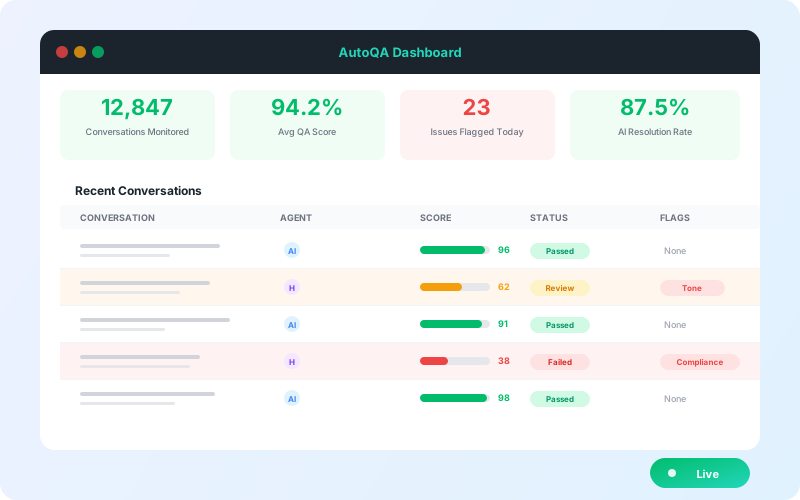
AutoQA | Standards on 100% of AI and human conversations (not a sample week) |
Channels | Chat, email, voice, and text next to the same ticket context |
Start narrow. One channel. High-volume, low-risk intents. Expand after you can name failure modes.
Deeper reads: support agent assist, AutoQA, AI Agents for Text, Voice AI.
The point of the table is not feature bingo. It is a reminder that helpdesk overlay value shows up next to the ticket: resolution when policy allows, assist when a human should stay in the loop, tagging that reduces swivel, quality that does not wait for a sample week, and channels that share context instead of splitting the story.
Resolve or hand off clean
A helpdesk overlay is only useful if it knows when to stop. Helpful AI is not "always autonomous."
The useful bar is:
Resolve on the thread when confidence and policy allow.
Stop when confidence drops.
Hand to a human with full ticket context so the customer does not restart the story.
That is the same promise behind our line Helpful AI that stays on your helpdesk: stay on the desk; resolve or hand off clean. No second inbox required.
Warm handoff is not a soft courtesy. It is how you protect CSAT when automation should stop. If the customer has to re-explain the account, the order, and the last three replies, you did not hand off. You restarted.
Operators already know this bar from human-to-human transfers. The overlay version is the same requirement with better tooling: the AI stops, the case stays open in the same helpdesk, and the next agent sees what was tried, what was cited, and why confidence dropped. That is resolve or hand off clean in practice, not as a slogan.
How to test an overlay before you buy
The fastest way to separate grounded tools from confident guessers is a test set pulled from your own queue, run on your own helpdesk data rather than a vendor demo workspace.
Pull 20 resolved tickets that needed nuance: policy exceptions, multi-step troubleshooting, account-specific answers.
Add five questions your knowledge base does not answer at all.
Run all 25 through each tool you are evaluating.
Score three things: was the answer correct, was the source cited, and did the tool escalate the five unanswerable questions instead of inventing an answer.
A tool that answers the five gap questions confidently will do the same thing in production. That one check filters out most of a shortlist.
Before the test, write down your three most complex routing rules. Ask each vendor to show the tool reading and respecting those exact rules on your desk. If it overrides them or needs them rebuilt, it is not an overlay; it is a migration with extra steps. Also ask where your ticket data goes and whether it is used to train models shared with other customers.
Boring deploy beats demo theater
A useful week-one plan for a helpdesk overlay looks boring on purpose. The goal is resolved work on the desk you keep, not a polished demo in a blank workspace:
Install from the marketplace for the helpdesk you already run.
Connect KB + recent ticket history for the pilot intents.
Turn on assist or autonomous only for intents you can ground.
Define the handoff rule before you expand volume.
Review misses as content and workflow fixes, not as a monthly blame meeting.
Flexible pricing keeps the economics honest: usage-based or per-resolution options mean you pay for work done on the desk you already run, not a year of platform seats before the first intent is live. Time-to-value depends on KB cleanliness for the pilot intents and a clear human handoff path, not on ripping out the helpdesk.
Skip the bake-off theater that starts with a blank workspace and a promise to "migrate later." Later is where macros die and agents lose trust. Start where the tickets already are, then expand the helpdesk overlay after you can name failure modes.
A boring deploy also forces honest scope. You name the intents. You name the handoff. You name what "done" looks like for week one. Demo theater skips those names because the slide is easier than the pilot. Overlay work rewards the opposite habit.
Clean the knowledge base before you connect anything
Overlay quality is capped by the content it reads. Contradictory articles produce contradictory answers, however capable the model is.
Export your 50 most-viewed help articles and have two or three agents read them for outdated policy, wrong screenshots, and broken links.
Fix those first. They carry most of the answer volume.
Archive articles with no views in the last 12 months so the AI cannot cite them.
Turn replies agents paste every week, but that never made it into the KB, into real articles.
For the longer playbook, see our guide to building and maintaining a customer support knowledge base.
Proof on the overlay you keep (scoped)
Proof for a helpdesk overlay should stay scoped to the channels where it was measured. Named outcomes belong on the channels they were measured on:
Dropbox: 160k email AHT minutes saved with IrisAgent on the helpdesk they already run (Dropbox story). Email / chat overlay scope only.
Zuora: 40% fewer escalations with IrisAgent overlayed on the helpdesk (platform page). Case-tied 10x only where you already publish that framing.
Do not stretch these proofs onto Voice, Support Analyst, or AutoQA creatives. Keep them as general CS / overlay evidence here. They show what overlay can do on email and chat without a rip-and-replace program. They are not a license to invent new percentages for other surfaces.
Native keep vs overlay shop (whiteboard)
Native suite AI getting deeper is good. Use it.
The live question is not native vs nothing. It is what stays in-suite vs what still needs a helpdesk overlay:
Usually keep native
Routing and queues the team already trusts
Seat workflows agents live in daily
Knowledge and ticket UI they already open
Where teams still shop overlay
Automation across gaps the suite does not close yet
Assist that spans ticket + adjacent channels without a second swivel
Speed when admin hours are the scarce resource
Whiteboard before the bake-off: handoff context, channel adjacency, admin hours, and what must stay in the helpdesk so you do not rip out the house. Many teams keep native routing, QA seats, and in-suite assist where it works, and add IrisAgent for grounded resolution depth, cross-gap automation, or channel adjacency the suite does not close yet. That checklist is operations, not a brand fight.
AI support tools that work with existing helpdesks, by job
No single tool does every job well, and suites that promise everything usually do several things at an average level. Start from your biggest bottleneck: if agents spend hours tagging, look at routing. If they answer the same how-to questions all day, look at resolution.
Tool | What it does on the helpdesk you keep | Best fit |
|---|---|---|
IrisAgent | Grounded resolution with cited sources, agent assist, tagging and routing, and AutoQA on Zendesk, Salesforce, Intercom, and Freshworks; escalates with context when documentation runs out | Teams that need tickets resolved accurately, with a clean handoff when the AI should stop |
Native suite AI (Zendesk AI agents, Salesforce Agentforce, Fin for Intercom, Freddy AI) | Automation and assist built into one vendor's desk | Teams standardized on one suite and happy with its roadmap |
Lang | Automated tagging, prioritization, and routing; it does not reply to customers | Operations teams buried in manual triage |
Ada | Conversational deflection on web and in-app before a ticket exists | High-volume consumer brands where simple transactional questions dominate |
These are not mutually exclusive. A common pattern is native routing plus an overlay for resolution depth.
Which path fits your volume
Under about 500 tickets a month: start with native macros and in-suite AI, and fix your top articles. Add an overlay once a single intent repeats often enough that agents paste the same answer every day.
Growing mid-market team with repetitive status and how-to questions: put an overlay on email and chat for the top intents, and use assist on everything else.
Enterprise team with complex technical queries across channels: grounded resolution, assist, and AutoQA on the same desk, with routing tied to the queues you already run.
Where the overlay approach falls short
An overlay inherits its host. If the helpdesk API has an outage or tight rate limits, the AI on top of it slows down too. If routing rules or macros are broken, automation runs the broken process faster. And if the knowledge base is thin, no overlay can ground an answer that was never written down. Fix process and content first; the overlay amplifies whatever is already there.
Bottom line
Keep Zendesk. Keep Salesforce. Keep Freshworks.
Add IrisAgent as a helpdesk overlay where you need grounded resolution, assist beside the ticket, and quality on every conversation, without migrating the house. That is the Zendesk AI overlay, Freshworks AI support, and Salesforce helpdesk AI path without rip-and-replace: same desk, better resolve-or-handoff. If you only remember one line, make it this: keep your helpdesk, then add a helpdesk overlay priced on the work it actually does.
Ready to keep your helpdesk and add IrisAgent? Talk through overlay scope for Zendesk, Salesforce, Intercom, or Freshworks.
Frequently Asked Questions
Do I have to replace Zendesk, Salesforce, Intercom, or Freshworks to use IrisAgent?
No. IrisAgent is a helpdesk overlay. It sits next to the ticket in the console your agents already use. Keep your system of record. Add grounded AI, assist, automation, and AutoQA beside it.
What does a helpdesk overlay do on day one?
Install from the marketplace, connect knowledge and ticket history, and start with scoped intents. Agents stay in one workspace. IrisAgent can draft or resolve with sources cited, tag and route, and escalate with context when confidence drops. Most teams go live in about 24 hours on a marketplace path.
How is this different from buying another inbox or AI platform?
Another inbox splits work. An overlay keeps one ticket timeline. You measure resolved work on the desk you already run, with usage-based or per-resolution pricing, instead of standing up a year-long platform program before the first intent is live.
How long does overlay install take?
With marketplace install and a narrow pilot, most teams go live in about 24 hours. Time-to-value depends on KB cleanliness for the pilot intents and a clear human handoff path, not on ripping out the helpdesk.
Can we keep native Copilot or suite AI and still add IrisAgent?
Yes. Many teams keep native routing, QA seats, and in-suite assist where it works, and add IrisAgent for grounded resolution depth, cross-gap automation, or channel adjacency the suite does not close yet. The checklist is operations, not a brand fight.
How do I test AI support tools that work with existing helpdesks before buying?
Pull 20 resolved tickets that needed nuance, add five questions your knowledge base does not answer, and run all 25 through each tool on your own helpdesk data. Score whether answers were correct, whether sources were cited, and whether the tool escalated the unanswerable questions instead of inventing an answer.
Does an AI overlay slow down the agent console?
No. A helpdesk overlay processes tickets on the vendor side and writes drafts, tags, and resolutions back into the same case, so the console your agents use stays as responsive as it is today.
What happens to historical ticket data when you connect an AI overlay?
Your records stay in your helpdesk. IrisAgent reads ticket history and knowledge base content to ground answers and does not delete or rewrite archived tickets. When evaluating any vendor, ask whether your data is used to train models shared with other customers.
Do I need engineers to connect an AI tool to my helpdesk?
Usually not. IrisAgent installs from the Zendesk, Salesforce, Intercom, and Freshworks marketplaces, so a support operations admin can connect it, point it at the knowledge base, and scope the first intents. Most teams go live in about 24 hours.
How does an AI overlay handle frustrated customers?
Sentiment detection flags frustration or escalation risk on incoming messages. For those tickets the useful behavior is to skip automated troubleshooting and route to a human with full context, so the customer does not have to repeat the story.

Loading the form. Prefer email? Reach us at info@irisagent.com or call +1 617 249 3312.