
SMS Customer Service: Benefits, Best Practices, and Setup
Last updated: October 2026
SMS customer service is two-way support over text message. A customer texts a business number, the message lands in the support team's helpdesk, and an agent or AI agent replies in the same thread. Done well, it gives customers a fast way to get help without waiting on hold or watching an inbox. Done badly, it becomes a second inbox nobody owns.
This guide covers how text message customer service works, where it helps, the consent and tone rules to follow, how to fit SMS into your helpdesk and AI workflows, and what to measure. If you are specifically evaluating AI on the text channel, read our companion guide to SMS AI customer support after this one.
What SMS customer service is and how it works
SMS customer service is support delivered over the short message service that every mobile phone supports. The flow is simple:
A customer sends a text to your business number.
A support tool receives it and matches it to a customer record or ticket when possible.
The conversation is routed to an agent queue or an automated workflow.
The reply goes back to the customer as a text, and the exchange is saved on the ticket.
Two-way support is different from one-way alerts. A delivery notice can tell someone a package is late. Two-way SMS lets the customer reply and ask what happens next. SMS also differs from live chat: customers can leave the conversation and come back hours later without keeping a web page open, so the channel is naturally asynchronous.
Text works best for short exchanges with a clear next step: order status, appointment changes, account questions, and simple troubleshooting. A long dispute or a sensitive account issue usually belongs on a call or a secure channel.
A few setup basics apply to every program:
Use an approved service, not personal phones. A shared record lets the next agent see what the customer asked and what the team already tried, and it gives managers a way to review quality and honor opt-outs.
Pick the right sender type. In the United States, businesses commonly text from a registered local number (10DLC), a toll-free number, or a short code. The right choice depends on use case and volume. Confirm registration and carrier requirements before launch.
Name an owner. Decide which queue receives new texts, who covers after hours, and how a customer asks for a person. If nobody owns the inbox, the customer sees a delivered message and gets no useful answer.
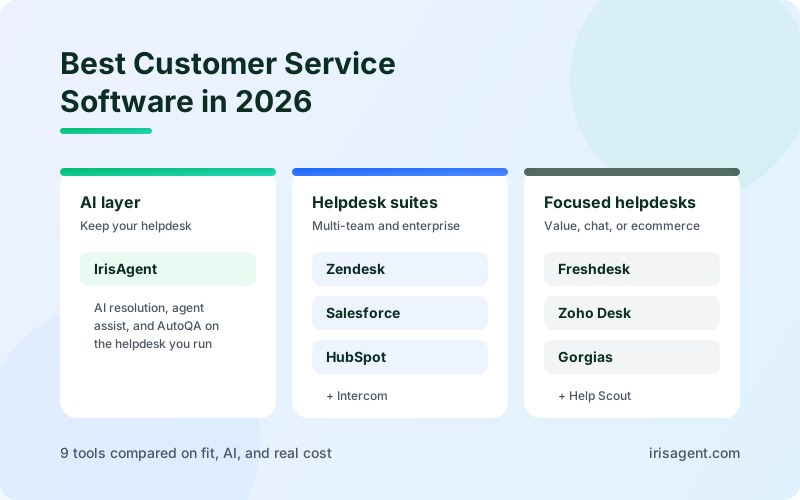
For the wider system that keeps support work organized, see our comparison of the best customer service software. The key is to connect each text thread to the customer record instead of treating every message as a separate task.
Key takeaway: SMS customer service is a short, two-way support channel. Its value depends on shared history, clear ownership, and a route to a human.
Why support teams use SMS: speed, engagement, and cost
Customers keep their text threads close at hand, so a short update reaches them without asking them to sign in or sit at a computer. That makes SMS useful when the customer needs one clear answer or a timely status update.
Speed is the main draw, but treat it as a target you set honestly, not a promise. Base your response goal on staffing, message volume, and the share of requests automation can actually resolve. Do not promise a pace your queue cannot sustain.
Speed also cuts repeat work. Imagine a customer asking whether an order has shipped. An automated reply shares the latest status. If the order is delayed, the workflow routes the thread to an agent with the order details already attached, and the customer never has to restate the issue on another channel.
SMS can lower handling cost when it lets an agent manage several short, asynchronous conversations instead of one live call at a time. That depends on the work. A complex complaint can take more messages than a call, so compare total effort and resolution quality rather than message counts.
Use a simple cost model:
Add platform and per-message costs to the staff time spent handling SMS.
Compare that total with the cost of resolving the same set of issues on other channels.
Credit time saved. If the team spends 20 fewer minutes a day on status requests, multiply the saved time by its loaded labor cost.
For a fuller framework, see our guide to calculating customer service ROI.
Then check that the gain holds up. Track cost per resolved conversation alongside first response time and customer satisfaction. If response times fall but repeat contacts rise, the team may be sending quick acknowledgments without solving the problem.
Engagement is not the same as satisfaction. A customer may answer a text quickly because the question is urgent. The team still needs to give a clear answer, avoid unnecessary follow-ups, and let the customer switch channels.
Measure the whole exchange. A fast first reply is useful, but a solved issue is better.
How SMS fits into helpdesk and AI workflows
SMS should run through the same support operation as email and chat. When a customer texts in, the helpdesk should capture the conversation, identify the issue, and send it to the right queue, with context visible to the agent before they reply.
Without that connection, teams end up with a separate texting inbox. Agents switch screens, copy details by hand, and miss earlier messages. Before choosing a service, check how it connects to your helpdesk and what data it passes into the ticket.
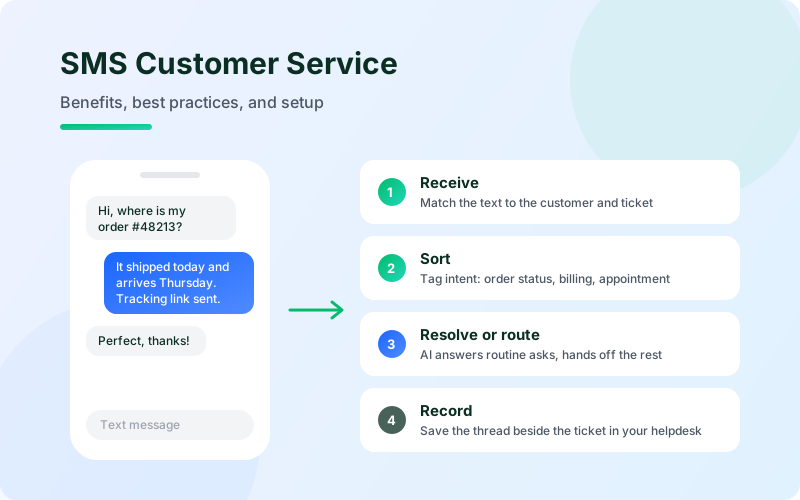
A useful workflow has four stages:
Receive: Match the message to the right customer or create a new ticket.
Sort: Apply an intent or tag, such as order status, billing, or appointment change.
Resolve or route: Answer a low-risk question from approved information, or assign it to a person.
Record: Save the reply and any action taken in the system the support team uses.
Automation fits predictable work, such as sharing a published policy or checking a known status. It should not guess when account details conflict or the request falls outside the written procedure. In those cases, hand the conversation to a person along with the customer's question and the steps already taken.
Workflow choice | Good fit | Risk to check |
|---|---|---|
Manual agent reply | Requests that need judgment or a personal review | Queue delays frustrate customers if ownership is unclear |
Saved reply or autoresponder | Receipt confirmation or a common, fixed answer | A generic reply can look like a resolution when it is only an acknowledgment |
AI resolution with handoff | Routine questions covered by trusted knowledge and procedures | How uncertainty, exceptions, and requests for a person are handled |
This is where IrisAgent AI Agents for Text fits. The same AI agent resolves inbound customer texts and runs opted-in outbound messages, grounded in your knowledge base, ticket history, and Smart Operating Procedures. The thread sits beside the ticket in Zendesk, Salesforce, Intercom, Freshworks, HubSpot, or the helpdesk you already run, so there is no second console. Numbers connect through the Twilio integration. When the agent escalates, the human sees the full SMS thread and context and takes over without asking the customer to start again.
For teams reviewing tagging, routing, and quality checks together, automated support operations explains how those tasks fit into one helpdesk workflow. That matters because SMS should follow the same service rules as every other channel.
Keep the first workflow narrow. Choose one high-volume request with a clear answer path. Test what happens when the customer gives incomplete information, asks for a person, or raises something the procedure does not cover. Those cases show whether the handoff is safe.
Make the handoff visible. The next agent should know what the customer asked, what the system answered, and why the conversation moved to a person. That is how you avoid the bot cliff, where automation stops and the customer is left alone.
Pro tip: Before expanding any automation, test it with real edge cases: a request for a person, missing account details, and a question outside approved policy.
Text message customer service best practices: consent, tone, timing, and privacy
Get and record consent
A phone number in a customer record does not, on its own, mean the person agreed to receive texts. Record the consent, the purpose it covers, and any later opt-out. Ask your legal and compliance teams to review the rules that apply to your messages and customers.
In the United States, the Telephone Consumer Protection Act (TCPA) sets requirements for certain calls and texts, and carrier registration rules apply to business senders. Requirements depend on message type and how messages are sent. This is an operational overview, not legal advice. Build your process with qualified counsel, and make sure staff know how to record and honor a STOP request.
Keep support texts focused on the customer's request. Do not slip a promotion into a service update unless the customer gave the separate permission marketing messages require. Keep opt-out easy, and make sure it updates the system that controls future sends.
Time messages carefully
A text feels personal. Send messages when the customer expects them, such as during an open support exchange or after an agreed service event. For proactive messages, set quiet hours and use the customer's time zone. If an issue can wait until business hours, do not send it late at night.
Write for a small screen
Say what happened, what you need, and what the customer can do next.
Use the customer's name only when it feels natural. A correct order number or appointment detail is more useful than an inserted first name.
Keep each message focused. If a reply needs several steps, split it into short messages or move the customer to a better channel.
Avoid unexplained abbreviations, and do not send a string of follow-ups just because the system can.
Sound human without pretending a person is typing when automation is replying. "I can check that for you" beats a long scripted greeting. If the system cannot complete the request, say so and explain the next step.
Use a small set of tested templates for common needs, then let agents adapt them. The aim is a consistent standard, not identical wording in every conversation.
Protect the thread
Ask only for information the team needs. Never request or send sensitive account data, payment details, or identity documents in a plain text message. Move identity checks and private records to a secure process, and limit inbox access by role.
Set retention rules with your legal and security teams. A support conversation may need to stay available for follow-up, coaching, or a complaint. Give agents clear guidance on what they may copy into a ticket and what should stay in a protected system.
Support more than one language
Store a preferred language when the customer provides it, and route the right approved message version. Machine translation can help draft replies, but a fluent person should review wording that affects safety, money, or access to service. See our best practices for AI translation in support for more.
SMS customer support use cases by industry
The best use cases share one trait: a short exchange moves the customer forward. Each industry should choose messages that fit its own service rules and risk level.
Ecommerce and retail
Order status, delivery delays, return instructions, and product availability questions all work well over text. A status request is a strong automation candidate when the system has reliable order data. A damaged-item complaint may need an agent who can review photos or approve an exception.
Healthcare and appointment-based services
Appointment reminders and schedule changes reduce no-shows and confusion. Keep messages limited to what the recipient needs. Sensitive details should go through an approved secure channel, and the organization should confirm its consent and privacy rules before sending.
SaaS and technology
A software team might text a service update or ask a customer to confirm a fix worked. Complex troubleshooting is usually easier in a ticket or live session, but SMS keeps the customer informed while the team investigates. For more on support in this segment, see AI customer support for SaaS and tech.
Not every request should become an SMS request. Customers should be able to move to email, chat, or voice when an issue grows more complex, and the history should follow them so the channel change does not force a restart.
How to measure SMS customer service
Set a baseline before changing the workflow. Track message volume by reason, first response time, resolution time, and first contact resolution. Add customer satisfaction if you can collect it without turning the exchange into a survey campaign.
Use clear definitions:
First response time: time from the customer's first message to the first meaningful reply (not an auto-acknowledgment).
Resolution time: time until the issue is closed.
First contact resolution: the issue is solved in the first exchange with no follow-up needed.
Repeat contact rate: the share of customers who text again about the same issue within a set window, such as 24 hours.
Measure SMS separately from email and chat. Each channel has its own rhythm, and a blended average can hide a slow text queue. Break results down by issue type too: order status may resolve in minutes while billing disputes need more time and judgment.
Separate automated resolutions from agent resolutions, and track handoffs. If automation appears to resolve many threads but customers return with the same question, the metric is counting an early reply as a full solution. Pair any deflection number with resolution quality and customer feedback. Our companion piece on SMS AI customer support goes deeper on the metrics that matter once AI is replying.
Run a short weekly review. Look for shifts in volume, slow response windows, repeat contacts, and opt-outs. When a metric moves, read the actual conversations before changing the automation. A surge in repeat contacts may point to a stale policy answer, not a staffing problem.
Key takeaway: Track speed, resolution, and quality by issue type, and scale only after conversation records show customers are getting complete answers.
Conclusion
Use SMS customer service for short support exchanges, connect every thread to your helpdesk, and keep a clear path to a person. Start with one common request, measure response time and resolution quality against a baseline, then expand. If you want AI to resolve inbound texts and run opted-in outbound messages beside the ticket in your existing helpdesk, see IrisAgent AI Agents for Text or book a demo.
Frequently Asked Questions
What is SMS customer service?
SMS customer service is two-way customer support over text message. A customer texts a business number, and an agent or AI agent replies in the same thread. It works best for short questions and status updates, and the conversation should be saved on the customer's ticket so the team keeps context if it moves to another channel.
Is SMS better than email for customer support?
SMS is better when a customer needs a short, timely exchange and can reply from a mobile phone. Email is a better fit for long explanations, attachments, and issues that do not need a quick back-and-forth. Most support teams use both, with the customer's history connected across channels.
How can a support team use AI for text message customer service?
AI can identify the topic of an incoming text, answer routine questions from approved knowledge and procedures, and route everything else to the right queue. It should hand off with full context when a request falls outside its rules or the customer asks for a person. IrisAgent AI Agents for Text does this beside the ticket in your existing helpdesk.
What should a company measure for SMS customer support?
Measure first response time, resolution time, and first contact resolution by issue type, along with repeat contacts and customer satisfaction. Separate automated outcomes from agent outcomes so a quick automated reply is not counted as solved unless the customer's need was actually met.
What rules apply to customer service text messages in the United States?
U.S. businesses need to consider the Telephone Consumer Protection Act, carrier registration requirements such as 10DLC, and other rules that apply to their message type and sending method. Consent records and opt-out handling are central. Because requirements depend on the details, have qualified counsel review your program before launch.
Loading the form. Prefer email? Reach us at info@irisagent.com or call +1 617 249 3312.