
Best Contact Center Analytics Software in 2026: 10 Platforms Compared
Last updated: October 2026
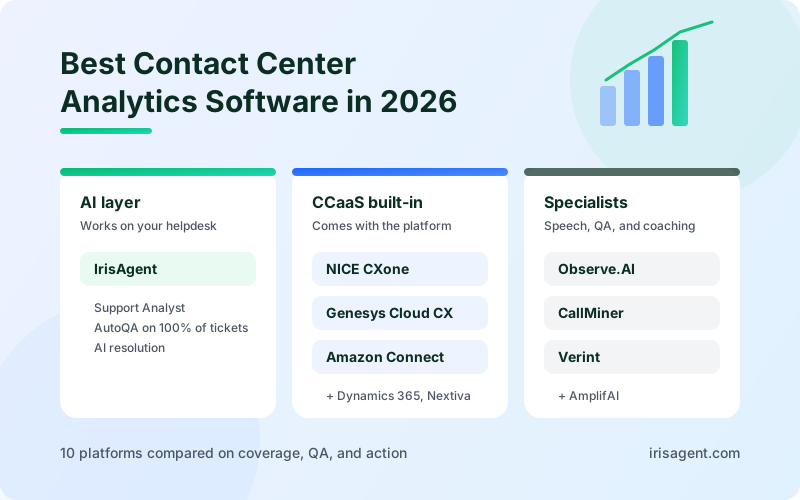
The best contact center analytics software in 2026 depends on where your conversations already live. If you want analytics, automated QA, and AI resolution on top of the helpdesk you run today, IrisAgent is the strongest fit. If you are buying a full contact center platform, Genesys Cloud CX, NICE CXone Mpower, Amazon Connect, and Dynamics 365 Contact Center ship analytics built in. If you need a dedicated conversation intelligence or speech analytics tool, compare Observe.AI, CallMiner, and Verint, and look at AmplifAI if agent performance management is the main goal.
Most call center analytics software can now transcribe every call, tag sentiment, and fill a dashboard. That part is table stakes. The real differences are whether the analytics cover 100% of conversations or a sample, whether they score answer quality against your own rules, and whether the insight turns into a change (a coaching session, a knowledge article, a fixed workflow) or just another report. This guide compares 10 platforms on those points.
What contact center analytics software does
Contact center analytics software collects data from every customer interaction (calls, chats, emails, and tickets) and turns it into measures a support leader can act on. It usually combines four kinds of analytics:
Performance analytics. Queue and agent metrics such as average handle time (AHT), first contact resolution (FCR), abandonment rate, service level, and CSAT.
Speech analytics. Transcribes calls and finds words, phrases, topics, silence, and talk-over patterns in voice interactions.
Conversation or interaction analytics. Reads the content of calls, chats, and tickets together to classify intent, detect sentiment, and spot recurring issues across channels.
Quality analytics. Scores conversations against a QA rubric automatically, instead of a supervisor reviewing 2% to 5% of calls by hand.
Performance metrics tell you what changed. Conversation analytics tells you why. You need both, because a rising handle time can mean an agent is struggling, or it can mean a new product bug is generating harder calls. For a deeper look at the AI side, see our guide to conversational AI analytics.
Three kinds of contact center analytics platforms
Separate the categories before you compare vendors. Most shortlists go wrong by comparing a full contact center platform with an analytics add-on as if they were the same purchase.
Analytics built into a CCaaS platform. Genesys, NICE, Amazon Connect, Dynamics 365, and Nextiva include analytics with the phone system, routing, and workforce management. You get analytics by migrating your contact center. If you are new to the category, our guide to CCaaS, its costs, and how AI fits in covers the basics.
Conversation intelligence specialists. Observe.AI, CallMiner, and Verint sit on top of your contact center and focus on speech analytics, automated QA, and coaching.
AI layers on your helpdesk. IrisAgent connects to the helpdesk and telephony you already run and pairs analytics with action: AI resolution, agent assist, routing, and AutoQA in one platform.
If your contact center platform works and your problem is visibility, QA coverage, or repeat contacts, start with a specialist or an AI layer. If the platform itself is end of life, you are buying a CCaaS, and analytics is one line in that decision.
How we evaluated the platforms
We compared each platform on five factors that separate a useful analytics program from a dashboard nobody opens:
Coverage. Does it analyze 100% of conversations across voice, chat, email, and tickets, or only calls, or only a sample?
Quality scoring. Can it score every conversation against your own QA rubric and policies, for both AI agents and human agents?
Speed to insight. Can a support lead ask a question and get an answer, or does every new question need an analyst to build a report?
Action. Does the insight feed coaching, routing, knowledge updates, or automated resolution, or does it stop at the report?
Fit and pricing. Does it require a platform migration, and how does the price scale (per seat, per minute, or custom)?
Pricing comes from vendor pricing pages where they exist. Contact center pricing is heavily negotiated, so treat every figure as a starting point and get a written quote.
Contact center analytics software comparison at a glance
Platform | Type | Best for | Starting list price |
|---|---|---|---|
IrisAgent | AI layer on your helpdesk | Analytics, AutoQA, and AI resolution without re-platforming | Free plan; Standard from $500/month |
NICE CXone Mpower | CCaaS with analytics | Large centers that want analytics tied to WFM and QM | About $110 to $249/agent/month |
Genesys Cloud CX | CCaaS with analytics | Enterprise omnichannel routing with built-in speech and text analytics | CX 3 from $155/user/month, billed annually |
Observe.AI | Conversation intelligence | Automated QA and coaching for voice-heavy teams | Custom |
CallMiner Eureka | Speech and conversation analytics | Deep omnichannel speech analytics at enterprise scale | Custom |
Amazon Connect | CCaaS with analytics | AWS teams that want usage-based pricing | About $0.038/voice minute with Contact Lens analytics included on the current plan |
Verint | CX automation suite | Large organizations that need speech, text, and compliance analytics | Custom |
Dynamics 365 Contact Center | CCaaS with analytics | Microsoft shops that want Copilot in the contact center | $110/user/month, billed annually |
AmplifAI | Performance management | Agent performance, coaching, and gamification | Custom |
Nextiva | All-in-one contact center | Mid-market teams consolidating phone, CRM, and analytics | Custom |
The 10 best contact center analytics software platforms in 2026
1. IrisAgent: analytics, AutoQA, and AI resolution on your existing helpdesk
Best for: mid-market and enterprise support teams that want analytics they can act on, without migrating their helpdesk or contact center.
IrisAgent connects to the helpdesk you already run, including Zendesk, Salesforce, Intercom, Freshdesk, and HubSpot, and to telephony platforms such as Genesys, Twilio, and Amazon Connect. It reads every ticket, chat, email, and call transcript, and puts the analysis to work in the same platform.
Three parts do the analytics work:
Support Analyst lets a support lead ask the ticket data questions in plain English, such as "show me tickets with negative sentiment about billing from the last 7 days." It returns tables, summaries, timelines, and trends without building a report, and flags emerging issues before they become incidents.
AutoQA scores 100% of AI and human conversations against rules your QA team writes in plain English. That replaces the 2% to 5% manual sample with full coverage, and it checks whether AI answers were grounded in your knowledge base.
Sentiment analysis tracks customer emotion across the conversation, so escalation risk shows up while the ticket is still open.
The difference from a pure analytics tool is what happens next. The same platform resolves routine requests with AI, assists human agents live on calls and tickets, routes work by intent and sentiment, and follows Smart Operating Procedures your team writes. Analytics findings become changes in the workflow, not a slide for next quarter.
What it does well:
Works on the helpdesk and telephony you already run, with no migration
Plain-English questions over all of your ticket data, no dashboard building
AutoQA on every AI and human conversation, with grounding checks for AI answers
In production at Dropbox (160,000 agent minutes saved and average handle time cut by 2 minutes), Zuora, InvoiceCloud, and Teachmint
Pricing: the Free plan includes the IrisGPT chatbot, AI Search, CRM connectors, and automated tagging. Standard starts at $500 per month and adds Support Analyst, AutoQA, Voice AI, agent assist, routing, and sentiment, with usage-based or resolution-based options. See pricing.
Where it is not a fit: IrisAgent is not a phone system and does not do workforce management. If you need forecasting and scheduling, pair it with a CCaaS or WFM tool below.
2. NICE CXone Mpower: analytics tied to workforce and quality management
Best for: large contact centers that want analytics, quality management, and workforce management in one enterprise suite.
NICE CXone Mpower is a cloud contact center platform with interaction analytics built on NICE's Enlighten AI. It analyzes voice and digital interactions for sentiment, topics, and behaviors, and feeds those signals into quality management, coaching, and workforce planning. The value is in that connection: a supervisor can see interaction patterns next to QA scores and staffing data instead of treating them as three separate data problems.
What it does well:
Interaction analytics across voice and digital channels on one platform
Analytics connected to QM, WFM, and coaching workflows
Mature enterprise deployment and compliance support
Pricing: CXone packages list at roughly $110 to $249 per agent per month, with AI features often priced on top in higher tiers.
Where it is not a fit: you are buying the whole platform. If your current contact center and helpdesk work, a full NICE migration is a large project to get better analytics.
3. Genesys Cloud CX: native speech and text analytics with predictive routing
Best for: enterprises standardizing on one omnichannel CCaaS platform.
Genesys Cloud CX includes speech and text analytics in its CX tiers, along with predictive routing that sends interactions to the agent most likely to resolve them. Analytics covers topic spotting, sentiment, and conversation trends across voice and digital channels, and it sits next to Genesys workforce engagement tools for quality and coaching.
What it does well:
Speech and text analytics included, not sold as a separate product
Predictive routing uses outcome data to improve how work is assigned
Strong omnichannel orchestration for complex enterprise contact centers
Pricing: Genesys lists CX 3, its omnichannel tier with full workforce engagement, at $155 per user per month, billed annually. Lower tiers start below that.
Where it is not a fit: like NICE, Genesys analytics comes with the platform. If you only need deeper insight into conversations in your existing helpdesk, a CCaaS migration is a lot of change for that goal.
4. Observe.AI: conversation intelligence and automated QA for voice teams
Best for: voice-heavy contact centers where agent coaching and QA coverage are the main goals.
Observe.AI focuses on conversation intelligence. It transcribes and analyzes calls, scores interactions with automated QA, and gives agents real-time guidance during live calls. Supervisors can find coaching moments from conversation evidence instead of the handful of calls a manual reviewer happened to pick.
What it does well:
Automated QA scoring across a large share of interactions
Real-time agent guidance tied to the same analytics
Coaching workflows built around conversation evidence
Pricing: custom, based on volume and modules.
Where it is not a fit: the focus is voice and agent performance. Teams with most volume in email, chat, and tickets should check how deep its digital channel coverage goes. Keep your rubric in charge too: AI scoring helps only when it reflects the standard your supervisors already hold agents to. Our comparison of AI tools for support QA and coaching goes deeper on this category.
5. CallMiner Eureka: deep speech and omnichannel conversation analytics
Best for: large enterprises that want a dedicated, highly configurable speech analytics platform.
CallMiner is one of the longest-running speech analytics vendors. Eureka analyzes calls, chats, emails, and surveys together, categorizes interactions by topic and behavior, scores agent performance, and redacts sensitive data. It is built for analytics teams that want to define their own categories and dig into root causes across millions of interactions.
What it does well:
Deep, configurable categorization across voice and text channels
Automated agent scoring and coaching insights
Redaction and compliance monitoring for regulated industries
Pricing: quote-only, typically based on user count and interaction volume.
Where it is not a fit: CallMiner is an analytics platform, not a resolution platform. It tells you what is happening in conversations, and your team still has to act on it. Smaller teams without an analyst may not use its depth.
6. Amazon Connect: Contact Lens analytics with usage-based pricing
Best for: enterprise teams already on AWS that want analytics bundled into per-minute pricing.
Amazon Connect is AWS's cloud contact center. Its Contact Lens feature transcribes calls and chats, detects sentiment, flags issues in real time, generates contact summaries, and supports automated agent evaluations. Real-time and historical dashboards cover queue and agent performance, and the data can flow into other AWS services such as S3, Athena, and QuickSight for custom reporting.
What it does well:
Conversation analytics, real-time alerts, and summaries included in the platform
Usage-based pricing that scales down in slow seasons
Flexible data access for teams with AWS engineering skills
Pricing: on the current default plan, AWS bundles AI features, including Contact Lens analytics, into a rate of about $0.038 per voice minute. Older plans bill analytics separately at about $0.015 per minute. Telephony charges are extra.
Where it is not a fit: getting the most from Connect's data usually means building on AWS. Teams without engineering support may find the out-of-the-box reporting limited.
7. Verint: broad speech, text, and compliance analytics for large enterprises
Best for: large organizations that want one suite for analytics, QA, compliance, and workforce engagement.
Verint offers speech and text analytics, automated quality assurance, and a set of AI bots for specific jobs, such as its PII redaction bot, which detects and removes sensitive personal information from voice interactions. Its analytics find themes, process friction, compliance risks, and coaching opportunities across channels.
What it does well:
Wide analytics coverage across speech, text, and quality
Compliance and redaction tooling for regulated industries
Integrates with Verint's workforce engagement suite
Pricing: custom.
Where it is not a fit: breadth is the selling point and the challenge. Decide which two or three workflows matter most before evaluating the suite, or the rollout can stall. For how call review fits into this, see how call monitoring software turns calls into reviewable data.
8. Dynamics 365 Contact Center: Copilot analytics for Microsoft shops
Best for: organizations that run on Microsoft and want Copilot across the contact center.
Dynamics 365 Contact Center is Microsoft's Copilot-first cloud contact center. It includes conversation summaries, sentiment analysis, live transcription and translation, AI agents, and real-time and historical analytics across voice and digital channels. Because it sits on the Microsoft stack, data connects to Dynamics 365 Customer Service, Power BI, and Teams.
What it does well:
Copilot summaries and sentiment inside the agent workspace
Live transcription and translation across channels
Native fit with Dynamics 365, Power BI, and Teams
Pricing: Microsoft lists Dynamics 365 Contact Center at $110 per user per month, billed annually, with voice-only and digital-only plans at $95.
Where it is not a fit: the value is highest when your CRM and service desk are already Dynamics 365. Teams on Zendesk or Salesforce get less from the integration.
9. AmplifAI: agent performance analytics, coaching, and gamification
Best for: contact centers where agent performance management is the main analytics need.
AmplifAI pulls metrics from your contact center, QA, and workforce tools into one view of agent performance. It recommends coaching actions, tracks whether coaching worked, uses gamification to make progress visible, and applies predictive analytics to flag agents at risk of underperforming or leaving.
What it does well:
Unified agent performance data across many source systems
Coaching recommendations and follow-up tracking
Gamification and recognition built in
Pricing: custom.
Where it is not a fit: AmplifAI analyzes performance data more than conversation content. Pair it with a conversation analytics or QA tool if you need to know what customers are saying. Define fair measures first, so gamification rewards the behaviors you actually want. For more on this angle, see how agent analytics give a holistic view of team performance.
10. Nextiva: all-in-one contact center with built-in analytics
Best for: mid-market teams that want to replace several disconnected tools with one contact center.
Nextiva combines a contact center with real-time dashboards, agent performance tracking, customer sentiment, and quality management, and it connects to CRM, team chat, and email. The appeal is consolidation: one system for calls, digital channels, and reporting instead of a separate tool for each.
What it does well:
Real-time dashboards and agent performance tracking in one place
Sentiment and QA alongside contact center operations
Consolidates phone, messaging, and reporting vendors
Pricing: custom for contact center plans.
Where it is not a fit: analytics depth is lighter than the specialists. Check whether managers can see the exact measures they act on without exporting data to another tool.
Contact center analytics metrics that matter
Every platform above tracks the same core metrics. What you do with them matters more than which dashboard shows them. Pair each number with the conversation evidence behind it.
Metric | What it tells you | Read it alongside |
|---|---|---|
First contact resolution (FCR) | Share of issues resolved without a repeat contact | Repeat contact reasons from conversation analytics |
Time spent per interaction | Issue complexity and topic mix, so you do not punish hard calls | |
CSAT | How customers rated the interaction | Sentiment across the conversation, since only some customers answer surveys |
QA score | How well conversations followed your standards | QA coverage: a score from 3% of calls is a guess |
Abandonment rate | Customers who gave up waiting | Queue volume by intent, to see which issues cause the spikes |
AI resolution rate | Share of conversations AI fully resolved | Answer accuracy, so deflected-but-wrong answers do not count as wins |
For benchmarks and formulas, see our guide to customer support metrics.
How to run a 30-day analytics pilot
Pick one queue and one goal. For example, cut repeat contacts on billing tickets by 20%.
Set a baseline. Record FCR, AHT, CSAT, and QA scores for that queue over the previous 30 days.
Turn on full coverage. Score 100% of conversations in the queue, not a sample, so the analytics show the real distribution.
Act on the top three findings. Fix a knowledge article, coach on one behavior, or automate one routine request.
Compare like for like. Measure the same queue, same metrics, and same period length after the change, and read conversation examples next to the numbers.
A platform that only produces findings will show you the problem in step 4. A platform that can also act on them will show you the fix in step 5.
Which contact center analytics software fits your team
You want analytics and AI action on the helpdesk you already run: IrisAgent gives you Support Analyst, AutoQA on every conversation, and AI resolution without a migration.
You are replacing your contact center platform at enterprise scale: shortlist NICE CXone Mpower and Genesys Cloud CX, and compare analytics packaging tier by tier.
You run on AWS or Microsoft: Amazon Connect and Dynamics 365 Contact Center give you analytics native to your stack.
You need dedicated speech analytics with deep configuration: compare CallMiner and Verint.
Your priority is agent coaching and QA on calls: look at Observe.AI, and add AmplifAI if performance management across many systems is the main gap.
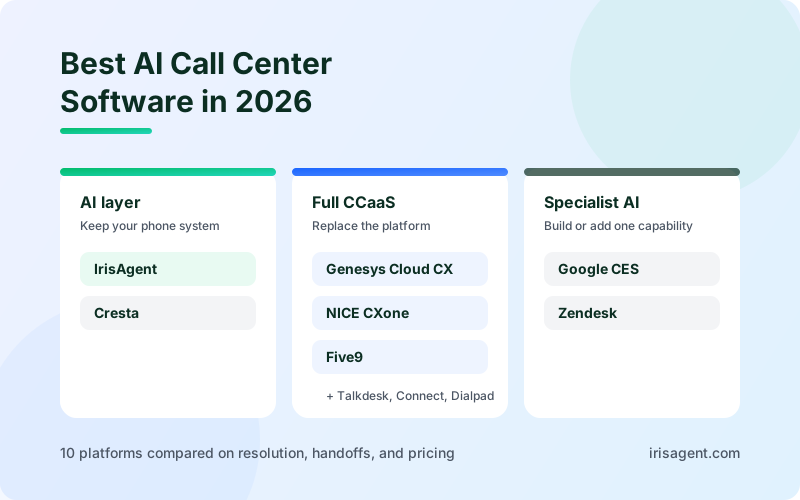
For the AI side of contact center platforms, see our comparison of the best AI call center software, and for sentiment specifically, the best AI sentiment analysis tools.
Start with one queue
Judge contact center analytics software on the changes it drives, not on how many charts it produces. Start with one queue, score every conversation in it, and expand once the numbers move.
IrisAgent works on top of the helpdesk and phone system you already run and has a free plan to start. Try IrisAgent free or book a demo to see Support Analyst and AutoQA on your own tickets.
Frequently Asked Questions
What is contact center analytics software?
Contact center analytics software collects and analyzes data from customer interactions across calls, chats, emails, and tickets. It combines performance metrics such as AHT, FCR, and CSAT with speech and conversation analytics that explain why those numbers change, and increasingly scores every conversation for quality automatically.
What is the best contact center analytics software?
For analytics, AutoQA, and AI resolution on the helpdesk you already run, IrisAgent is the strongest fit. For analytics built into a full contact center platform, NICE CXone Mpower and Genesys Cloud CX lead the enterprise market. For dedicated speech analytics, CallMiner and Verint are the established specialists.
What is the difference between call center analytics and conversation analytics?
Call center analytics usually means performance data: queue activity, handle time, abandonment, and agent outcomes. Conversation analytics reads the content of interactions to find intent, sentiment, and recurring issues. Performance data shows what changed, and conversation analytics shows why, so most teams need both.
What are the best contact center text analytics platforms?
Text analytics platforms read chats, emails, tickets, and call transcripts to find topics, sentiment, and emerging issues. Enterprise speech and text suites such as NICE, Verint, and CallMiner suit large voice-heavy centers. For support teams that live in a helpdesk such as Zendesk, Salesforce, or Intercom, IrisAgent analyzes every ticket and conversation for sentiment, topic trends, and escalation risk inside the tools agents already use.
What is speech analytics in a contact center?
Speech analytics transcribes recorded or live calls and analyzes the words, topics, sentiment, silence, and talk-over patterns in them. Contact centers use it to find the reasons behind repeat calls, check compliance language, and identify coaching opportunities across every call instead of a small manual sample.
Can contact center analytics work with my existing helpdesk?
Yes. AI layers such as IrisAgent connect to helpdesks like Zendesk, Salesforce, Intercom, Freshdesk, and HubSpot, and to telephony platforms such as Genesys, Twilio, and Amazon Connect, without a migration. CCaaS platforms such as NICE and Genesys include analytics but require moving your contact center onto their platform.
How much does contact center analytics software cost?
CCaaS platforms with built-in analytics typically list at about $110 to $250 per agent per month. Amazon Connect bundles Contact Lens analytics into about $0.038 per voice minute on its current plan. Specialists such as CallMiner, Verint, and Observe.AI quote custom pricing. IrisAgent has a Free plan, and Standard starts at $500 per month with usage-based or resolution-based options.
Loading the form. Prefer email? Reach us at info@irisagent.com or call +1 617 249 3312.