
9 AI Support Tools You Can Launch in Under 48 Hours (2026)
*Last updated: October 2026*
The AI support tools that can go live in under 48 hours without an IT project are the ones that install on the helpdesk you already run: IrisAgent, Intercom Fin, Zendesk AI agents, Freshworks Freddy AI Agent, Tidio Lyro, Gorgias AI Agent, and Chatbase. Ada and Salesforce Agentforce are strong platforms, but they usually take longer because of sales-led onboarding or Data Cloud setup. For most teams, the only thing IT needs to approve is an admin OAuth connection to the helpdesk.
Support leaders keep hearing the same promise: "set up in minutes." The setup screen is rarely what slows you down, though. The delays come from security review, a new chat widget that needs a developer, a helpdesk migration, or a data platform that has to be provisioned first. This guide compares nine tools on what actually decides your launch date: what you install, what IT has to sign off on, which channels work on day one, and how quality gets checked once the AI is talking to customers.
What "live in under 48 hours" actually requires
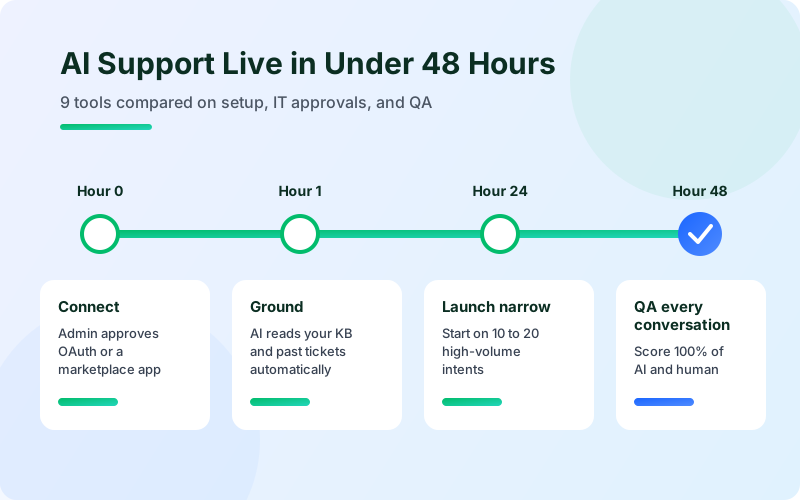
A tool can only go live in two days if four things are true:
It works inside your current helpdesk. If going live means moving tickets, macros, and agents to a new platform, you are looking at a quarter, not two days.
The install is a permissioned app, not a code project. A marketplace app or an OAuth connection takes an admin minutes. A custom API build takes a sprint.
It grounds itself on content you already have. The fastest tools read your help center, internal docs, and past tickets automatically. If you have to write intents or decision trees first, add weeks.
You can start narrow. Launching on 10 to 20 high-volume intents, then expanding, is how teams go live fast without risking bad answers on hard tickets.
Speed alone is not the goal. A tool that goes live tomorrow and gives wrong answers costs you more than one that takes a week. So this guide also looks at the step most "fast setup" lists skip: how you check the AI's quality after launch.
AI support tools at a glance
Tool | Stated setup time | What you install | Works with your existing helpdesk | Channels | Automated QA | Free plan or trial | Pricing model |
|---|---|---|---|---|---|---|---|
IrisAgent | Setup in 24 hours | Marketplace app or no-code OAuth connector | Yes: Zendesk, Salesforce, Intercom, Freshdesk, and more | Chat, email, voice; SMS on Enterprise | Yes, AutoQA on 100% of AI and human conversations (Standard plan and up) | Free plan, no credit card | Flexible: usage-based or resolution-based. Standard from $500/mo |
Intercom Fin | Under an hour | OAuth connection plus Messenger snippet | Yes: Intercom, Zendesk, Salesforce, HubSpot, Freshworks, and others | Chat, email, voice, SMS, social | Paid add-on (Analyze) | 14-day trial, no credit card | $0.99 per outcome, 50-outcome minimum |
Zendesk AI agents | "From day one" | Native, nothing to install | Zendesk only | Messaging, email, voice, social | Paid add-on (Zendesk QA) | 14-day trial | Included resolutions, then $1.50 to $2.00 each |
Freshworks Freddy AI Agent | Minutes | Native, no-code builder | Freshworks only | Email, chat, WhatsApp, social | Not a dedicated QA product | 14-day trial | 500 free sessions, then $49 per 100 |
Tidio Lyro | A few clicks | Tidio widget | Via Lyro Connect (Plus and Premium) | Chat, email, social | No | Free plan, 7-day trial | From $32.50/mo for 50 conversations |
Gorgias AI Agent | Not stated | Add-on inside Gorgias | Gorgias helpdesk | Email, chat (beta) | No | 7-day trial | $0.90 to $1.00 per automated interaction |
Chatbase | Minutes | Embed widget | Via integrations (Standard and up) | Web chat, messaging, email, voice | No | 7-day trial | Credit-based, from $32/mo |
Ada | Not stated | Sales-led onboarding | Via APIs and SDKs | Messaging, voice, email | Monitoring, not named QA scoring | Demo only | Conversation-based, quote-only |
Salesforce Agentforce | Not stated | Requires Data 360 and Einstein setup | Salesforce Service Cloud only | Chat, voice, Slack | Monitoring and analytics | Free starter tier | $2 per conversation or Flex Credits |
*Setup times are each vendor's own claim, taken from their sites in October 2026. Prices change often, so check each vendor's pricing page before you buy.*
The 9 best AI support tools you can launch fast
1. IrisAgent
Best for: Mid-market and enterprise teams on Zendesk, Salesforce, Intercom, or Freshdesk that want AI across chat, email, and voice without switching helpdesks.
IrisAgent layers AI agents, agent assist, and AutoQA onto the helpdesk you already run. You install it from the Zendesk Marketplace, or connect Salesforce, Intercom, or Freshdesk with a no-code, permissioned OAuth install. Once connected, it grounds itself on your knowledge base and past tickets automatically. No intents or flows need to be written first. Most teams are live within 24 hours and start on a narrow set of intents before expanding.
What separates it on a fast launch is the quality layer. The Hallucination Removal Engine checks every answer against your verified content and holds back low-confidence replies instead of guessing. Then AutoQA scores 100% of conversations, AI and human, against your own rules. You do not need to wait for a quarterly QA sample to find out the AI went off-script in week one.
Setup: Marketplace app or OAuth connector. Agents keep working in the Agent Assist sidebar inside their usual helpdesk.
Channels: Chat, email, and Voice AI on Standard. SMS (AI Agents for Text) and Live Call Copilot on Enterprise.
Proof: At Dropbox, IrisAgent saved 160,000 agent minutes and cut average handle time by 2 minutes. At InvoiceCloud, it answers 86% of chat questions from verified knowledge.
Pricing: A free plan with no credit card required. Standard starts at $500/mo, with a choice of usage-based or resolution-based pricing.
Trade-offs: The paid plans are not priced for very small teams. Self-hosted deployment is Enterprise-only.
2. Intercom Fin
Best for: Teams that want a polished chat-first AI agent and are comfortable with per-outcome pricing.
Fin advertises setup in under an hour, and it now runs on helpdesks beyond Intercom, including Zendesk, Salesforce, HubSpot, and Freshworks. On Zendesk you connect over OAuth with admin rights in both tools, then install the Messenger with a JavaScript snippet, a React or Vue component, or a Shopify app. Fin's channel list is broad: chat, email, voice, SMS, WhatsApp, and social.
Setup: OAuth plus a chat snippet. If your site already runs a different chat widget, budget time for a developer to swap it.
Pricing: $0.99 per outcome with a 50-outcome monthly minimum. Billable outcomes include resolutions and some handoffs. On Intercom's own helpdesk, seats are $29 per seat per month.
QA: Scorecards and monitors come with the paid Analyze add-on.
Trade-offs: Your cost grows as your resolution rate improves, so model next year's volume before signing. See our Fin alternatives guide for a deeper comparison.
3. Zendesk AI agents
Best for: Teams fully standardized on Zendesk that want native AI with nothing extra to install.
Zendesk AI agents are built into Zendesk, so there is no app to approve. Zendesk says they work "from day one" without training or scripting. Copilot adds agent assist for human agents, and Zendesk QA can score all AI and human conversations.
Setup: Native. The main work is configuring the AI agent and confirming your help center content is current.
Pricing: Each plan includes a small allowance of automated resolutions per agent (5 on Team plans, 10 on Professional). After that, extra resolutions cost $1.50 committed or $2.00 pay-as-you-go. Copilot is $50 per agent per month.
QA: Zendesk QA is a separately priced add-on.
Trade-offs: It only works on Zendesk. If you want AutoQA, voice, and agent assist without stacking add-ons, an overlay can cover the same jobs. See the best AI overlays for Zendesk.
4. Freshworks Freddy AI Agent
Best for: Freshdesk teams that want native AI on email, chat, and messaging.
Freshworks says you can launch Freddy AI Agents in minutes with a no-code builder. Because it is native to Freshdesk, there is no third-party app to approve.
Setup: Native, no-code.
Pricing: 500 free sessions per account, then $49 per 100 sessions, on top of agent seats. Freddy Copilot is $29 per agent per month on Pro and Enterprise.
QA: Performance monitoring and a coaching view, not a dedicated QA scoring product.
Trade-offs: It stays inside the Freshworks ecosystem, and voice is not part of the AI agent offer. IrisAgent also connects to Freshdesk if you want cross-channel AutoQA or Live Call Copilot. See IrisAgent vs Freshdesk.
5. Tidio Lyro
Best for: Small businesses and ecommerce stores that want a website chatbot this afternoon.
Tidio says you can add Lyro to your site "in a few clicks, without technical knowledge." It reads your website and FAQ content and answers chat questions. On Plus and Premium plans, Lyro Connect hands conversations off to Zendesk, Intercom, Salesforce, and other helpdesks.
Setup: Tidio widget plus content import.
Pricing: A free plan includes 50 lifetime Lyro conversations. Paid Lyro starts at $32.50/mo for 50 conversations.
QA: Helpfulness ratings and insights, no conversation scoring.
Trade-offs: It is chat-first and built for smaller volumes. Helpdesk handoff needs a higher plan.
6. Gorgias AI Agent
Best for: Shopify brands that already run support in Gorgias.
Gorgias AI Agent is an add-on inside the Gorgias helpdesk, connected to your Shopify store. It handles order-status, returns, and product questions over email, with chat in open beta.
Setup: Turn on the add-on inside Gorgias and connect Shopify. Gorgias does not publish a setup time.
Pricing: $0.90 per automated interaction on annual plans, $1.00 on monthly. Each interaction also counts as a helpdesk ticket.
QA: Quality analytics, not automated scoring.
Trade-offs: You need to be on Gorgias. It is a strong fit for ecommerce and a weak fit for B2B or complex technical support.
7. Chatbase
Best for: Teams that want a quick, credit-priced chatbot trained on their own docs.
Chatbase says its agents are "ready in minutes" with no code. You upload or link your content, embed the widget, and go. From the Standard plan up, it connects to Zendesk, Salesforce, Intercom, HubSpot, Freshdesk, and others for handoff.
Setup: Embed widget, then integrations if you need helpdesk handoff.
Pricing: Credit-based. Hobby starts at $32/mo billed yearly for 700 message credits.
QA: Pre-launch scenario testing and analytics, no QA scoring.
Trade-offs: It answers questions well, but it is not built for ticket workflows, routing, or agent assist on high-volume support teams. See our Chatbase alternatives.
8. Ada
Best for: Large, global brands with heavy self-service volume and a team to own the rollout.
Ada is an established agentic CX platform covering messaging, voice, and email. It does not publish a setup time, and it starts with a sales demo rather than a self-serve trial. That makes a 48-hour launch unlikely, even though Ada shows a G2 badge for fast implementation.
Setup: Sales-led onboarding through Ada's team.
Pricing: Conversation-based by default, resolution-based for some enterprises. No public rate card.
QA: Continuous monitoring and coaching tools, without a named QA scoring product.
Trade-offs: It is a strong platform, but not a fast one to buy. See Ada alternatives.
9. Salesforce Agentforce for Service
Best for: Salesforce Service Cloud teams with an admin team and Data Cloud already in place.
Agentforce is powerful inside Salesforce, but it is the clearest example of a tool that is not a 48-hour project for most teams. Salesforce's own Trailhead says Data 360 "must be provisioned and enabled for all Agentforce use." You also need Einstein generative AI, the Einstein Trust Layer, permission set licenses, and Enterprise edition or higher.
Setup: Data 360 and Einstein provisioning, then agent configuration in Agent Builder.
Pricing: $2 per conversation, or Flex Credits at $500 per 100,000 credits. Data 360 credits are extra.
QA: Agent monitoring and analytics.
Trade-offs: If your Salesforce org is not already on Data Cloud, plan for weeks, not days. An overlay can add grounded AI and agent assist to Service Cloud without Data Cloud. See IrisAgent for Salesforce.
What about no-code workflow tools like viaSocket?
Workflow automation tools like viaSocket, Zapier, and Make connect thousands of apps and can route tickets, send alerts, or trigger an AI step between tools. They are useful glue, and they are fast to set up.
They are not AI support agents, though. viaSocket's own blog says it is not a replacement for a dedicated ticketing platform. A workflow tool will not ground answers in your knowledge base, hold back a low-confidence reply, or score conversation quality. Use one alongside an AI support tool, not instead of one.
The time-to-live checklist: what IT actually needs to approve
Most "big IT projects" are really a handful of approvals nobody asked for early. Send this list to IT and security on day one, and the 48-hour launch stays on track.
Helpdesk admin access. Someone with admin rights approves an OAuth connection or a marketplace app install. This is usually a single consent screen, and it is the only true technical step for overlay tools.
Data scope. Confirm which data the tool reads: help center articles, internal docs, past tickets, customer fields. Agree on what is out of scope, such as payment data or certain ticket types.
Security review documents. Ask the vendor for its security documentation and data processing agreement on the first call, not after the pilot. This is the step that most often turns two days into two months.
Chat widget changes. If the tool needs its own chat widget, a developer has to add a snippet to your site. Tools that answer inside your existing helpdesk widget skip this step.
SSO and user access. Decide who gets admin and agent access. SSO is nice to have for a pilot, not a launch blocker.
A narrow launch scope. Pick 10 to 20 high-volume intents, like password resets, order status, or billing questions, and set a rule for when the AI hands off to a human.
A rollback switch. Know how to turn the AI off for one channel or intent in one click. That answer usually ends the risk discussion fast.
If a vendor's answer to item 1 is "migrate your tickets to our platform," it is not a 48-hour tool.
Why QA coverage matters more on a fast launch
Fast launches skip the long testing phase. That means quality checks have to happen after go-live, on live conversations.
Most support teams still review a small sample of conversations by hand. On an AI launch, that is not enough. If the AI handles 2,000 conversations in its first week and your QA team reviews 2% of them, 1,960 answers go unchecked during the period when errors are most likely.
Manual QA sampling | Automated QA on 100% of conversations | |
|---|---|---|
Coverage | A small sample of conversations | Every AI and human conversation |
Time to catch an AI error | Days to weeks | Same day |
Compliance checks | Only on sampled tickets | On every ticket |
What it costs | Reviewer hours that grow with volume | Software cost that scales with volume |
Of the nine tools above, only Intercom (with the Analyze add-on), Zendesk (with Zendesk QA), and IrisAgent (AutoQA, included on Standard and up) offer automated scoring of both AI and human conversations. IrisAgent's AutoQA also works across helpdesks, so it can review conversations even when a different AI tool is answering them. For a deeper comparison, see the best AI tools for support QA and coaching, and test your agent before launch with our guide to testing AI customer service agents.
What fast-launch tools cost at scale
The pricing model you pick on day one matters more than the starting price. A model that is cheap in a pilot can become your biggest support line item a year later.
Here is how per-outcome pricing behaves as volume grows. Take a team handling 10,000 conversations a month:
At a 40% AI resolution rate, that is 4,000 outcomes. At $0.99 each, the fee is about $3,960 a month.
Improve the resolution rate to 60%, and the fee rises to about $5,940 a month. The AI got better, and the bill went up 50%.
Double volume to 20,000 conversations at 60%, and the fee reaches about $11,880 a month.
Per-automated-resolution pricing works the same way. On Zendesk, resolutions beyond your plan's small allowance cost $1.50 to $2.00 each, so 6,000 resolutions a month means roughly $9,000 to $12,000 in overage fees.
None of this makes per-outcome pricing wrong. It is easy to start with, and it ties cost to results. However, you should model your cost at 12 and 24 months of growth before you sign. IrisAgent offers both usage-based and resolution-based pricing, so you can pick the structure that fits your volume curve instead of being locked into one. Our AI chatbot pricing guide walks through the full math at 10,000 tickets a month.
How to choose the right tool
You run Zendesk, Salesforce, Intercom, or Freshdesk and want AI across chat, email, and voice with QA built in: IrisAgent.
You are on Intercom and support is mostly chat: Intercom Fin.
You are all-in on Zendesk and want nothing to install: Zendesk AI agents.
You are on Freshdesk and want native AI: Freddy AI Agent.
You are a Shopify brand on Gorgias: Gorgias AI Agent.
You are a small team that needs a website chatbot today: Tidio Lyro or Chatbase.
You are a large enterprise with a dedicated rollout team: Ada, or Agentforce if you are already on Salesforce Data Cloud.
Whichever you pick, shortlist two or three tools and run them on the same 100 real tickets from last month. Score each answer as correct, wrong, or "admitted it did not know." The tool that is fastest to launch is only worth it if it is also right.
Next steps
The fastest AI support launch is the one that never turns into an IT project. Pick a tool that installs on the helpdesk you already run, send the time-to-live checklist to IT on day one, and launch on a narrow set of intents with QA watching every conversation.
If you run support on Zendesk, Salesforce, Intercom, or Freshdesk, you can start IrisAgent free with no credit card and be live in about 24 hours, or see pricing for Standard and Enterprise.
Frequently Asked Questions
Which AI support tools can go live in under 48 hours?
AI support tools that install on your existing helpdesk can usually go live in under 48 hours. IrisAgent sets up in about 24 hours on Zendesk, Salesforce, Intercom, or Freshdesk. Intercom Fin, Zendesk AI agents, Freshworks Freddy AI Agent, Tidio Lyro, and Chatbase also advertise setup in minutes to an hour. Ada and Salesforce Agentforce typically take longer.
What does IT need to approve to launch an AI support tool?
For most overlay tools, IT only needs to approve an admin OAuth connection or a marketplace app install on the helpdesk. Beyond that, plan for a data scope decision, the vendor's security documents and data processing agreement, and a chat snippet if the tool uses its own widget. Requesting security documents on the first call is the best way to avoid delays.
Do I need to switch helpdesks to use AI support automation?
No. IrisAgent, Intercom Fin, Tidio Lyro, and Chatbase all work with existing helpdesks such as Zendesk and Salesforce. Zendesk AI agents, Freddy AI Agent, and Gorgias AI Agent are native to their own helpdesks. Switching helpdesks is the single biggest reason an AI launch takes months instead of days.
Is Salesforce Agentforce fast to deploy?
Agentforce is fast to deploy only if your Salesforce org already runs Data Cloud and Einstein. Salesforce requires Data 360 to be provisioned for all Agentforce use, along with Einstein generative AI and Enterprise edition or higher. Teams without that foundation should plan for several weeks of setup.
How do I check AI answer quality after a fast launch?
Use automated QA that scores every AI and human conversation, not a manual sample. IrisAgent AutoQA, Zendesk QA, and Intercom's Analyze add-on all offer automated scoring. Start the AI on a narrow set of intents, review its scores daily for the first two weeks, and expand once accuracy holds.
Is per-outcome pricing more expensive at scale?
Per-outcome pricing can cost more at scale because the bill grows with both volume and resolution rate. At $0.99 per outcome, 6,000 resolutions a month costs about $5,940. Model your cost at 12 and 24 months of growth before you sign. IrisAgent offers both usage-based and resolution-based pricing.
Loading the form. Prefer email? Reach us at info@irisagent.com or call +1 617 249 3312.